
Introduzzjoni
This manual provides essential instructions for setting up, operating, and maintaining your Coolpad Note 3 smartphone. Please read this guide thoroughly to ensure proper use and to maximize the features of your device.
Informazzjoni dwar is-Sigurtà
Twissija: Żomm 'il bogħod mit-tfal.
Always handle your device with care. Avoid exposure to extreme temperatures, direct sunlight, and liquids. Do not attempt to disassemble or repair the device yourself, as this will void the warranty and may cause damage or injury.
Kontenut tal-Pakkett
Ivverifika li l-pakkett tiegħek fih l-oġġetti li ġejjin:
- Coolpad Note 3 Handset
- Headset
- Ċarġer tal
- Cable USB
- Film Protettiv
- Manwal għall-Utent (dan id-dokument)
- Karta ta' Garanzija
Setup
1. Daħħal il-Kards tas-SIM u l-Kard tal-MicroSD
The Coolpad Note 3 supports dual SIM cards (4G+2G) and a MicroSD card for expandable storage up to 64GB. Ensure the device is powered off before inserting or removing cards.
- Locate the SIM/MicroSD card tray on the side of the device.
- Uża l-għodda tal-ejector tas-SIM provduta biex tiftaħ it-trej.
- Place your SIM cards into the designated slots. Ensure the gold contacts face downwards.
- Insert your MicroSD card into its slot. For 64GB cards, ensure it is formatted to FAT32 for compatibility.
- Imbotta b'attenzjoni t-trej lura fl-apparat sakemm tikklikkja f'postha.
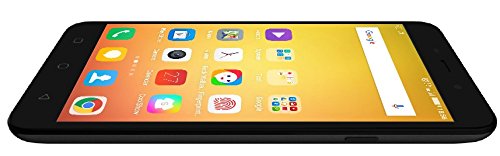
Immaġni: Ġenb view of the Coolpad Note 3, illustrating the location of the SIM/MicroSD card tray and physical buttons.
2. L-Assistent tal-Ixgħel u s-Setup Inizjali
- Press and hold the Power button until the Coolpad logo appears.
- Segwi l-istruzzjonijiet fuq l-iskrin biex tagħżel il-lingwa tiegħek, tikkonnettja mal-Wi-Fi, u tissettja l-kont Google tiegħek.
3. Konfigurazzjoni tas-Sensor tal-Marki tas-Swaba'
The Coolpad Note 3 features a fingerprint sensor for enhanced security and quick access.
- Innaviga lejn Settings > Sigurtà > Marki tas-swaba'.
- Follow the prompts to register your fingerprints. You can register multiple fingers.
- Optionally, customize fingerprints to launch specific applications directly.
Istruzzjonijiet Operattivi
1. Navigazzjoni Bażika
Your Coolpad Note 3 runs on Android v5.1 Lollipop with the COOLUI 6.0 interface. Use the touchscreen for navigation, tapping icons to open apps, swiping to scroll, and pinching to zoom.

Immaġni: Quddiem view of the Coolpad Note 3, showing the vibrant home screen with various application icons.
2. Użu tal-kamera
The device features a 13MP rear camera and a 5MP front camera.
- Iftaħ il- Kamera applikazzjoni.
- Tektek l-iskrin biex tiffoka.
- Agħfas il-buttuna tax-shutter biex tieħu ritratt jew tibda/twaqqaf ir-reġistrazzjoni tal-vidjow.
- Ibdel bejn il-kameras ta' quddiem u ta' wara billi tuża l-ikona tat-toggle tal-kamera.
- Explore various shooting modes available in the camera app.
3. Fingerprint Sensor for Unlocking
To unlock your phone, simply place your registered finger on the fingerprint sensor. The device unlocks in approximately 0.5 seconds. The sensor is designed to detect both dry and wet fingers accurately.
4. Konnettività
- Wi-Fi: Mur fuq Settings > Wi-Fi biex tikkonnettja man-netwerks disponibbli.
- Data mobbli: Kun żgur li s-SIM card tiegħek hija attiva u li d-dejta mobbli hija attivata Settings > Użu tad-dejta.
- Bluetooth: Imqabbad ma' apparati oħra permezz ta' Settings > Bluetooth.
- USB OTG: The Micro USB port supports On-The-Go (OTG) functionality for connecting external USB devices (e.g., flash drives) with an adapter.
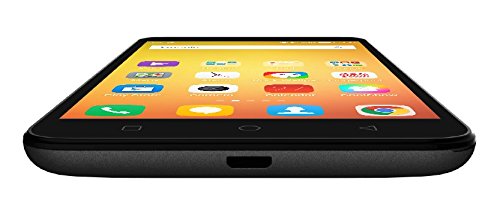
Immaġni: Taħt view of the Coolpad Note 3, highlighting the Micro USB port for charging and data transfer.
Manutenzjoni
1. Iċċarġjar tal-batterija
Use the provided charger and USB cable to charge your Coolpad Note 3. Connect the USB cable to the phone's Micro USB port and the charger to a power outlet. A full charge typically takes approximately 2 hours.
2. Aġġornamenti tas-Software
Regularly check for software updates to ensure optimal performance and access to the latest features and security patches. Go to Settings > Dwar it-telefon > Aġġornamenti tas-sistema.
3. Tindif tal-Apparat Tiegħek
Uża drapp artab u mingħajr suf biex tnaddaf l-iskrin u l-qafas tat-telefon tiegħek. Evita li tuża kimiċi ħarxa jew materjali li joborxu.
4. Protezzjoni tal-Iskrin
While the device features a durable display, it is recommended to use a tempered glass screen protector and a protective case to prevent scratches and damage from accidental drops.
Issolvi l-problemi
- Device is heating: It is normal for smartphones to generate some heat during intensive use (e.g., gaming, prolonged video playback). If excessive heating occurs, close background applications and allow the device to cool. Software updates often address heating optimizations.
- Poor camera quality: Ensure good lighting conditions. For potentially improved results, consider using third-party camera applications available on the Google Play Store.
- Network connectivity issues (international travel): The Coolpad Note 3's 3G/4G bands may not be compatible with all international carriers. Verify network compatibility with your service provider before traveling.
- Slow performance/lag: Close unused applications, clear cache, and restart the device. Ensure sufficient free storage space.
Speċifikazzjonijiet
| Brand | Coolpad |
| Mudell | Nota 3 |
| Sistema Operattiva | Android v5.1 Lollipop |
| Proċessur | 1.3GHz Cortex-A53 MT6753 Mediatek Octacore |
| RAM | 3GB |
| Ħażna Interna | 16GB (expandable up to 64GB via MicroSD) |
| Daqs tal-Wiri | 5.5 pulzieri (13.97 ċm) |
| Riżoluzzjoni tal-Wiri | 1280 x 720 pixels (HD) |
| Kamera ta' wara | 13MP |
| Kamera ta' Quddiem | 5MP |
| Kapaċità tal-batterija | 3000mAh Lithium-Ion |
| Ħin tat-Tkellem | Sa 15 sigħat |
| Ħin ta' Standby | Sa 400 sigħat |
| Appoġġ SIM | Dual SIM (4G+2G) |
| Sigurtà Biometrika | Rikonoxximent tal-marki tas-swaba' |
| Sensuri | G sensor, Proximity sensor, Light sensor, Gyro sensor, eCompass, Fingerprint sensor |
| Dimensjonijiet (L x W x H) | 15.2 x 7.7 x 0.9 ċm |
| Piż | 150 Gramm |
Informazzjoni dwar Garanzija
Your Coolpad Note 3 comes with a manufacturer's warranty:
- Apparat: Garanzija ta' sena mill-manifattur mid-data tax-xiri.
- Aċċessorji fil-kaxxa: Garanzija ta' 6 xhur mill-manifattur għall-aċċessorji inklużi l-batteriji, mid-data tax-xiri.
Please retain your purchase receipt and warranty card for future reference.
Appoġġ
For further assistance, technical support, or service inquiries, please refer to the official Coolpad support channels. Coolpad has partnered with HCL for service in some regions.
Visit the official Coolpad webis-sit għall-aħħar informazzjoni ta' appoġġ u dettalji ta' kuntatt.