
Introduzzjoni
This manual provides essential instructions for the safe and efficient operation of your F&D T400X Full Wooden 2.1 Tower Speakers. Please read this manual thoroughly before using the product and retain it for future reference.
Informazzjoni dwar is-Sigurtà
- Żgura li l-provvista tal-enerġija taqbel mal-voltage specified on the speaker unit.
- Tesponix l-ispikers għall-ilma, umdità, jew temperaturi estremi.
- Evita li tpoġġi l-ispikers ħdejn sorsi ta’ sħana jew fid-dawl tax-xemx dirett.
- Twaqqafx il-fetħiet tal-ventilazzjoni.
- Aqla 'l-unità waqt maltempati tas-sajjetti jew meta ma tintużax għal perjodi twal.
- Irreferi l-manutenzjoni kollha lil persunal kwalifikat.
Kontenut tal-Pakkett
Ivverifika li l-oġġetti kollha huma preżenti fil-pakkett:
- F&D T400X Tower Speakers (2 units)
- Subwoofer Unit (1 unit)
- Kontroll mill-bogħod (unità waħda)
- Kejbil tal-Awdjo (unità 1)
- Manwal għall-Utent (Dan id-dokument)
Prodott Overview
The F&D T400X system consists of two tower speakers and a central subwoofer unit, designed for a 2.1 channel audio experience. It features a bright LED display and multiple input options.
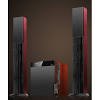
Figura 1: Quddiem view of the F&D T400X Full Wooden 2.1 Tower Speakers system, showing the two tall tower speakers and the central subwoofer unit.
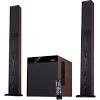
Figura 2: The F&D T400X Tower Speakers and subwoofer, accompanied by the remote control for convenient operation.
Setup
- Pjazzament: Position the two tower speakers on either side of your listening area, and the subwoofer unit centrally, preferably on the floor for optimal bass response. Ensure adequate ventilation around all units.
- Konnessjonijiet:
- Connect the tower speakers to the subwoofer unit using the provided speaker cables.
- Connect the audio source (e.g., smartphone, tablet, laptop, gaming console) to the subwoofer unit using the Auxiliary (AUX) input cable.
- Plug the power cord from the subwoofer unit into a suitable AC power outlet.
Istruzzjonijiet Operattivi
- Power On/Off: Press the Power button on the subwoofer unit or the remote control to turn the speakers on or off. The LED display will illuminate when powered on.
- Għażla tal-Input: Press the "Input" or "Source" button on the subwoofer unit or remote control to cycle through available input modes:
- Bluetooth: Select Bluetooth mode to pair with a compatible device. The LED display will indicate "BT". Fittex għal "F&D T400X" on your device and connect.
- Awżiljarju (AUX): Select AUX mode for wired connections. The LED display will indicate "AUX".
- Radju FM: Select FM mode to listen to radio stations. Use the remote control to scan and select stations.
- Kontroll tal-Volum: Use the Volume Up/Down buttons on the subwoofer unit or remote control to adjust the master volume.
- Funzjoni tal-karaoke: The T400X features dual microphone inputs. Connect microphones (not included) to the designated ports on the subwoofer unit to use the karaoke function. Adjust microphone volume as needed.
- Kontroll mill-bogħod: The included remote control provides full functionality for power, input selection, volume, track control (for Bluetooth/USB), and FM tuning.
Manutenzjoni
- Tindif: Uża drapp artab u niexef biex tnaddaf l-uċuħ tal-ispiker. Tużax prodotti tat-tindif likwidi jew materjali li joborxu.
- Ħażna: If storing the speakers for an extended period, unplug them from the power outlet and store them in a cool, dry place away from direct sunlight.
Issolvi l-problemi
| Problema | Kawża Possibbli | Soluzzjoni |
|---|---|---|
| Ebda qawwa | Il-korda tal-enerġija mhux imqabbda; Is-sokit tal-enerġija difettuż. | Kun żgur li l-korda tal-enerġija hija mdaħħla sew; Ittestja s-sokit tal-enerġija b'apparat ieħor. |
| L-ebda ħoss | Incorrect input selected; Volume too low; Audio cable not connected properly. | Select the correct input source; Increase volume; Check audio cable connections. |
| Kwistjonijiet ta 'tqabbil tal-Bluetooth | Device too far; Speakers not in pairing mode; Interference. | Ensure device is within range; Select Bluetooth input on speakers; Restart both devices. |
| Akkoljenza fqira tal-FM | Weak signal; Antenna not positioned correctly. | Adjust the position of the FM antenna; Try auto-scanning for stations again. |
Speċifikazzjonijiet
- Isem tal-Mudell: T400X
- Tip ta' Kelliem: Torri
- Sound Channel Configuration: 2.1
- Teknoloġija tal-Konnettività: Bluetooth, Awżiljarju
- Teknoloġija tal-Komunikazzjoni mingħajr Fili: Bluetooth
- Sors tal-Enerġija: AC
- Wattage: 37.00 W
- Dijametru tas-subwoofer: 8 Pulzier
- Dijametru tat-Tweeter: 1 Pulzier
- Karatteristiċi Speċjali: Built-in Microphone inputs (Dual), Bright LED display
- Metodu ta' Kontroll: Remote
- Apparati Kompatibbli: Smartphone, Tablet, Laptop, Gaming Console
- Materjal: Injam
- Piż tal-oġġett: 9.5 kg
- Dimensjonijiet tal-Prodott (LxWxH): 33.6 x 40.8 x 43.6 ċm
- Manifattur: F&D
Informazzjoni dwar Garanzija
The F&D T400X Tower Speakers come with a Garanzija tal-Manifattur ta' Sena from the date of purchase. This warranty covers manufacturing defects under normal use. Please retain your purchase receipt as proof of purchase for warranty claims. The warranty does not cover damage caused by misuse, accidents, unauthorized modifications, or normal wear and tear.
Appoġġ
For technical assistance, service, or warranty claims, please contact F&D customer support. Refer to the contact information provided with your product packaging or visit the official F&D webis-sit għad-dettalji ta' appoġġ l-aktar aġġornati.


