
1. Introduzzjoni
The Sony SBH54 is a versatile Stereo Bluetooth Headset designed for wireless communication and audio playback. It offers both handset and headset functionalities, allowing you to take and make calls, view messages, listen to music, and tune into FM radio directly from its display. Crafted from premium metal with a splash-proof design, it combines elegance with durability.
Key features include Bluetooth Wireless 3.0, NFC technology for easy pairing, an OLED display, and built-in noise cancellation for clear audio during calls. The headset supports A2DP profile and can connect to two devices simultaneously.
2. Prodott Aktarview
The SBH54 features a compact design that fits comfortably in your hand. It includes an OLED display for information at a glance and physical controls for media and call management.
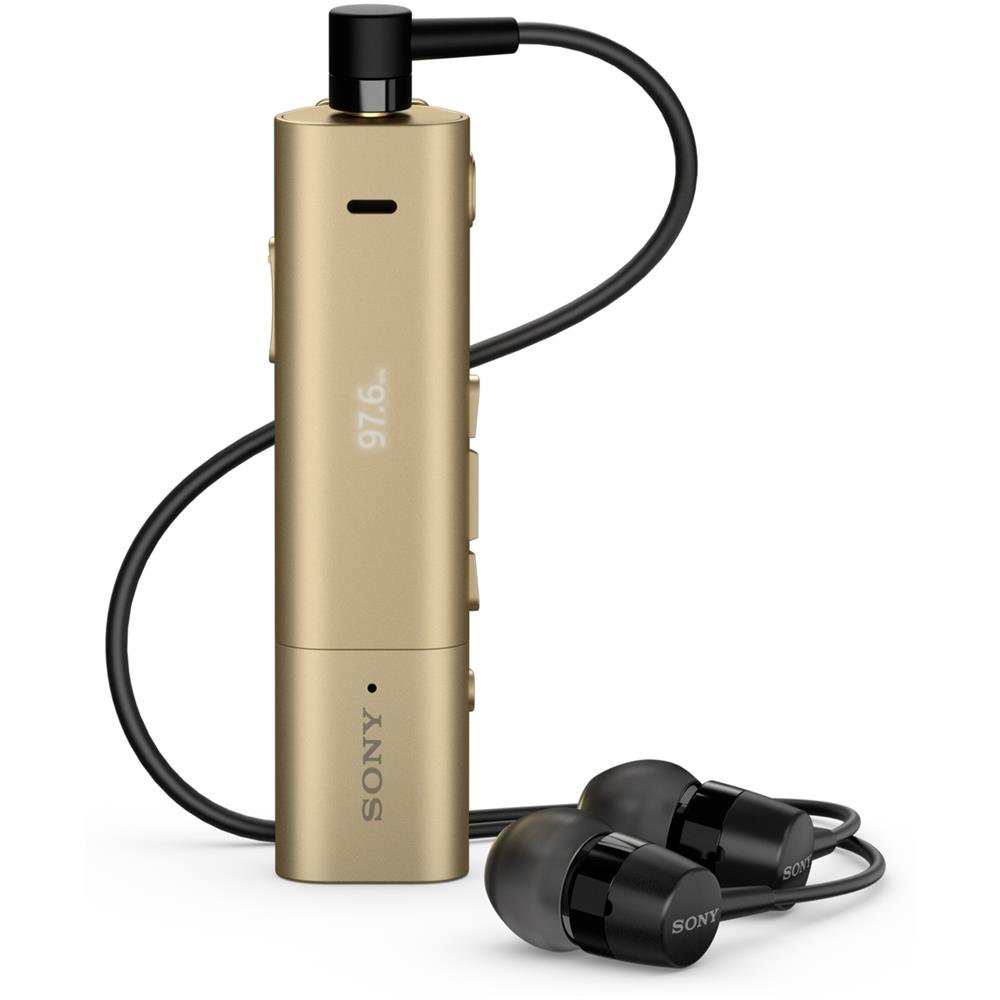
Image: Sony SBH54 Gold Stereo Bluetooth Headset. This image displays the compact, gold-colored headset with its integrated clip and display screen.
Kontrolli u Indikaturi:
- Display OLED: Shows caller ID, messages, music track information, and FM radio frequency.
- Buttuna b'ħafna funzjonijiet: For call answering/ending, play/pause music.
- Buttuni tal-Volum: Aġġusta l-volum tal-awdjo.
- Buttuni tan-Navigazzjoni: For menu navigation and track skipping.
- Mikrofonu: Integrated for voice calls.
- Jack tal-headphone: 3.5mm port for connecting the included premium headphones.
- Port tal-Iċċarġjar: Port mikro USB għall-iċċarġjar tal-apparat.
3. Setup
3.1 Iċċarġjar tal-Headset
- Connect the supplied USB cable to the headset's charging port and to a USB power adapter or a computer's USB port.
- L-indikatur tal-batterija fuq id-displej se juri l-istatus tal-iċċarġjar.
- Iċċarġja l-headset għal kollox qabel l-ewwel użu.
3.2 Pairing with a Device (Bluetooth)
- Kun żgur li l-headset huwa ċċarġjat u mitfi.
- Press and hold the power button until the headset enters pairing mode (indicated by a specific light pattern or message on the display).
- On your smartphone or other Bluetooth-enabled device, enable Bluetooth and search for available devices.
- Select "SBH54" from the list of found devices.
- Jekk tintalab, daħħal il-kodiċi tal-password "0000" (erba' żerijiet).
- Ladarba jkun imqabbad, il-headset jindika konnessjoni b'suċċess.
3.3 Pairing with a Device (NFC)
For devices with NFC (Near Field Communication):
- Ensure NFC is enabled on your smartphone and the screen is unlocked.
- Touch the NFC detection area of your smartphone to the NFC detection area on the SBH54 headset.
- Segwi kwalunkwe prompts fuq l-iskrin biex tlesti l-proċess ta 'tqabbil.
4. It-Tħaddim tal-Headset
4.1 Power On/Off
- Biex Tixgħel: Agħfas u żomm il-buttuna tal-qawwa sakemm id-displej jixgħel.
- Biex Tifi: Agħfas u żomm il-buttuna tal-qawwa sakemm id-displej jintefa.
4.2 Tagħmel u Riċeviment Sejħiet
- Tweġiba għal Sejħa: When a call comes in, press the multi-function button.
- Tmiem Sejħa: During a call, press the multi-function button.
- Ċaħda ta 'Sejħa: Agħfas u żomm il-buttuna multi-funzjoni meta tidħol telefonata.
- Tagħmel Sejħa: Dial the number on your phone. The call will automatically route to the headset. You can also use voice commands if supported by your phone.
- Handset Function: The compact SBH54 can be used as an unobtrusive handset for calls.
- Kanċellazzjoni tal-Istorbju: The headset features echo, wind, and noise cancellation for clear voice transmission.
- Vuċi HD: Enhances voice clarity for both parties during a call.
4.3 Daqq tal-Mużika
- Play/Pawsa: Agħfas il-buttuna multifunzjonali.
- Track li jmiss: Press the forward navigation button.
- Track preċedenti: Press the backward navigation button.
- Kontroll tal-Volum: Uża l-buttuni tal-volum 'il fuq/'l isfel.
4.4 Radju FM
- Attiva r-Radju FM: Navigate through the headset menu to select the FM Radio function.
- Stazzjonijiet tas-Sintonizzazzjoni: Use the navigation buttons to scan or manually tune to FM frequencies.
- Save Presets: The headset may allow saving favorite stations (refer to on-screen prompts).
5. Manutenzjoni
- Tindif: Imsaħ il-headset b'ċarruta ratba u niexfa. Evita li tuża kimiċi ħarxa jew materjali li joborxu.
- Reżistenza għall-Ilma: The SBH54 has a splash-proof design. This means it can withstand light splashes of water but should not be submerged or exposed to heavy rain. Ensure the charging port cover is securely closed.
- Ħażna: Aħżen il-headset f'post frisk u niexef 'il bogħod mix-xemx diretta u minn temperaturi estremi.
- Kura tal-batterija: Biex ittawwal il-ħajja tal-batterija, evita li tiċċarġja kompletament il-batterija ta' spiss. Iċċarġjaha regolarment.
6 Issolvi l-problemi
Kwistjonijiet Komuni u Soluzzjonijiet:
- Il-headset ma jixgħelx: Kun żgur li l-batterija hija ċċarġjata. Qabbad ma' sors ta' enerġija u erġa' pprova.
- Ma tistax tqabbad ma' apparat:
- Kun żgur li l-headset jinsab fil-modalità ta' tqabbil.
- Kun żgur li l-Bluetooth huwa attivat fuq it-tagħmir tiegħek.
- Mexxi l-headset eqreb lejn it-tagħmir tiegħek.
- Erġa' ibda kemm il-headset kif ukoll l-apparat tiegħek.
- Neħħi l-konnessjonijiet Bluetooth preċedenti fuq l-apparat tiegħek u erġa' pprova tqabbad.
- L-ebda awdjo jew kwalità awdjo fqira:
- Iċċekkja l-livelli tal-volum kemm fuq il-headset kif ukoll fuq l-apparat konness tiegħek.
- Kun żgur li l-headset jinsab fil-firxa tat-tagħmir tiegħek.
- Skonnettja u erġa' qabbad il-konnessjoni Bluetooth.
- Ensure the headphones are properly plugged into the 3.5mm jack.
- Ir-Radju FM mhux qed jaħdem: Ensure you are in an area with good FM signal reception.
7. Speċifikazzjonijiet
| Karatteristika | Dettall |
|---|---|
| Brand | Sony |
| Numru tal-Mudell | SBH54GD |
| Kulur | Deheb |
| Tqegħid tal-widnejn | Fil-widnejn |
| Fattur tal-Formola | Fil-widnejn |
| Kontroll tal-Ħoss | Kanċellazzjoni Attiva tal-Ħoss |
| Piż tal-oġġett | 0.1 Kilogrammi |
| Tip ta' Sewwieq Awdjo | Sewwieq Dinamika |
| Medda ta' Frekwenzi | 20 Hz - 20,000 Hz |
| Materjal tal-għeluq | Metall |
| Apparati Kompatibbli | Smartphones, Laptops, Tablets, Bluetooth-enabled Devices |
| Livell ta 'Reżistenza għall-Ilma | Water Resistant (Splash-proof) |
| Teknoloġija tal-Konnettività | Bluetooth, NFC |
| Teknoloġija bla fili | Bluetooth, NFC |
| Verżjoni Bluetooth | 3.0 |
| Tip ta' Kontroll | Kontroll tal-Midja |
| Metodu ta' Kontroll | Remote |
8. Garanzija u Appoġġ
For warranty information and customer support, please refer to the documentation included with your purchase or visit the official Sony support websit. It-termini speċifiċi tal-garanzija jistgħu jvarjaw skont ir-reġjun u l-bejjiegħ bl-imnut.
Appoġġ onlajn: www.sony.com/electronics/support