
Introduzzjoni
This manual provides essential information for the safe and efficient installation, operation, and maintenance of your APC Smart-UPS SRT 8kVA Rack Mount Uninterruptible Power Supply (UPS) with a 208V to 120V Step-Down Transformer. Please read this manual thoroughly before installing or operating the equipment.
The APC Smart-UPS SRT 8kVA is designed to provide protected power to electronic equipment from utility power outages, sags, surges, and small utility fluctuations. The integrated step-down transformer converts 208V input to 120V output for compatible equipment.
Istruzzjonijiet Importanti dwar is-Sigurtà
ĦAJJA DAWN L-ISTRUZZJONIJIET - This manual contains important instructions that should be followed during installation and maintenance of the UPS and batteries.
- Dan l-UPS huwa maħsub għall-użu fuq ġewwa biss.
- Tħaddimx dan l-UPS fid-dawl tax-xemx dirett, f'kuntatt ma' fluwidi, jew fejn ikun hemm trab jew umdità eċċessivi.
- Qabbad il-kejbil tad-dawl tal-UPS direttament ma 'plagg tal-ħajt. Tużax protetturi kontra l-mewġ jew estensjonijiet.
- Il-manutenzjoni tal-batteriji għandha ssir jew tkun sorveljata minn persunal li jkun jaf bil-batteriji u l-prekawzjonijiet meħtieġa. Żomm persunal mhux awtorizzat 'il bogħod mill-batteriji.
- Meta tissostitwixxi l-batteriji, ibdel bl-istess tip u numru ta 'batteriji jew pakketti ta' batteriji.
- Tarmix il-batteriji fin-nar. Il-batteriji jistgħu jisplodu.
- Tiftaħx jew timmultilja l-batteriji. L-elettrolit rilaxxat huwa ta 'ħsara għall-ġilda u l-għajnejn. Jista 'jkun tossiku.
- Batterija tista 'tippreżenta riskju ta' xokk elettriku u kurrent għoli ta 'short circuit. Il-prekawzjonijiet li ġejjin għandhom jiġu osservati meta taħdem fuq batteriji:
- Neħħi arloġġi, ċrieki, jew oġġetti oħra tal-metall.
- Uża għodda b'manki iżolati.
- Ilbes ingwanti tal-gomma u stivali.
- Tpoġġix għodda jew partijiet tal-metall fuq il-batteriji.
- Skonnettja s-sors tal-iċċarġjar qabel ma tikkonnettja jew skonnettja t-terminali tal-batterija.
Kontenut tal-Pakkett
Inspect the package upon receipt. Notify the carrier and dealer if there is any damage. The package contains:
- APC Smart-UPS SRT 8kVA UPS Unit
- 208V to 120V Step-Down Transformer
- Ħardwer għall-immuntar tar-rack
- Kejbil tal-komunikazzjoni tas-serje
- Kejbil tal-komunikazzjoni USB
- CD Dokumentazzjoni
- Istruzzjonijiet tas-sigurtà
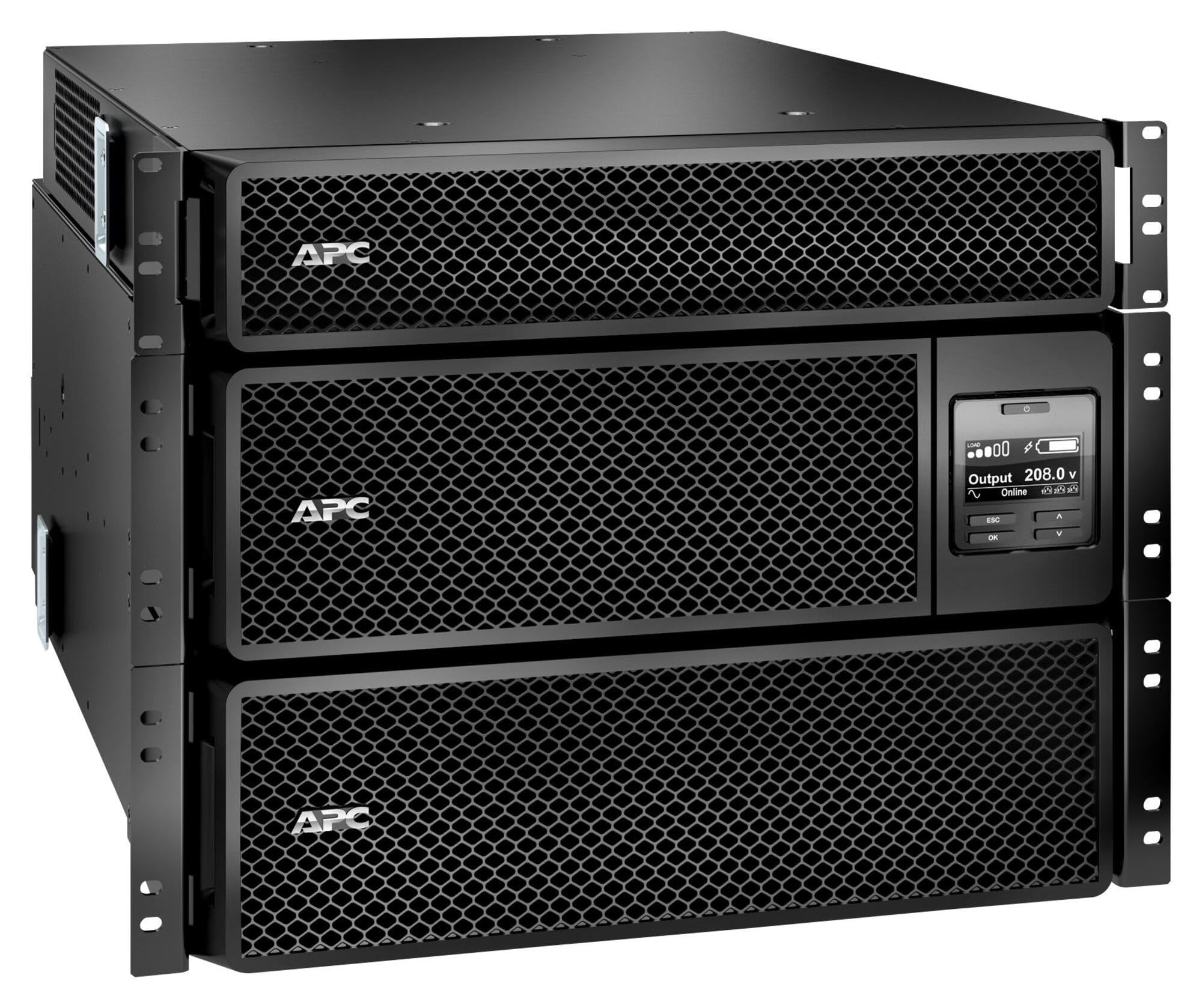
Image: APC Smart-UPS SRT 8kVA Rack Mount UPS with 208V to 120V Step-Down Transformer. This image shows the main UPS unit and the accompanying step-down transformer, typically in a rack-mountable configuration.
Setup
1 Tqegħid
The UPS and transformer are heavy. For rack-mount installations, ensure the rack is stable and capable of supporting the combined weight of the UPS, transformer, and any other equipment. For tower installations, place the unit on a flat, stable surface.
- Maintain at least 20 cm (8 inches) of clearance from the front and rear panels for proper ventilation.
- Evita li tpoġġi l-unità ħdejn sorsi ta’ sħana jew fid-dawl tax-xemx dirett.
2. Konnessjoni tal-batterija
The UPS is shipped with the internal batteries disconnected for safety. Follow these steps to connect the batteries:
- Remove the front bezel or access panel to expose the battery compartment.
- Connect the internal battery cables as indicated by the labels or instructions inside the compartment. Ensure a secure connection.
- Replace the front bezel or access panel.
3. Konnessjoni tal-Enerġija
Connect the UPS to utility power and your equipment.
- Qawwa tad-Dħul: Connect the UPS input power cord (NEMA L6-30P) to a dedicated 208V AC outlet. Ensure the outlet is properly grounded and rated for the UPS capacity.
- Konnessjoni tat-Transformer: Connect the output of the UPS to the input of the 208V to 120V Step-Down Transformer.
- Qawwa tal-Ħruġ: Connect your 120V equipment to the 120V output receptacles on the step-down transformer. Do not overload the transformer or the UPS.
- Kejbils tal-Komunikazzjoni: Connect the serial or USB communication cable from the UPS to your computer or server for monitoring and management.
4. Startup Inizjali
After all connections are made:
- Press the power ON button on the UPS front panel. The UPS will perform a self-test.
- Allow the UPS to charge its batteries for at least 24 hours before connecting critical loads to ensure full runtime capacity.
- Verify the UPS display shows normal operation status.
Jopera l-UPS
Wiri u Kontrolli tal-Panew ta 'quddiem
The front panel features an LCD display and control buttons for monitoring and configuring the UPS. Refer to the detailed user manual on the documentation CD for specific menu navigation.
- Buttuna ON/OFF: Powers the UPS on or off.
- Escape/Menu Button: Navigates back or enters the main menu.
- Vleġeġ 'il fuq/'l isfel: Scrolls through menu options or adjusts settings.
- Daħħal Button: Jagħżel għażla jew jikkonferma setting.
- Indikaturi LED: Provide quick status updates (e.g., On Line, On Battery, Fault).
Operazzjoni normali
During normal operation, the UPS will be in "On Line" mode, providing conditioned power to connected equipment and charging its batteries. The LCD display will show input/output voltage, tagħbija perċentwalitage, and battery charge level.
Modalità tal-batterija
If utility power fails or fluctuates outside acceptable limits, the UPS will automatically switch to battery power. An audible alarm may sound, and the display will indicate "On Battery" mode. The runtime available depends on the load and battery charge level.
Proċeduri ta' Tfigħ
- Għeluq Grazzjuż: Use the PowerChute software (if installed) to gracefully shut down connected equipment before the UPS runs out of battery power.
- Tfigħ manwali: Press and hold the OFF button on the front panel until the UPS powers down. Ensure all connected equipment is safely shut down first.
Manutenzjoni
Sostituzzjoni tal-batterija
The batteries in the UPS are user-replaceable hot-swappable battery modules. Refer to the specific battery replacement instructions provided with your replacement battery kit or on the APC website. Always use genuine APC replacement battery cartridges (RBCs).
- Battery life is typically 3-5 years, but can vary based on temperature and discharge cycles.
- Replace batteries when the UPS indicates a "Replace Battery" warning or when runtime significantly decreases.
Tindif
Keep the UPS and transformer free of dust and debris. Use a dry cloth to clean the exterior. Do not use liquid cleaners or solvents.
Aġġornamenti tal-Firmware
Iċċekkja l-APC perjodikament website for available firmware updates for your UPS model. Firmware updates can provide enhanced features, improved performance, or bug fixes. Follow the instructions provided with the firmware update package carefully.
Issolvi l-problemi
This section provides solutions to common issues. For more complex problems, contact APC Technical Support.
| Problema | Kawża Possibbli | Soluzzjoni |
|---|---|---|
| UPS mhux se jixgħel. | Battery not connected; No input power; UPS fault. | Ensure battery cables are securely connected. Verify input power cable is plugged into a live outlet. If fault persists, contact support. |
| Il-UPS jagħmel ħoss kontinwu jew frekwenti. | On battery mode; Overload; Low battery. | Check utility power. Reduce connected load. Allow batteries to charge. |
| L-indikatur "Ibdel il-Batterija" jixgħel. | Batteries are at end of life or faulty. | Order and install new APC replacement battery cartridges. |
| Connected equipment not receiving 120V. | Transformer not connected or faulty; UPS output issue. | Verify transformer connections. Check UPS output voltage on display. Ensure equipment is plugged into the 120V outlets of the transformer. |
Speċifikazzjonijiet
The following table outlines the key specifications for the APC Smart-UPS SRT 8kVA Rack Mount with 208V to 120V Step-Down Transformer (SRT8KRMXLT-5KTF).
| Karatteristika | Dettall |
|---|---|
| Brand | APC |
| Numru tal-Mudell | SRT8KRMXLT-5KTF |
| Kapaċità (VA/Watts) | 8000 VA / 8000 W |
| Input Voltage | 208 V AC |
| Ħruġ Voltage | 120 V AC (via Step-Down Transformer) |
| Kurrent tal-Ħruġ | 66.67 Amps |
| Medda ta' Frekwenzi | 50/60 Hz |
| Tip ta 'batterija | Aċidu taċ-Ċomb |
| Ħin tal-Ħarġ tal-Batterija | 1.5 Sigħat |
| Typical Runtime (Full Load) | minuti 5 |
| Fattur tal-Formola | Rack / Tower Mountable (8U) |
| Dimensjonijiet tal-Prodott (P x W x H) | 28.2" x 17" x 13.9" (71.6ċm x 43.2ċm x 35.3ċm) |
| Piż tal-oġġett | 341 Lira (154.7 kg) |
| Konnessjonijiet Output | 1 x NEMA L6-30R, 4 x NEMA 5-20R (via transformer) |
| Materjal tal-għeluq | Metall |
| Kulur | Iswed |
| Standard tas-Sigurtà | UL 1778 |
Garanzija u Appoġġ
For detailed warranty information, please refer to the warranty card included with your product or visit the official APC website. APC offers technical support to assist with installation, troubleshooting, and product inquiries.
- Appoġġ onlajn: Żur l-APC websit għal FAQs, dokumentazzjoni, u downloads ta' softwer.
- Appoġġ bit-Telefon: Contact APC Technical Support using the numbers provided on the APC websit għar-reġjun tiegħek.
- Reġistrazzjoni tal-Prodott: Register your product online to receive notifications about firmware updates and product information.