
ICP DAS X508
Manwal tal-Utent tal-Modulu ICP DAS X508
Mudell: X508
1. Introduzzjoni
This manual provides detailed instructions for the installation, operation, and maintenance of the ICP DAS X508 module. The X508 is a versatile I/O module designed for industrial applications, featuring a 1-Port RS-232 interface (5-Pin), 4 Digital Input (D/I) channels, and 4 Digital Output (D/O) channels. It is engineered for reliable performance in various control and monitoring systems.
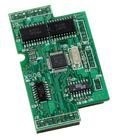
Figura 1: The ICP DAS X508 module, showcasing its green circuit board with integrated components and connection points. This image provides a visual reference for the physical appearance of the module.
2. Karatteristiċi
- 1-Port RS-232 Communication Interface (5-Pin)
- 4-Channel Digital Input (D/I)
- 4-Channel Digital Output (D/O)
- Designed for industrial control and data acquisition
- Disinn kompatt u robust
3. Setup u Installazzjoni
Follow these steps to properly set up and install your ICP DAS X508 module:
- Konnessjoni tal-Enerġija: Connect a stable DC power supply to the module's power input terminals. Ensure the voltage and current ratings match the module's requirements to prevent damage.
- Konnessjoni RS-232: Connect the 5-pin RS-232 port to your host controller or PC using a compatible serial cable. Verify pin assignments for proper communication.
- Digital Input Wiring: Wire your digital input devices (e.g., sensors, switches) to the D/I channels. Refer to the module's wiring diagram for correct polarity and connection type (e.g., sink/source).
- Digital Output Wiring: Connect your digital output devices (e.g., relays, indicators) to the D/O channels. Ensure that the load current does not exceed the module's specifications.
- Konfigurazzjoni tas-Softwer: Install any necessary drivers or configuration software on your host system. Configure communication parameters (baud rate, data bits, parity, stop bits) to match the module's settings.
- Immuntar: Securely mount the X508 module in a suitable enclosure or panel, ensuring adequate ventilation and protection from environmental factors.
4. Istruzzjonijiet Operattivi
Once the X508 module is installed and configured, you can begin operation:
- Komunikazzjoni: Establish communication with the module via the RS-232 interface using your chosen software or programming language.
- Reading Digital Inputs: Use the appropriate commands or functions to read the status of the 4 digital input channels. The module will report whether each input is ON or OFF (high or low).
- Controlling Digital Outputs: Send commands to set the state of the 4 digital output channels. You can turn individual outputs ON or OFF as required by your application.
- Monitoraġġ: Continuously monitor the status of inputs and outputs to ensure proper system operation. Implement error handling routines in your software for robust control.
5. Manutenzjoni
Regular maintenance helps ensure the longevity and reliable operation of your X508 module:
- Tindif: Periodically clean the module and its connectors with a soft, dry cloth. Avoid using liquid cleaners or solvents.
- Aġġornamenti tal-Firmware: Check the ICP DAS website for any available firmware updates. Apply updates as recommended to improve performance or address known issues.
- Spezzjoni tal-Konnessjoni: Regularly inspect all wiring and connections for looseness, corrosion, or damage. Tighten connections as needed.
- Kontroll Ambjentali: Kun żgur li l-ambjent operattiv jibqa' fil-firxiet speċifikati tat-temperatura u l-umdità.
6 Issolvi l-problemi
If you encounter issues with your X508 module, refer to the following troubleshooting tips:
- Ebda Qawwa:
- Ivverifika li l-provvista tal-enerġija hija konnessa b'mod korrett u li tipprovdi l-volum speċifikattage.
- Check power cables and fuses.
- Nuqqas ta' Komunikazzjoni:
- Ensure the RS-232 cable is securely connected at both ends.
- Verify that communication parameters (baud rate, data bits, parity, stop bits) in your software match the module's settings.
- Check for correct RS-232 pin assignments.
- Confirm that the correct COM port is selected on your host system.
- L-Input Diġitali Mhux Jirrispondi:
- Check the wiring of the input device to the module.
- Verify the input device is functioning correctly.
- Ensure the input signal voltage levels are within the module's specifications.
- Digital Output Not Activating:
- Check the wiring of the output device to the module.
- Verify the output device (e.g., relay) is functioning correctly and its load current does not exceed the module's rating.
- Confirm that the command to activate the output is being sent correctly by the host system.
7. Speċifikazzjonijiet
| Karatteristika | Dettall |
|---|---|
| Numru tal-Mudell | X508 |
| Brand | ICP DAS |
| Deskrizzjoni | 1 Port RS-232 (5-Pin), 4 Channel D/I, and 4 Channel D/O Module |
| Piż tal-oġġett | 3 Liri |
| Data L-Ewwel Disponibbli | 14 ta’ Awwissu, 2014 |
| ASIN | B014K1JNRK |
| Stil | Klassiku |
8. Informazzjoni dwar Garanzija
Specific warranty details for the ICP DAS X508 module are not provided in this document. Please refer to the official ICP DAS website or contact ICP DAS customer support for comprehensive warranty information.
9. Appoġġ u Kuntatt
For technical assistance, additional documentation, or support regarding your ICP DAS X508 module, please visit the official ICP DAS websit jew ikkuntattja lid-dipartiment tas-servizz tal-konsumatur tagħhom.
- Manifattur: ICP DAS
- Websit: www.icpdas.com (General link, specific support page not provided in input)
Ask a question about this manual
Ask about setup, troubleshooting, compatibility, parts, safety, or missing instructions. Manuals+ will review the question and use this page’s manual context to help answer it.