
Introduzzjoni
This manual provides detailed instructions for the Inateck Bluetooth 4.1 Sport Headset, Model P20 (BH1001). Please read this guide thoroughly before using the product to ensure proper operation and to maximize your listening experience. This headset is designed for active lifestyles, offering wireless audio with a secure fit and integrated microphone.
1. Setup
1.1 Kontenut tal-Pakkett
Ivverifika li l-oġġetti kollha huma preżenti fil-pakkett:
- Inateck Bluetooth Sport Headset (P20 / BH1001)
- Cable tal-Iċċarġjar tal-USB
- Multiple pairs of silicone ear tips (various sizes)
- Borża tal-Ġarr
- Manwal għall-Utent (dan id-dokument)
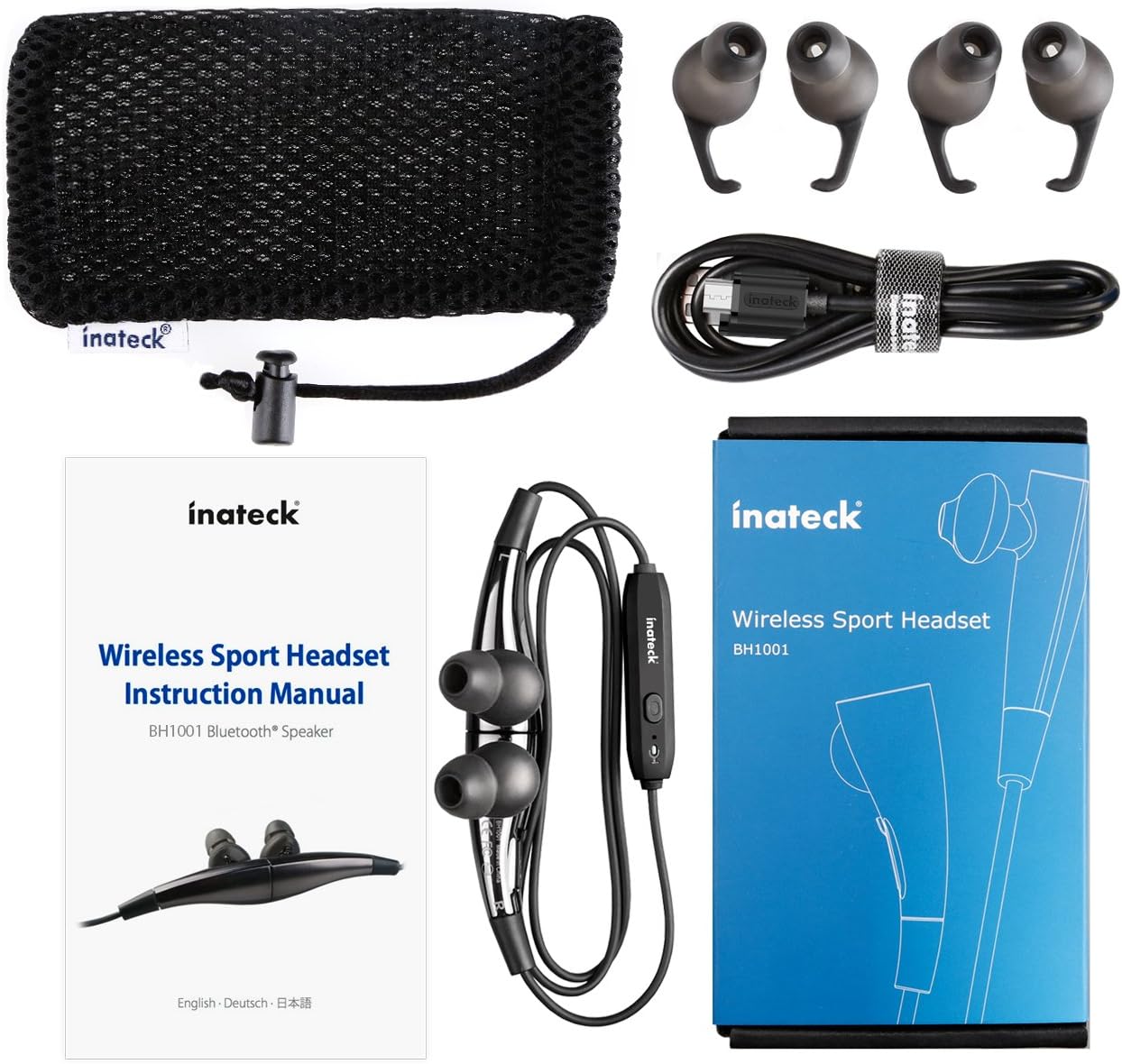
Figura 1.1: Contents of the Inateck Bluetooth Sport Headset package.
1.2 Iċċarġjar tal-Headset
Before first use, fully charge the headset. A full charge takes approximately 3 hours and provides at least 8 hours of music playback.
- Locate the Micro USB charging port on the headset.
- Connect the small end of the provided USB charging cable to the headset's Micro USB port.
- Qabbad it-tarf l-akbar tal-kejbil USB ma' sors ta' enerġija USB (eż., port USB tal-kompjuter, adapter tal-ħajt USB).
- The status indicator light will illuminate during charging. It will change color or turn off once charging is complete.

Figura 1.2: Charging the Inateck Bluetooth Sport Headset via Micro USB.
1.3 Tqabbil ma' Apparat Bluetooth
To connect your headset to a smartphone or other Bluetooth-enabled device:
- Kun żgur li l-widna hija mitfija.
- Press and hold the Multifunction Key (MFB) on the inline control unit for approximately 5-7 seconds until the status indicator light flashes red and blue alternately. This indicates pairing mode.
- Fuq l-apparat Bluetooth tiegħek, attiva l-Bluetooth u fittex apparati ġodda.
- Select "Inateck BH1001" or "Inateck P20" from the list of available devices.
- Once paired, the status indicator light on the headset will flash blue slowly, and you may hear an audible confirmation.
- The headset will automatically attempt to reconnect to the last paired device when turned on.

Figura 1.3: Inateck Headset paired with a mobile device for music playback.
2. Istruzzjonijiet Operattivi
2.1 Kontrolli tal-Headset
The inline control unit provides easy access to various functions:

Figura 2.1: Fuqview of the Inateck Headset control unit.
- Multifunction Key (MFB):
- Agħfas u żomm (5-7s): Ixgħel/Itfi, Daħħal il-Modalità ta' Tqabbil
- Agħfas qasir: Daqq/Pawża l-mużika, Tweġiba/Tmiem is-sejħa
- Long press (during incoming call): Reject call
- Volum 'il fuq (+) / Trakka li jmiss:
- Istampa qasira: Żid il-volum
- Agħfas fit-tul: Aqbeż għall-binarju li jmiss
- Volum 'l isfel (-) / Trakka Preċedenti:
- Press qasira: Naqqas il-volum
- Long press: Go to previous track
- Port Micro USB: Għall-iċċarġjar tal-headset.
- Indikatur tal-Istat: Juri l-istatus tal-qawwa, tat-tqabbil, u tal-iċċarġjar.
- Mikrofonu: Għal sejħiet hands-free.
2.2 L-Ilbies tal-Headset
Select the ear tips that provide the most comfortable and secure fit for your ears. The headset is designed to be worn with the cable behind your neck, ensuring stability during physical activity.

Figura 2.2: Proper wearing of the Inateck Sport Headset for active use.
2.3 Magnetic Earbuds Feature
The earbuds feature integrated magnets. When not in use, you can connect the two earbuds together, forming a necklace around your neck. This action automatically pauses music playback and prevents the headset from falling off.

Figura 2.3: Magnetic earbuds feature for secure wearing around the neck.

Figura 2.4: Headset worn as a necklace using the magnetic feature.
3. Manutenzjoni
- Tindif: Wipe the headset with a soft, dry cloth. Do not use abrasive cleaners or solvents.
- Tips tal-widnejn: Neħħi u naddaf regolarment il-ponot tas-silikon tal-widnejn b'sapun ħafif u ilma. Kun żgur li jkunu niexfa għalkollox qabel ma terġa' twaħħalhom.
- Ħażna: When not in use, store the headset in the provided carrying pouch to protect it from dust and damage. Avoid extreme temperatures.
- Reżistenza għall-Ilma: The headset is designed to be water-resistant for sports and exercise (e.g., sweat, light rain). Do not submerge it in water or expose it to heavy rain.
4 Issolvi l-problemi
4.1 Ma tistax tixgħel
Ensure the headset is fully charged. Connect it to a power source using the USB cable and allow it to charge for at least 30 minutes before attempting to power on again.
4.2 Ma tistax tqabbad mat-tagħmir
- Ensure the headset is in pairing mode (status indicator flashing red and blue alternately).
- Make sure Bluetooth is enabled on your device and it is within range (typically 10 meters or 33 feet).
- Itfi u ixgħel il-funzjoni Bluetooth fuq l-apparat tiegħek.
- If previously paired, try "forgetting" or "unpairing" the headset from your device's Bluetooth settings and then re-pair.
- Kun żgur li l-ebda apparat ieħor tal-Bluetooth ma qed jinterferixxi mal-konnessjoni.
4.3 Ebda Ħoss jew Kwalità tal-Ħoss Fqira
- Iċċekkja l-livell tal-volum kemm fuq il-headset kif ukoll fuq l-apparat konness tiegħek.
- Kun żgur li l-headset huwa mqabbad sew u konness mat-tagħmir tiegħek.
- Move closer to your device to reduce potential interference or range issues.
- Ensure the ear tips are correctly seated in your ears for optimal sound delivery.
- Reboot both the headset and your connected device.
4.4 Konnessjoni Intermittenti
- Ensure there are no physical obstructions between the headset and your device.
- Avoid placing your device in areas where the signal might be blocked (e.g., deep pockets, behind thick walls).
- Imminimizza l-interferenza minn apparati oħra mingħajr fili (routers Wi-Fi, apparati oħra Bluetooth).
- Keep the headset and your device within the recommended Bluetooth range.
5. Speċifikazzjonijiet
| Brand | Inateck |
| Isem tal-Mudell | P20 |
| Numru tal-Mudell | BH1001 |
| Teknoloġija tal-Konnettività | Bluetooth 4.1 |
| Fattur tal-Formola | Fil-widnejn |
| Tqegħid tal-widnejn | Intra-aural |
| Jack tal-headphone | USB (għall-iċċarġjar) |
| Livell ta 'Reżistenza għall-Ilma | Waterproof (suitable for sweat/light rain) |
| Karatteristiċi Speċjali | Sports and exercise, integrated microphone, magnetic earbuds |
| Piż tal-oġġett | 78 Gramm |
| Tip ta' Kontroll | Volume Control, Multifunction Button |
| Materjal | Plastik |
6. Informazzjoni dwar Garanzija
Inateck products typically come with a limited warranty. For specific warranty terms and conditions applicable to your Inateck Bluetooth Sport Headset, please refer to the warranty card included in your product packaging or visit the official Inateck websit. Żomm il-prova tax-xiri tiegħek għal talbiet ta' garanzija.
7. Appoġġ għall-Klijent
If you encounter any issues not covered in this manual or require further assistance, please contact Inateck customer support. You can usually find contact information, FAQs, and additional resources on the official Inateck websit:
Websit: www.inateck.com
Please have your product model (P20 / BH1001) and purchase details ready when contacting support.