
1. Introduzzjoni
This manual provides detailed instructions for the installation, operation, and maintenance of the Visionis FPC-5323 One Door Access Control Kit. This kit is designed for single-door access control in swinging door applications, utilizing a 300lbs magnetic lock and the VIS-3002 indoor keypad/reader with a mini controller. The system supports up to 1,000 users and offers multiple access methods including PIN codes, proximity cards, and keytags, ensuring enhanced security for your premises.
2. Komponenti tal-Prodott
The Visionis FPC-5323 kit includes the following components:
- (1) VIS-ML300LED: 300lbs Indoor Electric Magnetic Lock with LED Sensor.
- (1) VIS-ZL300: L and Z Bracket for 300lbs Electromagnetic Lock.
- (1) VIS-3002: Access Control Indoor Only Digital Touch Keypad + Reader Standalone with Mini Controller, Wiegand 26, No Software, EM Cards, 1000 Users.
- (1) VIS-MINI-CNTRL: 1 Door Controller for Access Control Systems with No Software. Supports up to 1,000 users.
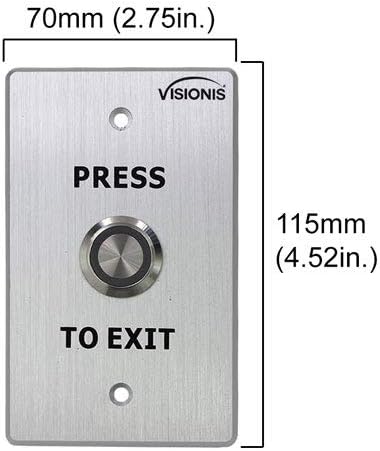
- (1) VIS-7001: Indoor + Outdoor Weather, Waterproof Rated IP65 Stainless Steel Door Bell Type Round Request To Exit Button with LED Light, NC, COM, NO Outputs.
- (1) VIS-8006: External Hardwire Doorbell for Keypad/Reader Access Control.
- (1) VISCP200: 12V 2Amp Power Supply Transformer, UL Listed.
- (10) VS-VIS-APROXCARD/26: Access Control Proximity Contactless Smart Entry Card, 1.8mm thick, 26 bit, 125khz.
- (10) VS-VIS-KEYTAG: Access Control Proximity Contactless Smart Entry Keyfob, 26 bit, 125khz.




3. Setup u Installazzjoni
Proper installation is crucial for the optimal performance and security of your access control system. It is recommended that installation be performed by a qualified technician. The FPC-5323 kit is designed for doors that open inwards.
3.1 Dijagramma tal-Wajers ta' Fuqview
Refer to the detailed wiring diagrams provided with your kit for specific connection instructions. The VIS-3002 keypad connects to the VIS-MINI-CNTRL mini controller, which then controls the magnetic lock and integrates with the exit button and doorbell.

3.2 Magnetic Lock Installation
Ensure the magnetic lock (VIS-ML300LED) and its armature plate are correctly aligned and make full contact when the door is closed. The L and Z brackets (VIS-ZL300) are essential for proper mounting on inswinging doors.
3.3 Keypad Mounting
Mount the VIS-3002 keypad at a convenient height near the door. Ensure all wiring connections are secure and protected from environmental factors.
3.4 Video Resource
VIS-3002 Product Overview: Dan il-filmat jipprovdi ħarsa ġenerali lejnview of the VIS-3002 keypad, its features, and potential applications. While not a full installation guide, it offers visual context for the product.
4. Istruzzjonijiet Operattivi
The VIS-3002 keypad offers multiple ways to gain access:
- Kodiċi PIN: Enter your assigned PIN code on the keypad.
- Proximity Card/Keytag: Present your EM card or keytag to the reader area on the keypad.
- Karta + PIN: For enhanced security, some configurations may require both a card/keytag presentation and a PIN code entry.
- NFC (Phone as Card): The keypad supports NFC functionality, allowing compatible phones with built-in NFC to act as a proximity card. This feature is not compatible with iOS devices.

4.1 Request to Exit Button (VIS-7001)
To exit the secured area, simply press the VIS-7001 Request to Exit button. This will momentarily release the magnetic lock, allowing the door to open.
4.2 External Doorbell (VIS-8006)
The VIS-8006 external doorbell provides an audible alert when activated from the keypad, allowing visitors to signal their presence.
5. Programming (Keypad)
The VIS-3002 keypad allows for programming of user PINs, proximity cards, and keytags. Refer to the specific programming instructions in the user manual included with the VIS-3002 keypad for detailed steps.
5.1 Dħul fil-Modalità ta' Programmazzjoni
Typically, you will need to enter a master code to access programming mode. For many Visionis keypads, this involves pressing * followed by the master code and then #.
5.2 Żieda ta' Utenti
Follow the keypad's specific menu options to add new user PINs or enroll new proximity cards/keytags. Each user will be assigned a unique identifier or PIN.
5.3 Tħassir ta' Utenti
To remove access for a user, enter programming mode and follow the instructions to delete their specific PIN or card/keytag from the system's memory.
6. Manutenzjoni
Manutenzjoni regolari tiżgura l-lonġevità u t-tħaddim affidabbli tas-sistema ta' kontroll tal-aċċess tiegħek.
- Tindif: Wipe the keypad and other components with a soft, dry cloth. Avoid abrasive cleaners or solvents.
- Kontrolli tal-Konnessjoni: Periodically inspect all wiring connections to ensure they are secure and free from corrosion or damage.
- Magnetic Lock Alignment: Ensure the magnetic lock and armature plate remain properly aligned and make full contact. Any gaps can reduce holding force.
- Provvista tal-Enerġija: Verify the power supply (VISCP200) is functioning correctly and providing stable 12V power to the system.
7 Issolvi l-problemi
If you encounter issues with your Visionis access control system, refer to the following common troubleshooting steps:
- Door Not Locking/Unlocking:
- Check power supply to all components.
- Ensure the magnetic lock and armature plate are in full contact. Adjust if necessary.
- Verify wiring connections between the keypad, mini controller, and magnetic lock.
- It-tastiera ma tirrispondix:
- Check power to the keypad.
- Ensure the keypad is securely mounted and not tampered ma.
- Karta/Ċavettatag Not Granting Access:
- Confirm the card/keytag is properly enrolled in the system.
- Ensure the card/keytag is presented correctly to the reader.
- Kwistjonijiet ta' Programmazzjoni:
- Double-check the master code and programming sequence. For many keypads, a * is needed before the master code and a # after it.
- Refer to the specific programming section of the VIS-3002 user manual.
- Anti-Tamper Allarm: The VIS-3002 keypad features an anti-tamper alarm that activates if the unit is illegally removed or torn down. If this alarm sounds, inspect the keypad's mounting and connections.
8. Speċifikazzjonijiet
| Komponent | Speċifikazzjoni |
|---|---|
| VIS-3002 Keypad | |
| Kapaċità tal-Utent | 1,000 utent |
| Input/Output | wiegand 26 |
| Input Voltage | DC 12V |
| Temperatura operattiva | -45°C ~ 55°C (-49°F ~ 131°F) |
| Umdità Operattiva | 0% ~ 95% |
| Searching Time (Card) | Inqas minn 0.1s |
| Frekwenzi Appoġġjati | 125KHz (EM cards), 13.56MHz (MFR cards) |
| VIS-ML300LED Magnetic Lock | |
| Forza ta' Żamma | 300 lbs |
| Applikazzjoni | Użu fuq ġewwa |
| VIS-MINI-CNTRL Mini Controller | |
| Kapaċità tal-Utent | Sa 1,000 utent |
| Software | L-ebda softwer meħtieġ |
| VISCP200 Power Supply | |
| Output | 12V 2Amp |
| Ċertifikazzjoni | Elenkat UL |
9. Garanzija u Appoġġ
For warranty information, technical support, or service inquiries, please contact Visionis customer support. Details can typically be found on the Visionis websit jew fl-ippakkjar tal-prodott.