
1. Introduzzjoni
Thank you for choosing the Kaiser MCS-9950 Digital AM/FM Car Stereo. This unit features a detachable faceplate, multiple media playback options including USB, SD, and MMC, an AUX input, and Bluetooth connectivity. This manual provides comprehensive instructions for the proper installation, operation, and maintenance of your new car stereo. Please read this manual thoroughly before use and keep it for future reference.
2. Kontenut tal-Pakkett
Jekk jogħġbok iċċekkja l-kontenut tal-pakkett tiegħek biex tiżgura li l-oġġetti kollha huma preżenti:
- Kaiser MCS-9950 Car Stereo Unit
- Detachable Faceplate
- Kontroll mill-bogħod
- Installation Accessories (wiring harness, mounting sleeve, removal keys)
- Manwal għall-Utent (dan id-dokument)
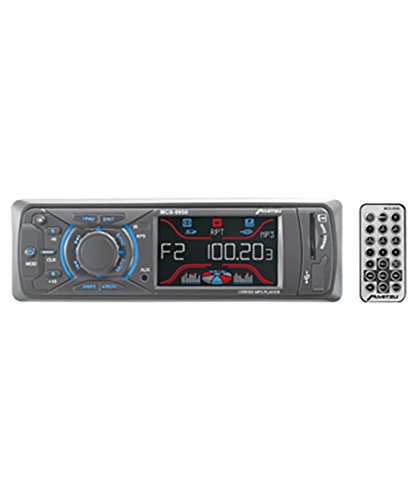
Figura 1: Kaiser MCS-9950 Car Stereo unit with its detachable faceplate and remote control. The image shows the main unit, the separate faceplate, and a remote control, illustrating the primary components included in the package.
3. Karatteristiċi tal-prodott
- Digital AM/FM Tuner: High-sensitivity tuner for clear radio reception with automatic station search and storage.
- Faceplate li jinqala': For enhanced security and convenience.
- Multi-Media Playback: Supports USB drives, SD cards, and MMC cards.
- Input AUX: 3.5mm front auxiliary input for connecting external audio devices.
- Konnettività Bluetooth: Integrated Bluetooth for wireless audio streaming and hands-free calling.
- Electronic Equalizer: Pre-set equalizer modes to optimize sound output.
- Funzjoni Kontra x-Xokk: Ensures smooth playback even on bumpy roads.
- Wiri tal-Arloġġ: Arloġġ diġitali integrat.
- Display LCD: Blue and red LCD with equalizer effect for clear visibility.
- Ħruġ ta' Enerġija Għolja: 900 W PMPO (Peak Music Power Output), 4x25 W maximum audio output.
- Navigazzjoni tal-binarji: +10 / -10 track reader for quick song selection.
- Kontroll mill-bogħod: Remot b'funzjoni sħiħa għal tħaddim konvenjenti.
4. Setup u Installazzjoni
Importanti: Professional installation is recommended. Disconnect the vehicle's negative battery terminal before starting installation to prevent electrical shorts.
4.1 Wiring Diagram (General Guidance)
While a specific wiring diagram is not provided in this manual, typical car stereo installations involve the following connections:
- Wajer Isfar: 12V Kostanti (Pożittiv tal-Batterija)
- Wajer Aħmar: 12V swiċċjat (Ignition/ACC)
- Wajer Iswed: Art (Art tax-Chassis)
- Wajer Blu: Antenna tal-Enerġija / AmpTixgħel mill-Bogħod tal-Lifter
- Wajers tal-Ispeaker: Typically color-coded (e.g., White/White-Black for Front Left, Gray/Gray-Black for Front Right, Green/Green-Black for Rear Left, Purple/Purple-Black for Rear Right). Ensure correct polarity.
Refer to your vehicle's wiring diagram and the included wiring harness for precise connections. Insulate all connections properly.
4.2 Immuntar tal-Unità
- Installa l-kmiem tal-immuntar fil-ftuħ tad-dashboard. Liwi t-tabs 'il barra biex twaħħalha.
- Connect all necessary wiring to the car stereo's harness.
- Slide the car stereo unit into the mounting sleeve until it locks into place.
- Attach the detachable faceplate.
- Erġa' qabbad it-terminal negattiv tal-batterija tal-vettura.
5. Istruzzjonijiet Operattivi
5.1 Operazzjoni Bażika
- Qawwa ON/OFF: Agħfas il- QAWWA buttuna (ġeneralment immarkata b' ⏻ or SRC) biex tixgħel jew titfi l-unità.
- Kontroll tal-Volum: Dawwar il- VOLUM pum jew uża l- VOL + / VOL- buttuni fuq il-remote.
- Għażla tas-Sors: Agħfas il- SRC or MODALITÀ button to cycle through available sources (FM, AM, USB, SD, AUX, Bluetooth).
5.2 Tħaddim tar-Radju (AM/FM)
- Għażla tal-Banda: Agħfas il- BANDA button to switch between FM1, FM2, FM3, and AM1, AM2.
- Irfinar awtomatiku: Agħfas u żomm il- FITX or INTONA buttuni (ġeneralment << / >>) biex tfittex awtomatikament l-istazzjon qawwi li jmiss.
- Irfinar Manwali: Agħfas fil-qosor il- FITX or INTONA buttuni biex tirfina l-frekwenza.
- Store/Recall Presets: To store a station, tune to the desired frequency, then press and hold one of the numeric preset buttons (1-6) until you hear a beep. To recall, simply press the corresponding preset button.
- Automatic Store: Agħfas u żomm il- AMS button (if available) to automatically scan and store strong stations into presets.
5.3 Daqq tal-USB/SD/MMC
- Insert a USB drive into the USB port or an SD/MMC card into the card slot. The unit will automatically switch to USB/SD mode and begin playback.
- Play/Pawsa: Agħfas il- DĦABBA/PAWŻA buttuna.
- Track Li jmiss / Preċedenti: Agħfas il- LI JMISS (>>) jew PREĊEDENTI (<<) buttuni.
- 'l quddiem/rewind malajr: Agħfas u żomm il- LI JMISS or PREĊEDENTI buttuni.
- +10 / -10 Track: Uża d-dedikat +10 or -10 buttons for quick track navigation.
5.4 Operazzjoni tal-Input AUX
- Connect your external audio device (e.g., smartphone, MP3 player) to the 3.5mm AUX input jack on the front panel using an audio cable.
- Agħfas il- SRC or MODALITÀ Agħfas il-buttuna sakemm tidher "AUX".
- Control playback from your external device. Adjust volume using the car stereo's volume control.
5.5 Operazzjoni Bluetooth
The Kaiser MCS-9950 features integrated Bluetooth for wireless audio and hands-free calling.
- Tqabbil:
- Ensure Bluetooth is enabled on your mobile device (e.g., smartphone).
- Select "BT" or "Bluetooth" as the source on the car stereo. The unit will enter pairing mode.
- On your mobile device, search for available Bluetooth devices. Select "MCS-9950" or a similar name.
- If prompted for a PIN, enter "0000" (default). Once paired, the display will confirm connection.
- Streaming tal-Awdjo (A2DP):
- Once paired, you can stream audio from your mobile device to the car stereo.
- Use the car stereo's LI JMISS / QABEL buttons to skip tracks or control playback from your device.
- Sejħiet mingħajr idejn (HFP):
- When a call comes in, the car stereo display will show the caller ID (if supported).
- Agħfas il- TWEĠIBA button (usually ☎) on the faceplate or remote to answer.
- Agħfas il- TMIEM SEJĦA button (usually ☏) biex itemm is-sejħa.
5.6 Pjanċa tal-wiċċ li tista' tinqala'
- Tneħħija: Agħfas il- ĦLAS button (usually on the top left of the faceplate). Gently pull the faceplate towards you.
- Waħħal: Align the faceplate with the main unit's slots on the right side, then push the left side until it clicks into place.
- Store the faceplate in a protective case when removed to prevent damage.
6. Manutenzjoni
- Cleaning the Faceplate: Use a soft, dry cloth to wipe the faceplate. Do not use abrasive cleaners or solvents.
- Tindif tal-Unità: Ensure the unit is off and cool. Use a soft, dry cloth. Avoid spraying liquids directly onto the unit.
- USB/SD Card Slots: Keep these slots free from dust and debris.
- Sostituzzjoni tal-fjus: If the unit does not power on, check the fuse located at the rear of the unit. Replace with a fuse of the same amperage rating only.
7 Issolvi l-problemi
| Problema | Kawża Possibbli | Soluzzjoni |
|---|---|---|
| Ebda qawwa | Wajers mhux korretti; Fjus maħruq; Konnessjoni maħlula. | Check power and ground connections. Verify fuse. Ensure ignition wire is connected. |
| L-ebda ħoss | Volum baxx wisq; Mute attivat; Wajers tal-ispiker mhux korretti; Spikers difettużi. | Increase volume. Deactivate mute. Check speaker connections and polarity. Test with known good speakers. |
| Ir-riċeviment tar-radju huwa fqir | Antenna mhux konnessa; Antenna bil-ħsara; Żona b'sinjal dgħajjef. | Ensure antenna is securely connected. Check antenna for damage. Try tuning in a different location. |
| Il-karta USB/SD mhux qed tilgħab | Mhux appoġġjat file format; Korrott files; Card not inserted correctly; Maximum capacity exceeded. | Tiżgura files are in supported format (e.g., MP3). Reinsert card. Try a different card/USB drive. |
| Tqabbil Bluetooth ifalli | Bluetooth not enabled on device; Incorrect pairing procedure; Device too far. | Ensure Bluetooth is on and discoverable on your device. Follow pairing steps. Keep devices close. |
| Detachable faceplate not attaching | Misalignment; Debris in connectors. | Ensure correct alignment. Check for any obstructions in the connectors. |
8. Speċifikazzjonijiet
| Numru tal-Mudell | MCS-9950 |
| Dimensjonijiet tal-Prodott | 45 x 41.5 x 24.5 ċm |
| Piż tal-Prodott | 900 g |
| Teknoloġija tal-Konnettività | MMC card, Bluetooth |
| Karatteristiċi Speċjali | Bluetooth integrated, Detachable Faceplate, USB/SD/MMC Reader, AUX Input, AM/FM Tuner, Preset Electronic Equalizer, Anti-shock, Clock, LCD Display (Blue/Red with EQ effect), Auto Search/Store Radio Stations, Remote Control |
| Teknoloġija tal-Wiri | LCD |
| Funzjonijiet oħra tal-Wiri | Wireless |
| Output ta 'Qawwa Max | 900 W PMPO, 4x25 W |
| Apparati Kompatibbli | Smartphone |
9. Garanzija u Appoġġ
Kaiser products are manufactured to high-quality standards. For warranty information, please refer to the warranty card included with your product or contact your local dealer. Keep your purchase receipt as proof of purchase.
For technical support or service inquiries, please contact Kaiser customer service through their official webis-sit jew l-informazzjoni ta' kuntatt ipprovduta mad-dokumentazzjoni tal-prodott tiegħek.