
XUNZEL INLI150RU
XUNZEL 150W Power Inverter with USB User Manual
Ditta: XUNZEL | Mudell: INLI150RU
1. Introduzzjoni
Grazzi tax-xiriasing the XUNZEL 150W Power Inverter with USB. This device converts 12V DC power from your vehicle's battery into 230V AC power at 50Hz, allowing you to power various electronic devices on the go. It is designed to be compact, lightweight, and easy to install, featuring both an AC outlet and a USB port for versatile use.
Informazzjoni Importanti dwar is-Sigurtà
- Aqra l-istruzzjonijiet kollha qabel ma tħaddem l-inverter.
- Do not expose the inverter to rain, moisture, or extreme temperatures.
- Ensure proper ventilation around the inverter during operation to prevent overheating.
- Tqabbadx l-inverter mal-wajers tad-distribuzzjoni tal-AC.
- Żomm fejn ma jintlaħaqx mit-tfal.
- Always disconnect the inverter from the power source when not in use or before cleaning.
- This inverter is designed for 12V DC input only. Do not attempt to connect it to a 24V system or higher.
2. Prodott Aktarview
The XUNZEL 150W Power Inverter is a compact and efficient solution for powering your devices. It features a modified sine wave output and includes essential safety protections.
Karatteristiċi ewlenin:
- 150W continuous power output, 300W peak power.
- Converts 12V DC to 230V AC (modified sine wave).
- Integrated AC outlet with child protection.
- Built-in USB charging port.
- High-quality DC cables with cigarette lighter plug for easy use.
- Comprehensive protection against overvoltage, undervoltage, u tagħbija żejda.
- Compact and round design for portability.
Dijagramma tal-Prodott
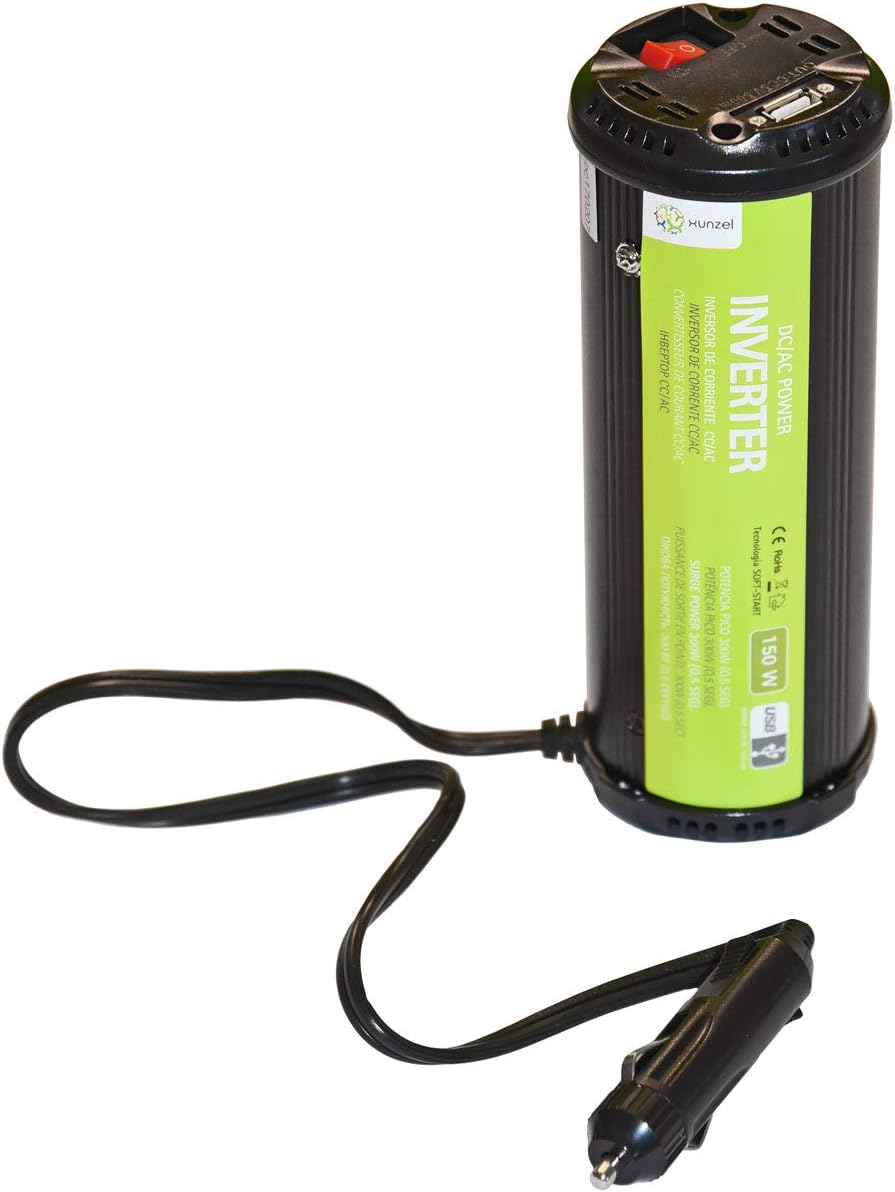
Figure 2.1: XUNZEL 150W Power Inverter. This image displays the XUNZEL 150W Power Inverter. The cylindrical black unit features a green label indicating 'DC/AC POWER INVERTER 150W USB'. The top of the unit has a red power switch, an AC outlet, and a USB port. A cable with a cigarette lighter plug extends from the base of the inverter.
3. Setup u Installazzjoni
- Kompatibbiltà tal-Vettura: Ensure your vehicle has a 12V DC cigarette lighter socket. This inverter is not compatible with 24V systems.
- Pjazzament: Place the inverter on a stable, flat surface in a well-ventilated area. Avoid placing it near heat sources, flammable materials, or in direct sunlight.
- Konnessjoni: Insert the cigarette lighter plug of the inverter firmly into your vehicle's 12V accessory socket. Ensure a secure connection.
- Qawwa Mixgħul: Once connected, press the red power switch on the inverter to turn it on. The LED indicator will illuminate, signifying that the inverter is ready for use.
- Konnessjoni tal-Apparat: You can now plug your AC-powered devices (up to 150W continuous) into the AC outlet or your USB-powered devices into the USB port.
Nota: For optimal performance and safety, ensure the total power consumption of your connected devices does not exceed the inverter's continuous power rating of 150W.
4. Istruzzjonijiet Operattivi
Tixgħel/Jitfi
- To turn on the inverter, press the red power switch. The LED indicator will light up.
- To turn off the inverter, press the red power switch again. The LED indicator will turn off.
Using the AC Outlet
- Ensure the inverter is turned on.
- Plug your AC-powered device into the 230V AC outlet on the inverter.
- Verify that the device's power consumption does not exceed 150W. For devices with motors or compressors, consider their startup (peak) power requirements, which should not exceed 300W.
Bl-użu tal-Port USB
- Ensure the inverter is turned on.
- Connect your USB-powered device (e.g., smartphone, tablet) to the USB port using a compatible USB cable.
- The USB port provides standard 5V DC output for charging.
Importanti: Some sensitive electronic devices may not operate correctly with a modified sine wave inverter. If your device malfunctions, discontinue use.
5. Manutenzjoni u Kura
- Tindif: Disconnect the inverter from all power sources before cleaning. Use a soft, dry cloth to wipe the exterior. Do not use liquid cleaners or solvents.
- Ventilazzjoni: Iċċekkja regolarment li l-fetħiet tal-ventilazzjoni jkunu nodfa mit-trab u l-fdalijiet biex tiżgura fluss tal-arja xieraq u tevita li jisħon iżżejjed.
- Ħażna: Meta ma tkunx qed tużah, aħżen l-inverter f'post frisk u niexef, 'il bogħod mix-xemx diretta u mill-umdità.
- Spezzjoni tal-Cable: Periodically inspect the power cable and plug for any signs of damage. Do not use the inverter if the cable or plug is damaged.
6 Issolvi l-problemi
If you experience issues with your XUNZEL Power Inverter, refer to the following common problems and solutions:
| Problema | Kawża Possibbli | Soluzzjoni |
|---|---|---|
| L-ebda output ta' enerġija / L-inverter mhux qed jixgħel |
|
|
| Overload protection activated (inverter shuts down) |
|
|
| Device not working correctly with inverter |
|
|
7. Speċifikazzjonijiet Tekniċi
| Parametru | Valur |
|---|---|
| Numru tal-Mudell | INLI150RU |
| Input Voltage | DC 12V |
| Ħruġ Voltage | AC 230V |
| Frekwenza tal-ħruġ | 50Hz |
| Qawwa Kontinwa | 150W |
| L-ogħla qawwa | 300W (0.5 seconds) |
| Output USB | 5V DC (standard USB) |
| Dimensjonijiet (L x W x H) | 7 x 19.2 x 7 ċm |
| Piż | 550 g |
| Protezzjonijiet | Overvoltage, Undervoltage, Overload, Short-circuit |
8. Garanzija u Appoġġ
This XUNZEL product is designed for reliability and performance. For warranty information, technical support, or service inquiries, please refer to the warranty card included with your purchase or contact your retailer or the manufacturer directly.
Jekk jogħġbok żomm il-prova tax-xiri tiegħek għal kwalunkwe talba ta' garanzija.
Ask a question about this manual
Ask about setup, troubleshooting, compatibility, parts, safety, or missing instructions. Manuals+ will review the question and use this page’s manual context to help answer it.