
1. Introduzzjoni
The Flexson Analog to Digital Converter is designed to bridge the gap between audio devices with analog outputs and modern audio systems that primarily use digital inputs, such as the SONOS PLAYBAR. This device allows you to connect older televisions, CD players, or other audio sources with analog audio outputs (e.g., RCA or 3.5mm headphone jack) to a digital audio input (optical TOSLINK) on your sound system. It ensures reliable and lossless audio signal transmission, integrating your existing equipment with digital-only setups.
2. Informazzjoni dwar is-Sigurtà
- Provvista tal-Enerġija: Uża biss l-adapter tal-enerġija pprovdut. Kun żgur li l-volumtage taqbel mal-provvista tal-enerġija lokali tiegħek.
- Umdità: Do not expose the device to water, rain, or excessive humidity. Avoid placing liquids near the unit.
- Ventilazzjoni: Ensure adequate ventilation around the unit. Do not block any ventilation openings.
- Sħana: Żomm l-apparat 'il bogħod minn sorsi ta' sħana bħal radjaturi, reġistri tas-sħana, stufi, jew apparati oħra li jipproduċu s-sħana.
- Tindif: Disconnect power before cleaning. Use a dry, soft cloth. Do not use liquid cleaners or aerosol cleaners.
- Servizzi: Tippruvax isservi dan il-prodott int stess. Irreferi l-manutenzjoni kollha lil persunal tas-servizz kwalifikat.
3. Kontenut tal-Pakkett
Jekk jogħġbok immarka l-kaxxa għall-oġġetti li ġejjin:
- Flexson Analog to Digital Converter Unit
- Adapter tal-Enerġija
- Manwal għall-Utent (dan id-dokument)
- Note: Audio cables (RCA, 3.5mm, Optical) are typically sold separately.
4. Setup
Follow these steps to connect your Flexson Analog to Digital Converter:
- Connect Analog Audio Source: Connect an analog audio cable (e.g., 3.5mm stereo jack or RCA stereo cables) from your source device (e.g., TV headphone output, CD player RCA output) to the corresponding analog input port on the Flexson converter.
- Connect Digital Audio Output: Connect an optical TOSLINK cable from the 'Optical Out' port on the Flexson converter to the digital optical input on your SONOS PLAYBAR or other digital audio system.
- Qabbad l-Enerġija: Plug the provided power adapter into the 'DC 5V' input on the Flexson converter, then plug the adapter into a wall outlet. The converter will power on automatically.
- Select Input on Audio System: On your SONOS PLAYBAR or digital audio system, select the optical input as the audio source.
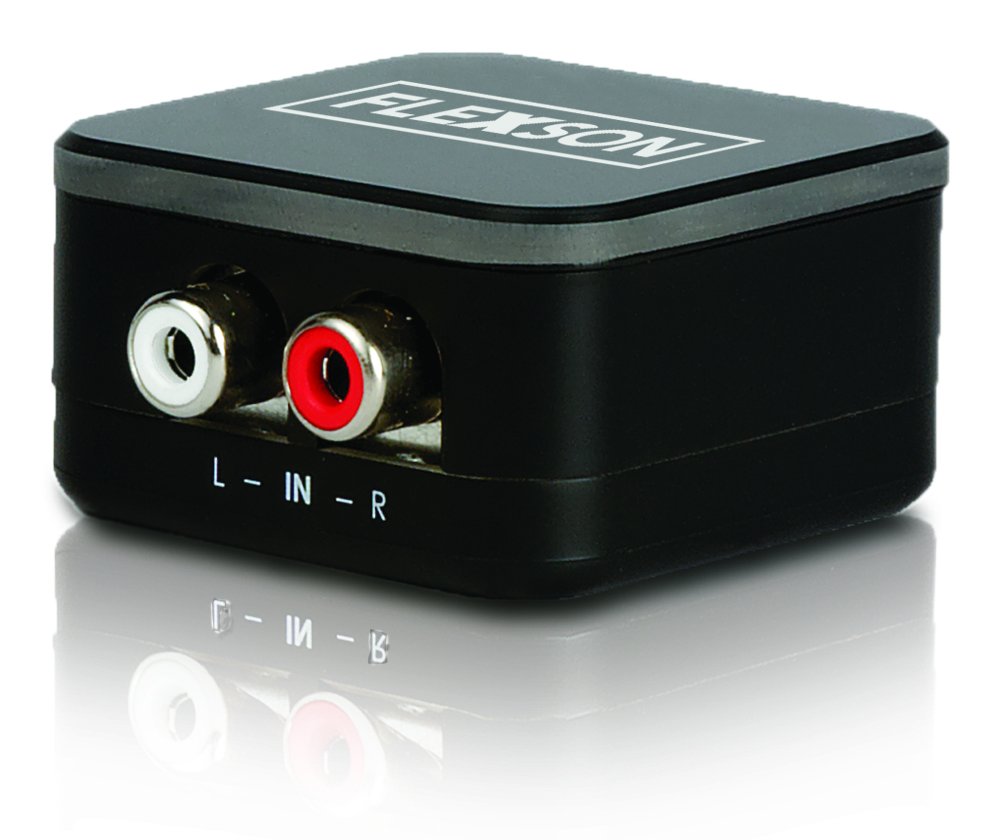
Image showing the compact Flexson Analog to Digital Converter unit with its various ports for analog input and digital optical output.
5. Joperaw
Once properly connected and powered, the Flexson Analog to Digital Converter operates automatically. It converts the incoming analog audio signal into a digital optical signal without requiring any user interaction. Ensure your source device is playing audio and your digital audio system is set to the correct input to hear sound.
6. Manutenzjoni
- Tindif: Use a soft, dry cloth to wipe the exterior of the converter. Do not use abrasive cleaners or solvents.
- Ħażna: Jekk se taħżen l-apparat għal perjodu estiż, skonnettjah mill-elettriku u aħżnu f'post frisk u niexef 'il bogħod mix-xemx diretta.
- Ġestjoni tal-Kejbil: Ensure all cables are connected securely and are not under strain or bent sharply.
7 Issolvi l-problemi
Ebda Output tal-Ħoss
- Iċċekkja l-Enerġija: Ensure the power adapter is securely connected to the converter and a working power outlet.
- Ivverifika l-Konnessjonijiet: Double-check that all analog and digital audio cables are firmly connected to their respective ports on the source, converter, and audio system.
- Ħruġ tal-Apparat Sors: Confirm that your analog source device (e.g., TV) is outputting audio through the connected port and its volume is turned up.
- Audio System Input: Ensure your SONOS PLAYBAR or digital audio system is set to the correct optical input.
- Integrità tal-Cable: Test with different audio cables if possible, to rule out faulty cables.
Kwalità tal-Ħoss Fqira / Distorsjoni
- Volum Sors: Ensure the analog source device's volume is not set too high, which could cause distortion before conversion.
- Kwalità tal-Kejbil: Use high-quality audio cables to minimize interference.
- Interferenza: Keep the converter and audio cables away from strong electromagnetic fields or other electronic devices that might cause interference.
8. Speċifikazzjonijiet
| Brand | Flexson |
| Mudell | FLXA2D1021 |
| Input Interface | Analog (e.g., 3.5mm, RCA stereo) |
| Output Interface | Ottiċi (TOSLINK) |
| Piż tal-oġġett | 0.16 Kilogrammi |
| Provvista tal-Enerġija | DC 5V (via included adapter) |
9. Garanzija u Appoġġ
This Flexson product comes with a standard manufacturer's warranty. Please refer to the warranty card included with your purchase or visit the official Flexson website for detailed warranty terms and conditions. For technical support, troubleshooting assistance, or to inquire about replacement parts, please contact Flexson customer support through their official channels.