1. Introduzzjoni
The Yatour Car A2DP Bluetooth Adapter is designed to integrate Bluetooth audio streaming, hands-free calling, and auxiliary input capabilities into your vehicle's factory stereo system. It connects via the original CD changer port, providing high-fidelity sound quality without interference. This manual provides instructions for installation, operation, and troubleshooting.
2. Informazzjoni dwar is-Sigurtà
Ensure compatibility with your car before use. Do not use while driving unless it is safe to do so and does not distract from operating the vehicle. Always prioritize road safety.
3. Kontenut tal-Pakkett
- 1 x Yatour Bluetooth Module Unit (AP0311-YTBTA-TOY2)
- 1 x Toyota Small Plug Cable
- 1 x Cable AUX
- 1 x Manwal għall-Utent
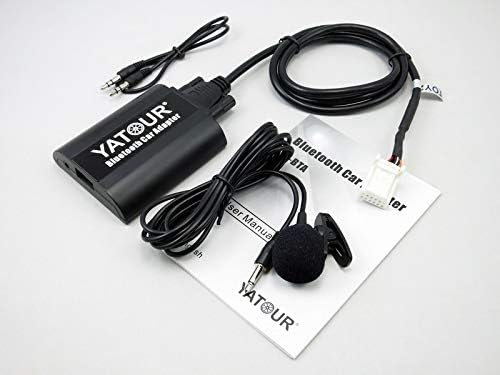
Image: All components included in the package, including the adapter module, cables, and microphone.
4. Kompatibilità
This adapter is compatible with specific Toyota, Lexus, and Scion models equipped with compatible OEM radios. Please verify your vehicle and radio model before installation.
Compatible Toyota Models:
- 4Runner (2003-2011)
- Avalon (2005-2011)
- Avensis (2003-2009)
- Camry (2005-2011)
- Celica (2003-2005)
- Corolla (2005-2011)
- FJ Cruiser (2007-2011)
- Highlander (2004-2011)
- Landcruiser (2003-2011)
- Matrix (2005-2011)
- MR2 (2004-2010)
- Prius (2004-2011)
- RAV4 (2003-2011)
- Sequoia (2005-2011)
- Sienna (2004-2010)
- Solara (2004-2008)
- Tacoma (2005-2011)
- Tundra (2004-2011)
- Venza (2009-2011)
- Vitz (2006-2010)
- Yaris (2006-2011)
- Fortuner (2004-2011)
- Hiace (2003-2011)
- Hilux (2003-2011)
- Mark X (2004-2009)
- Picnic (2003-2010)
- Reiz (2003-2010)
- Previa (2004-2010)
- Vios (2003-2011)
Compatible Scion Models:
- xA (2004 onwards)
- xB (2004-2013)
- tC (2005-2010)
Mudelli Lexus Kompatibbli:
- ES 300/330/350 (2004-2011)
- IS 200/250/300/350 (2006-2011)
- GS 300/400/430/450H (2004-2011)
- GX470 (2004-2009)
- LS 460 (2007-2011)
- LX 570 (2008-2011)
- RX 300/330/350/400H (2004-2009)
- SC 430 (2005-2010)
- LS430 (2004-2007)
- LX 470 (2004-2007)
Nota: RX300 (1998-2003) requires a YT-TOYSBY cable. Not compatible with Toyota Vios (Asia version) 2006-2010. Toyota Y cable (YT-TYY) is optional if the CD changer port is occupied by navigation, an existing CD Changer, or XM radio.
Compatible Toyota OEM Radios:
Fits Toyota OEM radios by Panasonic and Matsushita, including models such as 16852, 12821, 13803, 17006, 17828, 50323, 53816, 53818, 58814, 58816, 58827, P3914, P3916, P7809, A56828, W53901, W53903, W53905, W58810, W58814, W58831, B9002 Navigation System, etc. Compatible with Toyota Navigation System.
5. Karatteristiċi
- Plug & Play: Easy and fast installation via the original CD changer port.
- Hands-free Phone Call (HFP): Supports answering and hanging up calls via car radio buttons and steering wheel controls.
- Wireless A2DP Playback: Stream music from Bluetooth devices to the factory car stereo.
- Bluetooth AVRCP Control: Control track navigation (Prev/Next), Pause/Play, Fast forward/backward via car radio or steering wheel buttons.
- Input AUX: 3.5mm auxiliary input for connecting external audio sources.
- Port tal-Iċċarġjar tal-USB: Provides 5V/1A standard USB charging.
- Kwalità tal-Ħoss Hi-Fi: Direct wire harness connection ensures no interference or loss of sound quality.

Immaġni: Close-up view of the Yatour Bluetooth Adapter showing the various ports for remote control, microphone, AUX input, and USB charging.
6. Setup u Installazzjoni
Installation involves connecting the adapter to your car's factory stereo via the CD changer port. Professional installation is recommended if you are unfamiliar with car audio wiring.
- Access the CD Changer Port: Locate and remove your car's head unit (stereo) to access the rear connections. The CD changer port is typically a multi-pin connector.
- Qabbad l-Adapter: Plug the provided Toyota Small Plug Cable into the CD changer port on the back of your car's head unit.
- Qabbad mal-Modulu: Connect the other end of the cable to the Yatour Bluetooth module.
- Kejbils tar-Rotot: Carefully route the module, microphone cable, and AUX cable to desired locations within the dashboard or glove compartment. Ensure cables do not interfere with vehicle operation.
- Funzjonalità tat-Test: Before reassembling the dashboard, turn on your car and stereo to test the adapter's functionality.
- Assigura u Erġa' Arma: Once confirmed working, secure the module and reassemble the head unit and dashboard components.

Image: Detailed wiring diagram illustrating how to connect the Yatour Bluetooth Car Adapter to the car's head unit, including connections for the microphone and optional remote control.

Image: The Yatour Bluetooth Adapter module connected to a car radio unit, demonstrating the physical connection.
7. Istruzzjonijiet Operattivi
7.1 Tqabbil tal-Bluetooth
- Turn on your car stereo and select the CD changer mode (often labeled 'CD', 'AUX', or 'CDC').
- Fuq it-tagħmir mobbli tiegħek, ippermetti l-Bluetooth u fittex tagħmir disponibbli.
- Select 'Yatour' or a similar name from the list of devices to pair.
- Once paired, your device will connect automatically when the adapter is active.
7.2 Daqq tal-Mużika (A2DP)
- After successful pairing, play music on your Bluetooth-enabled device.
- Audio will stream through your car's speakers.
- Use your car stereo's controls or steering wheel buttons (if supported) to control playback (play/pause, next/previous track).
7.3 Sejħiet mingħajr idejn (HFP)
- When a call comes in, the music will pause, and the ringtone will play through your car speakers.
- Answer or hang up calls using the car stereo buttons or steering wheel controls (if supported).
- Speak into the connected microphone for clear communication.
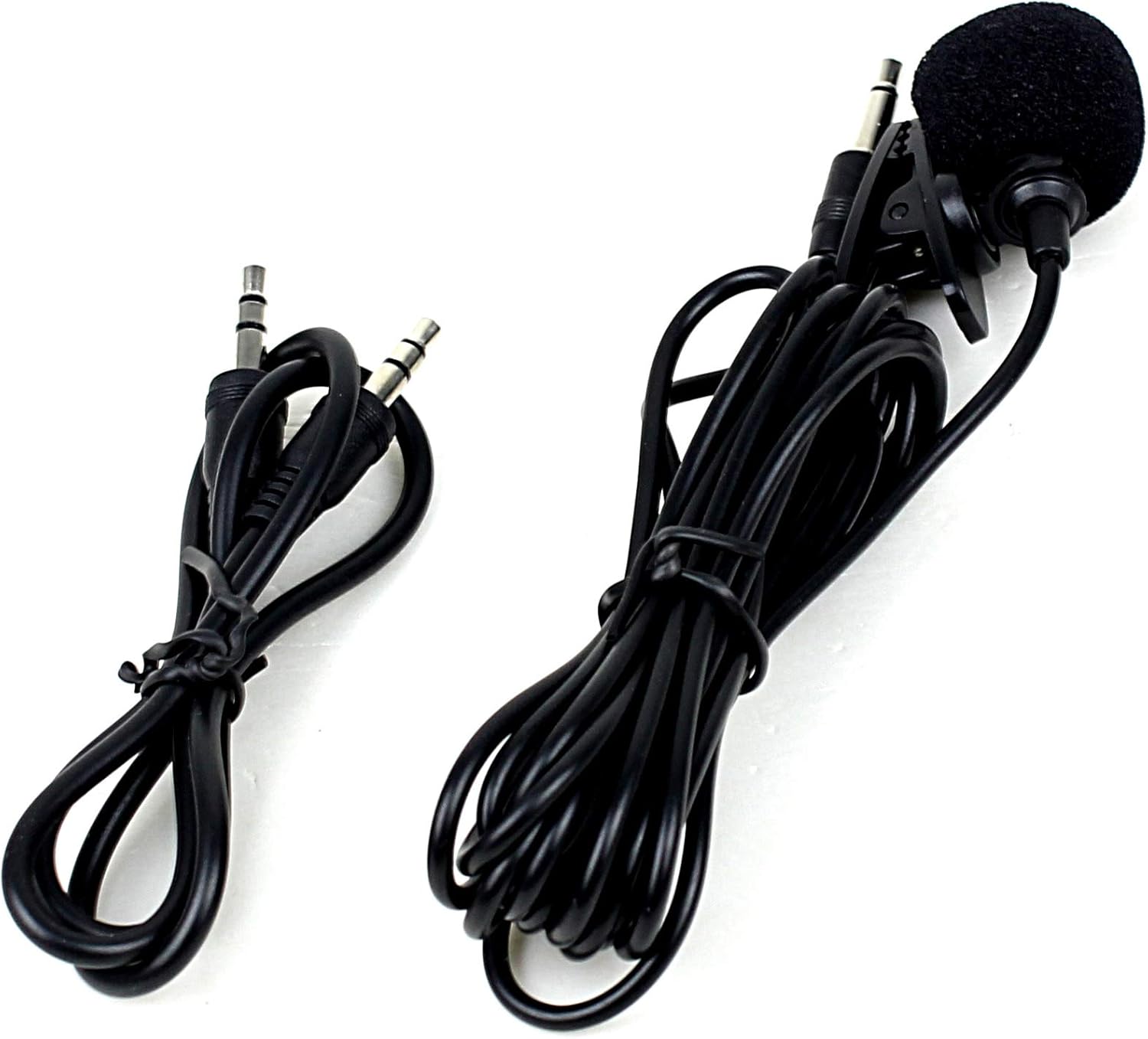
Image: The external microphone and AUX cable provided with the Yatour Bluetooth Adapter, essential for hands-free calling and auxiliary audio input.
7.4 Input AUX
- Connect any audio device with a 3.5mm audio jack to the AUX input port on the Yatour module using the provided AUX cable.
- Select the AUX input mode on your car stereo (this may be the same as the CD changer mode or a separate AUX option).
7.5 Port tal-Iċċarġjar tal-USB
- The USB port on the module provides 5V/1A power output for charging mobile devices.
- Connect your device's USB charging cable to this port. Note that this port is for charging only and does not support USB audio playback.
8. Manutenzjoni
- Keep the module and connections dry and free from dust.
- Evita li tesponi l-unità għal temperaturi estremi jew dawl tax-xemx dirett għal perjodi twal.
- Naddaf il-barra b'ċarruta ratba u niexfa. Tużax kimiċi ħarxa jew prodotti tat-tindif li joborxu.
- Kun żgur li l-konnessjonijiet kollha tal-kejbil jibqgħu sikuri.
9 Issolvi l-problemi
- Ebda Qawwa/Ebda Ħoss:
- Check all cable connections, especially the main power and CD changer port connection to the head unit.
- Ensure the car stereo is set to the correct mode (CD changer/AUX).
- Verify your car's fuse for the stereo system is intact.
- Bluetooth Not Connecting/Frequent Disconnections:
- Kun żgur li l-Bluetooth huwa attivat fuq it-tagħmir mobbli tiegħek.
- Ipprova neħħi l-akkoppjar u erġa' qabbad l-apparat.
- Restart both your mobile device and the car stereo.
- Kun żgur li l-ebda apparat ieħor tal-Bluetooth ma jkun qed jinterferixxi.
- Kwalità tal-Ħoss Fqira:
- Iċċekkja għal konnessjonijiet laxki.
- Ensure the audio source (e.g., phone volume) is not too low or too high, causing distortion.
- Jekk qed tuża l-AUX, kun żgur li l-kejbil ikun imdaħħal kompletament u mingħajr ħsara.
- Kwistjonijiet ta' Sejħiet Ħieles bl-idejn:
- Ensure the microphone is properly connected and positioned for clear voice pickup.
- Check microphone volume settings on your phone, if applicable.
10. Speċifikazzjonijiet
- Mudell: AP0311-YTBTA-TOY2
- Teknoloġija tal-Konnettività: AUX, Bluetooth
- Sors tal-Enerġija: Corded Electric (via car stereo)
- Karatteristika Speċjali: Hands-Free Calls & Easy Audio Control
- Output tal-Iċċarġjar tal-USB: 5V/1A
- Piż tal-oġġett: Madwar 10.6 uqija (0.3 Kilogrammi)
- Dimensjonijiet tal-pakkett: Madwar 5.91 x 4.33 x 3.54 pulzieri
- Data L-Ewwel Disponibbli: 12 ta’ April, 2015

Image: The Yatour Bluetooth Car Adapter module with its dimensions labeled as 7.3cm/2.87in and 6.1cm/2.41in.
11. Garanzija u Appoġġ
Specific warranty information is not provided in this manual. For warranty details, technical support, or further assistance, please refer to the product packaging or contact Yatour customer service directly.