
1. Introduzzjoni
The PowerDrive PD3000 is a 3000 Watt power inverter designed to convert 12V DC power from your vehicle's battery into 115V AC household power. This unit provides 3000 Watts of continuous AC power and has a high surge capacity of up to 6000 Watts to accommodate devices with high starting power requirements. It features integrated Bluetooth wireless technology for remote monitoring and control via a mobile application, along with a removable control panel for flexible placement. This manual provides essential information for the safe and efficient operation of your PowerDrive PD3000 inverter.
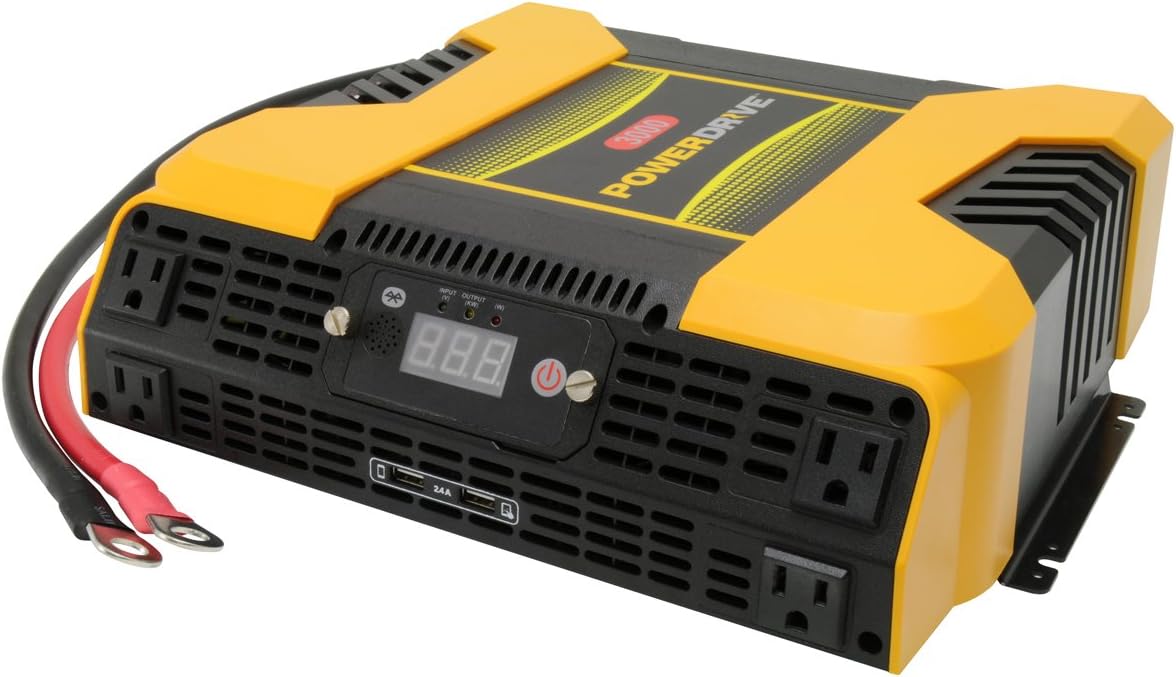
Figure 1.1: PowerDrive PD3000 3000 Watt Power Inverter, front view with outlets and display.
2. Informazzjoni dwar is-Sigurtà
Please read and understand all safety instructions before installing or operating the inverter. Failure to follow these instructions may result in electrical shock, fire, serious injury, or property damage.
- Periklu ta' Xokk Elettriku: Tiftaħx l-inverter casing. Ġewwa m'hemm l-ebda partijiet li jistgħu jiġu rranġati mill-utent. Irreferi għal kull manutenzjoni għand persunal tas-servizz kwalifikat.
- Periklu tan-Nar: Do not operate the inverter near flammable materials, gases, or vapors. Ensure adequate ventilation around the inverter.
- Sigurtà tal-batterija: Connect the inverter only to a 12V DC battery system. Ensure battery terminals are clean and connections are secure. Wear eye protection and gloves when working with batteries.
- Ventilazzjoni: Ensure the inverter is installed in a well-ventilated area. Do not block ventilation openings.
- Protezzjoni ta' tagħbija żejda: Do not exceed the inverter's continuous power rating of 3000 Watts. Overloading can damage the inverter and connected devices.
- Umdità: Tesponix l-inverter għax-xita, l-umdità, jew l-isprej.
3. Kontenut tal-Pakkett
Iċċekkja li l-oġġetti kollha huma preżenti meta tiftaħ il-pakkett:
- PowerDrive PD3000 Power Inverter Unit
- Manwal ta' Istruzzjoni
- Battery Cables (Red and Black)
- Panel tal-Kontroll li Jista' Jitneħħa bil-Kejbil
4. Karatteristiċi tal-prodott
The PowerDrive PD3000 inverter offers a range of features for versatile power conversion:
- Ħruġ ta' Enerġija Għolja: Delivers 3000 Watts of continuous AC power with a 6000 Watt surge capacity.
- Multiple AC Outlets: Equipped with four (4) 3-prong AC outlets to support various devices.
- Portijiet tal-Iċċarġjar tal-USB: Includes two (2) USB power ports (shared 2400mA total output) for charging mobile devices.
- Konnettività Bluetooth: Allows remote access to features and settings via a free downloadable mobile application.
- Removable Control Panel: Detachable control panel enables remote monitoring and testing, offering installation flexibility.
- Kostruzzjoni Durabbli: Features a robust ABS PVC composite housing designed to protect internal electronic components.
- Protezzjonijiet tas-Sigurtà: Incorporates audible alarms and automatic shut-off triggers for low battery, high battery, and overload conditions.

Figure 4.1: Front panel of the PowerDrive PD3000 showing AC outlets, USB ports, and digital display.
5. Setup u Installazzjoni
Installazzjoni xierqa hija kruċjali għat-tħaddim sikur u effiċjenti tal-inverter tiegħek.
5.1 Immuntar tal-Inverter
- Agħżel post niexef u ventilat sew 'il bogħod mix-xemx diretta, sorsi ta' sħana, u materjali fjammabbli.
- Ensure there is sufficient space around the inverter for air circulation, especially around the cooling fans.
- Mount the inverter securely using appropriate hardware (not included) to prevent movement during operation.
5.2 Connecting to a 12V DC Power Source
Importanti: Kun żgur li l-inverter ikun MITFI qabel ma tagħmel xi konnessjonijiet.
- Qabbad il- AĦMAR (positive) battery cable to the AĦMAR (positive) terminal on the inverter. Tighten securely.
- Qabbad it-tarf l-ieħor tal- AĦMAR (positive) battery cable to the pożittiv (+) terminal of your 12V DC battery. Tighten securely.
- Qabbad il- ISWED (negative) battery cable to the ISWED (negative) terminal on the inverter. Tighten securely.
- Qabbad it-tarf l-ieħor tal- ISWED (negative) battery cable to the negattiv (-) terminal of your 12V DC battery. Tighten securely.
- Verify all connections are tight and free from corrosion. Loose connections can cause overheating and damage.

Figure 5.1: PowerDrive PD3000 Inverter showing battery cable connections.

Figura 5.2: Wara view of the PowerDrive PD3000 showing cooling fans and battery terminals.
5.3 Removable Control Panel Installation
The control panel can be used directly on the inverter or detached for remote operation.
- To use remotely, gently pull the control panel from the inverter.
- Connect the provided cable to the port on the back of the detached control panel and to the corresponding port on the inverter.
- Mount the control panel in a convenient location for monitoring and control.

Figure 5.3: PowerDrive PD3000 Inverter with its control panel detached for remote use.
6. Istruzzjonijiet Operattivi
6.1 Tixgħel/Jitfi
- After ensuring all battery connections are secure, press and hold the power button on the inverter or the remote control panel for approximately 1-2 seconds.
- The digital display will illuminate, and the inverter will begin providing AC power.
- Biex titfi, agħfas u żomm il-buttuna tal-qawwa mill-ġdid sakemm id-displej jintefa.
6.2 Konnessjoni ta' Apparati tal-AC
- Plug your 115V AC devices into the 3-prong AC outlets on the front of the inverter.
- Tiżgura l-wat totalitagIl-qawwa tal-apparati kollha konnessi ma taqbiżx il-3000 Watt.
- For devices with high starting loads (e.g., motors, compressors), ensure their surge wattage is within the inverter's 6000 Watt surge capacity.
6.3 L-Użu tal-Portijiet tal-Iċċarġjar tal-USB
- Connect your USB-powered devices (e.g., smartphones, tablets) to the USB ports.
- The two USB ports share a total output of 2400mA (2.4A).
6.4 Understanding the Digital Display and Indicators
The digital display shows real-time information such as input voltage or output wattage. Indicator lights provide status feedback:
- LED tad-dħul: Indicates the status of the DC input power.
- LED tal-ħruġ: Indicates the status of the AC output power.
- LED tal-ħsara: Illuminates to indicate an error condition (e.g., overload, low/high voltagu).
7. Konnettività Bluetooth
The PowerDrive PD3000 features Bluetooth wireless technology, allowing you to monitor and control the inverter using a compatible smartphone application.
7.1 Downloading the Mobile App
- Fittex għal the official PowerDrive inverter app on your smartphone's app store (e.g., Apple App Store, Google Play Store).
- Niżżel u installa l-applikazzjoni.
7.2 Pairing with Your Inverter
- Kun żgur li l-Bluetooth huwa attivat fuq l-ismartphone tiegħek.
- Turn on the PowerDrive PD3000 inverter.
- Open the PowerDrive mobile app. The app should automatically detect nearby PowerDrive inverters.
- Follow the on-screen prompts within the app to pair with your PD3000 inverter.
7.3 Karatteristiċi tal-App
Ladarba tkun imqabbda, l-app tippermettilek li:
- Monitor input voltage u output wattage.
- View inverter status and fault codes.
- Remotely turn the inverter on or off.
- Adjust certain settings (refer to the app's help section for details).

Figure 7.1: Smartphone displaying the PowerDrive mobile application interface.
8. Manutenzjoni
Manutenzjoni regolari tiżgura prestazzjoni ottimali u lonġevità tal-inverter tiegħek.
- Tindif: Naddaf il-barra tal-inverter perjodikament b'ċarruta niexfa u ratba. Tużax prodotti tat-tindif likwidi jew solventi.
- Ventilazzjoni: Ensure the cooling fans and ventilation openings are free from dust and debris. Use compressed air to clear blockages if necessary.
- Konnessjonijiet: Regularly check battery cable connections for tightness and corrosion. Clean terminals with a wire brush if corrosion is present.
- Ħażna: Jekk se taħżen l-inverter għal perjodu estiż, skonnettjah mill-batterija u aħżnu f'post frisk u niexef.
9 Issolvi l-problemi
This section addresses common issues you might encounter with your PowerDrive PD3000 inverter.
9.1 Kwistjonijiet Komuni u Soluzzjonijiet
- L-Inverter Mhux Qed Jinxtegħel:
- Check battery connections for tightness and proper polarity.
- Żgura li l-batterija voltage is above 10.5V DC (Low Battery Shut Down Point).
- Verify the power button is pressed and held for the required duration.
- L-ebda Ħruġ tal-AC:
- Check if the inverter is powered on and the Output LED is illuminated.
- Ensure the connected AC device is functioning correctly.
- Check for an overload condition (Fault LED illuminated). Reduce the load.
- Audible Alarm / Fault LED On:
- Allarm tal-Batterija Baxxa: Activates at 11 ± 0.3V DC. Recharge or replace the battery. The inverter will shut down at 10.5 ± 0.3V DC.
- High Battery Shut Down: Occurs at 15.5 ± 0.5V DC. Check the charging system of your vehicle.
- Tagħbija żejda: Il-wat totalitage of connected devices exceeds 3000 Watts. Disconnect some devices.
- Temperatura żejda: Inverter is overheating. Ensure proper ventilation and reduce load.
- Kwistjonijiet ta' Konnessjoni Bluetooth:
- Ensure Bluetooth is enabled on your smartphone and the inverter is powered on.
- Restart the mobile app and try pairing again.
- Ensure your smartphone is within range of the inverter.
10. Speċifikazzjonijiet
| Speċifikazzjoni | Valur |
|---|---|
| Mudell | PD3000 |
| Continuous AC Power Output | 3000 Watts |
| Qawwa ta 'Qawwa Massima | 6000 Watts |
| Vol Input DCtage | 12.8V |
| Vol Output ACtage | 115V |
| Frekwenza tal-Ħruġ AC | 58Hz-62Hz |
| Output USB | 5V / 2 (Shared 2400mA) |
| Effiċjenza (Massimu) | >88% |
| Effiċjenza (Tagħbija Sħiħa) | >84% |
| Battery Drain (No AC Load) | <0.6A |
| Trigger tal-Allarm tal-Batterija Baxxa | 11 ± 0.3V DC |
| Punt ta' Għeluq ta' Batterija Baxxa | 10.5 ± 0.3V DC |
| Punt Għoli ta' Mitfi tal-Batterija | 15.5 ± 0.5V DC |
| Volum ta' rkuprutage wara Taħt Volumtage Itfi | 12 ± 0.3V DC |
| Piż tal-oġġett | 12.14 liri |
| Dimensjonijiet tal-Prodott | 16.2 x 16.3 x 7.6 pulzieri |
11. Garanzija u Appoġġ
For warranty information or technical support, please refer to the documentation included with your purchase or visit the official PowerDrive websit. Żomm il-prova tax-xiri tiegħek għal kwalunkwe talba ta' garanzija.