
Introduzzjoni
This instruction manual provides comprehensive guidance for the StarTech.com M.2 SATA External SSD Enclosure. This device allows you to convert a SATA M.2 solid-state drive into a portable, high-speed USB 3.0 (5Gbps) external drive with UASP support. Please read this manual carefully before installation and operation to ensure proper use and optimal performance.
Kontenut tal-Pakkett
Ivverifika li l-komponenti kollha huma preżenti fil-pakkett tiegħek:
- 1 x M.2 NGFF SATA Enclosure
- 1 x USB 3.0 Cable (USB-A to Micro-B)
- 1 x Mini tornavit
- 1 x SSD Screw Kit
- 1 x Manwal ta 'Istruzzjoni

Image: All components included in the package, such as the enclosure, USB cable, screwdriver, and screw kit.
Kompatibilità
This enclosure is designed for specific M.2 SSD types. Please ensure your SSD meets the following criteria:
- Interface: SATA M.2 SSDs only.
- Tip ta 'ċavetta: Supports M.2 SATA Type with B Key Interface and B+M Key Interface.
- Mhux Kompatibbli: M.2 NVMe or AHCI PCIe SSDs (M Key interface).
- Drive Sizes: Supports common M.2 SSD lengths including 30mm (2230), 42mm (2242), 60mm (2260), and 80mm (2280).
- Sistemi Operattivi: Compatible with any operating system, including Windows, macOS, Chrome OS, and Linux, without requiring additional drivers.

Image: Visual representation of compatible M.2 SATA B Key and B+M Key interfaces, and incompatible M Key NVMe/AHCI PCIe interfaces.

Image: Illustration of the various standard M.2 SATA drive sizes (2230, 2242, 2260, 2280) that fit into the enclosure.
Setup u Installazzjoni
Follow these steps to install your M.2 SATA SSD into the enclosure:
- Neħħi Faceplate: Use the included screwdriver to remove the enclosure's faceplate and slide out the internal drive tray.
- Qabbad l-SSD: Carefully connect your M.2 SATA SSD to the M.2 port on the drive tray. Ensure it is seated firmly.
- SSD Sikur: Press the drive down toward the standoff and secure it in place with the appropriate screw from the SSD screw kit.
- Reassemble Enclosure: Slide the drive tray back into the enclosure and re-secure the faceplate with the screw.
- Qabbad mal-Kompjuter: Attach the USB cable to the enclosure and then connect it to an available USB 3.0 port on your computer.
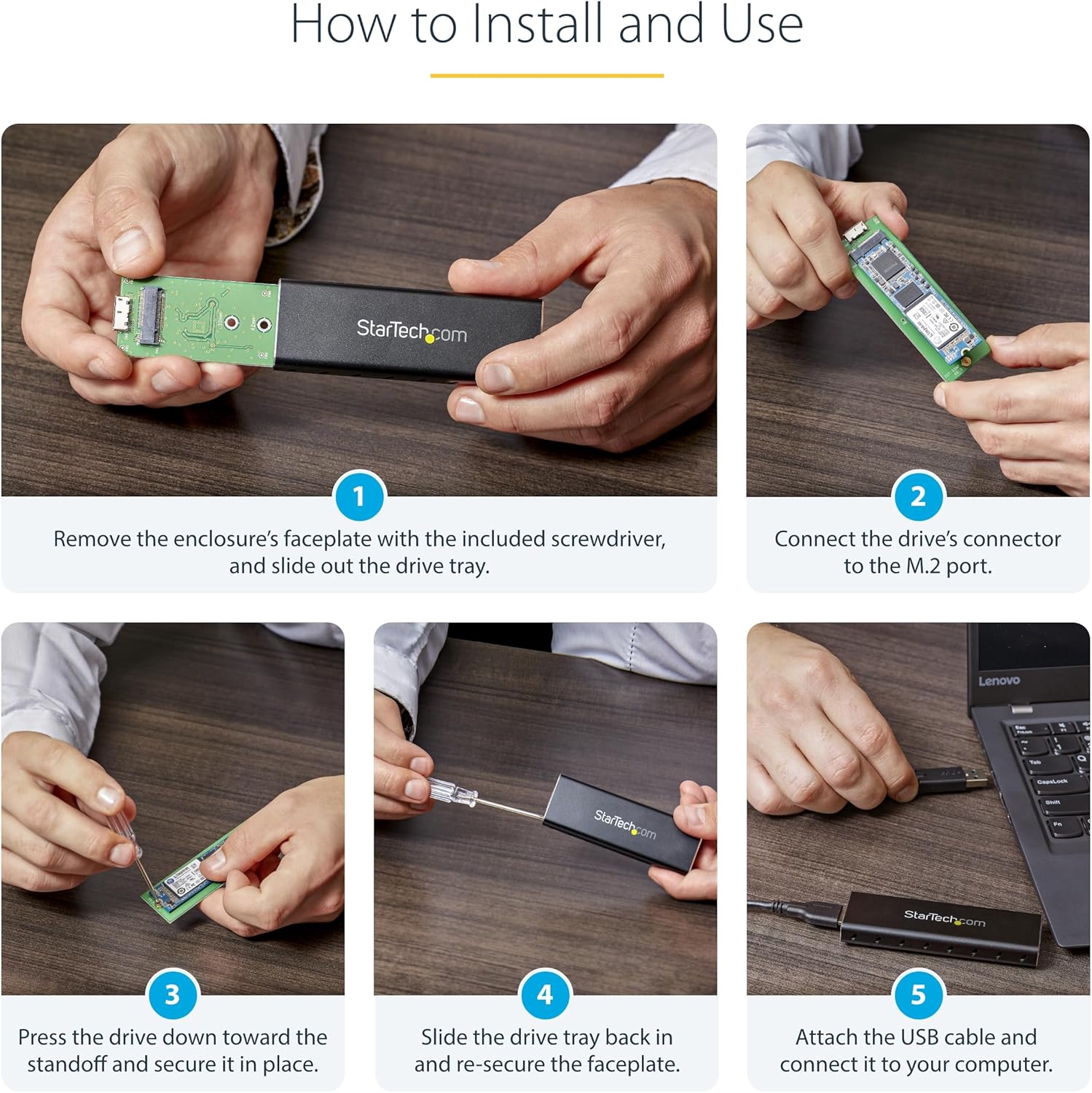
Image: A series of five images demonstrating the installation process: removing the faceplate, connecting the SSD, securing it, reassembling, and connecting to a computer.
Istruzzjonijiet Operattivi
Once installed, the enclosure operates as a standard external USB drive.
- Operazzjoni mingħajr Sewwieq: The enclosure supports plug-and-play functionality across various operating systems, requiring no additional software or drivers.
- Appoġġ UASP: When connected to a UASP-enabled host computer, the enclosure can achieve up to 70% faster transfer speeds compared to traditional USB 3.0.
- Qawwa: The enclosure is USB-powered and does not require an external power adapter.

Image: The M.2 SSD enclosure connected to a laptop, highlighting its compatibility with multiple operating systems without requiring drivers.

Image: The portable M.2 SATA enclosure connected to a laptop, demonstrating its use as an external drive.
Manutenzjoni
To ensure the longevity and optimal performance of your enclosure:
- Tindif: Uża drapp artab u niexef biex tnaddaf il-barra tal-kaxxa. Evita prodotti tat-tindif likwidi.
- Dissipazzjoni tas-Sħana: The aluminum construction and ventilation holes are designed to dissipate heat. Ensure these vents are not obstructed during operation to maintain a cool environment for your SSD.
- Protezzjoni Fiżika: The durable aluminum construction protects your drive. Avoid dropping the enclosure or subjecting it to excessive force.

Image: The enclosure's durable aluminum body, highlighting its dimensions and ventilation holes designed for heat dissipation.
Issolvi l-problemi
If you encounter issues with your M.2 SATA External SSD Enclosure, refer to the following common problems and solutions:
- Sewqan Mhux Rikonoxxut:
- Ensure the M.2 SSD is correctly seated and secured within the enclosure.
- Verify that your M.2 SSD is a SATA type (B Key or B+M Key) and not an NVMe/AHCI PCIe type (M Key).
- Ipprova qabbad l-enclosure ma' port USB differenti fuq il-kompjuter tiegħek.
- Iċċekkja Disk Management (Windows) jew Disk Utility (macOS) biex tara jekk id-drajv ġiex skopert iżda mhux inizjalizzat jew mhux ifformattjat.
- Veloċitajiet ta' Trasferiment Baxxi:
- Ensure the enclosure is connected to a USB 3.0 port on your computer. USB 2.0 ports will result in slower speeds.
- Confirm that your operating system and host controller support UASP for optimal performance.
- Check the health of your M.2 SSD.
- Tisħin żejjed tal-Għeluq:
- Ensure the ventilation holes on the enclosure are not blocked.
- Avoid placing the enclosure in direct sunlight or confined spaces.
Speċifikazzjonijiet
| Karatteristika | Speċifikazzjoni |
|---|---|
| Interface tal-Ħardwer | USB 3.0 |
| Rata ta' Trasferiment tad-Data | Up to 600 Megabits Per Second (5Gbps with UASP) |
| Apparati Kompatibbli | PC, Mac |
| Supported Devices Quantity | 1 |
| Materjal tal-għeluq | Aluminju |
| Kulur | Iswed |
| Dimensjonijiet tal-Prodott (L x W x H) | 3.7" x 1.1" x 0.4" (98mm x 34mm x 12mm) |
| Piż tal-oġġett | 0.05 Kilogrammi |
| Supported M.2 SSD Sizes | 2230, 2242, 2260, 2280 |
| M.2 Key Support | B Key, B+M Key (SATA) |
Garanzija
This StarTech.com M.2 SATA External SSD Enclosure is backed by a 2-Sena Garanzija.
For detailed warranty terms and conditions, please refer to the official StarTech.com webis-sit jew il-karta tal-garanzija inkluża mal-prodott tiegħek.
Appoġġ
For technical support, troubleshooting assistance, or to access additional resources, please visit the official StarTech.com websit:
You may also find helpful information in the FAQ section or by contacting their customer service directly.