
1. Introduzzjoni
Grazzi tax-xiriasing the F&D F690 Multimedia Speaker System. This system is designed to provide high-quality audio playback from various sources, including USB drives, SD cards, FM radio, and auxiliary input. Please read this manual carefully before operating the device to ensure proper use and to maximize its performance.
2. Informazzjoni dwar is-Sigurtà
- Sors tal-Enerġija: Tiżgura l-provvista tal-enerġija voltage matches the requirements specified on the speaker unit. Use only the provided power cable.
- Ventilazzjoni: Timblokkax l-ebda fetħiet tal-ventilazzjoni. Żomm spazju adegwat madwar l-unità għal fluss tal-arja xieraq.
- Ilma u Umdità: Tesponix l-unità għax-xita, umdità, jew likwidi li jqattru/jittajru. Tpoġġix oġġetti mimlija b'likwidi, bħal vażuni, fuq l-unità.
- Sħana: Żomm l-unità 'l bogħod minn sorsi ta' sħana bħal radjaturi, reġistri tas-sħana, stufi, jew apparat ieħor (inkluż amplifiers) li jipproduċu sħana.
- Tindif: Unplug the unit from the power outlet before cleaning. Use a dry cloth for cleaning. Do not use liquid cleaners or aerosol cleaners.
- Servizzi: Tippruvax isservi dan il-prodott int stess. Irreferi l-manutenzjoni kollha lil persunal tas-servizz kwalifikat.
- Pjazzament: Poġġi l-unità fuq wiċċ stabbli u ċatt biex tevita li taqa'.
3. Kontenut tal-Pakkett
Jekk jogħġbok immarka l-kaxxa għall-oġġetti li ġejjin:
- Subwoofer unit (1 pc)
- Satellite speakers (2 pcs)
- Kontroll mill-bogħod (1 pc)
- Audio input cable (RCA vs. 3.5mm stereo cable) (1 pc)
- Quick installation guide (1 pc)
- Warranty card (1 pc)
4. Prodott Aktarview
The F&D F690 system consists of a subwoofer and two satellite speakers, designed for a balanced audio experience. The subwoofer features a 6.5-inch bass driver, while each satellite speaker includes a 3-inch full-range driver and a 1-inch tweeter.
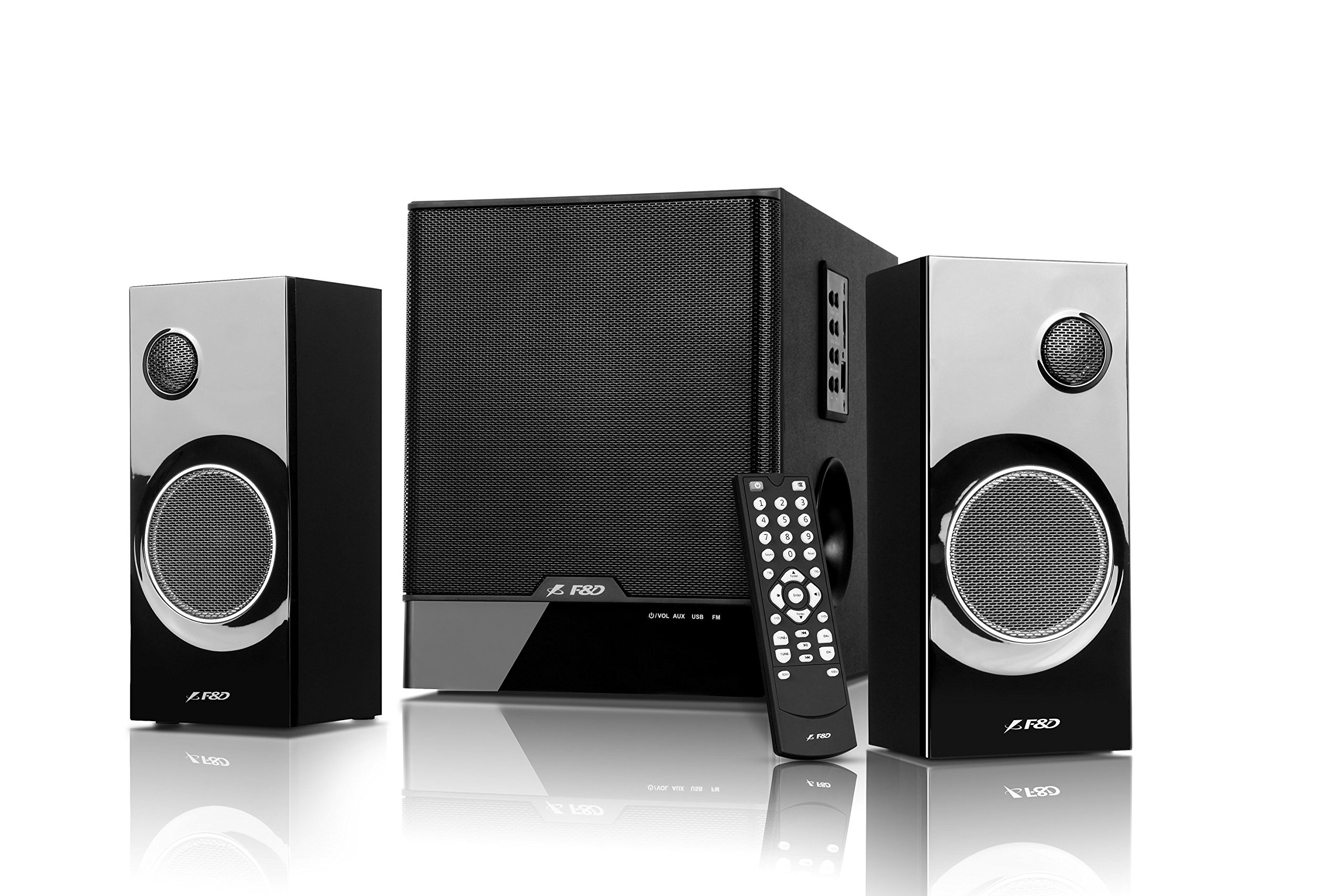
Image: The F&D F690 Multimedia Speaker System, showing the central subwoofer unit and two satellite speakers. The subwoofer has a large speaker grille, and the satellites feature smaller grilles.
4.1. Front Panel Controls (Subwoofer)
The subwoofer unit includes the following controls:
- Buttuna Standby: Jixgħel jew jitfi l-unità.
- Buttuna tas-Sors: Cycles through input sources (USB, SD, FM, AUX).
- Buttuna tal-Ħoss: Adjusts sound modes or settings.
- Buttuni tal-Volum +/-: Iżżid jew tnaqqas il-volum ewlieni.
- Buttuna Play/Pause: Controls playback for USB/SD modes.
- Buttuni Preċedenti/Li Jmiss: Navigates tracks in USB/SD modes or stations in FM mode.
4.2. Kontroll mill-bogħod
The full-function remote control allows for convenient operation of all features from a distance, including direct numeric key input for track selection or FM station tuning.
5. Setup
5.1. Connecting Satellite Speakers
- Locate the speaker output ports on the rear of the subwoofer unit.
- Connect the cables from the satellite speakers to the corresponding output ports. Ensure a secure connection.
5.2. Konnessjoni ta' Sorsi Awdjo
- Input Awżiljarju: Use the provided RCA to 3.5mm stereo cable to connect external devices (e.g., TV, PC, MP3 player) to the AUX input ports on the subwoofer.
- USB Drive: Insert a USB flash drive into the USB port on the subwoofer.
- Karta SD: Insert an SD card into the SD card slot on the subwoofer.
5.3. Konnessjoni tal-Enerġija
- Connect the power cable to the AC input on the rear of the subwoofer.
- Plug the other end of the power cable into a standard AC 220-240V~50/60Hz wall outlet.
- Press the Standby button on the subwoofer or remote control to power on the unit.
6. Istruzzjonijiet Operattivi
6.1. Għażla tas-Sors
Agħfas il- Sors button on the subwoofer or remote control repeatedly to cycle through the available input modes: AUX, USB, SD, and FM.
6.2. Daqq tal-USB/SD
- Daħħal USB drive jew SD card li fiha awdjo MP3/WMA files. The system will automatically switch to USB/SD mode and begin playback.
- Uża l- Play/Pawsa buttuna biex tieqaf jew terġa’ tibda d-daqq.
- Uża l- Preċedenti/Li jmiss buttuni biex taqbeż għall-korsa preċedenti jew li jmiss.
- For direct track selection, use the numeric keys on the remote control.
6.3. Operazzjoni tar-Radju FM
- Aqleb għall-modalità FM billi tuża l- Sors buttuna.
- The system features PLL technology for stable FM reception.
- Skennjar Awtomatiku: Agħfas u żomm il- Play/Pawsa button (or a dedicated scan button on the remote, if available) to automatically scan and store available FM stations. The system can store up to 100 stations.
- Irfinar Manwali: Uża l- Preċedenti/Li jmiss buttuni biex tinnaviga fost l-istazzjonijiet maħżuna.
- Input ta' Frekwenza Diretta: Use the numeric keys on the remote control to directly enter an FM frequency.
6.4. Kontroll tal-Volum
Aġġusta l-volum ewlieni billi tuża l- Volum +/- buttons on the subwoofer or the remote control.
7. Manutenzjoni
- Tindif: Wipe the surfaces of the speakers and subwoofer with a soft, dry cloth. Do not use abrasive cleaners, waxes, or solvents.
- Trab: Regularly dust the speaker grilles to prevent accumulation that could affect sound quality.
- Ħażna: Jekk taħżen l-unità għal perjodu estiż, aqlagħha mill-plagg tal-elettriku u aħżenha f'post frisk u niexef.
8 Issolvi l-problemi
| Problema | Kawża Possibbli | Soluzzjoni |
|---|---|---|
| Ebda qawwa | Kejbil tal-enerġija mhux imqabbad; Sokit tal-enerġija mhux attiv | Ensure power cable is securely connected; Check power outlet with another device. |
| L-ebda ħoss | Incorrect source selected; Volume too low; Audio cables not connected properly | Press Source button to select correct input; Increase volume; Check all audio cable connections. |
| Il-USB/SD mhux qed jilgħab | Skorretta file format; USB drive/SD card corrupted; Device not inserted correctly | Tiżgura files are MP3/WMA format; Try another USB drive/SD card; Reinsert the device. |
| Akkoljenza fqira tal-FM | Sinjal dgħajjef; Interferenza | Adjust the position of the unit; Try auto-scanning again; Avoid placing near other electronic devices. |
| Il-kontroll mill-bogħod ma jaħdimx | Batteriji eżawriti; Ostruzzjoni bejn ir-remote u l-unità | Replace remote control batteries; Ensure clear line of sight to the unit's sensor. |
9. Speċifikazzjonijiet
| Karatteristika | Dettall |
|---|---|
| Qawwa tal-Ħruġ (RMS) | 60 W (Subwoofer: 30W, Satellites: 15W x 2) |
| Sewwieq tas-Subwoofer | 6.5-inch bass driver |
| Sewwieqa bis-Satellita | 3-inch full range driver & 1-inch tweeter |
| Rispons tal-Frekwenza (Subwoofer) | 30Hz ~ 120Hz |
| Rispons tal-Frekwenza (Satellita) | 200Hz ~ 20kHz |
| Konnettività | USB, SD Card, AUX (RCA to 3.5mm stereo) |
| Formati Awdjo Appoġġjati | MP3, WMA (via USB/SD) |
| Radju FM | Digital FM with PLL technology, 100 station storage |
| Provvista tal-Enerġija | AC 220-240V ~ 50 / 60Hz |
| Subwoofer Dimensions (W×D×H) | 206 x 302 x 260 mm |
| Satellite Speaker Dimensions (W×D×H) | 93 x 91 x 213 mm |
| Piż Nett | 7.6 kg |
| Materjal | Plastik, Injam |
| Metodu ta' Kontroll | Remote, Unit Buttons |
10. Garanzija u Appoġġ
This product comes with a limited warranty. Please refer to the warranty card included in your package for detailed terms and conditions. For technical support, service, or inquiries, please contact your local F&D customer service center or authorized dealer. Keep your purchase receipt as proof of purchase for warranty claims.