
ICP DAS I-7058_FG
Manwal tal-Utent tal-ICP DAS I-7058_FG
8 Channel Isolated AC Voltage Digital Input Data Acquisition Module
1. Introduzzjoni
This manual provides comprehensive instructions for the installation, operation, and maintenance of the ICP DAS I-7058_FG 8 Channel Isolated AC Voltage Digital Input Data Acquisition Module. Please read this manual thoroughly before using the device to ensure proper and safe operation.
The I-7058_FG is designed for reliable data acquisition in industrial environments, offering isolated AC voltage digital inputs and communication via RS-485.
2. Informazzjoni dwar is-Sigurtà
Dejjem osserva l-prekawzjonijiet ta' sigurtà li ġejjin biex tevita korrimenti u ħsara lill-apparat:
- Kun żgur li l-provvista tal-enerġija hija skonnettjata qabel l-installazzjoni jew il-manutenzjoni.
- Do not operate the module in environments exceeding its specified temperature range (-25 to 75°C).
- Persunal kwalifikat biss għandu jwettaq l-installazzjoni u l-wajers.
- Protect the module from moisture, dust, and corrosive substances.
- Uża tagħmir protettiv personali (PPE) xieraq meta timmaniġġja komponenti elettriċi.
3. Prodott Aktarview
The I-7058_FG is an 8-channel isolated AC voltage digital input module. Key features include:
- 8 Isolated AC Voltage Digital Input Channels
- Interface tal-Komunikazzjoni RS-485
- Wide Operating Temperature Range: -25 to 75°C
- DIN Rail Mountable design for easy installation.
- Provides cost-effective protection for industrial control signals.
- Supports various industrial control systems.
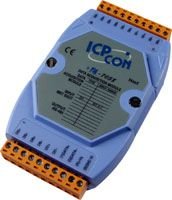
Figura 3.1: Quddiem view of the ICP DAS I-7058_FG module, showing input terminals and display area.
4. Setup u Installazzjoni
4.1 Disimballaġġ
Carefully unpack the I-7058_FG module and inspect it for any signs of damage. Report any damage to your supplier immediately.
4.2 Immuntar
The I-7058_FG module is designed for DIN rail mounting. Securely attach the module to a standard DIN rail in a suitable enclosure, ensuring adequate ventilation.
4.3 Wajers
Connect the power supply and RS-485 communication cables to the module's designated terminals. Refer to the wiring diagram below for correct connections. Ensure all connections are secure to prevent intermittent operation.
Għal AC voltage digital inputs, connect your signal sources to the input terminals. Observe polarity and voltage klassifikazzjonijiet.
(Note: A detailed wiring diagram would typically be included here. For this exercise, a textual description is provided.)
4.4 Konfigurazzjoni Inizjali
The DCON utility can be used to configure and test the module. This utility provides an interface for setting communication parameters (e.g., baud rate, device ID) and verifying input readings. Library functions and demo programs are also provided to assist with integration into your system.
For detailed instructions on using the DCON utility, please refer to the software's documentation or the ICP DAS websit.
5. Istruzzjonijiet Operattivi
Once installed and configured, the I-7058_FG module operates by acquiring AC voltage digital input signals and transmitting them over the RS-485 bus to a host system (e.g., PC, PLC, HMI).
5.1 Akkwist tad-Dejta
The module continuously monitors the state of its 8 AC voltage digital input channels. The status of these inputs can be read by the host system via RS-485 commands.
5.2 Protokoll ta' Komunikazzjoni
The I-7058_FG uses a standard RS-485 communication protocol. Ensure your host system's communication settings match those configured on the module (e.g., baud rate, parity, data bits, stop bits, device ID).
Refer to the ICP DAS communication protocol guide for specific commands and data formats.
6. Manutenzjoni
The I-7058_FG module is designed for low maintenance. However, periodic checks are recommended to ensure optimal performance and longevity.
- Tindif: Keep the module clean and free from dust and debris. Use a soft, dry cloth for cleaning. Do not use liquid cleaners.
- Kontrolli tal-Konnessjoni: Spezzjona perjodikament il-konnessjonijiet tal-wajers kollha għal issikkar u sinjali ta' korrużjoni.
- Monitoraġġ Ambjentali: Kun żgur li l-ambjent operattiv jibqa' fil-firxiet speċifikati tat-temperatura u l-umdità.
7 Issolvi l-problemi
If you encounter issues with your I-7058_FG module, refer to the following common problems and solutions:
| Problema | Kawża Possibbli | Soluzzjoni |
|---|---|---|
| Il-modulu mhux qed jixgħel. | Provvista ta' enerġija mhux korretta voltage jew wiring. | Ivverifika l-provvista tal-enerġija voltage and check wiring connections. |
| No communication with host. | Incorrect RS-485 wiring, mismatched communication parameters (baud rate, ID), or faulty cable. | Check RS-485 wiring (A/B lines), ensure host and module communication settings match, test cable continuity. Use DCON utility to verify module communication. |
| Incorrect input readings. | Incorrect input wiring, faulty sensor, or signal interference. | Verify input wiring, test the input signal source, check for sources of electrical noise. |
If the problem persists, contact ICP DAS technical support for further assistance.
8. Speċifikazzjonijiet
Detailed technical specifications for the ICP DAS I-7058_FG module:
| Parametru | Valur |
|---|---|
| Numru tal-Mudell | I-7058_FG |
| Channels Input | 8 (Isolated AC Voltage Digital Input) |
| Interface tal-Komunikazzjoni | RS-485 |
| Temperatura operattiva | -25 sa 75°C (-13 sa 167°F) |
| Piż tal-oġġett | 2.5 Libbra (madwar 1.13 kg) |
| Immuntar | DIN Rail Mountable |
| Manifattur | ICP DAS |
| Pajjiż ta' Oriġini | Tajwan |
| L-Ewwel Data Disponibbli | 14 ta’ Awwissu, 2014 |
9. Informazzjoni dwar Garanzija
This product is sold by ICP DAS USA. For specific warranty terms and conditions, please refer to the official ICP DAS USA warranty policy available on their website or contact their customer service. Typically, products come with a standard manufacturer's warranty covering defects in materials and workmanship.
Żomm il-prova tax-xiri tiegħek għal pretensjonijiet ta' garanzija.
10. Appoġġ Tekniku
For technical assistance, troubleshooting beyond this manual, or inquiries regarding the I-7058_FG module, please contact ICP DAS USA technical support:
- Manifattur: ICP DAS
- Bejjiegħ: ICP DAS USA
- Websit: www.icpdas-usa.com (or refer to the link provided in the Amazon listing for the seller: ICP DAS USA Seller Page)
- Informazzjoni ta' Kuntatt: Please visit the official ICP DAS USA website for the most current contact details, including phone numbers and email addresses for technical support.
Ask a question about this manual
Ask about setup, troubleshooting, compatibility, parts, safety, or missing instructions. Manuals+ will review the question and use this page’s manual context to help answer it.