
1. Introduzzjoni
This manual provides detailed instructions for the installation, operation, and maintenance of your ASUS X99-DELUXE motherboard. The ASUS X99-DELUXE is an ATX motherboard designed for high-performance computing, supporting Intel LGA 2011-3 processors and DDR4 memory.

Figura 1: Minn fuq għal isfel view of the ASUS X99-DELUXE Motherboard, showing the CPU socket, RAM slots, and heatsinks.
2. Karatteristiċi ewlenin
- ASUS OC Socket: Designed to enhance 8-core CPU and DDR4 performance beyond standard X99 expectations.
- Appoġġ għall-Memorja DDR4: Features a special memory overclocking design, supporting DDR4 memory speeds up to 3200MHz (O.C.).
- Dual M.2 X4 Support: Provides two M.2 slots with PCIe 3.0 x4 interface, enabling data transfer speeds up to 32Gb/s for compatible NVMe SSDs.
- Fan Extension Card: Includes an extension card for advanced PC cooling management.
- Ottimizzazzjoni f'5 Modi: Utilizes Dual Intelligent Processors 5 for system optimization, including performance tuning, power saving, digital power control, and fan control.
- UEFI BIOS: Features a media-acclaimed Unified Extensible Firmware Interface (UEFI) BIOS for intuitive system configuration.
- SATA Express: Supports SATA Express for storage speeds up to 10Gb/s.
3. Setup u Installazzjoni
Qabel tibda l-installazzjoni, kun żgur li s-sistema tiegħek hija mitfija u skonnettjata mis-sors tal-enerġija. Immaniġġja l-motherboard mit-truf tagħha biex tevita skariku statiku.
3.1. CPU Installation (LGA 2011-3 Socket)
- Iftaħ bir-reqqa l-mekkaniżmu taż-żamma tas-sokit tas-CPU.
- Allinja l-marka trijangulari fuq is-CPU mal-marka korrispondenti fuq is-sokit.
- Poġġi s-CPU bil-mod fis-sokit mingħajr ma tisforzah.
- Close the retention mechanism to secure the CPU. Ensure no pins are bent during this process.

Figura 2: Angolat view of the ASUS X99-DELUXE Motherboard, highlighting the LGA 2011-3 CPU socket.
3.2. Installazzjoni tal-Memorja (DDR4)
The motherboard supports DDR4 memory modules. Refer to the motherboard manual for specific memory configurations and supported speeds.
- Iftaħ il-klipps fiż-żewġt itruf tas-slott tad-DIMM.
- Allinja l-islott fuq il-modulu tal-memorja DDR4 maċ-ċavetta fl-islott tad-DIMM.
- Daħħal il-modulu sew fl-islott sakemm il-klipps jidħlu f'posthom.
3.3. Storage Device Installation (M.2, SATA)
Install M.2 SSDs into the dedicated M.2 slots and SATA drives to the SATA ports. The motherboard supports SATA 3 (6Gb/s) and SATA Express.
3.4. Konnessjoni Periferali
Connect your display, keyboard, mouse, and other peripherals to the rear I/O panel. The motherboard provides various USB ports, Ethernet ports, and audio jacks.
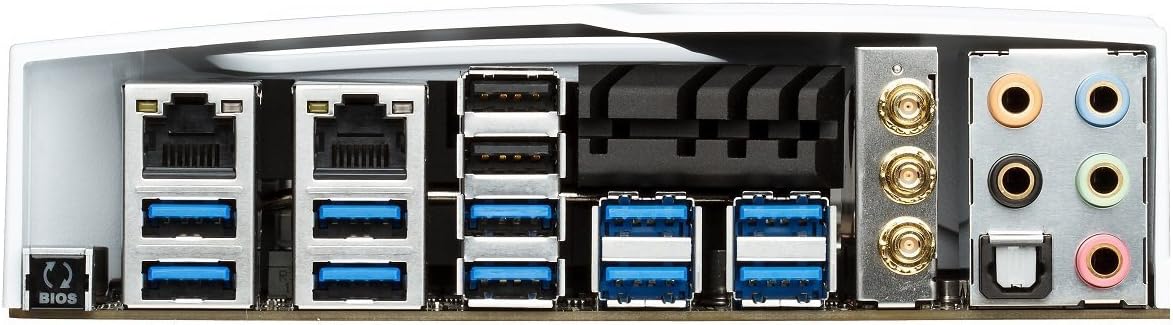
Figure 3: Rear I/O panel of the ASUS X99-DELUXE Motherboard, showing USB ports, Ethernet, and audio jacks.
4. Istruzzjonijiet Operattivi
4.1. UEFI BIOS Configuration
The UEFI BIOS allows you to configure system settings, boot options, and hardware parameters. To enter the BIOS, press the DEL ċavetta waqt l-istartjar tas-sistema.
- Modalità EZ: Provides a simplified interface for basic settings.
- Modalità Avvanzata: Offers comprehensive control over all motherboard features, including overclocking and fan control.
4.2. Installazzjoni tas-sewwieq
After installing your operating system (e.g., Windows XP, as listed in specifications, and newer OS versions), install the necessary drivers for the motherboard chipset, audio, network, and other integrated components. These are typically provided on a support DVD or available for download from the ASUS websit.
4.3. 5-Way Optimization
The 5-Way Optimization feature, accessible through ASUS software, automatically tunes your system for optimal performance, power efficiency, digital power delivery, and fan acoustics based on your usage. It is recommended to manage overclocking and fan settings directly within the BIOS for more precise control.
5. Manutenzjoni
Manutenzjoni regolari tgħin biex tiżgura l-lonġevità u t-tħaddim stabbli tal-motherboard tiegħek.
- Tneħħija tat-Trab: Naddaf it-trab mill-motherboard u l-komponenti tat-tkessiħ perjodikament bl-użu ta' arja kkompressata. Kun żgur li s-sistema tkun mitfija u skonnettjata qabel ma tnaddafha.
- Kontrolli tal-Konnessjoni: Verify that all cables and components are securely seated.
- Aġġornamenti tal-BIOS: Iċċekkja l-appoġġ tal-ASUS website for the latest BIOS updates to improve compatibility and performance. Follow update instructions carefully.
6 Issolvi l-problemi
If you encounter issues with your ASUS X99-DELUXE motherboard, consider the following troubleshooting steps:
- Ebda Qawwa/Ebda Boot:
- Kun żgur li l-kejbils tal-enerġija kollha (24-pin ATX, 8-pin CPU) huma konnessi sew.
- Iċċekkja li l-unità tal-provvista tal-enerġija (PSU) qed taħdem sew.
- Iċċekkja l-konnessjoni tas-swiċċ tal-enerġija tal-pannell ta' quddiem mal-motherboard.
- Ebda Display:
- Confirm the graphics card is properly seated in its PCIe slot and has adequate power.
- Ensure the monitor cable is securely connected to the graphics card.
- Ittestja b'kejbil tad-displej jew monitor differenti jekk possibbli.
- Instabbiltà/Ħsarat tas-Sistema:
- Check RAM modules for proper seating; try reseating them or testing one module at a time.
- Ensure CPU cooler is correctly installed and making good contact with the CPU. Monitor CPU temperatures.
- Irrisettja s-settings tal-BIOS għad-default.
- Bent CPU Socket Pins:
Bent pins in the CPU socket can cause severe system malfunctions or prevent booting. This type of damage is typically not covered under warranty. Exercise extreme caution during CPU installation to avoid bending pins.
7. Speċifikazzjonijiet
| Kategorija | Speċifikazzjoni |
|---|---|
| Brand | ASUS |
| Isem tal-Mudell | X99-DELUXE |
| Socket tas-CPU | LGA 2011-3 |
| Proċessuri Kompatibbli | Intel Core i7 (LGA 2011-3) |
| Tip ta' Ċipset | Intel X99 |
| Teknoloġija tal-Memorja RAM | DDR4 |
| Veloċità tal-Arloġġ tal-Memorja | Up to 3200 MHz (O.C.) |
| Slots tal-Memorja Disponibbli | 8 |
| Daqs Massimu tal-Memorja RAM | 64 GB |
| Interface tal-Kard Grafika | PCI Express |
| Total PCIe Ports | 5 |
| Portijiet SATA Totali | 8 |
| Standard tal-Bus tas-Sistema Appoġġjat | SATA 3 |
| Portijiet USB 2.0 | 2 (internal headers, total ports may vary) |
| Portijiet USB totali | Various (including USB 3.0 on rear I/O) |
| Numru ta' Portijiet Ethernet | 1 (Dual Gigabit LAN) |
| Tip ta 'Konnettur tal-Enerġija Prinċipali | ATX ta' 24-Pin |
| Apparati Kompatibbli | Kompjuter Personali |
| Pjattaforma | Windows XP (and newer OS versions) |
| Piż tal-oġġett | 4.44 Libbra (madwar 2.01 kg) |
8. Garanzija u Appoġġ
Għal informazzjoni dwar il-garanzija u appoġġ tekniku, jekk jogħġbok irreferi għall-websajt uffiċjali tal-ASUS webis-sit jew ikkuntattja lis-servizz tal-klijenti tal-ASUS. Żomm il-prova tax-xiri tiegħek għal talbiet ta' garanzija.
Appoġġ ASUS Websit: https://www.asus.com/support/
Note: Damage resulting from improper installation, misuse, or unauthorized modifications may void your product warranty.