
1. Introduzzjoni
This manual provides comprehensive instructions for the Adesso AKB-132UY Luminous Large Print Multimedia Desktop USB Keyboard. This keyboard is designed with large, high-contrast keys to enhance readability, particularly for users with visual impairments. It also integrates multimedia controls for convenience.

Figure 1: Adesso AKB-132UY Luminous Large Print Multimedia Desktop USB Keyboard. This image displays the full keyboard with its black frame and bright yellow keys, featuring large black characters.
2. Kontenut tal-Pakkett
Ivverifika li l-oġġetti kollha huma preżenti fil-pakkett:
- Adesso EasyTouch 132 - Florescent Yellow Multimedia Desktop Keyboard
- Gwida Quick Start
3. Istruzzjonijiet ta' Setup
3.1 Konnessjoni tat-Tastiera
- Sib port USB disponibbli fuq il-kompjuter tiegħek.
- Plug the USB connector of the Adesso AKB-132UY keyboard into the USB port.
- The operating system will automatically detect and install the necessary drivers. No additional software installation is typically required.
The keyboard is powered via the USB connection.
4. It-Tħaddim tat-Tastiera
4.1 Karatteristiċi ewlenin
- Fluorescent 4X Large Print Keys: The keyboard features black characters printed in a large 4X size on bright fluorescent yellow keys. This design provides high contrast for improved visibility and readability, particularly beneficial for users with visual impairments.

Figura 2: Close-up view of the keyboard's QWERTY section, highlighting the large black characters on fluorescent yellow keys.
- Kontrolli Multimedjali: Dedicated hotkeys allow for one-touch control of media functions. These include:
- Media Player
- Volum 'l isfel
- Volum Up
- Mute
- Play/Pawsa
- Track Preċedenti
- Track li jmiss
- Waqqaf

Figura 3: Close-up view of the numeric keypad and dedicated multimedia control keys located on the upper right side of the keyboard.
- Windows One-Touch Controls: Access common Windows applications directly with dedicated hotkeys:
- Il-Kompjuter Tiegħi
- Fittex
- Kalkulatur
- Posta
- Home (Browser)
- Favorites (Browser)
- Quiet Membrane Key Switches: The keyboard utilizes membrane key switches designed to provide a responsive and quiet typing experience. These switches are rated for a lifespan of up to five million keystrokes.
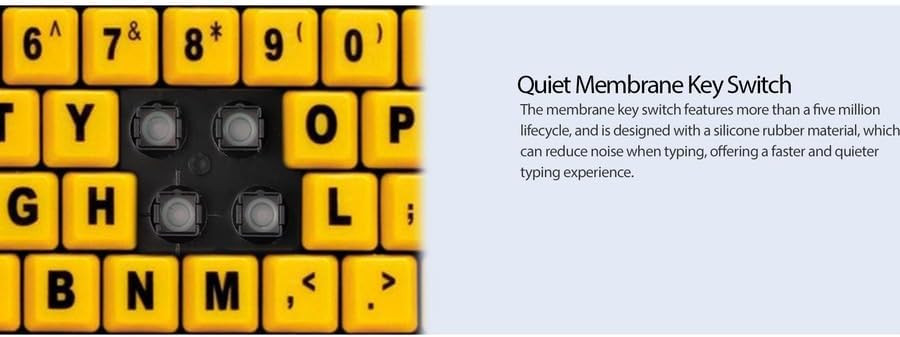
Figura 4: Dettaljat view showing the internal membrane key switch mechanism beneath a keycap.
- 104-Key US Layout: The keyboard features a standard 104-key US layout, providing a familiar typing experience.
5. Manutenzjoni
5.1 Tindif tat-Tastiera
Biex iżżomm id-dehra u l-funzjonalità tat-tastiera:
- Skonnettja t-tastiera mill-kompjuter tiegħek qabel ma tnaddafha.
- Uża artab, ftit damp cloth to wipe the surface of the keys and the keyboard body.
- For stubborn dirt or debris between keys, use compressed air or a soft brush.
- Avoid using harsh chemicals, abrasive cleaners, or excessive moisture, as these can damage the keyboard's finish or internal components.
6 Issolvi l-problemi
If you encounter issues with your Adesso AKB-132UY keyboard, refer to the following troubleshooting steps:
6.1 It-Tastiera Ma Tirrispondix
- Iċċekkja l-Konnessjoni tal-USB: Ensure the keyboard's USB cable is securely plugged into a functioning USB port on your computer. Try unplugging and re-plugging the cable.
- Ipprova Port USB Differenti: Connect the keyboard to another USB port on your computer to rule out a faulty port.
- Ibda mill-ġdid il-Kompjuter: Xi kultant, sempliċi bidu mill-ġdid tas-sistema jista' jsolvi l-problemi ta' konnettività.
- Test fuq Kompjuter Ieħor: Jekk possibbli, ittestja t-tastiera fuq kompjuter ieħor biex tiddetermina jekk il-problema hijiex fit-tastiera jew fis-setup tal-kompjuter tiegħek.
6.2 Keys Sticking or Not Registering
- Clean Under Keys: Dust, crumbs, or debris can get lodged under keys. Use compressed air to clear any obstructions.
- Evita t-tixrid: Liquid spills can cause keys to stick or malfunction. If a spill occurs, disconnect the keyboard immediately and allow it to dry completely before reconnecting.
7. Speċifikazzjonijiet
| Karatteristika | Deskrizzjoni |
|---|---|
| Brand | Adesso |
| Numru tal-Mudell | AKB-132UY |
| Isem tal-Mudell | EasyTouch 132 |
| Teknoloġija tal-Konnettività | USB |
| Deskrizzjoni tat-Tastiera | Membrana |
| Karatteristika Speċjali | Large Print Keys |
| Kulur | Isfar Iswed |
| Materjal | Plastik |
| Numru ta' Ċwievet | 104 |
| Layout tat-Tastiera | QWERTY (US Layout) |
| Sors tal-Enerġija | Qawwa USB |
| Piż tal-oġġett | 1.5 Liri |
| Apparati Kompatibbli | PC |
8. Informazzjoni dwar Garanzija
The Adesso AKB-132UY keyboard comes with a Garanzija limitata ta 'sena from the date of purchase. This warranty covers defects in materials and workmanship under normal use. For specific terms and conditions, please refer to the warranty card included in your package or visit the official Adesso websit.
9. Appoġġ
For technical support, product registration, or additional information, please visit the official Adesso websit fuq www.adesso.com. You may also find FAQs and driver downloads on their support pages.