
Introduzzjoni
This manual provides essential information for the safe and efficient operation of your InFocus IN124a XGA Wireless-Ready Projector. Please read this manual thoroughly before using the projector and retain it for future reference. This projector is designed for displaying content with XGA (1024 x 768) native resolution, offering 3500 lumens of brightness and a 15000:1 contrast ratio.
Informazzjoni dwar is-Sigurtà
- Sigurtà Elettrika: Always connect the projector to a grounded power outlet. Do not use damaged power cords. Disconnect power before cleaning or servicing.
- Sħana u Ventilazzjoni: Ensure adequate ventilation around the projector. Do not block ventilation openings. Avoid placing the projector near heat sources.
- Lamp Sigurtà: Il-proġekter lamp operates at high temperatures and pressures. Allow the projector to cool down before moving or replacing the lamp. Do not look directly into the lens when the lamp hija mixgħula.
- Immaniġġjar: Immaniġġja l-proġettur b'attenzjoni. Evita li twaqqgħu jew li tissottomettih għal impatti qawwija.
- Umdità: Do not expose the projector to rain, moisture, or excessive humidity.
Kontenut tal-Pakkett
Ivverifika li l-oġġetti kollha huma preżenti fil-pakkett:
- InFocus IN124a Projector
- Cable HDMI
- Kejbil VGA
- Korda tal-Enerġija
- Remote Control (not explicitly listed but standard)
- Optional USB adapter for wireless connectivity (if purchased separately)
Prodott Overview
Familiarize yourself with the physical components and connections of your InFocus IN124a projector.

This image displays the rear panel of the InFocus IN124a projector, highlighting various connectivity options including HDMI, VGA (Computer 1 and 2), Monitor Out, S-Video, Video, Audio In (1 and 2), Audio Out, RS-232, USB-B, USB Mini-B, and USB-A ports. The power input is located on the lower left.

The top panel of the InFocus IN124a projector is shown, featuring the control buttons for power, menu navigation (up, down, left, right, enter), source selection, blank screen function, and indicators for temperature and lamp status. The focus and zoom adjustment rings are also visible.

A quddiem view of the InFocus IN124a projector, showing the main projection lens and the power indicator light. The focus and zoom rings are visible near the lens.

Din l-immaġni tippreżenta naħa view of the InFocus IN124a projector, emphasizing the ventilation grilles designed for heat dissipation, crucial for maintaining optimal operating temperature.
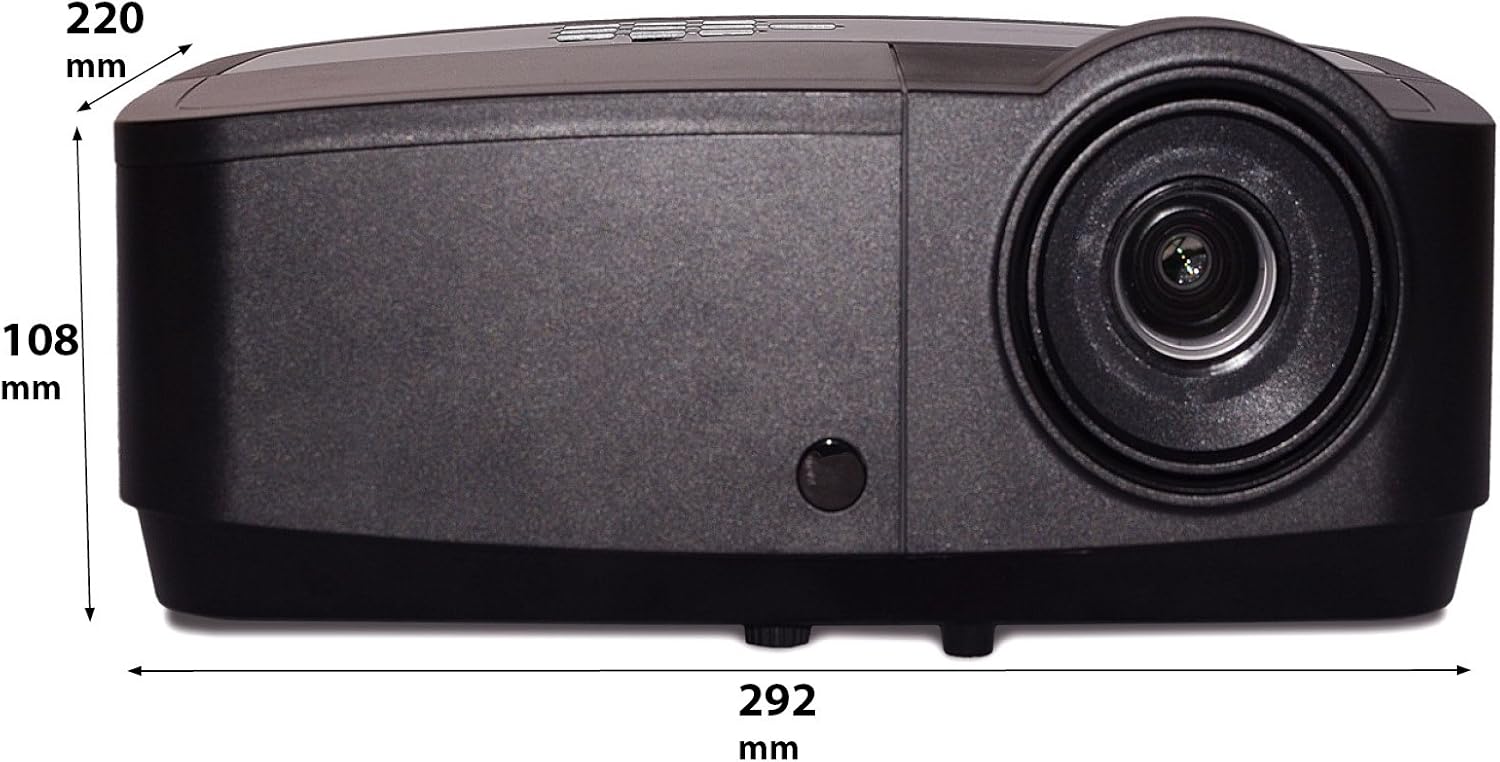
Din l-immaġni turi vantaġġ tal-ġenbfile of the InFocus IN124a projector, illustrating its physical dimensions: approximately 292 mm in length, 108 mm in height, and 220 mm in width.
Setup
1 Tqegħid
Position the projector on a stable, flat surface or mount it securely. Ensure the projector is at an appropriate distance from the screen to achieve the desired image size. Avoid direct sunlight or strong ambient light on the screen for optimal viewing.
2. Qawwa tal-Konnessjoni
- Qabbad il-korda tal-enerġija mad-daħla tal-enerġija tal-proġettazzjoni.
- Ipplaggja t-tarf l-ieħor tal-korda tad-dawl fi żbokk elettriku ertjat.
3. Konnessjoni ta' Sorsi tal-Vidjo
The IN124a offers multiple connectivity options:
- HDMI: Qabbad kejbil HDMI mit-tagħmir tas-sors tiegħek (eż. laptop, Blu-ray player) mal-port HDMI fuq il-proġettazzjoni.
- VGA (Computer 1/2): Use a VGA cable to connect your computer to either the 'COMPUTER 1' or 'COMPUTER 2' port.
- S-Video/Video: For older devices, connect S-Video or composite video cables to the respective ports.
- USB: The USB-A port can be used for displaying content directly from a USB drive. The USB-B port supports USB display functionality.
- Awdjo: Connect external audio sources to 'AUDIO 1' or 'AUDIO 2' inputs, and use 'AUDIO OUT' for external speakers if needed.
4. Wireless Setup (Optional)
For wireless connectivity, an optional USB adapter is required. Insert the wireless USB adapter into the designated USB port on the projector. Refer to the adapter's specific instructions for software installation and connection procedures on your source device.
Operazzjoni
1. Tixgħil / Mitfi
- Qawwa Mixgħul: Press the 'Power' button on the projector's control panel or remote control. The power indicator light will turn steady blue.
- Itfi: Press the 'Power' button again. A confirmation message may appear. Press 'Power' a second time to confirm shutdown. The fan will continue to run briefly to cool the lamp before shutting down completely.
2. Aġġustament tal-Immaġni
- Fokus: Rotate the focus ring around the lens until the image appears sharp and clear.
- Zoom: Rotate the zoom ring around the lens to adjust the image size without moving the projector.
- Korrezzjoni Keystone: Jekk l-immaġni tidher trapezojdali, uża l-funzjoni ta' korrezzjoni tat-trapezoidali fil-menu tal-proġettazzjoni biex tikkwadra l-immaġni.
3. Għażla tas-Sors
Press the 'Source' button on the control panel or remote control repeatedly to cycle through available input sources (HDMI, Computer 1, Computer 2, S-Video, Video, USB). The projector will automatically detect an active signal.
4. Navigazzjoni fil-menu
Press the 'Menu' button to access the On-Screen Display (OSD) menu. Use the arrow buttons to navigate through options and 'Enter' to select. Press 'Menu' or 'Exit' to close the OSD.
5. Modalità 3D
The InFocus IN124a is 3D-Ready. To utilize 3D functionality, you will need compatible 3D content, a 3D-capable source device, and active 3D glasses. Refer to your 3D source device's manual for specific setup instructions. The projector will automatically detect a 3D signal when available.
Manutenzjoni
1. Lamp Sostituzzjoni
Il-proġekter lamp has a lifespan of up to 7,000 hours. When the lamp life is nearing its end, a warning message may appear, or the lamp indicator light will illuminate. Only replace the lamp with an authorized InFocus replacement lamp. Always allow the projector to cool completely before attempting lamp sostituzzjoni.
2. Tindif
- Proġettur Ċasing: Uża drapp ratba u mingħajr ħelu dampened with a mild, non-abrasive cleaner. Do not use harsh chemicals.
- Lenti: Gently wipe the lens with a lens cleaning cloth or lens tissue. Avoid touching the lens surface with your fingers.
- Vents tal-arja: Periodically check and clean the air vents to prevent dust buildup, which can lead to overheating. Use a soft brush or compressed air to clear obstructions.
Issolvi l-problemi
Jekk tiltaqa' ma' problemi bil-proġettur tiegħek, irreferi għall-problemi u s-soluzzjonijiet komuni li ġejjin:
| Problema | Kawża Possibbli | Soluzzjoni |
|---|---|---|
| Ebda immaġini murija | Power not connected; Incorrect input source; Source device not active. | Check power connection; Select correct input source; Ensure source device is on and outputting signal. |
| L-immaġni hija mċajpra jew mhux iffukata | Lens focus not adjusted; Projector too close/far from screen. | Adjust the focus ring on the lens; Adjust projector distance or use zoom ring. |
| Il-kontroll mill-bogħod ma jaħdimx | Batteriji eżawriti; Ostruzzjoni bejn ir-remote u l-proġettazzjoni; Sensur tar-remote imblukkat. | Replace batteries; Remove obstructions; Ensure remote sensor on projector is clear. |
| Il-proġettur jisħon iżżejjed u jintefa | Blocked ventilation; Dusty air filter. | Ensure vents are clear; Clean air filter (if applicable) and vents. |
Speċifikazzjonijiet
| Karatteristika | Speċifikazzjoni |
|---|---|
| Riżoluzzjoni Nattiva | XGA (1024 x 768) |
| Luminożità | 3500 Lumens |
| Proporzjon ta' Kuntrast | 15000:1 |
| Lamp Ħajja | Sa 7,000 siegħa (Modalità Eko) |
| Teknoloġija tal-Konnettività | Wireless (with optional adapter), HDMI, USB video |
| Karatteristika Speċjali | 3D-Let |
| Dimensjonijiet tal-Prodott | 14.25 x 12 x 7.75 pulzieri (36.2 x 30.5 x 19.7 ċm) |
| Piż tal-oġġett | 5.4 liri (2.45 kg) |
| Użi Rakkomandati | Ġewwa/Barra |
Garanzija u Appoġġ
For warranty information and technical support, please refer to the warranty card included with your product or visit the official InFocus websit. Żomm l-irċevuta tax-xiri tiegħek bħala prova tax-xiri għal talbiet ta' garanzija.