
1. Prodott Aktarview
The Irradio Mini Blast is a compact, amplified Bluetooth speaker designed for portable audio playback. It offers high-efficiency sound output and versatile connectivity options.
Karatteristiċi ewlenin:
- Bluetooth 3.0 EDR for wireless audio streaming.
- Integrated USB 2.0 connection.
- Auxiliary (AUX) input for connecting external audio devices.
- Integrated lithium battery for portable use.
- 3 Watts maximum speaker output power.
- Provvista ta 'enerġija DC 5V.
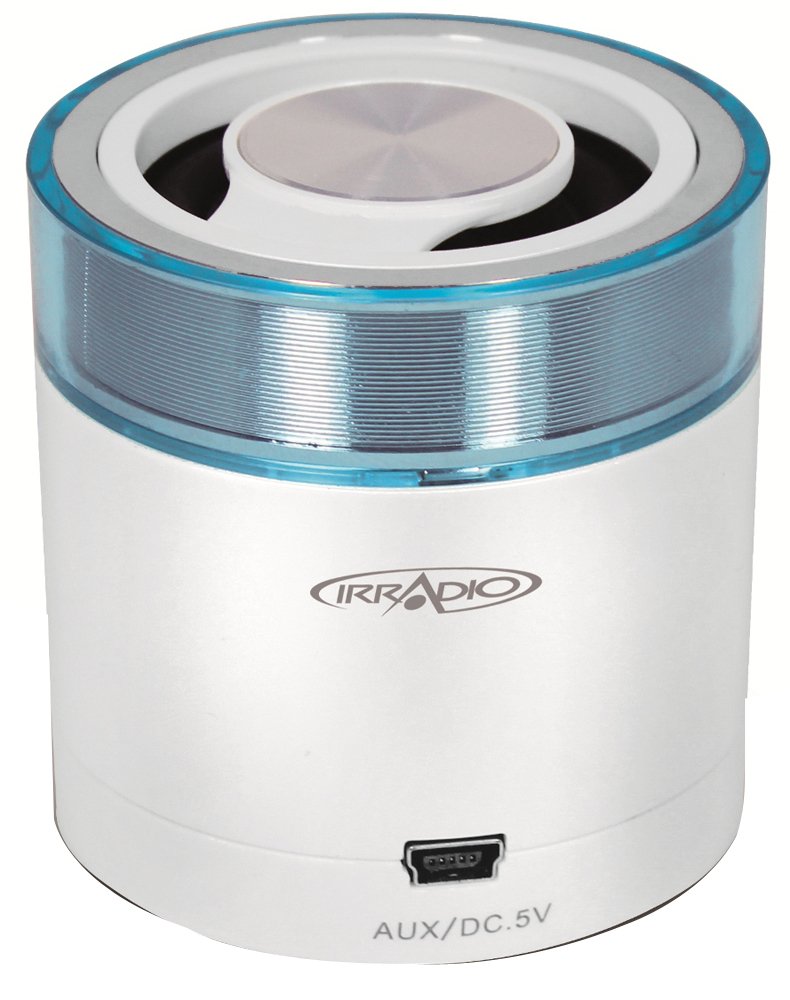
Stampa 1.1: Quddiem view of the Irradio Mini Blast Amplified Bluetooth Speaker in white and blue. This image displays the compact design and primary color scheme of the device.
2. Kontenut tal-Pakkett
Jekk jogħġbok immarka l-kaxxa għall-oġġetti li ġejjin:
- Irradio Mini Blast Speaker Unit
- Cable USB
- Gwida Quick Start
- Manwal għall-Utent
3. Informazzjoni dwar is-Sigurtà
Aqra l-istruzzjonijiet kollha tas-sigurtà qabel tuża dan il-prodott. Jekk ma ssegwix dawn l-istruzzjonijiet, dan jista' jirriżulta f'xokk elettriku, nar, jew perikli oħra.
- Tesponix l-apparat għal temperaturi estremi, dawl tax-xemx dirett, jew umdità għolja.
- Do not disassemble, repair, or modify the device. This may void the warranty and pose a safety risk.
- Żomm l-apparat 'il bogħod mill-ilma u likwidi oħra.
- Uża biss il-kejbil tal-iċċarġjar ipprovdut jew approvat.
- Armi l-apparat u l-batterija tiegħu b'mod responsabbli skont ir-regolamenti lokali.
4. Setup
4.1 Iċċarġjar inizjali
- Connect the provided USB cable to the speaker's USB port.
- Connect the other end of the USB cable to a compatible USB power adapter (DC 5V, not included) or a computer's USB port.
- The charging indicator light will illuminate (color may vary) to show that the device is charging.
- Allow the speaker to charge fully before first use. The indicator light will change or turn off when charging is complete.
4.2 Tixgħel/Jitfi
- Biex Tixgħel: Press and hold the Power button (usually marked with Ⓘ) for approximately 3 seconds. An audible tone or indicator light will confirm the device is on.
- Biex Tifi: Press and hold the Power button for approximately 3 seconds. An audible tone or indicator light will confirm the device is off.
5. Istruzzjonijiet Operattivi
5.1 Tqabbil tal-Bluetooth
- Ensure the speaker is powered on and within close proximity (within 10 meters) of your Bluetooth-enabled device.
- The speaker will automatically enter Bluetooth pairing mode, indicated by a flashing LED light (e.g., blue).
- Fuq l-apparat awdjo tiegħek (smartphone, tablet, eċċ.), attiva l-Bluetooth u fittex apparati disponibbli.
- Select "Irradio Mini Blast" from the list of found devices.
- Once paired, the LED indicator will typically stop flashing and remain solid, and an audible confirmation may be heard.
- Issa tista' ddoqq l-awdjo mit-tagħmir tiegħek permezz tal-ispiker.
5.2 Konnessjoni AUX
For devices without Bluetooth, use the AUX input:
- Connect one end of a 3.5mm audio cable (not included) to the AUX port on the Irradio Mini Blast speaker.
- Qabbad it-tarf l-ieħor tal-kejbil tal-awdjo ta' 3.5mm mal-jack tal-headphones jew mal-port tal-output tal-awdjo tal-apparat awdjo estern tiegħek.
- The speaker should automatically switch to AUX mode, or you may need to press a mode button if available.
- Adjust the volume on both your external device and the speaker.
5.3 Daqq tal-USB
The integrated USB 2.0 connection can be used for charging the speaker or potentially for playing audio from a USB storage device, depending on the model's specific features. Refer to the quick start guide for detailed USB playback instructions if applicable.
6. Manutenzjoni
6.1 Tindif
- Dejjem itfi l-apparat qabel ma tnaddaf.
- Use a soft, dry, lint-free cloth to wipe the exterior of the speaker.
- Tużax prodotti tat-tindif li joborxu, solventi, jew kimiċi qawwija, għax dawn jistgħu jagħmlu ħsara lill-wiċċ.
- Evita li tidħol l-umdità fi kwalunkwe fetħiet.
6.2 Ħażna
- Aħżen l-ispiker f'post frisk u niexef 'il bogħod mix-xemx diretta u minn temperaturi estremi.
- Jekk se taħżinha għal perjodu estiż, iċċarġja l-batterija perjodikament (eż., kull 3-6 xhur) biex iżżommha f'saħħitha.
7 Issolvi l-problemi
| Problema | Kawża Possibbli | Soluzzjoni |
|---|---|---|
| L-ispiker ma jixgħelx. | Il-batterija hija eżawrita. | Iċċarġja l-kelliem billi tuża l-kejbil USB ipprovdut. |
| Ma nistax nikkonnettja permezz tal-Bluetooth. | Bluetooth is not enabled on the device; speaker is out of range; speaker is already paired to another device. | Ensure Bluetooth is on; move device closer to speaker; disconnect from other devices and try pairing again. |
| L-ebda ħoss jew volum baxx. | Volume is too low on speaker or connected device; incorrect input mode selected. | Increase volume on both speaker and connected device; ensure correct input mode (Bluetooth/AUX) is selected. |
| Distorsjoni tal-ħoss. | Il-volum huwa għoli wisq; il-kwalità tas-sors awdjo hija fqira. | Reduce volume on speaker and connected device; try a different audio source. |
8. Speċifikazzjonijiet
| Karatteristika | Dettall |
|---|---|
| Isem tal-Mudell | Mini |
| Numru tal-Mudell | 166000109 |
| Brand | IRRADJU |
| Teknoloġija tal-Konnettività | Bluetooth (3.0 EDR), Auxiliary, USB |
| Qawwa tal-Ħruġ Massimu tal-Ispeaker | 3 Watts |
| Sors tal-Enerġija | Battery Powered (Integrated Lithium Battery) |
| Provvista tal-Enerġija | DC 5V |
| Tip ta 'Immuntar | Tabella Mount |
| Dimensjonijiet tal-Prodott | 18.2 x 11 x 7.2 ċm |
| Piż tal-oġġett | 100 gramma |
| Kulur | Abjad/Blu ċar |
9. Garanzija u Appoġġ
9.1 Informazzjoni dwar Garanzija
This product is covered by a limited warranty. Please refer to the warranty card included in your package or contact your retailer for specific terms and conditions. The warranty typically covers manufacturing defects under normal use.
9.2 Appoġġ għall-Klijent
For technical assistance, troubleshooting, or warranty claims, please contact your point of purchase or visit the official Irradio website for support contact details. Have your model number (166000109) and purchase information ready when contacting support.