
1. Prodott Aktarview
The OBDLink LX Bluetooth 3.0 OBD2 Adapter is a high-speed automotive diagnostic device designed to transform your Windows PC, laptop, or Android phone into a powerful scan tool. It provides fast and accurate diagnostics for a wide range of vehicles.
This device is compatible with all 1996+ cars and light trucks sold in the United States (excluding hybrid or electric vehicles) and works with MotoScan compatible motorcycles.

Image: The compact OBDLink LX Bluetooth adapter.
2. Kontenut tal-Pakkett
- OBDLink LX Bluetooth Adapter
- Gwida Quick Start
- Karta ta' Garanzija
- Compliance insert
3. Setup u Installazzjoni
Follow these steps to set up your OBDLink LX adapter:
- Sib il-Port tal-OBD-II: The OBD-II port is typically located under the dashboard on the driver's side of your vehicle.
- Ipplaggja l-Adapter: Firmly insert the OBDLink LX adapter into your vehicle's OBD-II port. Ensure it is securely connected.
- Ixgħel l-Ignition tal-Vettura: Turn your vehicle's ignition to the "ON" position (do not start the engine). The adapter's Power LED should illuminate.
- Install Software/App:
- For Android devices: Download the official OBDLink app from the Google Play Store.
- For Windows PCs/Laptops: Install the OBDwiz software.
- The device is also compatible with third-party apps such as Torque and DashCommand (Android only).
- Par via Bluetooth:
- Open your device's Bluetooth settings.
- Fittex għal available devices and select "OBDLink LX".
- Segwi kwalunkwe prompts fuq l-iskrin biex tlesti l-proċess ta 'tqabbil.
- Tnedija tal-Applikazzjoni: Open the OBDLink app or OBDwiz software. The application should automatically detect and connect to the adapter.

Image: OBDLink LX adapter plugged into a vehicle's OBD-II port.

Image: OBDLink LX is compatible with Android devices.

Image: OBDLink LX connected to a smartphone running the diagnostic app.
Għal struzzjonijiet ta 'installazzjoni dettaljati, jekk jogħġbok irreferi għall- Manwal tal-Installazzjoni (PDF).
4. Istruzzjonijiet Operattivi
Once connected, the OBDLink LX allows you to access various vehicle data and diagnostic functions:
- Read and Clear Diagnostic Trouble Codes (DTCs): Identify the cause of your vehicle's "Check Engine" light and clear codes after repairs.
- View Live Sensor Data: Monitor real-time parameters such as engine RPM, vehicle speed, engine temperature, fuel rate, and battery voltage.
- Metriċi tal-Prestazzjoni: Track performance data like 0-60 mph times, quarter-mile times, and more (app dependent).
- Trip Logging: Irrekordja u erġa'view trip data, including fuel economy, distance traveled, and driving habits.

Immaġni: Eżample of diagnostic trouble codes displayed on a smartphone.

Image: Live sensor data and monitor tests displayed on a smartphone.
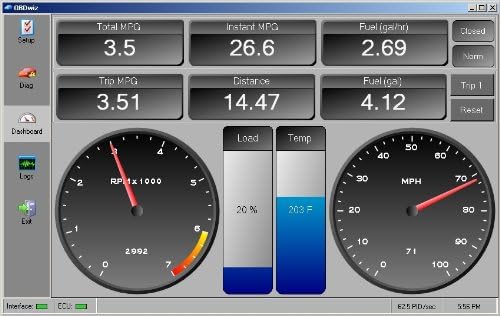
Image: OBDwiz software interface displaying various vehicle metrics on a computer.

Image: OBDwiz software running on a laptop, showing vehicle data.
Refer to your chosen diagnostic application's user guide for specific feature navigation and usage.
5. Manutenzjoni
The OBDLink LX is designed for minimal maintenance. It features BatterySaver™ Technology, allowing it to be safely left plugged into your vehicle's OBD-II port without draining the car's battery.

Image: OBDLink LX highlighting BatterySaver Technology.
Keep the device clean and free from dust or debris. Store it in a cool, dry place when not in use for extended periods.
6 Issolvi l-problemi
If you encounter issues with your OBDLink LX adapter, consider the following common troubleshooting steps:
- Ebda Qawwa: Ensure the adapter is firmly seated in the OBD-II port and the vehicle's ignition is in the "ON" position. Check your vehicle's fuse box for any blown fuses related to the OBD-II port.
- Kwistjonijiet ta' Konnessjoni:
- Iċċekkja li l-Bluetooth huwa attivat fuq l-apparat tiegħek.
- Ensure no other devices are actively connected to the OBDLink LX via Bluetooth.
- Try restarting your device and the diagnostic application.
- Unplug and re-plug the OBDLink LX from the vehicle.
- App Not Recognizing Adapter: Ensure you are using a compatible application (OBDLink app, OBDwiz, Torque, DashCommand, etc.) and that it is updated to the latest version.
- Incorrect Readings/Data: Confirm your vehicle is supported by the adapter and the application. Ensure the application's settings are correctly configured for your vehicle type.
For more comprehensive troubleshooting, please consult the Gwida għas-Soluzzjoni tal-Problemi (PDF).
7. Speċifikazzjonijiet
| Karatteristika | Dettall |
|---|---|
| Brand | OBDLink |
| Mudell | OBDLink LX (LX101) |
| Konnettività | Bluetooth 3.0 |
| Sors tal-Enerġija | 12V DC (Vehicle Power) |
| Dimensjonijiet tal-Prodott | 1.97"T x 1.77"W x 0.91"Għ |
| Piż tal-oġġett | 1.1 uqija |
| Kompatibilità tas-Sistema Operattiva | Android and Windows (Not compatible with Apple iOS devices) |
| Lingwa | Ingliż |
| Numru tal-Parti tal-Manifattur | 427201 |
8. Garanzija u Appoġġ
The OBDLink LX comes with a 3-Sena Garanzija. For full details regarding warranty coverage, please refer to the Garanzija (PDF) dokument.
For product support, technical assistance, or any inquiries, please contact OBDLink's U.S. Based Support team. You can also visit the official OBDLink Store għal aktar informazzjoni u riżorsi.