
1. Introduzzjoni
This manual provides comprehensive instructions for the setup, operation, and maintenance of your A4tech Natural A Ergonomic Keyboard, model KRS-85. Designed with patented A-Shape keys and round-edged keycaps, this keyboard aims to promote a natural typing position, thereby helping to prevent Repetitive Strain Injury (RSI).
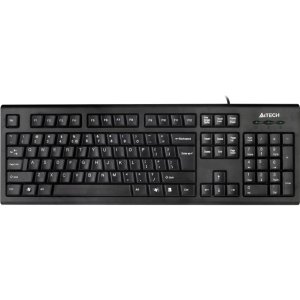
Figure 1: A4tech Natural A Ergonomic Keyboard (KRS-85). This image displays the full layout of the black wired keyboard, highlighting its ergonomic design with A-Shape keys and round keycaps.
2. Setup
2.1 Rekwiżiti tas-Sistema
- IBM or Compatible Systems
- Windows 2000 / XP (X64) / 2003 (X64) / Vista
2.2 Konnessjoni tat-Tastiera
- Sib port USB disponibbli fuq il-kompjuter tiegħek.
- Insert the USB connector of the A4tech KRS-85 keyboard firmly into the USB port.
- Is-sistema operattiva tiegħek għandha tiskopri u tinstalla awtomatikament id-drajvers meħtieġa. Dan il-proċess jista' jieħu ftit mumenti.
- Once installation is complete, the keyboard is ready for use.
3. Istruzzjonijiet Operattivi
The A4tech Natural A Keyboard is designed for comfortable and efficient typing. Its unique features are intended to enhance your typing experience and reduce strain.
3.1 Karatteristiċi ewlenin
- Patented A-Shape Keys: The layout of the keys is designed to align with the natural position of your hands and wrists, promoting a more relaxed posture.
- Round Edged Keycaps: These keycaps provide a smooth and comfortable typing surface.
- Disinn Standard: The keyboard features a full-size layout including a numeric keypad, function keys (F1-F12), and navigation keys.
3.2 Użu Bażiku
Use the keyboard as you would any standard computer keyboard for typing, navigating, and executing commands. The ergonomic design is intended to provide comfort during extended use.
4. Manutenzjoni
Manutenzjoni xierqa tiżgura l-lonġevità u l-prestazzjoni ottimali tat-tastiera tiegħek.
4.1 Tindif
- Skonnettja t-tastiera mill-kompjuter tiegħek qabel ma tnaddafha.
- Uża drapp ratba u mingħajr ħelu ftit dampLaħlaħ bl-ilma jew b'soluzzjoni ħafifa tat-tindif biex timsaħ il-wiċċ tat-tastiera.
- Evita li tuża kimiċi ħarxa, prodotti tat-tindif li joborxu, jew umdità eċċessiva.
- Għat-tindif bejn iċ-ċwievet, uża arja kkompressata biex tneħħi t-trab u l-fdalijiet.
5 Issolvi l-problemi
If you encounter issues with your A4tech Natural A Keyboard, please refer to the following common solutions.
5.1 It-Tastiera Ma Tirrispondix
- Ensure the USB cable is securely connected to a working USB port on your computer. Try a different USB port.
- Ibda mill-ġdid il-kompjuter tiegħek.
- Check your computer's Device Manager (Windows) to see if the keyboard is recognized and if there are any driver issues.
5.2 Specific Key Combinations Not Working (e.g., Ctrl-Alt-Del)
- Some users have reported that certain key combinations, such as Ctrl-Alt-Del, may not function as expected on this keyboard with Windows operating systems. This is a known compatibility limitation for some configurations.
- If this issue persists, consider using alternative methods for these functions within your operating system, or consult A4tech support for potential workarounds or driver updates if available.
6. Speċifikazzjonijiet
| Karatteristika | Dettall |
|---|---|
| Isem tal-Prodott | Natural_A Rounded Edge Keyboard |
| Numru tal-Mudell | KRS-85 |
| Teknoloġija tal-Konnettività | Kejbil (USB) |
| Deskrizzjoni tat-Tastiera | Ergonomiku |
| Numru ta' Ċwievet | 85 |
| Dimensjonijiet tal-Prodott | 19.69 x 7.87 x 1.97 pulzieri |
| Piż tal-oġġett | 2.2 liri |
| Manifattur | ERGOGUYS (A4tech Co., Ltd) |
| Data L-Ewwel Disponibbli | 31 ta’ Ottubru, 2013 |
7. Informazzjoni dwar Garanzija
The A4tech Natural A Ergonomic Keyboard (KRS-85) comes with a Garanzija Limitata ta' 1 Snin mingħand il-manifattur. Din il-garanzija tkopri difetti fil-materjali u l-abbilità taħt użu normali.
Please retain your proof of purchase for warranty claims. For detailed terms and conditions, refer to the warranty documentation provided with your product or contact the manufacturer directly.
8. Appoġġ
For further assistance, technical support, or warranty inquiries, please contact the manufacturer or your point of purchase. Ensure you have your product model number (KRS-85) and proof of purchase ready when contacting support.