
1. Introduzzjoni
The ATEN VE812 HDMI Over CAT5 Extender is designed to extend an HDMI signal over a single CAT5e/6 cable. This device allows for the transmission of high-definition video and audio signals over long distances, making it ideal for various applications where the HDMI source and display are not in close proximity.
Karatteristiċi Ewlenin
- Extends HDMI signal over a single CAT5e/6 cable.
- Designed for high availability, scalability, and maximum flexibility.
- Supports high-definition video and audio transmission.
Kontenut tal-Pakkett
The ATEN VE812 package typically includes:
- VE812T HDMI Over CAT5 Transmitter Unit
- VE812R HDMI Over CAT5 Receiver Unit
- Adapters tal-Enerġija
- Manwal għall-Utent (dan id-dokument)
2. Prodott Aktarview
The VE812 system consists of two main components: a transmitter unit (VE812T) and a receiver unit (VE812R). These units work in conjunction to extend the HDMI signal.
Komponenti

Figure 2.1: Two ATEN VE812 extender units. The top panel of each unit features the ATEN logo and product information.

Figura 2.2: Wara view of an ATEN VE812 unit, highlighting the 'REMOTE I/O' RJ45 port for CAT5e/6 cable connection and the DC 5V power input.
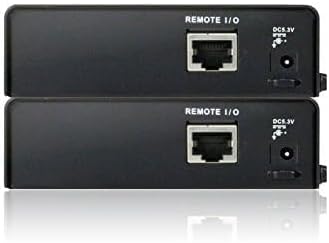
Figura 2.3: Angolat view of two ATEN VE812 units, providing a perspective of their compact design and port layout.
3. Setup u Installazzjoni
Rekwiżiti tas-Sistema
- HDMI source device (e.g., DVD player, computer, game console)
- HDMI display device (e.g., TV, monitor, projector)
- One CAT5e or CAT6 cable of appropriate length (up to 60m for 1080p)
- Two HDMI cables
Connection Diagram (Conceptual)
- Connect an HDMI cable from your HDMI source device to the HDMI input port on the VE812T (Transmitter) unit.
- Connect one end of the CAT5e/6 cable to the RJ45 port on the VE812T (Transmitter) unit.
- Connect the other end of the CAT5e/6 cable to the RJ45 port on the VE812R (Receiver) unit.
- Connect an HDMI cable from the HDMI output port on the VE812R (Receiver) unit to your HDMI display device.
- Connect the provided power adapters to both the VE812T and VE812R units, then plug them into power outlets.
Installazzjoni pass pass
- Ensure all devices (HDMI source, display, and extender units) are powered off before making connections.
- Connect the HDMI source to the VE812T.
- Run the CAT5e/6 cable between the VE812T and VE812R units. Ensure the cable is properly terminated and meets specifications for the desired distance.
- Connect the VE812R to the HDMI display.
- Connect power to both extender units.
- Power on the HDMI display, then the HDMI source. The video signal should now be extended to your display.
4. Istruzzjonijiet Operattivi
Once the ATEN VE812 HDMI Over CAT5 Extender is properly installed and powered on, it operates automatically. No additional software or configuration is typically required for basic functionality.
- Qawwa Mixgħul: Ensure both the transmitter and receiver units are connected to power. Status LEDs (if present) should indicate power and link status.
- Għażla tas-Sors: Select the correct HDMI input on your display device to view the extended signal.
- Integrità tas-Sinjal: The extender is designed to maintain signal quality over the specified distance. If you experience signal degradation, refer to the troubleshooting section.
5. Manutenzjoni
The ATEN VE812 HDMI Over CAT5 Extender requires minimal maintenance to ensure optimal performance and longevity.
- Tindif: Uża drapp artab u niexef biex tnaddaf il-barra tal-unitajiet. Tużax prodotti tat-tindif likwidi jew aerosol.
- Ventilazzjoni: Kun żgur li l-unitajiet jitqiegħdu f'żona ventilata sew biex tevita li jisħnu żżejjed. Timblokkax xi fetħiet tal-ventilazzjoni.
- Ġestjoni tal-Kejbil: Keep cables neatly organized and avoid sharp bends or excessive tension on the connectors.
- Kundizzjonijiet Ambjentali: Ħaddem l-apparat fil-firxiet speċifikati tat-temperatura u l-umdità tiegħu.
6 Issolvi l-problemi
If you encounter issues with your ATEN VE812 extender, please refer to the following common troubleshooting steps:
- Ebda Sinjal tal-Vidjo/Awdjo:
- Verify that both the transmitter and receiver units are powered on.
- Check all HDMI and CAT5e/6 cable connections to ensure they are secure.
- Ensure the CAT5e/6 cable is not damaged and is within the recommended length for your resolution.
- Try connecting the HDMI source directly to the display to confirm the source and display are working correctly.
- Test with a different HDMI cable or CAT5e/6 cable if possible.
- Kwalità Fqira tal-Istampa (Teptip, Distorsjoni):
- Ensure you are using a high-quality CAT5e or CAT6 cable.
- Reduce the length of the CAT5e/6 cable if it is near the maximum supported distance.
- Check for strong electromagnetic interference (EMI) sources near the CAT5e/6 cable.
- Sinjal Intermittenti:
- Ensure power adapters are firmly connected and providing stable power.
- Iċċekkja għal konnessjonijiet tal-kejbil maħlula.
7. Speċifikazzjonijiet
| Attribut | Dettall |
|---|---|
| Brand | ATEN |
| Serje | VE812 |
| Numru tal-Mudell tal-Oġġett | VE812 |
| Piż tal-oġġett | 3 liri |
| Dimensjonijiet tal-Prodott | 4 x 11 x 7 pulzieri |
| Kulur | Iswed |
| Manifattur | ATEN TECHNOLOGY |
| ASIN | B00FG96GTY |
| Data L-Ewwel Disponibbli | 30 ta’ Settembru, 2013 |
8. Appoġġ u Garanzija
ATEN is committed to providing reliable products and customer satisfaction. For technical assistance or warranty inquiries, please refer to the following information:
- Appoġġ Tekniku: ATEN offers free technical support to assist with product setup, troubleshooting, and general inquiries. Please visit the official ATEN websit għal informazzjoni ta' kuntatt u riżorsi ta' appoġġ.
- Informazzjoni dwar il-garanzija: This product is covered by ATEN's standard warranty. Details regarding warranty duration and terms can be found on the official ATEN website or by contacting customer service. Extended warranty service packages may also be available.
- Localized Repair Center: ATEN provides localized repair centers for Return Merchandise Authorization (RMA) services.


