
1. Introduzzjoni
This manual provides detailed instructions for the safe and efficient operation of your VOLTCRAFT 8210 Function Generator. The 8210 is a versatile instrument combining a sweep function, function generator, pulse generator, and frequency counter into a single unit. It is designed for professional use, generating various waveforms with precision.
2. Istruzzjonijiet tas-Sigurtà
Please read these safety instructions carefully before operating the device to prevent injury and damage. Keep this manual for future reference.
- Dejjem qabbad l-apparat ma' żbokk tad-dawl ertjat.
- Tħaddimx l-apparat fl-imxarrab jew damp kundizzjonijiet.
- Żgura ventilazzjoni xierqa biex tevita sħana żejda.
- Tiftaħx l-apparat casing; m'hemm l-ebda partijiet li jistgħu jiġu rranġati mill-utent ġewwa. Irreferi għas-servizz lil persunal kwalifikat.
- Disconnect power before cleaning or moving the unit.
- Evita li tapplika voltages exceeding the specified maximum input ratings.
3. Prodott Aktarview
The VOLTCRAFT 8210 is a versatile 4-in-1 instrument designed for various electronic testing and development applications. It integrates the functionalities of a sweep function generator, a standard function generator, a pulse generator, and a frequency counter.
Karatteristiċi ewlenin:
- Four-in-one functionality: Sweep function, function generator, pulse generator, and frequency counter.
- Medda ta' Frekwenzi: Generates signals from 0.1 Hz to 10 MHz.
- Counter tal-Frekwenzi: Measures frequencies from 2 Hz to 100 MHz.
- Waveform Generation: Produces professional-grade rectangular, triangular, and sawtooth signals.
- Output Amplonġitudni: Massimu amplitude of 20 Vpp (10 Vpp into 50 ohms).
Stampi tal-Prodott:
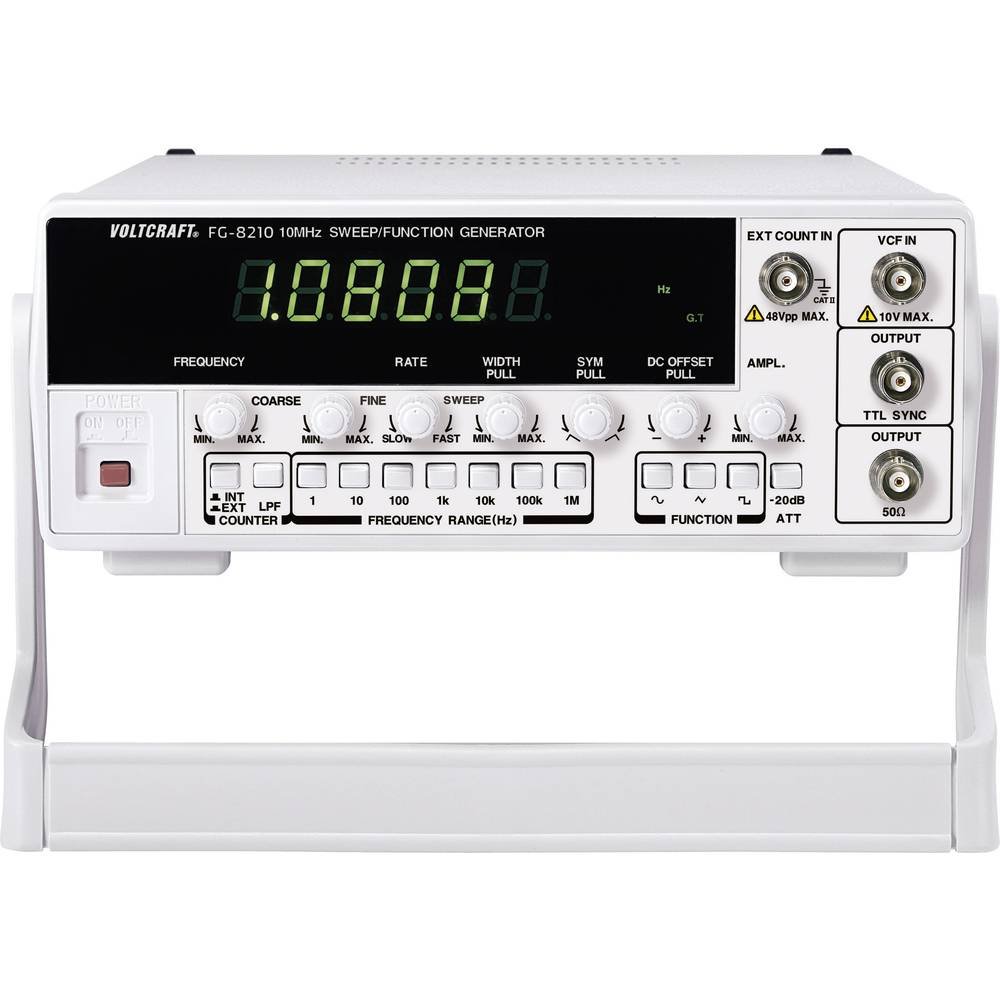


Vidjows Uffiċjali tal-Prodott:
Bħalissa m'hemm l-ebda vidjows uffiċjali tal-prodott mill-bejjiegħ disponibbli biex jiġu inkorporati.
4. Setup
- Spakkjar: Carefully remove the function generator from its packaging. Inspect the unit for any signs of damage during transit. Retain the packaging for future storage or transport.
- Pjazzament: Place the unit on a stable, flat surface with adequate ventilation around it. Avoid placing it near heat sources or in direct sunlight.
- Konnessjoni tal-Enerġija: Connect the provided power cord to the power input on the rear panel of the 8210 and then to a suitable grounded AC power outlet. Ensure the power switch is in the OFF position before connecting.
- Qawwa Inizjali Mixgħula: Flip the power switch to the ON position. The display should illuminate, indicating the unit is receiving power.
- Konnessjonijiet tal-Ħruġ: Connect your test leads or cables to the appropriate output terminals (e.g., BNC connectors for main output, TTL output) on the front panel, depending on your application.
5. Istruzzjonijiet Operattivi
This section details the basic operation of the VOLTCRAFT 8210 for its primary functions.
5.1. Function Generator Mode
- Select Waveform: Use the dedicated buttons (e.g., Sine, Square, Triangle) on the front panel to select the desired output waveform.
- Issettja Frekwenza: Adjust the frequency using the frequency control knob and range buttons. The display will show the current frequency.
- Aġġusta Amplonġitudni: Uża l- amplitude knob to set the desired output voltage peak-to-peak (Vpp). Monitor the output with an oscilloscope for precise adjustment.
- Offset DC: If available, use the DC offset control to add a DC bias to the output signal.
- Qabbad l-Output: Connect the main output (e.g., BNC) to your circuit or device under test.
5.2. Sweep Function Mode
The sweep function allows the output frequency to vary automatically over a specified range.
- Activate Sweep: Press the "Sweep" button to enable this mode.
- Set Start/Stop Frequencies: Use the frequency controls to define the lower and upper limits of the sweep range.
- Adjust Sweep Rate: Set the sweep duration or rate using the dedicated control.
- Riżultat tal-Monitoraġġ: Observe the sweeping signal on an oscilloscope to verify the settings.
5.3. Frequency Counter Mode
The built-in frequency counter measures external signals.
- Select Counter Input: Connect the external signal to the designated frequency counter input terminal.
- Activate Counter: Press the "Counter" or "Freq. Meas." button to switch to frequency measurement mode.
- Read Frequency: The display will show the frequency of the input signal.
6. Manutenzjoni
Proper maintenance ensures the longevity and accuracy of your VOLTCRAFT 8210.
- Tindif: Uża drapp artab u niexef biex tnaddaf il-barra tal-unità. Għal ħmieġ iebes, neħħi ftitamp Jista' jintuża drapp b'deterġent ħafif, biex tiżgura li l-ebda likwidu ma jidħol fl-apparat. Tużax prodotti tat-tindif jew solventi li joborxu.
- Ħażna: Meta ma tkunx qed tużaha għal perjodi twal, aħżen l-unità f'ambjent niexef u ħieles mit-trab, preferibbilment fl-imballaġġ oriġinali tagħha.
- Kalibrazzjoni: Periodic calibration by qualified service personnel is recommended to maintain measurement accuracy, especially for critical applications.
7 Issolvi l-problemi
If you encounter issues with your VOLTCRAFT 8210, refer to the following common problems and solutions:
| Problema | Kawża Possibbli | Soluzzjoni |
|---|---|---|
| Ebda enerġija/Wiri mitfi | Power cord disconnected, power switch off, faulty outlet. | Iċċekkja l-konnessjoni tal-korda tal-enerġija, kun żgur li s-swiċċ tal-enerġija jkun ON, ittestja s-sokit b'apparat ieħor. |
| L-ebda sinjal tal-ħruġ | Output cable disconnected, amplitude set to zero, incorrect function selected. | Verify output cable connection, increase amplitude, ensure correct waveform/function is selected. |
| Incorrect frequency reading (counter) | Signal too weak, incorrect input range, noisy signal. | Ensure signal amplitude is sufficient, check input range settings, use shielded cables. |
Jekk il-problema tippersisti wara li tipprova dawn is-soluzzjonijiet, ikkuntattja l-appoġġ għall-klijenti.
8. Speċifikazzjonijiet
The following are the technical specifications for the VOLTCRAFT 8210 Function Generator:
- Manifattur: VOLTCRAFT
- Numru tal-Mudell: 8210
- Piż tal-oġġett: 3 kilogrammi
- Numru ta' oġġetti fil-pakkett: 1
- Batteriji Inklużi: Nru
- Batteriji Meħtieġa: Nru
- ASIN: B00EPLFP46
- First Available Date on Amazon.fr: 15 ta’ Frar 2014
- Disponibbiltà ta' Spare Parts: Informazzjoni mhux disponibbli dwar il-partijiet ta' riżerva
9. Garanzija u Appoġġ
Information regarding specific warranty terms and conditions for the VOLTCRAFT 8210 Function Generator is not available in the provided product data. Please refer to the documentation included with your purchase or contact VOLTCRAFT customer support directly for warranty details and technical assistance.
For further support, visit the official VOLTCRAFT webis-sit jew ikkuntattja ċ-ċentri ta’ servizz awtorizzati tagħhom.