
1. Introduzzjoni
Thank you for choosing the Fonestar AS-24U Hi-Fi USB/SD/MP3 Amplifier. Dan il-manwal jipprovdi informazzjoni essenzjali għat-tħaddim sikur u effiċjenti tat-tagħmir tiegħek. Jekk jogħġbok aqrah bir-reqqa qabel l-użu u żommu għal referenza futura.
2. Istruzzjonijiet tas-Sigurtà
- Provvista tal-Enerġija: Tiżgura l- amplifier is connected to a power source matching the specified voltage (230V).
- Ventilazzjoni: Timblokkax il-fetħiet tal-ventilazzjoni. Ħalli biżżejjed spazju madwar l-unità għal fluss tal-arja xieraq biex tevita li jisħon iżżejjed.
- Umdità: Żomm il- amplifier away from water, moisture, and high humidity environments. Do not expose it to dripping or splashing.
- Sorsi tas-Sħana: Evita li tpoġġi l-unità ħdejn sorsi tas-sħana bħal radjaturi, reġistri tas-sħana, stufi, jew apparati oħra li jipproduċu s-sħana.
- Tindif: Disconnect the power cord before cleaning. Use a dry, soft cloth. Do not use liquid cleaners or aerosol cleaners.
- Servizzi: Tippruvax isservi dan il-prodott int stess. Irreferi l-manutenzjoni kollha lil persunal tas-servizz kwalifikat.
- Oġġett/Dħul Likwidu: Qatt m'għandek timbotta oġġetti ta' kwalunkwe tip f'dan il-prodott minn fetħiet peress li jistgħu jmissu vol perikolużitage punti jew short-out partijiet li jistgħu jirriżultaw f'nar jew xokk elettriku.
3. Prodott Aktarview
3.1 Panel ta 'Quddiem
The front panel features controls for power, input selection, volume adjustment, and USB/SD media playback. It also includes a display for media information.
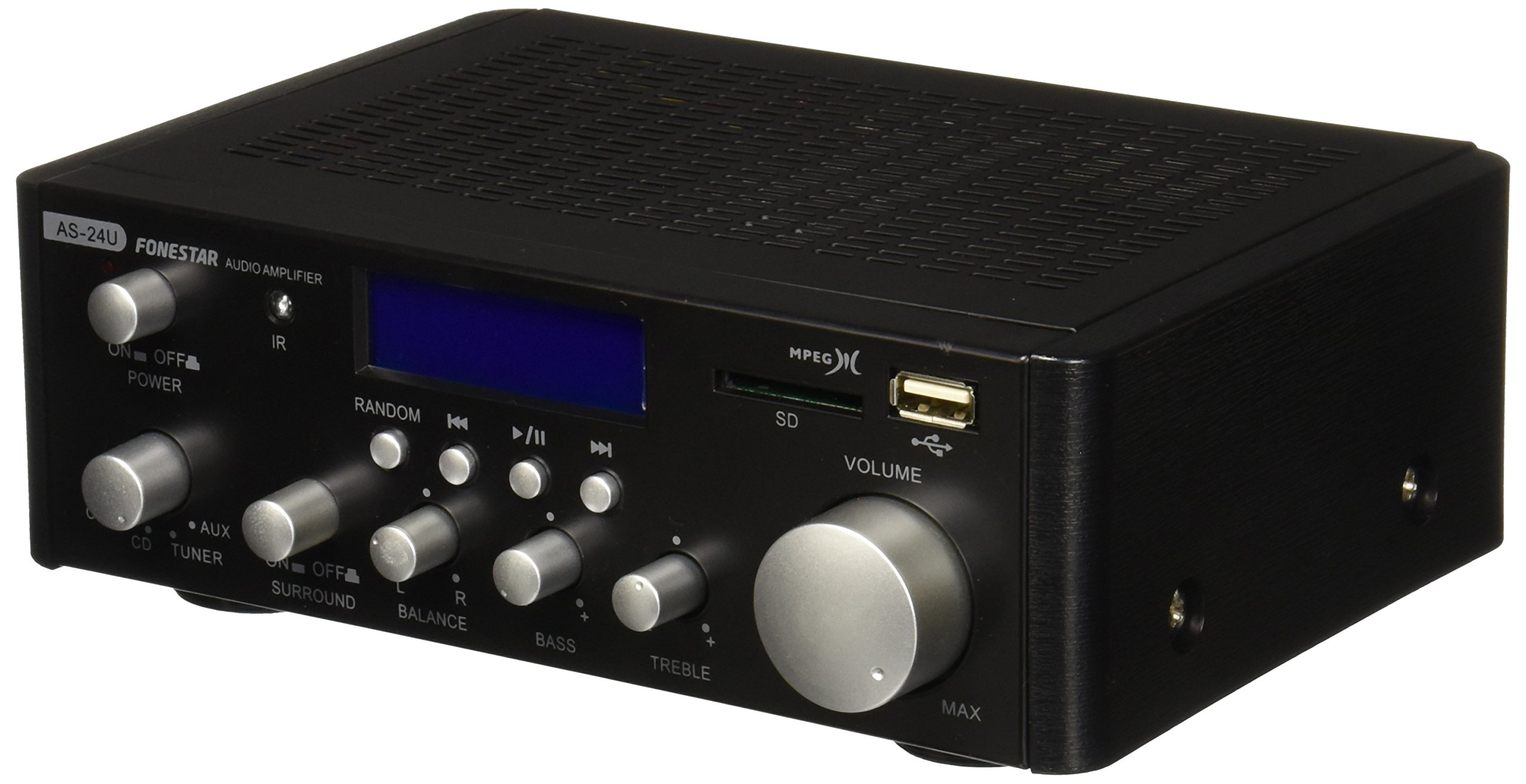
Stampa 1: Quddiem view of the Fonestar AS-24U amplifier, showing the main controls and display.
3.2 Panel ta 'wara
The rear panel provides all necessary connections for audio input sources, speaker outputs, and power.

Stampa 2: Wara view of the Fonestar AS-24U amplifier, detailing input/output ports and power connection.
- INPUT (AUX, TUNER, CD): RCA stereo inputs for connecting external audio sources.
- SPEAKER OUT (STEREO): Spring clip terminals for connecting passive speakers (4-8 Ω).
- SPEAKER OUT (SURROUND): Additional spring clip terminals for surround speakers (8 Ω).
- QAWWA FI: AC power input for the main power cable.
- VOLTAGE SELECTOR: Switch for selecting between 115V and 230V power input. Ensure this is set correctly for your region.
3.3 Kontroll mill-Bogħod
Il-kontroll remot inkluż jippermetti tħaddim konvenjenti tal- amplifier's media playback functions.
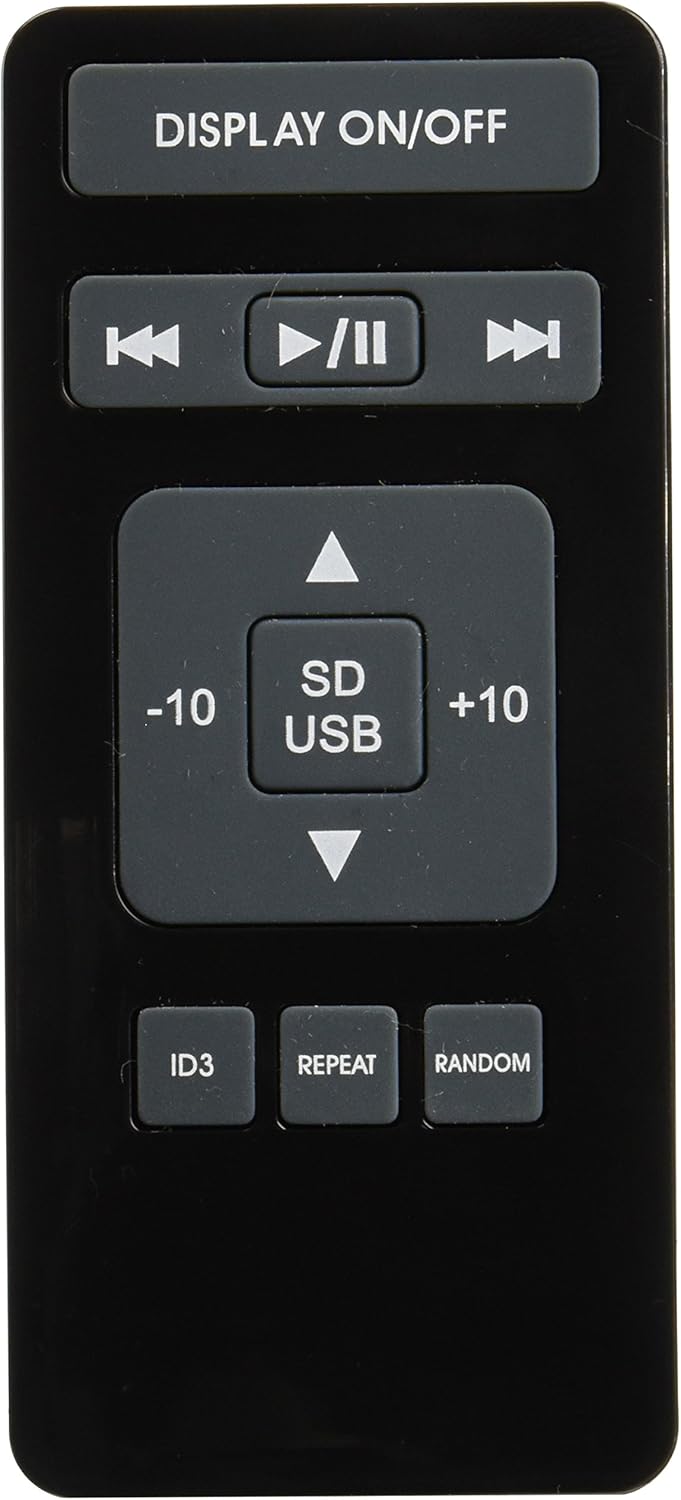
Image 3: Remote control for the Fonestar AS-24U amplifier, showing buttons for media playback and display control.
- DISPLAY ON / OFF: Toggles the front panel display.
- DAQQA/PAWŻA, PREĊEDENTI/LI JMISS: Controls for media playback.
- SD/USB: Selects between SD card and USB drive as the media source.
- -10/+10: Skips tracks by 10.
- ID3: Displays ID3 tag informazzjoni għall-MP3 files.
- IRREpeti: Toggles repeat modes (e.g., repeat one, repeat all).
- ADDOĊĊ: Toggles random playback.
4. Setup
4.1 Konnessjoni ta' Kelliema
- Tiżgura l- ampL-ilfier ikun mitfi u skonnettjat.
- Connect your passive speakers to the SPEAKER OUT terminals on the rear panel.
- Match the positive (+) terminal on the amplifier to the positive (+) terminal on your speaker, and the negative (-) to the negative (-).
- For stereo speakers, use the 4-8 Ω terminals. For surround speakers, use the 8 Ω terminals. Ensure your speakers' impedance matches the ampspeċifikazzjonijiet tal-lifier.
4.2 Konnessjoni ta' Sorsi tal-Awdjo
- Connect your audio devices (e.g., CD player, tuner, auxiliary device) to the corresponding RCA INPUT jacks (CD, TUNER, AUX) on the rear panel.
- Ensure left and right channels are correctly matched (red for right, white for left).
4.3 Konnessjoni tal-Enerġija
- Ivverifika l-VOLTAGE SELECTOR switch on the rear panel is set to the correct voltage for your region (e.g., 230V).
- Connect the power cable to the POWER IN socket on the rear panel and then to a suitable wall outlet.
5. Istruzzjonijiet Operattivi
5.1 Tixgħel/Jitfi
Agħfas il-buttuna tal-qawwa fuq il-pannell ta' quddiem biex tixgħel amplifier on or off. A soft start protection circuit is integrated.
5.2 L-Għażla tas-Sors tal-Input
Use the input selector knob or buttons on the front panel to choose between CD, TUNER, AUX, USB, or SD inputs.
5.3 Aġġustament tal-Volum
Rotate the main volume knob on the front panel to adjust the overall sound level. Start with a low volume and gradually increase it to a comfortable listening level.
5.4 Daqq tal-USB/SD
- Daħħal USB flash drive jew SD card li fiha awdjo MP3 files fl-islott rispettiv fuq il-pannell ta' quddiem.
- Select the USB or SD input using the input selector.
- Use the playback controls (Play/Pause, Previous/Next) on the front panel or remote control to manage your music.
- The remote control allows for additional functions like skipping 10 tracks (+10/-10), displaying ID3 tags, repeating tracks, and random playback.
6. Manutenzjoni
6.1 Tindif
Biex tnaddaf il- amplifier, first unplug it from the power outlet. Use a soft, dry cloth to wipe down the exterior surfaces. Do not use abrasive cleaners, waxes, or solvents as they may damage the finish.
6.2 Ħażna
Jekk taħżen il amplifier for an extended period, ensure it is unplugged, clean, and stored in a cool, dry place away from direct sunlight and extreme temperatures.
7 Issolvi l-problemi
- Ebda Qawwa:
- Iċċekkja jekk il-kejbil tal-enerġija huwiex imqabbad sew maż-żewġ amplifier u s-sokit tal-ħajt.
- Kun żgur li s-sokit tal-ħajt jaħdem.
- Ivverifika l-VOLTAGE SELECTOR switch is set correctly.
- Ebda Ħsejjes:
- Ikkonferma li s-sors tad-dħul korrett intgħażel.
- Iċċekkja l-konnessjonijiet kollha tal-ispikers għal polarità xierqa u twaħħil sikur.
- Kun żgur li l-volum huwa mdawwar u mhux siekta.
- Ittestja b'sors awdjo differenti.
- Ħoss Mgħawġ:
- Naqqas il-volum.
- Iċċekkja l-kompatibbiltà tal-impedenza tal-ispiker.
- Ensure audio cables are not damaged and are securely connected.
- USB/SD Playback Issues:
- Ensure the USB drive or SD card is formatted to a compatible file sistema (eż., FAT32).
- Ivverifika li l-awdjo filehuma fil-format MP3.
- Ipprova USB drive jew SD card differenti.
8. Speċifikazzjonijiet
| Brand | FONESTAR |
| Mudell | AS-24U |
| Qawwa Stereo tal-Ħruġ | 25 + 25 W max, 15 + 15 W RMS (4 Ω), 12 + 12 W RMS (8 Ω) |
| Surround Power Output | 10 + 10 W max, 6 + 6 W RMS (8 Ω) |
| Inputs | 3 stereo (CD, Tuner, AUX), 2 x RCA 400 mV |
| Protezzjonijiet | Soft start, short circuit, overload |
| Voltage | 230 Volts |
| Dimensjonijiet (L x W x H) | 5 x 5 x 10 ċm (madwar 50 x 50 x 100 mm) |
| Piż | 1.9 kg |
| Konnettività tal-Ispeaker | Bil-fili |
9. Garanzija u Appoġġ
This Fonestar AS-24U amplifier comes with a standard manufacturer's warranty. Please refer to the warranty card included with your purchase for specific terms and conditions. For technical support, service, or warranty claims, please contact your retailer or the official Fonestar customer service.