
VeriFone VX510
Manwal tal-Utent tat-Terminal tal-Karta tal-Kreditu Dial-Up Verifone VX510
Mudell: VX510 | Ditta: VeriFone
Introduzzjoni
Dan il-manwal jipprovdi struzzjonijiet komprensivi għat-Terminal tal-Karta ta' Kreditu Dial-Up Verifone VX510. Ikopri s-setup, it-tħaddim, il-manutenzjoni, u s-soluzzjoni tal-problemi tat-tagħmir tiegħek biex jiżgura prestazzjoni effiċjenti u affidabbli għall-ipproċessar ta' tranżazzjonijiet bil-karta ta' kreditu.
Prodott Overview
Il-Verifone VX510 huwa terminal robust tal-karti tal-kreditu dial-up iddisinjat għal ipproċessar ta' tranżazzjonijiet sigur u effiċjenti. Għandu tastiera faċli biex tintuża, display ċar, u portijiet essenzjali għall-konnettività.

Figura 1: Terminal tal-Karta tal-Kreditu Dial-Up Verifone VX510, inkluż l-unità prinċipali, l-adapter tal-enerġija (SMPS094000-09), u l-korda tal-enerġija.
Komponenti
- Unità Terminali: L-apparat ewlieni għall-ipproċessar tat-tranżazzjonijiet.
- Tastiera: Ċwievet numeriċi u tal-funzjoni għad-dħul tad-dejta u n-navigazzjoni.
- Skrin tad-displej: Juri d-dettalji tat-tranżazzjonijiet, il-menus, u l-messaġġi tas-sistema.
- Adapter tal-Enerġija: Il-mudell SMPS094000-09, jipprovdi l-enerġija lit-terminal.
- Korda tal-Enerġija: Jqabbad l-adapter tal-enerġija ma' sokit tal-ħajt.
- Portijiet tal-Komunikazzjoni: Jinsab fuq wara/fil-qiegħ għal konnessjonijiet dial-up u oħra.
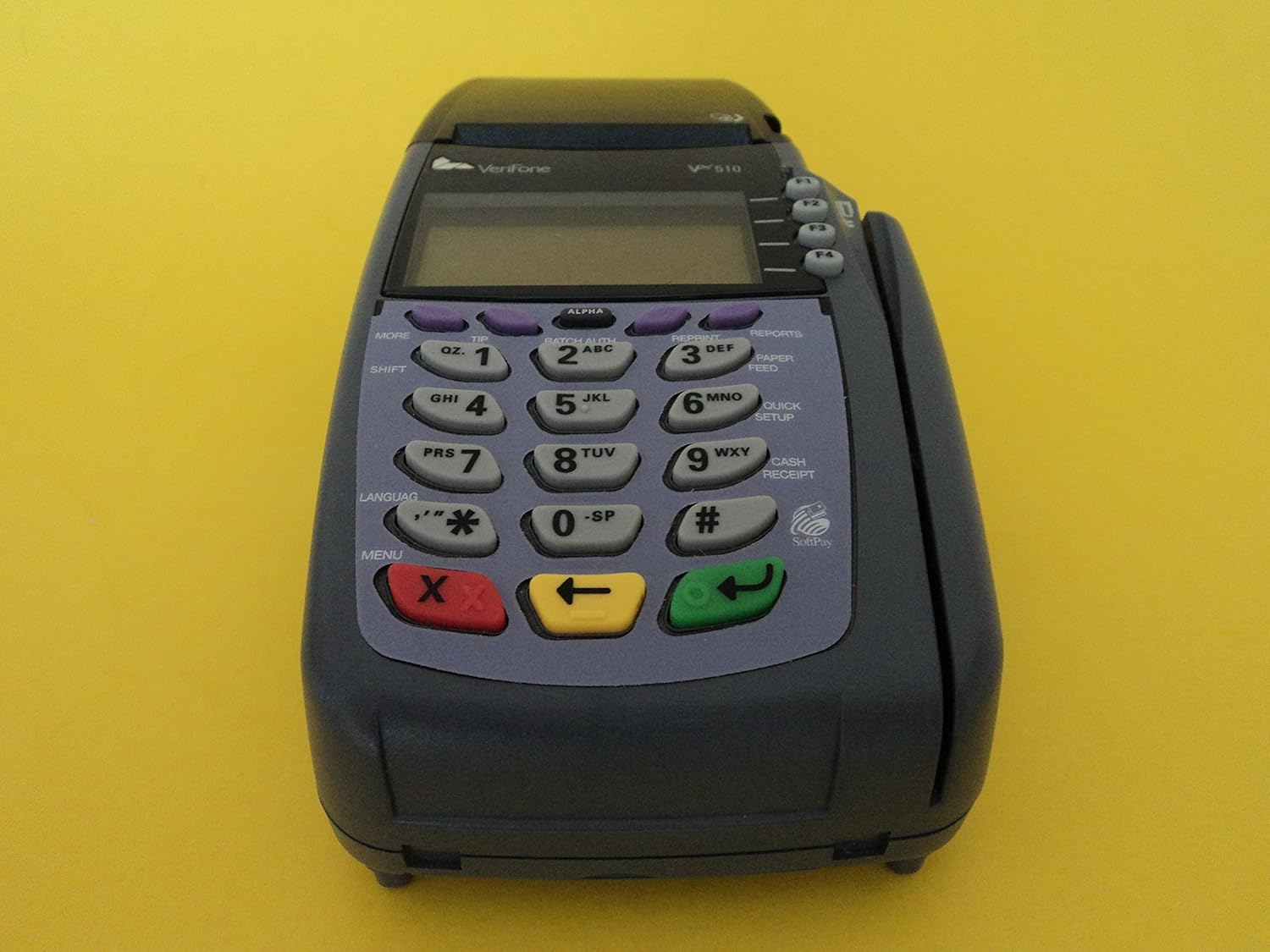
Figura 2: Quddiem view tat-terminal Verifone VX510, fejn jiġu enfasizzati t-tastiera u l-iskrin tal-wiri.

Figura 3: L-iskrin tad-displej tat-terminal li juri l-informazzjoni tal-bidu tal-istartjar, inkluż "VERIFONE VX510" u d-dettalji tad-drittijiet tal-awtur.

Figura 4: Wara view tal-Verifone VX510, li turi l-portijiet tal-komunikazzjoni, inklużi l-konnessjonijiet 10BaseT (Ethernet) u RS232.
Setup
Segwi dawn il-passi biex tissettja t-terminal Verifone VX510 tiegħek għall-ewwel darba.
- Iftaħ it-Terminal: Neħħi l-komponenti kollha mill-imballaġġ bir-reqqa. Kun żgur li għandek l-unità tat-terminal, l-adapter tal-enerġija, u l-korda tal-enerġija.
- Qabbad l-Enerġija:
- Qabbad il-korda tal-enerġija mal-adapter tal-enerġija.
- Ipplaggja l-konnettur tal-adapter tal-enerġija fil-port tad-dħul tal-enerġija fuq wara tat-terminal VX510.
- Ipplaggja l-korda tad-dawl fi żbokk elettriku standard.

Figura 5: It-terminal Verifone VX510 bl-adapter tal-enerġija konness u l-unità mixgħula, li juri d-data u l-ħin attwali.
- Qabbad il-Linja ta' Komunikazzjoni (Dial-Up): Għal konnettività dial-up, qabbad linja tat-telefon standard mill-ġakk tal-ħajt tiegħek mal-port "TELCO" fuq it-terminal.
- L-Ewwel Bidu: It-terminal jinxtegħel awtomatikament ladarba jkun imqabbad mal-provvista tal-enerġija. Id-displej juri sekwenzi tal-istartjar u mbagħad tipikament id-data u l-ħin jew skrin lest.
- Konfigurazzjoni: It-terminal tiegħek jista' jeħtieġ settings ta' konfigurazzjoni speċifiċi (eż., ID tal-merkant, ID tat-terminal, parametri tal-komunikazzjoni) mill-proċessur tal-ħlas tiegħek. Irreferi għad-dokumentazzjoni tal-proċessur tiegħek jew ikkuntattja l-appoġġ tagħhom għal dawn id-dettalji.
Istruzzjonijiet Operattivi
Din it-taqsima tiddeskrivi l-operazzjonijiet bażiċi għall-ipproċessar ta' tranżazzjonijiet fuq it-terminal Verifone VX510 tiegħek.
Ipproċessar ta' Bejgħ
- Mill-iskrin idle, agħfas il- BEJGĦ ċavetta (spiss F1 jew buttuna apposta).
- Daħħal l-ammont tat-tranżazzjoni billi tuża t-tastiera numerika. Agħfas DĦUL (ċavetta ħadra) biex tikkonferma.
- Għaddi l-karta tal-kreditu tal-klijent mill-qarrej tal-istrixxa manjetika fuq il-ġenb tat-terminal, jew daħħal il-karta biċ-ċippa EMV fl-islott fil-qiegħ.
- Segwi kwalunkwe struzzjonijiet fuq l-iskrin, bħad-dħul ta' ammont ta' tip jew PIN.
- It-terminal se jċempel lill-proċessur tal-ħlas. Ladarba jiġi approvat, jidher messaġġ ta' konferma.
- Ipprintja l-kopja tal-bejjiegħ u l-kopja tal-klijent tal-irċevuta.
Tħassir ta' Tranżazzjoni
- Mill-iskrin idle, agħfas il- VOID ċavetta (spiss F2 jew buttuna apposta).
- Daħħal in-numru tat-tranżazzjoni jew agħżel it-tranżazzjoni minn lista jekk tintalab.
- Ikkonferma l-vojt meta tintalab.
- Ipprintja l-irċevuta nulla.
Saldu tal-lott
Fi tmiem kull jum ta' negozju, trid tħallas il-lott tiegħek biex tirċievi l-fondi għat-tranżazzjonijiet ipproċessati.
- Mill-iskrin idle, agħfas il- ISSOLDI or LOTT ċavetta (spiss F3 jew buttuna apposta).
- Ikkonferma s-saldu tal-lott meta tintalab.
- It-terminal se jċempel u jittrażmetti l-lott.
- Ipprintja r-rapport tas-saldu tal-lott.
Manutenzjoni
Manutenzjoni xierqa tiżgura l-lonġevità u l-prestazzjoni ottimali tat-terminal Verifone VX510 tiegħek.
- Tindif: Uża drapp ratba u mingħajr ħelu ftit dampLaħlaħ bl-ilma jew b'tindif ħafif u mhux abrażiv biex timsaħ il-barra. Tużax kimiċi ħarxa jew materjali abrażivi. Evita li tisprejja likwidi direttament fuq it-terminal.
- Sostituzzjoni tar-Roll tal-Karta: Meta r-romblu tal-karta jkun baxx jew vojt, iftaħ l-għatu tal-istampatur, neħħi r-romblu l-qadim, u daħħal romblu tal-karta termali ġdid, waqt li tiżgura li l-karta tidħol sew. Agħlaq l-għatu sew.
- Ġestjoni tal-Kejbil: Kun żgur li l-kejbils kollha (tal-enerġija, tal-linja tat-telefon) huma konnessi sew u mhux imkemmxin jew imġebbda.
- Aġġornamenti tas-Software: Iċċekkja perjodikament mal-proċessur tal-ħlas tiegħek għal kwalunkwe aġġornament tas-softwer meħtieġ għat-terminal tiegħek.
Issolvi l-problemi
Din it-taqsima tindirizza kwistjonijiet komuni li tista' tiltaqa' magħhom bit-terminal Verifone VX510 tiegħek.
| Problema | Kawża Possibbli | Soluzzjoni |
|---|---|---|
| It-terminal ma jixgħelx. | L-adapter tal-enerġija mhux imqabbad; problema bis-sokit tal-enerġija. | Kun żgur li l-adapter tal-enerġija huwa konness sew mat-terminal u ma' sokit elettriku li jaħdem. Ittestja s-sokit b'apparat ieħor. |
| Messaġġ "COMM ERROR" jew "DIAL FAILED". | Linja tat-telefon skonnettjata; settings tad-dial-up mhux korretti. | Iċċekkja li l-linja tat-telefon hija konnessa sew mal-port "TELCO" u l-ġakk tal-ħajt. Ivverifika s-settings tad-dial-up mal-proċessur tal-ħlas tiegħek. |
| Il-karta mhux qed tinqara. | Karta mgħoddija ħażin; qarrej tal-karta maħmuġ; karta bil-ħsara. | Kun żgur li l-karta tittajjar bla xkiel u b'mod konsistenti. Naddaf il-qarrej tal-istrixxa manjetika b'karta tat-tindif tal-qarrej tal-karti. Ipprova karta oħra jekk possibbli. |
| Il-printer mhux qed jistampa. | Ebda karta; karta mdaħħla ħażin; printer imblukkat. | Iċċekkja u ibdel ir-romblu tal-karta. Kun żgur li l-karta qed tidħol sew u li l-għatu tal-istampatur huwa magħluq. Neħħi kwalunkwe karta mblukkata. |
Speċifikazzjonijiet
Speċifikazzjonijiet tekniċi ewlenin għat-Terminal tal-Karta ta' Kreditu Dial-Up Verifone VX510.
- Mudell: VX510 (M251-060-36-NAA)
- Manifattur: VeriFone
- Konnettività: Dial-Up (PSTN), RS232, 10BaseT (Ethernet - mudelli/konfigurazzjonijiet speċifiċi)
- Input ta' Enerġija: 9VDC, 4A (permezz tal-adapter tal-enerġija SMPS094000-09)
- Dimensjonijiet: Madwar 12 x 8 x 10 pulzieri (Dimensjonijiet tal-Prodott mid-dejta)
- Piż: Madwar 0.01 uqija (Piż tal-Oġġett mid-dejta - probabbilment żball tipografiku, il-piż attwali huwa ogħla)
- Wiri: LCD backlit
- Tastiera: Tastiera ergonomika b'19-il ċavetta
- Qarrejja tal-Kards: Qarrej tal-Istrixxi Manjetiċi, Qarrej tal-Kards Intelliġenti EMV
- Printer: Printer Termali Integrat
- Numru tas-serje Eżample: 213-141-334 (Eżample mill-immaġni tal-prodott)

Figura 6: It-tikketta tal-qiegħ tat-terminal Verifone VX510, li turi n-numru tal-mudell M251-060-36-NAA, il-klassifikazzjoni tal-prodott, u n-numru tas-serje (S/N 213-141-334).
Garanzija u Appoġġ
Għal informazzjoni dwar il-garanzija u appoġġ tekniku, jekk jogħġbok irreferi għad-dokumentazzjoni pprovduta mir-rivenditur jew mill-proċessur tal-ħlas tiegħek. Verifone jipprovdi appoġġ permezz ta' distributuri u fornituri ta' servizzi awtorizzati.
- Ikkuntattja lill-Proċessur tal-Ħlas tiegħek: Għal ħafna kwistjonijiet operattivi u ta' konfigurazzjoni, il-proċessur tal-ħlas tiegħek huwa l-punt ta' kuntatt primarju.
- Bejjiegħa Awtorizzati: Jekk xtrajt l-apparat mingħand bejjiegħ mill-ġdid, dawn jistgħu joffru appoġġ dirett jew jiffaċilitaw talbiet ta' garanzija.
- Verifone Websit: Żur il-Verifone uffiċjali websit għal informazzjoni ġenerali dwar il-prodott u biex issib ċentri ta' servizz awtorizzati.
Ask a question about this manual
Ask about setup, troubleshooting, compatibility, parts, safety, or missing instructions. Manuals+ will review the question and use this page’s manual context to help answer it.