
Introduzzjoni
The Innova 3030g Diagnostic Code Reader is designed to assist in diagnosing issues with OBD2 compliant vehicles. This device allows users to read and clear diagnostic trouble codes (DTCs) related to the 'Check Engine' light and Anti-lock Braking System (ABS) for various vehicle makes. It provides essential information for vehicle maintenance and repair.

Figure 1: Innova 3030g Diagnostic Code Reader device.
Setup
1. Spakkjar u Spezzjoni Inizjali
Carefully remove the Innova 3030g from its packaging. Inspect the device and its cable for any signs of damage. Ensure all components are present.
2. Connecting to the Vehicle
- Locate the vehicle's Data Link Connector (DLC), typically found under the dashboard on the driver's side.
- Kun żgur li l-ignition tal-vettura tkun fil-pożizzjoni OFF.
- Plug the Innova 3030g's OBD2 connector firmly into the vehicle's DLC.
- Turn the vehicle's ignition to the ON position (engine can be off). The device should power on automatically.
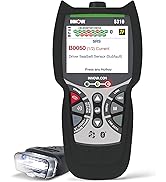
Figure 2: Connecting the diagnostic tool to a vehicle's OBD2 port.
3. Installazzjoni tas-Softwer (Mhux obbligatorja)
For advanced features, detailed code descriptions, or saving data, connect the device to a computer via its USB port. Download and install the necessary software from the official Innova website. Follow the on-screen instructions for installation and registration.
Istruzzjonijiet Operattivi
1. Navigazzjoni fil-Menu
The Innova 3030g features an all-in-one screen displaying vital information. Use the scroll-down button to navigate through menu options. Be mindful that there is typically only a scroll-down function, requiring careful presses to select the desired option.
2. Qari tal-Kodiċijiet ta' Problemi Dijanjostiċi (DTCs)
Once connected and powered on, the device will automatically scan for DTCs. The screen will display any detected 'Check Engine' light codes or ABS codes. Red, yellow, and green LEDs on the device indicate the emissions monitor status, providing a quick visual reference.

Figure 3: Device screen showing detected Diagnostic Trouble Codes (DTCs).
3. ErasinKodiċijiet g
To clear stored DTCs and turn off the 'Check Engine' or ABS light:
- Navigate to the 'Erase Codes' option in the menu.
- Press the designated erase button (often red) and follow the on-screen prompts.
- Ikkonferma t-tħassir meta tintalab.
Nota: In some cases, it may require multiple attempts to successfully erase codes. If the code persists after erasure, the underlying issue may still be present and require further diagnosis.
4. Live Data and Emissions Readiness
The 3030g automatically refreshes data every 30 seconds when connected to the vehicle. This allows for monitoring of live sensor data. The device also displays emissions monitor status, which is useful for verifying a vehicle's readiness for emissions testing.

Figure 4: Device screen showing Powertrain Live Data.
Manutenzjoni
1. Tindif tal-Apparat
Wipe the device with a soft, dry cloth. Do not use abrasive cleaners or solvents, as these can damage the screen or casing. Keep the OBD2 connector free of dirt and debris.
2. Ħażna
Store the Innova 3030g in a clean, dry environment, away from extreme temperatures and direct sunlight. Keep the cable neatly coiled to prevent damage.
Issolvi l-problemi
1. L-Apparat Ma Jixgħelx
- Ensure the OBD2 connector is securely plugged into the vehicle's DLC.
- Ivverifika li l-ignition tal-vettura tinsab fil-pożizzjoni ON.
- Check the vehicle's fuse for the OBD2 port (refer to your vehicle's owner's manual).
2. Unable to Read Codes
- Confirm the vehicle is OBD2 compliant (generally 1996 and newer).
- Ensure a stable connection to the vehicle.
- Try the device on a different OBD2 compliant vehicle to rule out a vehicle-specific issue.
3. Codes Do Not Erase
- Attempt to erase the codes multiple times as per operating instructions.
- Ensure the vehicle's ignition is ON and the engine is OFF during the erase procedure.
- If codes persist, the underlying fault may still be active. Address the vehicle's issue before attempting to clear codes again.
Speċifikazzjonijiet
| Mudell | 3030g |
| Piż tal-oġġett | 11.2 uqija |
| Dimensjonijiet tal-Prodott | 10 x 6.5 x 2 pulzieri |
| Voltage | 12 Volts |
| Daqs tal-Iskrin | 2.8 Pulzier |
| Sors tal-Enerġija | Corded Elettriku |
| Vetturi Appoġġjati | 1996 and newer foreign/domestic cars, light trucks, SUVs, and Hybrids (OBD2 compliant) |
| Karatteristiċi Ewlenin |
|
Informazzjoni dwar Garanzija
For detailed warranty information, please refer to the official Innova website or the warranty card included with your product packaging. Warranty terms and conditions may vary.
Appoġġ
For technical assistance, software updates, or additional product information, please visit the official Innova website or contact Innova customer support. The website may also offer detailed repair procedures and further resources.
Official Innova Websit: www.innova.com