
1. Introduzzjoni
The D-Link GO-SW-5G is a 5-Port Unmanaged Gigabit Desktop Switch designed for home and small office environments. This device provides a simple and cost-effective solution to expand your network connectivity, offering high-speed Gigabit Ethernet ports for reliable data transfer. It incorporates D-Link's Green Technology for energy efficiency, reduced heat generation, and extended product lifespan.
This switch is a plug-and-play device, requiring no complex configuration or software installation, making it easy to integrate into an existing network.
2. Kontenut tal-Pakkett
Jekk jogħġbok ivverifika li l-oġġetti kollha elenkati hawn taħt huma inklużi fil-pakkett tiegħek:
- D-Link GO-SW-5G 5-Port Gigabit Desktop Switch
- Adapter tal-Enerġija
- Gwida ta' Installazzjoni Mgħaġġla
Jekk xi oġġetti huma nieqsa jew bil-ħsara, jekk jogħġbok ikkuntattja lill-bejjiegħ tiegħek għall-għajnuna.
3. Istruzzjonijiet ta' Setup
The D-Link GO-SW-5G switch is designed for easy plug-and-play installation. Follow these steps to set up your device:
3.1. Qabbad l-Adapter tal-Enerġija
- Locate the power input port on the side of the D-Link GO-SW-5G switch.
- Qabbad l-adapter tal-enerġija pprovdut ma' dan il-port.
- Ipplaggja t-tarf l-ieħor tal-adapter tal-enerġija f'sokit elettriku standard.
- The power LED on the front of the switch will illuminate, indicating that the device is receiving power.

Figura 1: Ġenb view of the D-Link GO-SW-5G switch with the power input port.
3.2. Qabbad man-Netwerk Tiegħek
- Using a standard Ethernet cable (RJ45), connect one end to an available LAN port on your router (not your modem).
- Connect the other end of this Ethernet cable to any of the five available ports on the back of the D-Link GO-SW-5G switch.
- The corresponding LED on the front of the switch will light up, indicating an active connection.
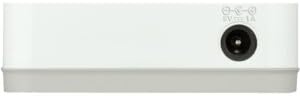
Figura 2: Wara view of the D-Link GO-SW-5G switch with five Ethernet ports.
3.3. Connect Network Devices
- Connect your network devices (e.g., computers, gaming consoles, network printers, smart TVs) to the remaining available Ethernet ports on the D-Link GO-SW-5G switch using Ethernet cables.
- Each connected device will have its corresponding LED on the front of the switch illuminate, confirming a successful connection.

Figura 3: Quddiem view of the D-Link GO-SW-5G switch showing active port LEDs.
4. Istruzzjonijiet Operattivi
The D-Link GO-SW-5G is an unmanaged switch, meaning it operates automatically without requiring user configuration. Once connected as described in the Setup section, it will begin forwarding network traffic between connected devices.
- Negozjar Awtomatiku: The switch automatically detects the network speed (10/100/1000 Mbps) and duplex mode (half/full) of connected devices and adjusts accordingly.
- MDI/MDIX Awtomatiku: All ports support automatic MDI/MDIX crossover, eliminating the need for crossover cables when connecting to other switches or hubs.
- Indikaturi LED: Each port has an LED indicator on the front panel. A lit LED indicates an active link, and blinking indicates network activity.
5. Manutenzjoni
To ensure optimal performance and longevity of your D-Link GO-SW-5G switch, consider the following maintenance guidelines:
- Pjazzament: Poġġi s-swiċċ f'post frisk u niexef 'il bogħod mix-xemx diretta, sorsi ta' sħana, u umdità eċċessiva. Kun żgur li jkun hemm ventilazzjoni adegwata madwar l-apparat.
- Tindif: Use a soft, dry cloth to clean the exterior of the switch. Avoid using liquid or aerosol cleaners, as they may damage the device.
- Ġestjoni tal-Kejbil: Żomm il-kejbils tal-Ethernet organizzati pulit biex tevita t-tħabbil u l-iskonnessjonijiet aċċidentali.
- Ċiklu tal-Enerġija: If you experience network issues, a simple power cycle (unplugging the power adapter for 10 seconds and then plugging it back in) can often resolve minor problems.
6 Issolvi l-problemi
If you encounter issues with your D-Link GO-SW-5G switch, refer to the following common troubleshooting steps:
- L-ebda LED tal-Enerġija:
- Kun żgur li l-adapter tal-enerġija huwa konness sew kemm mas-swiċċ kif ukoll ma' sokit elettriku li jaħdem.
- Ivverifika li s-sokit elettriku jaħdem billi tqabbad apparat ieħor.
- No Link/Activity LED for a Connected Device:
- Iċċekkja li l-kejbil tal-Ethernet huwa mdaħħal sew kemm fil-port tas-swiċċ kif ukoll fl-apparat tan-netwerk.
- Ipprova kejbil Ethernet differenti biex teskludi kejbil difettuż.
- Kun żgur li l-apparat imqabbad huwa mixgħul u li l-adapter tan-netwerk tiegħu qed jaħdem sew.
- Ipprova qabbad l-apparat ma 'port differenti fuq is-swiċċ.
- Veloċità baxxa tan-Netwerk:
- Verify that all connected devices and cables support Gigabit Ethernet (1000 Mbps) for optimal performance. The switch will operate at the lowest common speed.
- Ensure your router and internet service provider (ISP) plan support the desired speeds.
- Perform a power cycle on the switch and your router.
- Konnettività intermittenti:
- Iċċekkja għal konnessjonijiet tal-kejbil maħlula.
- Ensure the switch is not overheating; provide adequate ventilation.
- Test with different Ethernet cables.
7. Speċifikazzjonijiet
| Brand | D-Link |
| Numru tal-Mudell | GO-SW-5G/B |
| Numru ta' Portijiet | 5 |
| Tip ta' Swiċċ | Mhux immexxi |
| Rata ta' Trasferiment tad-Data | 1 Gigabits Per Second (10/100/1000 Mbps) |
| Interface | RJ45 |
| Kulur | Abjad |
| Piż tal-oġġett | 0.22 Liri |
| Voltage | 100-240 volt |
| Apparati Kompatibbli | PC, Mac, and other Ethernet-enabled devices |
| Tessili Qlib | 10 Gbps |
| UPC | 790069365669 |
8. Garanzija u Appoġġ
Garanzija Limitata: The D-Link GO-SW-5G switch comes with a 3-year limited warranty. For detailed terms and conditions, please refer to the warranty information included in your package or visit the official D-Link websit.
Appoġġ Tekniku: For technical assistance, product registration, or to download the latest firmware and documentation, please visit the Appoġġ D-Link Websit jew ikkuntattja lis-servizz tal-klijenti ta' D-Link.