
Introduzzjoni
The Jabra Music Street2 Bluetooth Stereo Headset is designed to provide high-quality audio and hands-free communication. This manual provides essential information for the proper use, maintenance, and troubleshooting of your device. Please read it carefully before use.
Setup
1. Iċċarġjar tal-Headset
Before first use, fully charge the headset. Connect the micro-USB charging cable to the charging port on the headset and the other end to a USB power source.
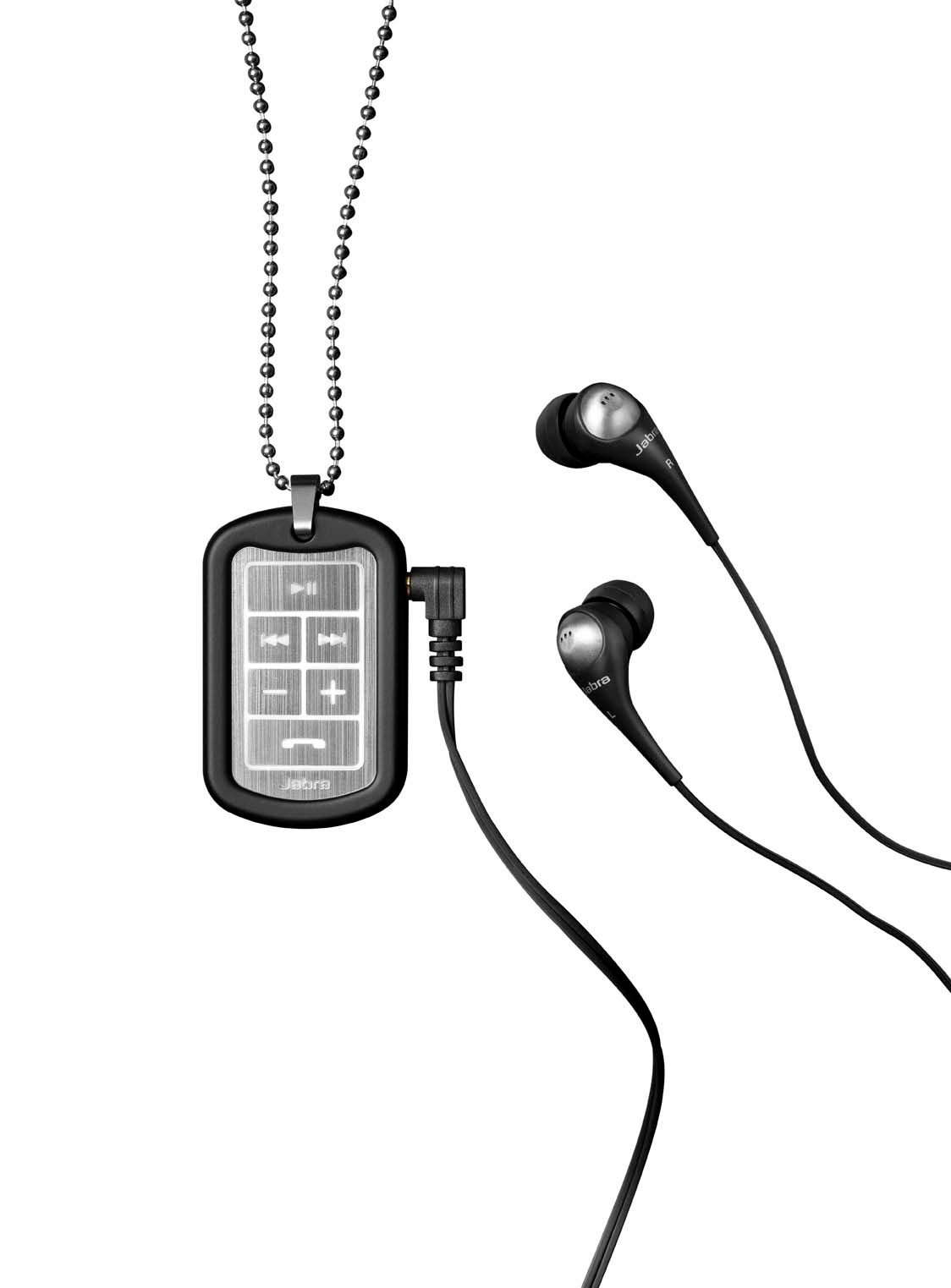
Image: The Jabra Music Street2 headset, highlighting the micro-USB charging port located on the side of the control unit.
- Ċarġ sħiħ tipikament jieħu madwar 2 sigħat.
- L-indikatur LED se juri l-istatus tal-iċċarġjar (eż., aħmar għall-iċċarġjar, blu għal iċċarġjat kompletament).
2. Tqabbil ma' Apparat Bluetooth
- Kun żgur li l-widna hija mitfija.
- Press and hold the Multi-function button (usually the play/pause button) for approximately 5-7 seconds until the LED indicator flashes blue rapidly. This indicates pairing mode.
- Fuq it-tagħmir tiegħek li jaħdem bil-Bluetooth (smartphone, tablet, eċċ.), mur fis-settings tal-Bluetooth u attiva l-Bluetooth.
- Fittex għal available devices. "Jabra Street2" should appear in the list.
- Select "Jabra Street2" to connect. If prompted for a passcode, enter "0000" (four zeros).
- Ladarba jkun imqabbad b'suċċess, l-indikatur LED se jteptep blu bil-mod.
The headset can remember multiple paired devices but can only be connected to one at a time.
Istruzzjonijiet Operattivi
Qawwa mixgħul/mitfi
- Qawwa Mixgħul: Press and hold the Multi-function button until the LED flashes blue.
- Itfi: Press and hold the Multi-function button until the LED flashes red and then turns off.
Kontroll tal-Mużika
- Play/Pawsa: Agħfas il-buttuna b'diversi funzjonijiet darba.
- Track li jmiss: Press the "Next Track" button (usually marked with a forward arrow).
- Track preċedenti: Press the "Previous Track" button (usually marked with a backward arrow).
- Volum 'il fuq: Agħfas il-buttuna "+".
- Volum 'l isfel: Agħfas il-buttuna "-".
Ġestjoni tas-Sejħiet
- Irrispondi Sejħa: Agħfas il-buttuna b'diversi funzjonijiet darba.
- Tmiem Sejħa: Agħfas il-buttuna Multi-funzjoni darba waqt telefonata.
- Irrifjuta Sejħa: Agħfas u żomm il-buttuna Multi-funzjoni għal 2-il sekonda.
- Isemmi mill-ġdid l-Aħħar Numru: Double-press the Multi-function button when not on a call.
- Iddajljar bil-Vuċi: Press the Multi-function button once when not on a call (if supported by your phone).
The headset automatically switches between music and calls.
Manutenzjoni
- Keep the headset dry. Moisture can damage the electronic circuits.
- Avoid extreme temperatures. High temperatures can shorten the life of electronic devices, damage batteries, and warp or melt certain plastics.
- Do not attempt to open the headset. Unauthorized modifications can damage the unit and void your warranty.
- Clean the headset with a soft, dry cloth. Do not use harsh chemicals or detergents.
- Aħżen il-headset f'post frisk u niexef meta ma tkunx qed tużah għal perjodi twal.
Issolvi l-problemi
Ebda Qawwa
- Kun żgur li l-headset huwa ċċarġjat kompletament. Qabbadha ma' sors tal-enerġija u ċċekkja l-indikatur tal-iċċarġjar.
Ma jistax Jingħaqad mal-Apparat
- Make sure the headset is in pairing mode (LED flashing blue rapidly).
- Ensure Bluetooth is enabled on your device and it is within range (typically 10 meters or 33 feet).
- Try turning off and on both the headset and your Bluetooth device.
- If previously paired, try deleting "Jabra Street2" from your device's Bluetooth list and re-pairing.
Ebda Ħsejjes jew Kwalità Fqira tal-Ħoss
- Iċċekkja l-livelli tal-volum kemm fuq il-headset kif ukoll fuq l-apparat konness tiegħek.
- Kun żgur li l-headset huwa konness sew mat-tagħmir tiegħek.
- Ersaq eqreb lejn l-apparat tiegħek biex tevita interferenza.
- Ensure the ear buds are correctly inserted and fit snugly to block external noise.
Calls Not Switching Automatically
- Verify that the headset is the active audio device for calls on your phone's Bluetooth settings.
- Some phone models may require manual selection of the audio output during a call.
Speċifikazzjonijiet
| Isem tal-Mudell | Jabra Music Street2 |
| Verżjoni Bluetooth | 3.0 + EDR |
| Firxa Wireless | Sa 10 metri (33 pied) |
| Ħin tat-Tkellem | Sa 8 sigħat |
| Ħin ta' Standby | Sa 9.5 jum |
| Ħin tal-Iċċarġjar | Madwar sagħtejn |
| Konnettività | Bluetooth, 3.5 mm Jack (for wired connection if applicable) |
| Karatteristiċi | Virtual surround sound, power bass, noise-blocking ear buds, automatic music/call switching |
Garanzija u Appoġġ
Jabra products are covered by a limited warranty. For specific warranty terms and conditions, please refer to the warranty card included with your product or visit the official Jabra websit.
For technical support, frequently asked questions, or to download the latest software/firmware updates, please visit the official Jabra support page:
You may also contact Jabra customer service directly for assistance.