
Prodott Overview
The Targus Presenter AMP09AP is a multimedia presentation remote designed for ease of use during presentations. It features a laser pointer for highlighting content, backlit buttons for low-light environments, and an ergonomic design for comfortable handling. This remote also offers cursor control for remote program access and volume adjustment for media. Its wireless technology provides a range of up to 50 feet, and the USB receiver conveniently stores within the presenter.
Gwida ta' Setup
1. Spakkjar
Carefully remove the Targus Presenter AMP09AP and its components from the packaging. The box should contain:
- One Targus Presentation Remote
- One USB Receiver
2. Installazzjoni tal-batterija
The Targus Presenter AMP09AP requires batteries (not included). Use alkaline batteries for optimal performance.
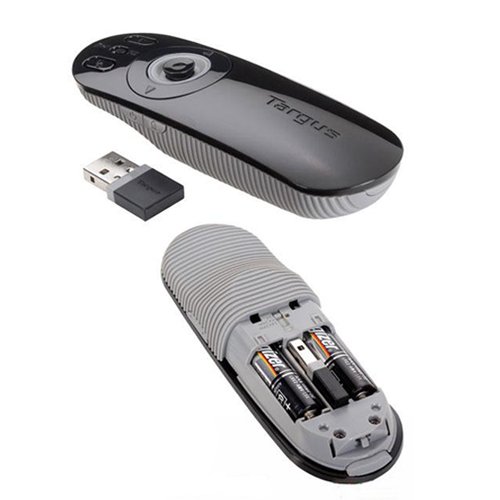
- Locate the battery compartment on the back of the presenter.
- Iftaħ l-għatu tal-kompartiment tal-batterija.
- Daħħal il-batteriji meħtieġa, waqt li tiżgura l-polarità korretta (+/-).
- Agħlaq l-għatu tal-kompartiment tal-batterija sew.
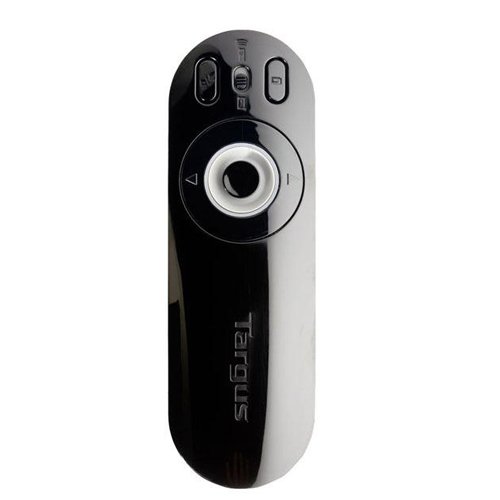
Image: The Targus Presenter AMP09AP, its USB receiver, and the open battery compartment revealing two AAA batteries.
3. Konnessjoni tar-Riċevitur USB
- Remove the USB receiver from its storage slot within the presenter.
- Ipplaggja r-riċevitur USB f'port USB disponibbli fuq il-kompjuter tiegħek.
- The computer should automatically detect and install the necessary drivers.
The remote is now ready for use.
Istruzzjonijiet Operattivi
Modalità Preżentazzjoni
The presenter's simplistic layout allows for easy navigation during presentations.
Immaġni: Fuq view of the Targus Presenter AMP09AP, highlighting the laser pointer button, slide navigation buttons, and the mode switch.
- Pointer tal-Lejżer: Press and hold the dedicated laser button to activate the laser pointer for highlighting content.
- Next Slide: Press the forward arrow button to advance to the next slide.
- Previous Slide: Press the backward arrow button to return to the previous slide.
- Buttuni backlit: Buttons are backlit for visibility in dimly lit rooms.
Cursor Control Mode
The presenter features cursor control for remote access to programs and media functions.
- Activating Cursor Control: Use the mode switch (located at the top right of the remote) to toggle between presentation and cursor control modes.
- Moving Cursor: Use the central circular button (joystick/directional pad) to move the mouse cursor on the screen.
- tikklikkja: Press the center of the circular button to perform a left-click action.
- Kontroll tal-Volum: Adjust the volume for music and videos remotely using the designated volume controls (if available on your specific model).
Firxa Wireless
The wireless technology allows operation up to 50 feet (approximately 15 meters) from the computer, providing flexibility during presentations.
Manutenzjoni
- Tindif: Wipe the presenter with a soft, dry cloth. Avoid using harsh chemicals or abrasive cleaners.
- Sostituzzjoni tal-batterija: Replace batteries when the indicator light (if present) signals low power, or when performance degrades. Ensure correct polarity during replacement.
- Ħażna: When not in use, store the USB receiver inside the presenter's dedicated slot to prevent loss. Store the presenter in a cool, dry place.
Issolvi l-problemi
| Problema | Kawża Possibbli | Soluzzjoni |
|---|---|---|
| Il-preżentatur ma jirrispondix | Batteriji baxxi jew mejta | Ibdel il-batteriji b'batteriji alkalini ġodda. |
| Il-preżentatur ma jirrispondix | Ir-riċevitur USB mhux imqabbad sew | Kun żgur li r-riċevitur tal-USB huwa mdaħħal sew f'port USB li jaħdem fuq il-kompjuter tiegħek. Ipprova port USB ieħor. |
| Il-preżentatur ma jirrispondix | Barra mill-firxa | Move closer to the computer (within 50 feet / 15 meters). |
| Laser pointer mhux qed jaħdem | Batterija baxxa | Ibdel il-batteriji. |
| Cursor control erratic or not working | Interference or mode not activated | Ensure no obstructions between presenter and receiver. Check if cursor control mode is active using the mode switch. |
Speċifikazzjonijiet
| Karatteristika | Dettall |
|---|---|
| Brand | Targus |
| Numru tal-Mudell | AMP09AP-51 |
| Kulur | Iswed u Griż |
| Dimensjonijiet (LxWxH) | 12.1 x 3.8 x 2.5 ċm |
| Piż tal-oġġett | 140 g |
| Teknoloġija tal-Konnettività | Wireless |
| Firxa Wireless | Sa 50 pied (madwar 15 metri) |
| Tip ta 'batterija | Alkalin (mhux inkluż) |
| Komponenti Inklużi | Presentation Remote, USB Receiver |
| Karatteristiċi Speċjali | Ergonomic design, Laser pointer, Cursor control, Backlit buttons |
Garanzija u Appoġġ
For warranty information and technical support, please refer to the documentation provided with your purchase or visit the official Targus websit. Żomm il-prova tax-xiri tiegħek għal talbiet ta' garanzija.