
1. Setup
1.1 Tneħħija tal-kaxxa u Spezzjoni Inizjali
Carefully remove all components from the packaging. Verify that all items listed in the 'What's in the box' section are present and undamaged.
- ASUS 32GB Transformer Pad TF300T 10.1-Inch Tablet
- Provvista tal-Enerġija
- Karta ta' Garanzija ta' Sena

Image: The ASUS Transformer Pad TF300T tablet alongside its retail packaging.
1.2 Iċċarġjar tal-Apparat
Before first use, connect the tablet to the power supply and charge it fully. The charging port is located on the bottom edge of the tablet. A full charge ensures optimal performance and battery calibration.
1.3 Tixgħel/Jitfi
- Biex Tixgħel: Press and hold the power button, located on the top edge of the tablet, until the ASUS logo appears on the screen.
- Biex Tifi: Press and hold the power button until a menu appears. Select 'Power off' and confirm.
- Biex terġa' tibda: Mill-menù tal-enerġija, agħżel 'Ibda mill-ġdid'.
1.4 Wizard tas-Setup Inizjali
Malli tixgħelha għall-ewwel darba, it-tablet jiggwidak permezz ta' proċess inizjali ta' setup. Dan jinkludi:
- Għażla tal-Lingwa: Agħżel il-lingwa ppreferuta tiegħek.
- Konnessjoni Wi-Fi: Connect to an available Wi-Fi network to enable internet access.
- Setup tal-Kont Google: Sign in with an existing Google account or create a new one. This is essential for accessing the Google Play Store and other Google services.
- Issettjar tad-Data u l-Ħin: Configure the correct date and time.
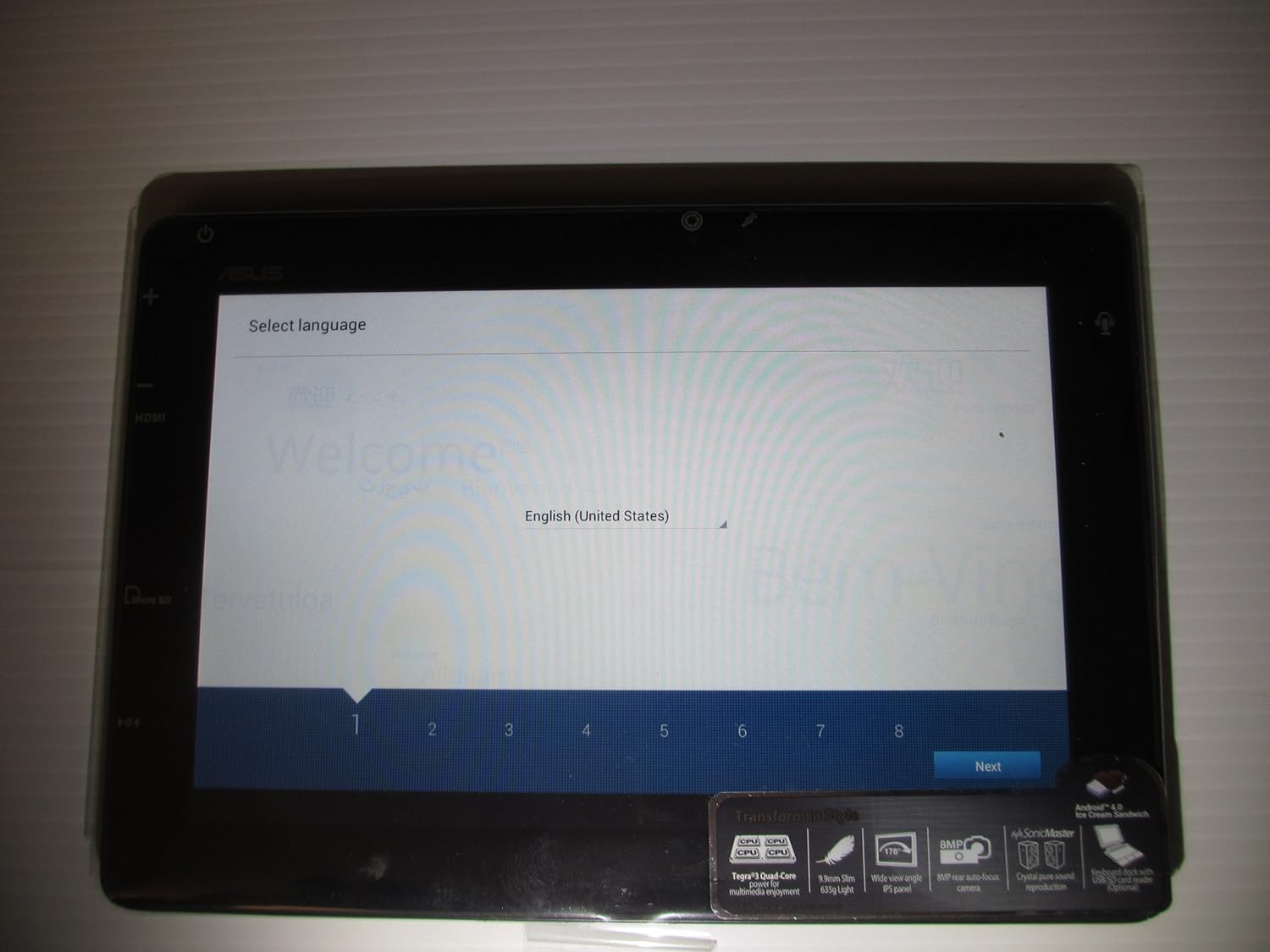
Image: The ASUS Transformer Pad TF300T screen showing the 'Select Language' prompt, with 'English (United States)' highlighted.
2. Istruzzjonijiet Operattivi
2.1 Basic Navigation and Touchscreen Gestures
The ASUS Transformer Pad TF300T utilizes a multi-touch display for interaction. Common gestures include:
- Tektek: Agħżel oġġett jew iftaħ applikazzjoni.
- Tektek u Żomm: Aċċessa l-menus kuntestwali jew iċċaqlaq l-ikoni.
- Swipe: Navigate through home screens, lists, or web paġni.
- Agħfas biex Tiżżumja: Enlarge or reduce content size (e.g., photos, web paġni).
2.2 Android 4.0 (Ice Cream Sandwich) Overview
The tablet runs on Android 4.0, providing a user-friendly interface. Key features include:
- Skrins tad-dar: Customizable screens for app shortcuts and widgets.
- Notifications Bar: Located at the top, displays alerts and quick settings.
- App Drawer: Access to all installed applications.
- Apps riċenti: Button to quickly switch between recently used applications.
2.3 Konnettività
The TF300T supports various connectivity options:
- Wi-Fi (802.11bgn): Connect to wireless networks for internet access. Configure via Settings > Wi-Fi.
- Bluetooth 3.0: Pair with compatible devices such as headphones, speakers, or keyboards. Configure via Settings > Bluetooth.
- GPS: Integrated Global Positioning System for location services and navigation.
2.4 Portijiet u Slots
The tablet features several ports for expanded functionality:
- Mikro HDMI: Qabbad ma' displays jew televiżjonijiet esterni.
- Docking Port: For connecting to the optional keyboard dock.
- 3.5mm Headphone/Microphone Jack: Għall-ħruġ u d-dħul tal-awdjo.
- Slott tal-Karta Mikro SD: Expand storage capacity with a Micro SD card.
2.5 Użu tal-Kamera
The TF300T is equipped with two cameras:
- Front Camera (1.2 MP): Suitable for video calls and self-portraits.
- Rear Camera (8 MP): Għall-qbid ta' ritratti u vidjows.
Access the camera application from the home screen or app drawer to take pictures or record videos.
2.6 Optional Keyboard Dock
The ASUS Transformer Pad TF300T is compatible with an optional keyboard dock (sold separately). This dock provides:
- Tastiera Fiżika: For enhanced typing experience.
- Additional Battery: Extends the tablet's battery life.
- Port USB: Għall-konnessjoni ta' apparati USB.
- Slot tal-Kard SD: For additional storage expansion.

Immaġni: Close-up view of the ASUS Transformer Pad TF300T, highlighting key features such as the NVIDIA Tegra 3 processor, IPS panel, 8MP camera, SonicMaster audio, and Android 4.0 Ice Cream Sandwich operating system.
3. Manutenzjoni
3.1 Tindif tal-Apparat
- Skrin: Uża drapp artab u mingħajr suf, ftit imxarrabampImlaħlaħ bl-ilma jew b'tindif tal-iskrin, biex timsaħ bil-mod id-displej. Evita kimiċi ħarxa.
- Korp: Wipe the tablet's body with a soft, dry cloth. Keep liquids away from ports and openings.
3.2 Aġġornamenti tas-Software
Regularly check for and install software updates to ensure optimal performance, security, and access to new features. Updates can typically be found in Settings > About tablet > System updates.
3.3 Ġestjoni tal-Ħażna
The tablet comes with 32GB of internal storage. To manage storage effectively:
- Delete Unused Apps: Uninstall applications you no longer need.
- Clear Cache: Regularly clear the cache of applications.
- Use Micro SD Card: Store photos, videos, and documents on an external Micro SD card to free up internal space.
4 Issolvi l-problemi
4.1 Kwistjonijiet Komuni u Soluzzjonijiet
| Ħruġ | Soluzzjoni Possibbli |
|---|---|
| Tablet is unresponsive or frozen | Agħfas u żomm il-buttuna tal-qawwa għal 10-15-il sekonda biex terġa' tibda. |
| Kwistjonijiet ta 'konnessjoni Wi-Fi | Ensure Wi-Fi is enabled in settings. Restart the tablet and your Wi-Fi router. Forget and reconnect to the network. |
| Slow performance or lag | Close unused applications. Clear app caches. Check for system updates. Consider a factory reset if issues persist. |
| Il-batterija tiskula malajr | Reduce screen brightness. Disable Wi-Fi/Bluetooth/GPS when not in use. Close background apps. Check battery usage in settings to identify power-hungry apps. |
| Apps crashing or not installing | Ensure sufficient storage space. Clear Google Play Store cache. Restart the tablet. |
4.2 Irrisettja l-Fabbrika
If persistent issues occur, a factory reset can restore the tablet to its original state. Warning: This will erase all data on the tablet. Back up important data before proceeding.
- Go to Settings > Backup & reset.
- Select 'Factory data reset'.
- Confirm the action. The tablet will restart and erase all data.
5. Speċifikazzjonijiet
Detailed technical specifications for the ASUS Transformer Pad TF300T-B1-BL:
| Karatteristika | Speċifikazzjoni |
|---|---|
| Brand | ASUS |
| Isem tal-Mudell | Transformer Pad |
| Numru tal-Mudell | TF300T-B1-BL |
| Sistema Operattiva | Android 4.0 (Sandwich tal-Ġelat) |
| Proċessur | NVIDIA Tegra 3 Quad-Core (1.2 GHz) |
| Koproċessur tal-Grafika | Nvidia Tegra 3 |
| Daqs tal-Iskrin | 10.1 Pulzier |
| Riżoluzzjoni tal-Wiri | 1280 x 800 Pixels (WXGA IPS Touch Panel) |
| Memorja RAM | 1 GB DDR3 |
| Kapaċità tal-Ħżin | Memorja Flash ta' 32 GB (SSD) |
| Ħażna espansibbli | Slot tal-Kard Mikro SD |
| Kamera ta' Quddiem | 1.2 MP |
| Kamera ta' wara | 8 MP |
| Konnettività bla fili | 802.11bgn Wi-Fi, Bluetooth 3.0, GPS |
| Portijiet | 1x Micro HDMI, 1x Docking, 1x 3.5mm Headphone/Microphone |
| Ħajja tal-batterija | Up to 10 Hours (22W/h Lithium Polymer) |
| Sensuri | G-Sensor, E-Compass, Light Sensor, Gyroscope |
| Piż tal-oġġett | 1.4 Liri |
| UPC | 886227185054 |
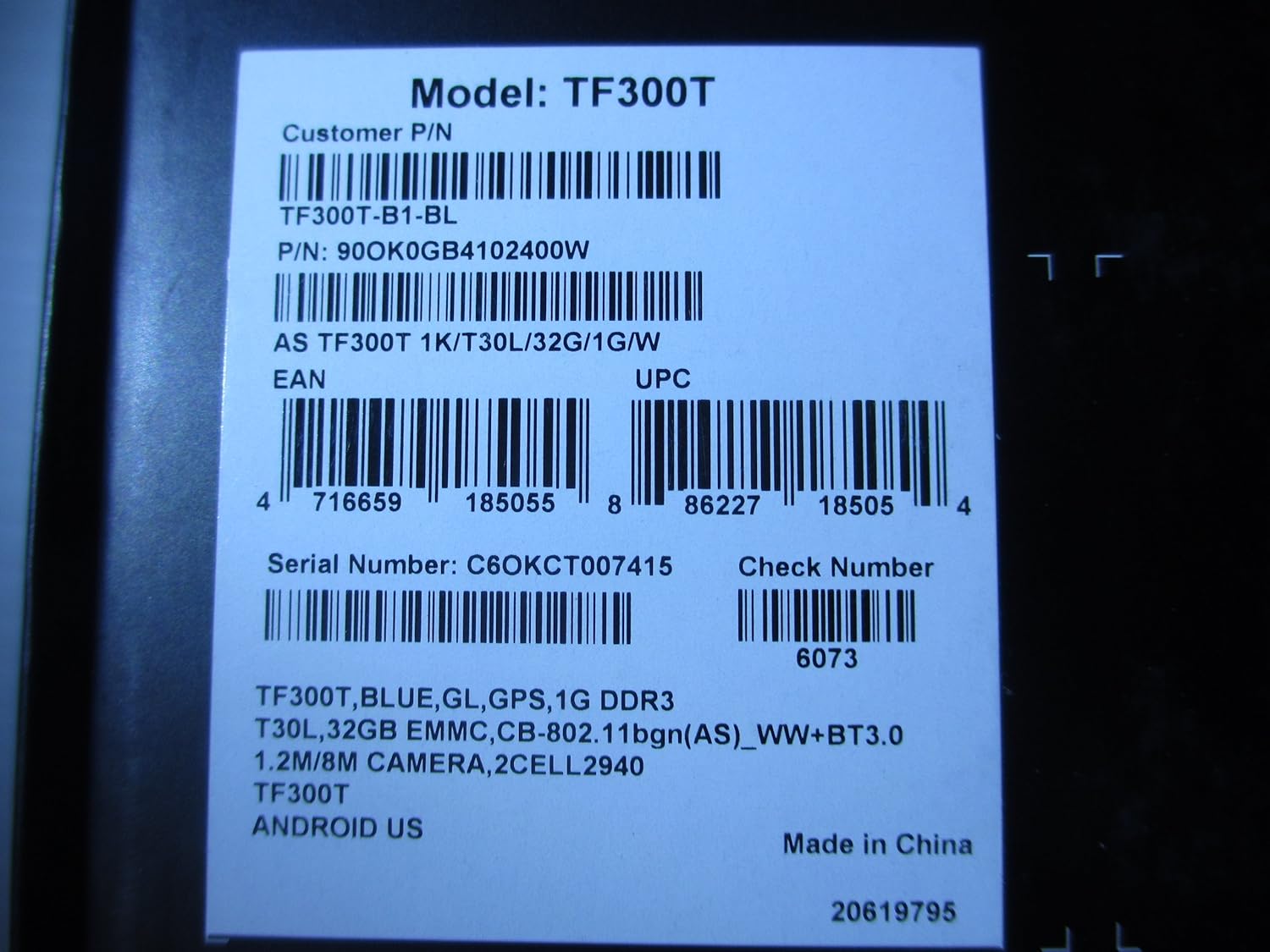
Image: A product label displaying the model number TF300T, part number TF300T-B1-BL, serial number C6OKCT007415, and UPC 886227185054.
6. Garanzija u Appoġġ
6.1 Informazzjoni dwar Garanzija
The ASUS Transformer Pad TF300T comes with a 1-Year North American Warranty. This warranty covers manufacturing defects under normal use conditions. Please refer to the warranty card included in your product packaging for full terms and conditions.
6.2 Appoġġ għall-Klijent
Għal assistenza teknika, soluzzjoni ta' sitwazzjonijiet lil hinn minn dan il-manwal, jew talbiet ta' garanzija, jekk jogħġbok ikkuntattja l-appoġġ għall-klijenti tal-ASUS. Tista' ssib informazzjoni ta' kuntatt u riżorsi addizzjonali fuq il-websajt uffiċjali tal-ASUS. websit:
- Żur il- Ħanut tal-ASUS fuq Amazon għal informazzjoni dwar il-prodott.
- Refer to the official ASUS support website for service centers and contact details.