
Introduzzjoni
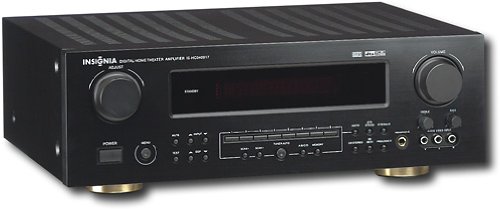
This manual provides essential instructions for the setup, operation, maintenance, and troubleshooting of your Insignia 6.1-Channel 600W Digital Home Theater Receiver, model IS-HC040917. Please read this manual thoroughly before using the receiver to ensure proper and safe operation.
Istruzzjonijiet Importanti dwar is-Sigurtà
- Timblokkax il-fetħiet tal-ventilazzjoni. Installa skont l-istruzzjonijiet tal-manifattur.
- Tinstallax ħdejn xi sorsi tas-sħana bħal radjaturi, reġistri tas-sħana, stufi, jew apparat ieħor (inkluż amplifiers) li jipproduċu sħana.
- Ipproteġi l-korda tad-dawl milli timxi fuqha jew maqrusa, partikolarment fil-plakek, ir-reċipjenti tal-konvenjenza, u l-punt fejn joħorġu mill-apparat.
- Uża biss aċċessorji/aċċessorji speċifikati mill-manifattur.
- Aqla’ dan l-apparat waqt maltempati tas-sajjetti jew meta ma jintużax għal perjodi twal ta’ żmien.
- Irreferi l-manutenzjoni kollha lil persunal tas-servizz kwalifikat. Il-manutenzjoni hija meħtieġa meta l-apparat ikun sar xi ħsara.
Gwida ta' Setup
1. Spakkjar
Carefully remove the receiver and all accessories from the packaging. Ensure all components are present:
- Insignia IS-HC040917 Receiver
- Kontroll mill-bogħod
- AM Loop Antenna
- Antenna tal-Wajer FM
- Manwal għall-Utent (dan id-dokument)
2. Konnessjoni tal-Ispeakers
The IS-HC040917 receiver supports a 6.1-channel speaker configuration. Connect your speakers to the corresponding terminals on the rear panel. Ensure correct polarity (+ to + and - to -) for each speaker.
- Quddiem Xellug/Lemin: Għall-ħoss stereo prinċipali.
- Ċentru: For dialogue.
- Surround Left/Right: For ambient sound effects.
- Madwar Dahar: For additional rear channel effects in 6.1 setups.
- Subwoofer (Pre-out): Connect to a powered subwoofer's LFE input.
Note: The receiver is designed for speakers with an impedance of 8 ohms.
3. Connecting Audio/Video Sources
Connect your external devices (e.g., DVD player, Blu-ray player, game console, cable box) to the appropriate input jacks on the receiver.
- HDMI: Use HDMI cables for high-definition audio and video signals. The receiver has 3 HDMI input ports.
- Digital Audio (Optical/Coaxial): For digital audio from devices like CD players or set-top boxes.
- Analog Audio (RCA): For standard stereo audio connections from devices like VCRs or older CD players.
- Vidjo S: For video signals from compatible devices.
4. Konnessjoni tal-antenna
Connect the supplied AM loop antenna and FM wire antenna to their respective terminals on the rear panel for radio reception.
5. Konnessjoni tal-Enerġija
Once all audio/video and speaker connections are made, plug the receiver's power cord into a standard AC wall outlet.
Immaġni: Rear panel of the Insignia IS-HC040917 receiver, showing various input and output connections for speakers, audio/video sources (HDMI, RCA, S-Video, Digital), and antenna terminals. This diagram is crucial for correctly wiring the home theater system.
Istruzzjonijiet Operattivi
1. Power On/Off
Agħfas il- QAWWA buttuna fuq il-pannell ta' quddiem jew fuq il-kontroll remot biex tixgħel jew titfi r-riċevitur.
2. Għażla tal-Input
Uża l- SELEKTUR TAL-INPUT knob/buttons on the front panel or the remote control to choose the desired audio/video source (e.g., HDMI 1, DVD, CD, Tuner).
3. Kontroll tal-Volum
Aġġusta l-volum ewlieni billi tuża l-buttuna l-kbira VOLUM pum fuq il-pannell ta' quddiem jew il- VOLUM +/- buttuni fuq il-kontroll remot.
4. Modi tal-Awdjo
The receiver supports various audio modes, including 6.1-channel surround sound. Use the MODALITÀ or DSP buttons on the remote to cycle through available sound modes (e.g., Stereo, Dolby Digital, DTS, Pro Logic).
5. Tuner Operation (AM/FM Radio)
Select the "Tuner" input. Use the BANDA button to switch between AM and FM. Use the INTONA +/- buttons to manually tune to stations or PRESET +/- to select stored stations. Refer to the remote control for specific tuner functions.
Manutenzjoni
1. Tindif
Wipe the exterior of the receiver with a soft, dry cloth. Do not use liquid cleaners or aerosol sprays, as they may damage the finish or internal components. Ensure the unit is unplugged before cleaning.
2. Ventilazzjoni
Ensure that the ventilation openings on the top and sides of the receiver are not blocked. Proper airflow is essential to prevent overheating and ensure long-term performance.
3. Ġestjoni tal-Kejbil
Periodically check all cable connections to ensure they are secure. Loose connections can lead to poor audio or video quality.
Issolvi l-problemi
| Problema | Kawża Possibbli | Soluzzjoni |
|---|---|---|
| Ebda qawwa | Il-korda tal-enerġija skonnettjata; is-sokit tal-enerġija mhux attiv. | Iċċekkja l-konnessjoni tal-korda tal-enerġija; ipprova sokit differenti. |
| L-ebda ħoss | Incorrect input selected; speaker wires loose; volume too low; mute activated. | Select correct input; check speaker connections; increase volume; deactivate mute. |
| Ebda video | Incorrect input selected; video cables loose or incorrect. | Select correct input; check video cable connections (HDMI, S-Video, RCA). |
| Il-kontroll mill-bogħod ma jaħdimx | Batteries depleted; obstruction between remote and receiver; incorrect remote mode. | Replace batteries; remove obstructions; ensure remote is in the correct operating mode. |
Speċifikazzjonijiet
- Mudell: IS-HC040917
- Ditta: INSINJJA
- Qawwa tal-Ħruġ: 600 Watts
- Numru ta' kanali: 6.1 kanal
- Modalità tal-Ħruġ tal-Awdjo: Jdawru
- Portijiet HDMI totali: 3
- Tipi ta' Konnettur: Ġakk ta' 3.5mm, HDMI, RCA, USB
- Apparati Kompatibbli: Speaker
- Metodu ta' Kontroll: Remote
- Kulur: Iswed
- UPC: 799530659962
- ASIN: B0075C3DN2
Garanzija u Appoġġ
Għal informazzjoni dwar il-garanzija u appoġġ għall-klijenti, jekk jogħġbok irreferi għall-karta tal-garanzija inkluża mal-prodott tiegħek jew żur is-sit uffiċjali ta' Insignia. websit. Żomm l-irċevuta tax-xiri tiegħek għal pretensjonijiet ta' garanzija.
For further assistance, you may contact Insignia customer service. Contact details are typically available on the manufacturer's websit jew fl-ippakkjar tal-prodott.