
Introduzzjoni
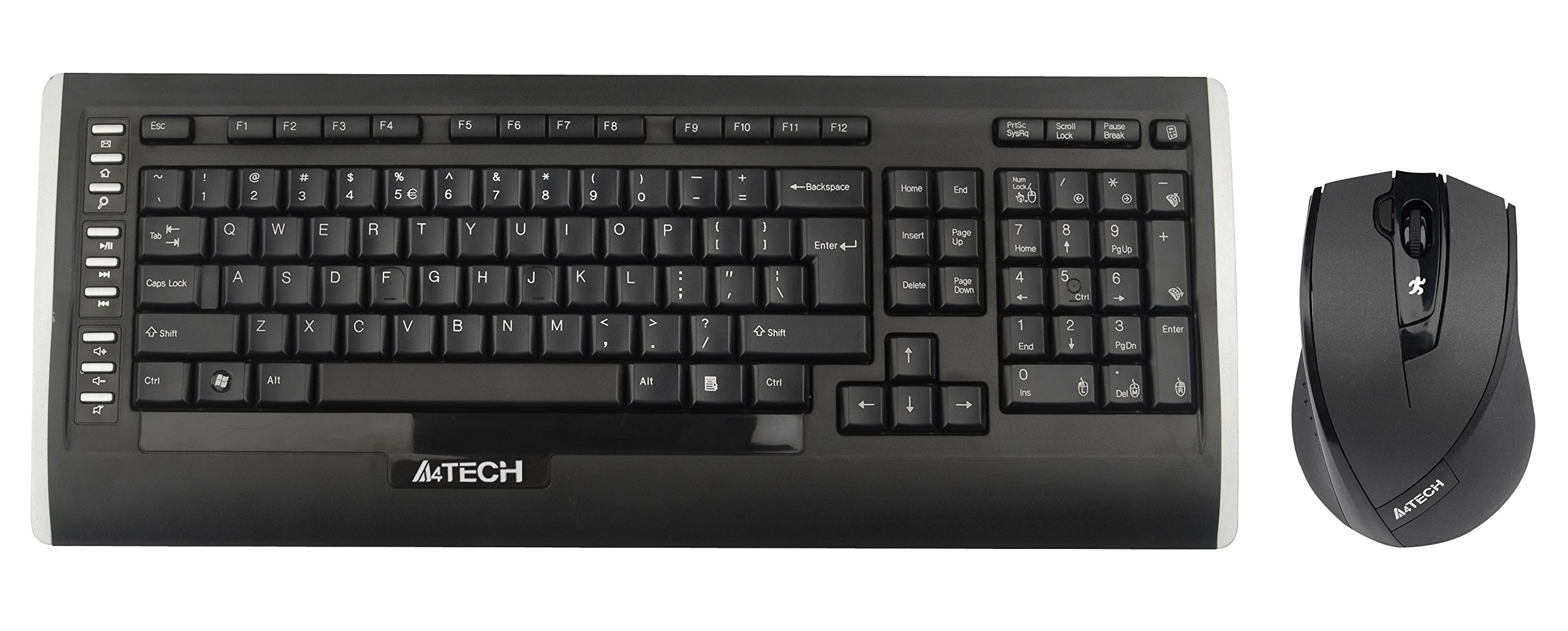
This user manual provides comprehensive instructions for the A4Tech 9300F Wireless RF Keyboard and Mouse Combo. Please read this manual thoroughly before using the product to ensure proper setup and operation. This combo features a wireless keyboard and a mouse with V-Track technology, designed for reliable performance and ease of use with your personal computer.
Setup
Follow these steps to set up your A4Tech 9300F Wireless RF Keyboard and Mouse Combo.
1. Installazzjoni tal-batterija
- Sib il-kompartimenti tal-batteriji fuq in-naħa ta’ taħt kemm tat-tastiera kif ukoll tal-maws.
- Iftaħ l-għatu tal-kompartiment tal-batterija.
- Insert two AA alkaline batteries into the keyboard and two AA alkaline batteries into the mouse, ensuring correct polarity (+/-).
- Agħlaq l-għata tal-kompartiment tal-batterija sew.
2. Konnessjoni tar-Riċevitur
- Locate the USB receiver, typically stored within the mouse's battery compartment or packaged separately.
- Plug the USB receiver into an available USB port on your personal computer.
- Is-sistema operattiva tiegħek għandha tiskopri u tinstalla awtomatikament id-drajvers meħtieġa. Dan il-proċess jista' jieħu ftit mumenti.
- Once drivers are installed, the keyboard and mouse should be ready for use. If not, ensure the power switches on both devices are in the "ON" position.
Istruzzjonijiet Operattivi
This section details the basic and advanced functions of your A4Tech 9300F combo.
Funzjonijiet tat-Tastiera
- Ittajpjar Standard: The keyboard features a standard QWERTY layout with comfortable, round-edged keycaps for general typing tasks.
- Tastiera numerika: It-tastiera numerika ddedikata tippermetti dħul effiċjenti tad-dejta.
- Ċwievet tal-Funzjoni (F1-F12): These keys perform various system or application-specific functions. Refer to your operating system or application documentation for specific uses.
- Dual-Function Keys: Some keys may have secondary functions accessible via a modifier key (e.g., Fn key, if present). These can include media controls or quick access to applications.
Mouse Functions and V-Track Technology
- Standard Mouse Operation: The mouse provides precise cursor control with left, right, and scroll wheel buttons.
- V-Track Technology: This innovative optical technology uses vertical light to ensure smooth and accurate tracking on virtually any surface, including soft fabrics, without the need for a mouse pad. This technology is characterized by:
- Vertical light for enhanced precision.
- Short light path for lower power consumption.
- Incomparable adaptability on diverse surfaces.
- Smooth operation even on soft textiles.
- Tiny lens hole for optimal precision.
- Screen Capture Tool: The mouse may support a screen capture tool with value-added functions such as screen capture, TutorPen, 16-in-One, 4-way wheel, multi-link management, and DPI adjustment. Refer to the manufacturer's website for software download and updates related to this feature.
Manutenzjoni
Proper maintenance ensures the longevity and optimal performance of your wireless combo.
Tindif
- Disconnect the USB receiver from your computer before cleaning.
- Uża drapp artab, niexef u mingħajr suf biex timsaħ l-uċuħ tat-tastiera u l-maws.
- Għal ħmieġ iebes, neħħi ftitampLaħlaħ id-drapp bl-ilma jew b'tindif ħafif u mhux abrażiv. Evita umdità eċċessiva.
- Do not spray cleaning solutions directly onto the devices.
- Use compressed air to remove dust and debris from between the keyboard keys.
Sostituzzjoni tal-batterija
- When the devices exhibit reduced performance or stop responding, it is likely time to replace the batteries.
- Segwi l-passi tal-installazzjoni tal-batterija deskritti fit-taqsima "Setup".
- Always replace all batteries in a device at the same time with new, fresh alkaline batteries of the specified type (AA).
- Armi l-batteriji użati b'mod responsabbli skont ir-regolamenti lokali.
Issolvi l-problemi
If you encounter issues with your A4Tech 9300F combo, refer to the following common solutions.
- L-ebda Rispons mit-Tastiera/Maws:
- Kun żgur li l-batteriji huma installati sew u mhux eżawriti. Ibdelhom jekk meħtieġ.
- Check that the power switches on both devices are turned "ON".
- Iċċekkja li r-riċevitur tal-USB huwa mdaħħal sew f'port USB li jaħdem fuq il-kompjuter tiegħek. Ipprova port USB ieħor.
- Ensure the devices are within the 15-meter operating range of the receiver and there are no significant obstructions.
- Ibda mill-ġdid il-kompjuter tiegħek.
- Konnessjoni Dewmien jew Intermittenti:
- Mexxi l-apparati eqreb lejn ir-riċevitur USB.
- Avoid placing the receiver near other wireless devices or large metal objects that could cause interference.
- Ibdel il-batteriji jekk ikunu baxxi.
- Il-Kurser tal-Maws Jaqbeż jew Mhux Preċiż:
- Ensure the mouse lens is clean and free of dust or debris.
- While V-Track technology works on most surfaces, extreme textures or highly reflective surfaces might still affect performance. Try using the mouse on a different surface.
- Ċwievet Speċifiċi Mhux Jaħdmu:
- Iċċekkja għal ostakli fiżiċi taħt il-keycap.
- If multiple keys are affected, try the general troubleshooting steps for no response.
Speċifikazzjonijiet
| Numru tal-Mudell | 9300F |
| Brand | A4Tech |
| Teknoloġija tal-Konnettività | Frekwenza tar-Radju (RF) |
| Firxa Wireless | Sa 15 metri |
| Keyboard Form Factor | Standard QWERTY |
| Teknoloġija tat-Traċċar tal-Ġurdien | Optical (V-Track) |
| Sors tal-Enerġija | Mħaddma bil-batterija |
| Tip ta 'batterija | AA Alkaline (2 for keyboard, 2 for mouse) |
| Apparati Kompatibbli | Kompjuter Personali |
| Kulur | Iswed |
| Piż tal-oġġett | Madwar 1.85 Liri (0.84 kg) |
Garanzija u Appoġġ
For warranty information and technical support, please refer to the documentation included with your product or visit the official A4Tech websit. Żomm l-irċevuta tax-xiri tiegħek bħala prova tax-xiri għal talbiet ta' garanzija.
Manifattur: A4Tech
Websit: www.a4tech.com