
Introduzzjoni
Welcome to your new BUSICOM BC-423M-W printer-connected cash drawer. This manual provides essential information for the proper setup, operation, and maintenance of your device. Please read it thoroughly before use to ensure optimal performance and longevity.
Karatteristiċi Ewlenin
- Kostruzzjoni Durabbli: Made in Japan with a high-strength steel body for exceptional durability and reliability.
- Printer-Connected Operation: Designed to open automatically via commands from a compatible POS receipt printer equipped with a built-in drawer kick mechanism.
- Ample Ħażna: Features 4 compartments for various bill types and 6 compartments for different coin denominations.
- Dimensjonijiet kompatti: Measures Width 405mm x Depth 423mm x Height 113mm, fitting well into various retail environments.
- Kapaċità ta' Tagħbija Għolja: The top surface can support up to 30kg when the load is evenly distributed.
- Stabbiltà Mtejba: Equipped with anti-tilt and anti-forward movement mechanisms for stable and secure operation.
- Konformità Ambjentali: RoHS compliant, ensuring adherence to environmental standards.
- Garanzija Estiża: Comes with a 3-year warranty from the shipment date, providing peace of mind.

This image displays the BUSICOM BC-423M-W white cash drawer in an open position, highlighting its overall dimensions: 405mm width, 423mm depth, and 113mm height. The top left corner shows a small inset of a printer connected to the drawer.

This image details key structural advantages of the BUSICOM cash drawer. It points out that the entire unit, except for the coin tray, is made of steel for superior strength. It also highlights a top load capacity of 30kg (when evenly distributed) and confirms 1 million open/close operations for durability.
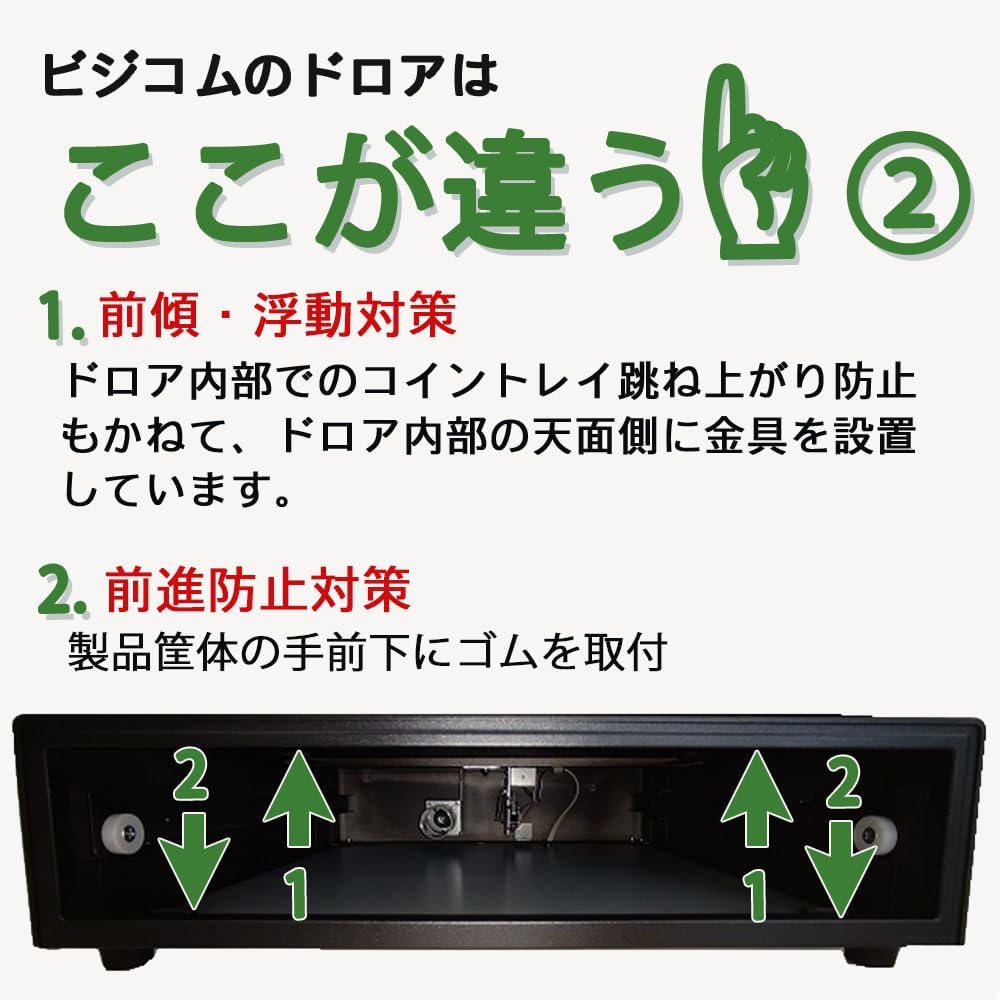
A diagram explaining two important design features: 1. Anti-tilt/float measures, which include metal fittings inside the drawer to prevent the coin tray from bouncing. 2. Anti-forward movement measures, which involve rubber feet installed at the front bottom of the product casing to prevent the drawer from sliding forward.
Setup
Follow these steps to set up your cash drawer for initial use:
- Spakkjar: Carefully remove the cash drawer from its packaging. Ensure all accessories, including the two keys, are present.
- Pjazzament: Place the cash drawer on a stable, flat surface. Ensure there is adequate space around the unit for proper operation and ventilation.
- Konnessjoni: Connect the modular cable from the cash drawer to the designated drawer interface port on your compatible POS receipt printer. Refer to your printer's manual for the exact port location.
- Key Insertion: Insert one of the provided keys into the lock on the front of the drawer. Keep the spare key in a safe and accessible location.
Importanti: This is not a manual (hand-push) drawer. It requires proper connection and configuration with a compatible POS printer to open automatically.

An overhead view of the white cash drawer with a tablet device resting on its top surface, demonstrating how it can integrate into a POS setup. The image also reiterates the dimensions: 405mm width, 423mm depth, and 113mm height. Note that the tablet and stand are not included with the cash drawer.

A diagram illustrating the modular connection type of the cash drawer. A black cash drawer is shown connected to a receipt printer via a modular cable, indicating that the drawer opens automatically in response to print commands from the printer.
Istruzzjonijiet Operattivi
The BUSICOM BC-423M-W cash drawer is designed for seamless integration with your POS system and receipt printer.
- Ftuħ tal-Kexxun: The drawer will automatically open when a print command is sent from your POS system to the connected receipt printer, provided the printer has a built-in drawer kick mechanism and is properly configured.
- L-Għeluq tal-Kxaxen: Gently push the drawer closed until it latches securely. Ensure it is fully closed to prevent accidental re-opening or security risks.
- Manual Opening (Emergency): In case of power failure or system malfunction, the drawer can be opened manually using one of the provided keys. Insert the key into the lock, turn it to the open position, and then pull the drawer open.
Nota: Always ensure the drawer is closed securely after each transaction to prevent unauthorized access and maintain security.
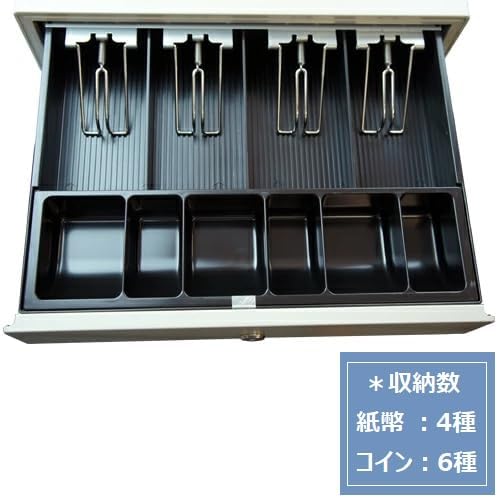
Din l-immaġni tipprovdi ċara view of the cash drawer's interior, detailing the layout of its money compartments. It features four bill compartments equipped with metal clips to secure banknotes, and six fixed compartments for various coin denominations.
Manutenzjoni
Regular maintenance helps ensure the smooth and reliable operation of your cash drawer.
- Tindif ta' Barra: Regularly wipe the exterior surfaces of the cash drawer with a soft, dry cloth. For more persistent dirt, use a slightly damp cloth and immediately dry the surface thoroughly. Avoid using abrasive cleaners, solvents, or harsh chemicals, as these can damage the finish.
- Cleaning Interior: Periodically remove the coin and bill trays to clean any accumulated dust, lint, or debris from the interior of the drawer and its slides. This prevents obstructions that could hinder smooth operation.
- Kura Ewlenija: Keep the provided keys clean and dry. Do not force a key if it feels stiff when turning; apply a small amount of graphite lubricant to the lock mechanism if necessary.
- Spezzjoni tal-Cable: Periodically inspect the modular connection cable for any signs of wear, cuts, or damage. A damaged cable can lead to intermittent operation or complete failure. Replace the cable if any damage is observed.
Issolvi l-problemi
If you encounter issues with your cash drawer, refer to the following table for common problems and solutions.
| Problema | Kawża Possibbli | Soluzzjoni |
|---|---|---|
| Drawer does not open automatically. |
|
|
| Drawer is difficult to close. |
|
|
| Iċ-ċavetta ma ddurx fis-serratura. |
|
|
Speċifikazzjonijiet tal-Prodott
| Brand | BUSICOM |
| Numru tal-Mudell | BC-423M |
| Kulur | Abjad |
| Materjal | Alloy Steel, Plastic (for trays) |
| Dimensjonijiet (W x D x H) | 405mm x 423mm x 113mm |
| Piż | Appross. 8 kg |
| Tul tal-Cable | 1.5 m |
| Kapaċità tat-Tagħbija Fuq | 30 kg (evenly distributed) |
| Bill Compartments | 4-il tip |
| Coin Compartments | 6-il tip |
| Aċċessorji | 2 Ċwievet |
| Konformità Ambjentali | Konformi RoHS |
| Perjodu ta' Garanzija | 3 snin mid-data tal-ġarr |
Garanzija u Appoġġ
The BUSICOM BC-423M-W cash drawer is backed by a 3-year warranty from the date of shipment. This warranty covers manufacturing defects under normal use. Please retain your proof of purchase for warranty claims.
For warranty claims, technical support, or any inquiries regarding your product, please contact your retailer or BUSICOM customer service. When contacting support, providing your order number will help expedite the process by allowing us to verify your purchase history.
Compatible Printers and Applications
This cash drawer is designed for compatibility with various POS receipt printers that feature a built-in drawer kick mechanism and connect via a modular cable.
Confirmed Compatible Printer Models:
- Epson TM Series: TM-m30II, TM-m30III, TM-T20II, TM-T88VI, TM-T88VII
- Star Micronics TSP Series: TSP143III, TSP654II
- Star Micronics mC-Print2 Series: MCP21LB
- Star Micronics mC-Print3 Series: MCP31LB
- Seiko Instruments RP Series: RP-F10, RP-D10
- Fujitsu FP Series
Compatible POS Applications:
This cash drawer is compatible with receipt printers recommended by various POS applications such as Square, Riareji, AirREGI, Sumareji, Ubi-REGI, and Rakuten Pay. Please confirm compatibility with your specific POS application provider before purchase to ensure seamless integration.

This image lists various printer models from brands like Epson, Star Micronics, Seiko Instruments, and Fujitsu that are confirmed compatible with the cash drawer. It also mentions compatibility with receipt printers recommended by popular POS applications such as Square, AirREGI, and Sumareji.