
1. Introduzzjoni
This manual provides essential information for the proper setup, operation, and maintenance of your Lenovo ThinkPad X220 12.5-inch laptop. Please read these instructions carefully to ensure optimal performance and longevity of your device.
The ThinkPad X220 is a compact and powerful laptop featuring an Intel Core i5 processor, 4GB DDR3 RAM, a 128GB Solid State Drive, and a 12.5-inch display. It comes pre-installed with Windows 7 Home Premium and includes integrated Intel HD Graphics 3000, a webcam, and a fingerprint reader for enhanced security.

Figura 1: Angolat view of the Lenovo ThinkPad X220 laptop, showcasing id-disinn kompatt tiegħu.
2. Setup
2.1 Żpakkjar u Spezzjoni Inizjali
Carefully remove the laptop and all accessories from the packaging. Inspect the device for any signs of damage. If any components are missing or damaged, contact your vendor immediately.
2.2 Qawwa tal-Konnessjoni
- Connect the AC adapter to the power connector on the laptop.
- Ipplaggja l-adapter tal-AC f'bokk elettriku ertjat.
- Il-batterija tibda tiċċarġja awtomatikament. Huwa rakkomandat li tiċċarġja l-batterija kompletament qabel l-ewwel użu.
2.3 L-Ibbutjar Inizjali u s-Setup tas-Sistema Operattiva
Press the power button to turn on the laptop. Follow the on-screen instructions to complete the Windows 7 Home Premium setup process. This typically involves setting up user accounts, language preferences, and network connections.
2.4 Konnessjoni ta' Apparati Esterni
The ThinkPad X220 offers various ports for connecting peripherals:
- Portijiet USB 2.0: Three ports are available for connecting USB devices such as mice, keyboards, or external storage.
- Port VGA: Connect an external monitor or projector using a VGA cable.
- Port Ethernet (LAN): Għal konnessjonijiet tan-netwerk bil-fili.
- Awdjo Jack: Għall-konnessjoni ta' headphones jew kelliema esterni.
- ExpressCard Slot: For compatible expansion cards.

Figure 2: Left side of the ThinkPad X220, showing the USB, Ethernet, and audio jack ports.
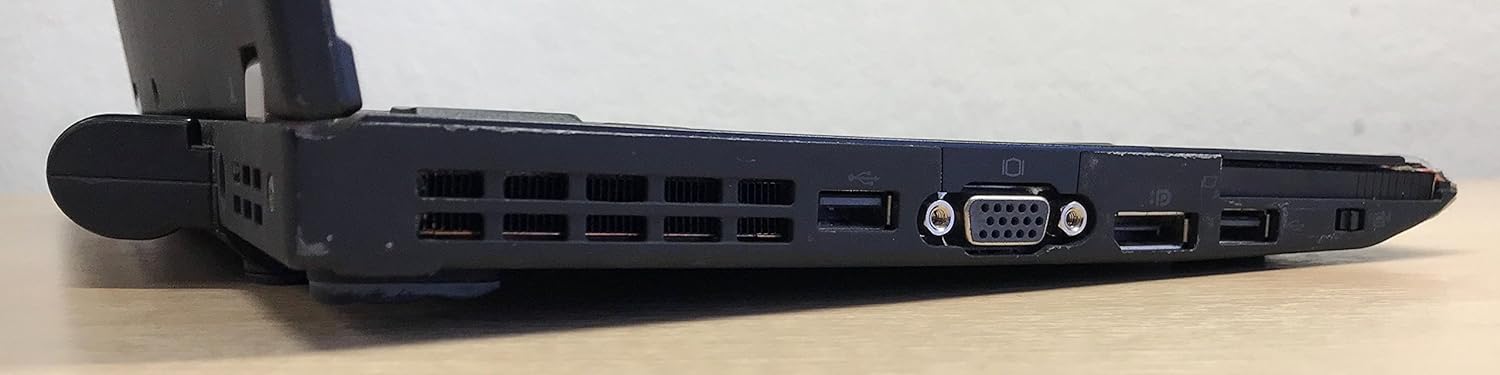
Figure 3: Right side of the ThinkPad X220, featuring the VGA port, additional USB ports, and the ExpressCard slot.
3. It-Tħaddim tal-Laptop Tiegħek
3.1 Power On/Off
- Qawwa Mixgħul: Agħfas il-buttuna tal-qawwa li tinsab fin-naħa ta’ fuq tal-lemin tat-tastiera.
- Itfi: Click the Start button in Windows, then select 'Shut down'. Do not force power off by holding the power button unless the system is unresponsive.
3.2 Tastiera u Apparati ta' Input
The ThinkPad X220 features a full-sized keyboard, a TrackPoint pointing device (red dot in the center of the keyboard), and a multi-touch touchpad.
- Tastiera: Standard QWERTY layout with function keys (Fn) for system controls.
- TrackPoint: Use the TrackPoint to move the cursor and the associated buttons below the spacebar for left, right, and middle-click functions.
- Touchpad: Use gestures for navigation, scrolling, and clicking.
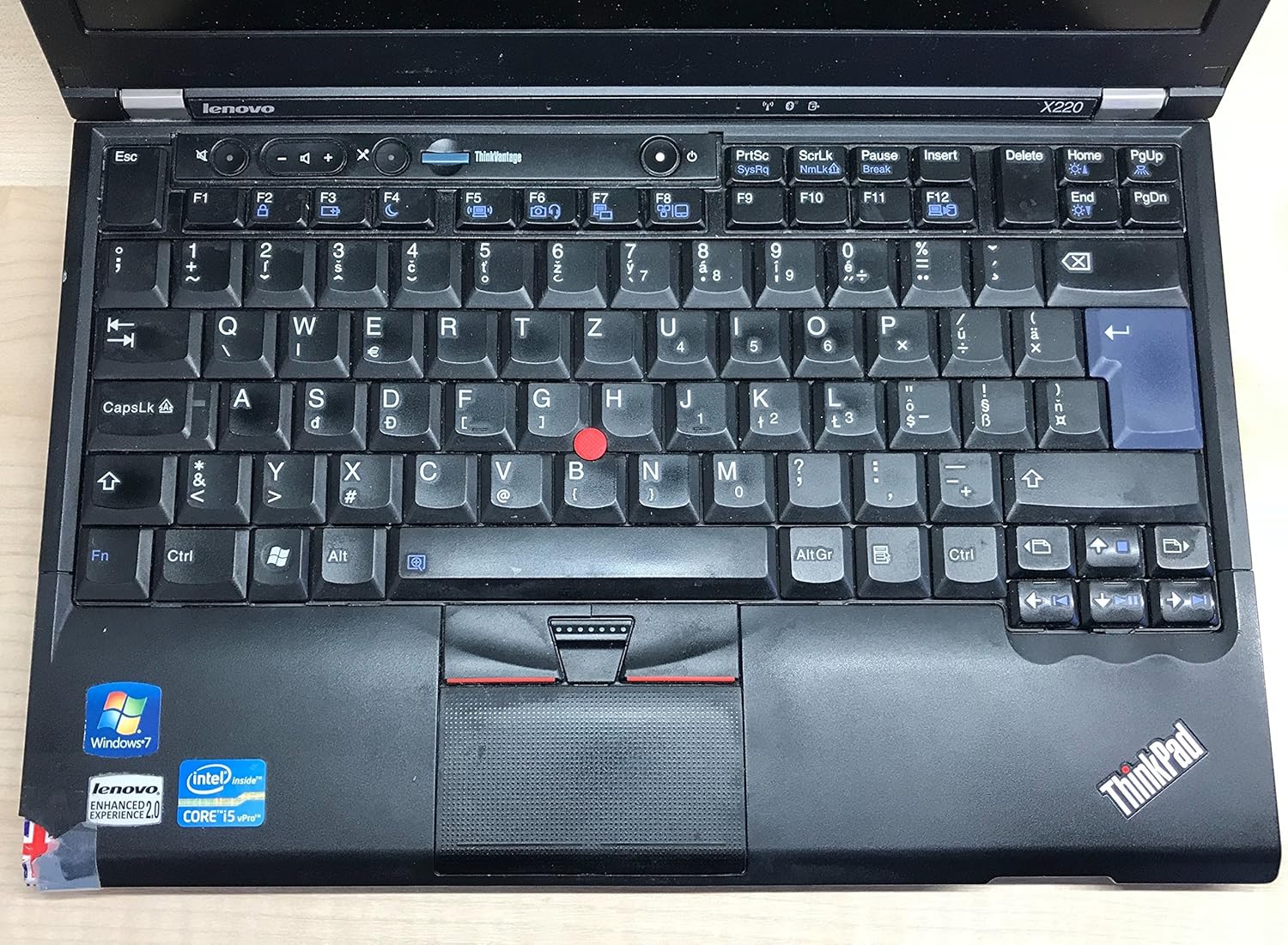
Figura 4: Dettaljat view of the ThinkPad X220 keyboard, TrackPoint, and touchpad.
3.3 Konnettività bla fili
- Wi-Fi (802.11bgn): To connect to a wireless network, click the network icon in the system tray and select your desired network. Enter the password if prompted.
- Bluetooth: Enable Bluetooth through the Windows settings to connect to compatible devices such as headphones or mice.
3.4 Uża l- Webcam and Fingerprint Reader
- Webcam: L-integrat webcam can be used for video conferencing and recording. Access it through applications like Skype or the built-in camera software.
- Qarrej tal-marki tas-swaba': For enhanced security, configure the fingerprint reader through Windows security settings to log in or authenticate.
4. Manutenzjoni
4.1 Tindif tal-Laptop Tiegħek
- Skrin: Uża ċarruta ratba u mingħajr ħelu dampLaħlaħ bl-ilma jew b'tindif tal-iskrin. Tisprejjax likwidu direttament fuq l-iskrin.
- Tastiera u Ċasing: Use a soft cloth and a mild cleaning solution. For dust, use compressed air. Ensure the laptop is powered off before cleaning.
4.2 Ġestjoni tal-batterija
- To maximize battery life, avoid extreme temperatures and fully discharging the battery frequently.
- Calibrate the battery periodically by fully discharging and then fully recharging it.
- The average battery life is approximately 2.45 hours, but this can vary based on usage.
4.3 Aġġornamenti tas-Software
Regularly check for and install operating system updates (Windows Update) and driver updates from the Lenovo support websit biex tiġi żgurata l-istabbiltà u s-sigurtà tas-sistema.
5 Issolvi l-problemi
This section addresses common issues you might encounter with your ThinkPad X220.
- Il-laptop ma jixgħelx: Ensure the AC adapter is securely connected and the power outlet is functional. If using battery power, ensure the battery is charged.
- Problemi bil-wiri: If the screen is blank, try pressing Fn + F7 to cycle through display modes (internal, external, both). Ensure external monitors are properly connected.
- Input devices (keyboard/touchpad/TrackPoint) unresponsive: Restart the laptop. Check for driver updates if the issue persists. For the TrackPoint, ensure no debris is obstructing its movement.
- L-ebda konnessjoni tal-internet: Verify Wi-Fi is enabled and connected to a network. For wired connections, ensure the Ethernet cable is properly inserted. Check network adapter drivers.
- System slow or unresponsive: Close unnecessary applications. Check Task Manager for processes consuming high CPU or memory. Consider running a virus scan.
Għal kwistjonijiet aktar kumplessi, irreferi għall-appoġġ ta' Lenovo websit jew ikkuntattja l-appoġġ tekniku.
6. Speċifikazzjonijiet
| Karatteristika | Speċifikazzjoni |
|---|---|
| Brand | Lenovo |
| Serje | ThinkPad |
| Numru tal-Mudell | 428743U |
| Daqs tal-Iskrin | 12.5 Pulzier |
| Riżoluzzjoni tal-Iskrin | 1366 x 768 pixel |
| Proċessur | Intel Core i5-2430M (2.4 GHz) |
| RAM | 4 GB DDR3 (1333 MHz) |
| Hard Drive | SSD ta' 128 GB (Serial ATA) |
| Koproċessur tal-Grafika | Intel HD Graphics 3000 |
| Tip bla fili | 802.11bgn |
| Portijiet USB 2.0 | 3 |
| Sistema Operattiva | Windows 7 Home Premium |
| Ħajja Medja tal-Batterija | 2.45 Sigħat |
| Piż tal-oġġett | 0.01 ounces (Note: This weight is likely incorrect and refers to packaging or a component, actual laptop weight is typically around 3 lbs) |
| Dimensjonijiet tal-Prodott (LxWxH) | 15 x 13 x 5 pulzieri |
| Kulur | Iswed |
| Karatteristika Speċjali | Qarrej tal-marki tas-swaba' |
7. Garanzija u Appoġġ
7.1 Informazzjoni dwar Garanzija
Your Lenovo ThinkPad X220 laptop is covered by a limited warranty. The specific terms and duration of the warranty may vary based on your region and point of purchase. Please refer to the warranty documentation included with your product or visit the official Lenovo support websit għal informazzjoni dettaljata.
7.2 Appoġġ Tekniku
Għal assistenza teknika, downloads ta' sewwieqa, jew aktar soluzzjonijiet għal problemi, jekk jogħġbok żur is-sit uffiċjali tal-Appoġġ Lenovo website. You can typically find support resources by searching for your specific model (ThinkPad X220) on their site. Have your product's serial number ready when contacting support.
Appoġġ Lenovo Websit: https://support.lenovo.com