
1. Introduzzjoni
This manual provides essential information for the safe and efficient operation of your Datalogic PowerScan M8300-AR910RB Handheld Laser Bar Code Reader. Please read this manual thoroughly before using the device to ensure proper setup, operation, and maintenance. Keep this manual for future reference.
2. Informazzjoni dwar is-Sigurtà
Dejjem osserva l-prekawzjonijiet ta' sigurtà li ġejjin biex tevita korriment jew ħsara lill-apparat:
- Sigurtà tal-Laser: This device emits a laser beam. Do not stare directly into the laser beam or point it at others. Avoid direct eye exposure.
- Sigurtà tal-batterija: Use only Datalogic-approved batteries and charging accessories. Do not expose batteries to extreme temperatures, puncture, or disassemble them. Dispose of batteries according to local regulations.
- Kundizzjonijiet Ambjentali: Do not operate the device in explosive atmospheres or near flammable materials. Keep the device dry and away from extreme temperatures.
- Manutenzjoni: Refer all servicing to qualified service personnel. Do not attempt to open or modify the device.
3. Kontenut tal-Pakkett
Ivverifika li l-oġġetti kollha huma preżenti fil-pakkett:
- Datalogic PowerScan M8300-AR910RB Handheld Laser Bar Code Reader
- Batterija li tista 'titneħħa
- Charging/Communication Cradle (may be sold separately depending on configuration)
- USB or Serial Cable (for cradle connection, may be sold separately)
- Power Supply (for cradle, may be sold separately)
- Gwida Quick Start
4. Prodott Aktarview
The Datalogic PowerScan M8300 is a robust, cordless handheld laser bar code reader designed for industrial applications. It features a durable casing and a 910MHz radio for reliable wireless communication.
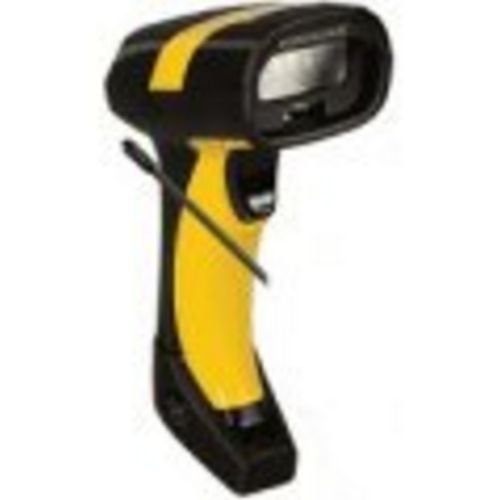
Stampa 1: Datalogic PowerScan M8300 Handheld Laser Bar Code Reader. This image displays the front view of the scanner, highlighting its ergonomic design, scan window, and trigger button.
Komponenti Ewlenin:
- Tieqa tal-Iskanjar: Located at the front, where the laser beam exits to read barcodes.
- Trigger: Activates the laser for scanning.
- Dwal indikaturi: Provide feedback on scan status, battery level, and communication.
- Kompartiment tal-batterija: Located at the base of the handle, housing the removable battery.
- Interface tal-Komunikazzjoni: For wireless data transmission via the 910MHz radio.
5. Setup
5.1. Installazzjoni tal-batterija
- Kun żgur li l-iskaner huwa mitfi.
- Sib l-għatu tal-kompartiment tal-batterija fil-qiegħ tal-manku.
- Iftaħ l-għatu u daħħal il-batterija li tista' titneħħa, waqt li tiżgura l-polarità korretta.
- Agħlaq l-għatu tal-kompartiment tal-batterija sew.
5.2. Iċċarġjar tal-batterija
- Place the scanner into its charging cradle. Ensure the contacts on the scanner align with those on the cradle.
- Connect the power supply to the charging cradle and plug it into an electrical outlet.
- The scanner's indicator light will show charging status (typically amber for charging, green for fully charged).
- Allow the battery to fully charge before first use (approximately 4 hours).
5.3. Konnessjoni ma' Sistema Ospitanti
The PowerScan M8300 uses a 910MHz radio for wireless communication. It typically connects to a host system (e.g., PC, laptop) via a base station or cradle connected by a USB or serial cable.
- Connect the communication cable (USB or serial) from the charging/communication cradle to your host system.
- Connect the power supply to the cradle and plug it in.
- Place the scanner in the cradle. The scanner and cradle will automatically establish a wireless link.
- Install any necessary drivers or software on your host system as prompted or as instructed by Datalogic documentation for your specific cradle model.
6. Istruzzjonijiet Operattivi
6.1. Tixgħil / Mitfi
- Biex Tixgħel: The scanner typically powers on automatically when removed from the cradle or when the trigger is pressed.
- Biex Tifi: The scanner will enter a low-power sleep mode after a period of inactivity. To fully power off, remove the battery.
6.2. Scanning Barcodes
- Aim the scan window at the barcode you wish to read.
- Agħfas u żomm il-buttuna tal-grillu. Tidher linja tal-lejżer.
- Position the laser line across the entire barcode.
- Once the barcode is successfully read, the scanner will emit an audible beep and/or an indicator light will illuminate.
- Release the trigger. The scanned data will be transmitted to the connected host system.
6.3. Trażmissjoni tad-Data
The PowerScan M8300 transmits scanned data wirelessly to its paired base station/cradle. Ensure the scanner is within range of its base station for successful data transfer. Out-of-range scanning capabilities may vary by configuration; refer to advanced programming guides for details.
7. Manutenzjoni
7.1. Tindif tal-Apparat
- Uża drapp artab u nadifampimdaħħla bl-ilma jew soluzzjoni ħafifa għat-tindif.
- Tużax prodotti tat-tindif li joborxu, solventi, jew kimiċi ħarxa.
- Imsaħ bil-mod it-tieqa tal-iskannjar u l-barra tal-iskannjar.
- Kun żgur li l-ebda likwidu ma jidħol fil-fetħiet tal-apparat.
7.2. Kura tal-batterija
- Iċċarġja l-batterija regolarment.
- Evita li tiċċarġja l-batterija kompletament ta' spiss.
- Store the scanner and spare batteries in a cool, dry place when not in use.
7.3. Ħażna
When storing the scanner for extended periods, ensure the battery is partially charged (around 50%) and remove it from the device if possible. Store in a temperature-controlled environment.
8 Issolvi l-problemi
If you encounter issues with your PowerScan M8300, refer to the following common problems and solutions:
| Problema | Kawża Possibbli | Soluzzjoni |
|---|---|---|
| L-iskaner ma jixgħelx. | Batterija mejta jew installata ħażin. | Check battery installation. Charge the battery. Replace battery if necessary. |
| L-iskaner ma jaqrax il-barcodes. | Barcode damaged or poorly printed; scan window dirty; incorrect symbology enabled. | Try scanning a different barcode. Clean the scan window. Refer to the programming guide to enable/disable symbologies. |
| L-ebda dejta ma ġiet trażmessa lill-host. | Scanner out of range; base station not connected; communication issue. | Move scanner closer to the base station. Verify base station connection to host. Check base station power. |
| Il-ħajja tal-batterija hija qasira. | Battery nearing end of life; frequent use; improper charging. | Replace battery. Ensure full charges. Reduce backlight/power settings if configurable. |
If the problem persists, contact Datalogic technical support.
9. Speċifikazzjonijiet
The following specifications apply to the Datalogic PowerScan M8300-AR910RB model:
- Numru tal-Mudell: PM8300-AR910RB
- Dimensjonijiet tal-Prodott: 2.72 x 4.49 x 8.15 pulzieri
- Piż tal-oġġett: 13.9 uqija
- Manifattur: ADC tad-Datalogic
- Sors tal-Enerġija: Mħaddma bil-batterija
- Teknoloġija tal-Konnettività: Mingħajr fili (910MHz)
- Apparati Kompatibbli: Desktop, Laptop
- UPC: 053926383351
10. Informazzjoni dwar Garanzija
Datalogic products are covered by a limited warranty against defects in materials and workmanship. The specific terms and duration of the warranty may vary by region and product. Please refer to the warranty card included with your product or visit the official Datalogic websit għal informazzjoni dettaljata dwar il-garanzija u l-proċeduri ta' reġistrazzjoni.
11. Appoġġ
For technical assistance, product inquiries, or to report issues, please contact Datalogic customer support:
- Websit: Visit the official Datalogic website for support resources, FAQs, and driver downloads.
- Kuntatt: Refer to the 'Contact Us' section on the Datalogic website for phone numbers and email addresses specific to your region.
When contacting support, please have your product model number (PM8300-AR910RB) and serial number ready.