
Introduzzjoni
This manual provides detailed instructions for the proper setup, operation, and maintenance of your Denon AVR-1312 5.1-channel AV Surround Receiver. The AVR-1312 is designed to deliver a powerful surround sound experience, supporting 3D video when connected to compatible equipment. It features Compressed Audio Restorer technology for enhanced sound from portable audio players and Quick Select buttons for easy source and surround mode selection.
Setup Inizjali
1. Spakkjar
Carefully remove the receiver from its packaging. Ensure all accessories, such as the remote control, batteries, and FM/AM antennas, are present. Retain the packaging for future transport or storage.
2 Tqegħid
Place the receiver on a stable, level surface with adequate ventilation. Avoid placing it near heat sources or in direct sunlight. Ensure there is sufficient space around the unit for proper airflow to prevent overheating.
3. Konnessjonijiet
Qabel ma tagħmel xi konnessjonijiet, kun żgur li r-riċevitur u l-apparati kollha konnessi huma mitfija u skonnettjati mill-plakka tal-ħajt.

Figure 1: Rear panel connections of the Denon AVR-1312. This view displays HDMI inputs and output, analog audio inputs, digital audio inputs (optical and coaxial), video inputs, and speaker terminals.
Konnessjonijiet HDMI:
- Connect your video sources (e.g., Blu-ray player, game console, cable box) to the HDMI-IN ports (HDMI 1-4).
- Connect your TV or projector to the HDMI OUT MONITOR port. This single cable will carry both video and audio signals to your display.
Konnessjonijiet Awdjo:
- Digital Audio Inputs (OPTICAL/COAXIAL): For devices with digital audio outputs (e.g., CD player, older game consoles).
- Analog Audio Inputs (AUDIO IN): For devices with analog stereo outputs (e.g., CD player, tape deck).
- Stereo Mini Jack (FRONT PANEL): For connecting portable audio players.
Video Connections (Legacy):
- Component Video (DVD, GAME, SAT/CBL): For devices using component video cables (red, green, blue).
- Composite Video (DVD, GAME, SAT/CBL, VCR): For devices using composite video cables (yellow).
Konnessjonijiet tal-Ispeaker:
- Connect your speakers to the corresponding terminals on the rear panel: QUDDIEM L/R, ĊENTRU, DWAR L/R.
- Ensure correct polarity (+ to + and - to -) for all speakers.
- For the subwoofer, connect a single RCA cable from the SUBWOOFER PRE OUT to the subwoofer's LFE input.
- The receiver supports 6-8 ohm speakers.
Konnessjonijiet tal-antenna:
- Connect the supplied FM indoor antenna to the ANTENNA FM terminali.
- Connect the supplied AM loop antenna to the AM ANTENNA terminali.
Operazzjoni Bażika
1. Power On/Off
Agħfas il- QAWWA buttuna fuq il-pannell ta' quddiem jew il- FUQ / STANDBY button on the remote control to turn the receiver on or off.
2. Għażla tal-Input
Select the desired input source using the input selector buttons on the front panel (e.g., DVD, GAME, SAT/CBL) or the corresponding buttons on the remote control.
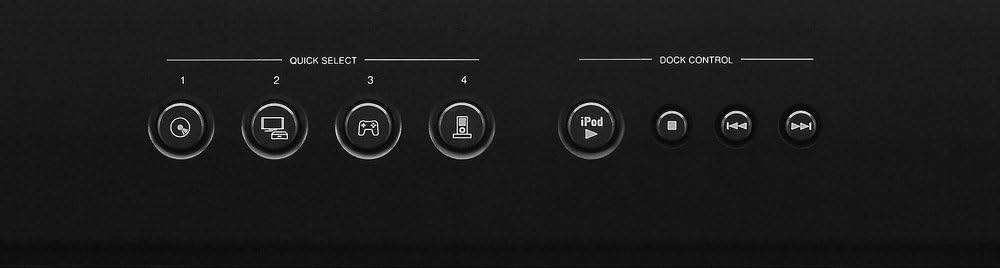
Figure 2: Front panel Quick Select and Dock Control buttons. These buttons allow for quick access to frequently used sources and sound modes.
Buttuni tal-Għażla Mgħaġġla:
The AVR-1312 features four GĦAŻLA MALAJR buttons on the front panel and remote control. These buttons allow you to instantly switch to a pre-registered input source and surround mode. To register a setting, select the desired input and surround mode, then press and hold one of the Quick Select buttons (1-4) for a few seconds until the display flashes.
3. Kontroll tal-Volum
Aġġusta l-volum ewlieni billi tuża l-buttuna l-kbira VOLUM pum fuq il-pannell ta' quddiem jew il- VOLUM +/- buttuni fuq il-kontroll remot.
4. Modi tal-Ħsejjes
Agħfas il- MODALITÀ or DWAR buttons on the remote control to cycle through available sound modes (e.g., Stereo, Dolby Digital, DTS, Multi-Channel Stereo). The receiver automatically detects the incoming audio signal and suggests optimal modes.

Figure 3: Denon RC-1158 Remote Control. This remote provides full control over the receiver's functions, including power, input selection, volume, sound modes, and menu navigation.
Kura u Manutenzjoni
- Tindif: Wipe the exterior of the receiver with a soft, dry cloth. Do not use abrasive cleaners, solvents, or chemical cloths, as these may damage the finish.
- Ventilazzjoni: Ensure that the ventilation openings on the top and sides of the receiver are not blocked. Proper airflow is essential to prevent internal heat buildup.
- Korda tal-Enerġija: When unplugging the power cord, always grasp the plug, not the cord itself.
- Ħażna: If storing the unit for an extended period, disconnect the power cord and store it in a clean, dry place.
Gwida dwar is-sejbien ta 'problemi
If you encounter issues with your receiver, refer to the following common problems and solutions before contacting customer support.
| Problema | Kawża Possibbli | Soluzzjoni |
|---|---|---|
| Ebda qawwa | Il-korda tal-enerġija mhux imqabbda; problema fis-sokit tal-enerġija. | Ensure power cord is securely plugged in. Check if the power outlet is functional. |
| L-ebda ħoss | Incorrect input selected; speakers not connected; volume too low; mute activated. | Select correct input. Check speaker connections. Increase volume. Deactivate mute. |
| Ebda video | Incorrect input selected; HDMI cable issue; TV input issue. | Select correct input. Check HDMI cable connections. Ensure TV is on correct input. |
| Il-kontroll mill-bogħod ma jaħdimx | Batteries depleted; obstruction; incorrect remote mode. | Replace batteries. Remove obstructions. Ensure remote is in the correct operating mode for the receiver. |
Speċifikazzjonijiet Tekniċi
| Brand | Denon |
| Numru tal-Mudell | AVR1312 |
| Qawwa tal-Ħruġ | 75 Watt għal kull kanal |
| Numru ta 'Kanali | 5.1 |
| Portijiet HDMI totali | 5 (4 Daħliet / 1 Ħruġ) |
| Teknoloġija tal-Konnettività | Bil-fili |
| Modalità tal-Ħruġ tal-Awdjo | Stereo, Surround |
| Karatteristiċi Speċjali | 3D Pass-Through, Equal Power Amp Design, High-Definition Audio Support |
| Apparati Kompatibbli | Game Console, Television |
| Piż tal-oġġett | 19.8 Liri |
Informazzjoni dwar Garanzija
The Denon AVR-1312 AV Surround Receiver comes with a garanzija ta 'sena from the date of purchase. This warranty covers defects in materials and workmanship under normal use. Please retain your proof of purchase for warranty claims. For full terms and conditions, refer to the warranty card included with your product or visit the official Denon websit.
Appoġġ għall-Klijent
For further assistance, technical support, or service inquiries, please visit the official Denon website or contact their customer service department. You can typically find contact information, FAQs, and additional resources on the manufacturer's support pages.