
1. Prodott Aktarview
The Rosslare AYCE55 is an advanced, ultra-slim PIN reader designed for versatile access control applications. It can operate as a standalone unit, managing user PINs directly, or as a reader connected to a central access control panel. Its robust design and compact form factor make it suitable for various indoor and outdoor installations, providing secure and reliable entry management.

Figura 1: Quddiem view of the AYCE55 PIN reader, showcasing its ultra-slim design and numeric keypad.
2. Setup u Installazzjoni
2.1 Immuntar
Select a suitable mounting location, ensuring it is secure and provides adequate space for wiring. The AYCE55 is designed for surface mounting. Use appropriate screws and anchors for the wall material. Ensure the unit is level and securely fastened to prevent tampering or accidental dislodgement.
2.2 Wajers
Connect the AYCE55 to the power supply and, if applicable, to the access control panel according to the wiring diagram provided in the full product manual. Ensure all connections are secure and insulated. Pay close attention to polarity for power connections. For Wiegand or Clock & Data interfaces, connect the data lines to the corresponding inputs on your access control panel. It is highly recommended that installation and wiring be performed by a qualified technician.
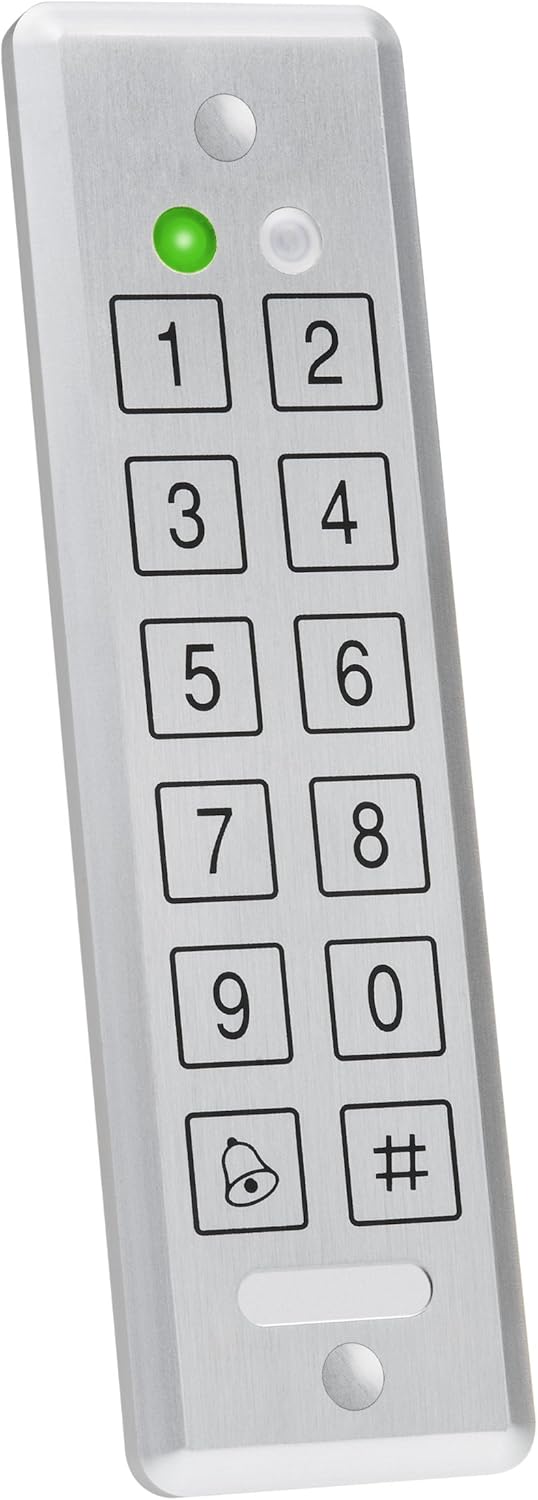
Figura 2: Proġett tal-ġenbfile of the AYCE55, illustrating its slim form factor which aids in discreet mounting.
3. Istruzzjonijiet Operattivi
3.1 Modalità Standalone
In standalone mode, the AYCE55 manages user PINs directly. To program new user PINs, enter the master code followed by the programming sequence. Refer to the detailed programming guide for specific steps on adding, deleting, or modifying user PINs and system settings. The unit will activate the connected lock mechanism upon successful PIN entry.
3.2 Modalità Qarrej
When connected to an external access control panel, the AYCE55 functions as a reader. It transmits the entered PIN data to the panel, which then processes the authentication and controls the lock. In this mode, all user management and access decisions are handled by the connected access control system.
3.3 Dħul tal-PIN
To gain access, simply enter your valid PIN using the numeric keypad. The green LED indicator will illuminate upon successful entry, and the connected lock will activate. An incorrect PIN entry will typically result in a red LED flash and an audible error tone.

Figura 3: Angolat view of the AYCE55, providing a clearer look at the keypad layout and indicator lights.
4. Kura u Manutenzjoni
To ensure the longevity and optimal performance of your AYCE55 reader, follow these maintenance guidelines:
- Tindif: Use a soft, dry cloth to wipe the surface of the reader. For stubborn dirt, a slightly damp cloth with mild soap can be used, but ensure no liquid enters the unit. Avoid abrasive cleaners, solvents, or harsh chemicals, as these can damage the finish and internal components.
- Kundizzjonijiet Ambjentali: While designed for durability, avoid exposing the unit to extreme temperatures, direct prolonged sunlight, or excessive moisture. Ensure proper sealing during installation to protect against water ingress if installed outdoors.
- Spezzjoni: Periodically check the wiring connections for any signs of wear or corrosion. Ensure the unit remains securely mounted.
5. Gwida għas-soluzzjoni tal-problemi
This section provides solutions to common issues you might encounter with your AYCE55 reader.
| Problema | Kawża Possibbli | Soluzzjoni |
|---|---|---|
| Ebda dawl indikatur tal-qawwa | Ebda provvista tal-enerġija; Wajers mhux korretti; Unità difettuża | Check power source and connections; Verify wiring against diagram; Contact support if issue persists. |
| PIN not accepted / Access denied | Incorrect PIN entered; PIN not programmed; Unit in wrong mode (e.g., standalone vs. reader); Controller issue (in reader mode) | Re-enter PIN carefully; Program the PIN (standalone mode); Verify operating mode; Check access control panel status. |
| It-tastiera ma tirrispondix | Power issue; Internal fault | Check power supply; Perform a power cycle (disconnect and reconnect power); Contact support. |
If the problem persists after attempting these solutions, please refer to the full product manual or contact Rosslare customer support.
6. Speċifikazzjonijiet Tekniċi
Below are the key technical specifications for the Rosslare AYCE55 Convertible Reader/Stand Alone unit:
| Speċifikazzjoni | Dettall |
|---|---|
| Numru tal-Mudell | AYCE55 |
| Manifattur | Rosslare |
| ASIN | B004HN7CVG |
| L-Ewwel Data Disponibbli | 31 ta’ Diċembru 2010 |
| Tip | Convertible PIN Reader / Stand Alone Access Control |
| Disinn | Ultra-SLIM |
7. Informazzjoni dwar Garanzija
The Rosslare AYCE55 Convertible Reader/Stand Alone unit is covered by a manufacturer's limited warranty. The specific terms and duration of the warranty may vary by region and purchase date. Please retain your proof of purchase. For detailed warranty information, including coverage and claims procedures, refer to the official Rosslare webis-sit jew il-karta tal-garanzija inkluża mal-prodott tiegħek.
8. Appoġġ għall-Klijent
For technical assistance, product inquiries, or service requests, please contact Rosslare Security Products customer support. You can find contact information, FAQs, and additional resources on the official Rosslare website. When contacting support, please have your product model number (AYCE55) and purchase details ready.
Rosslare Official Websit: www.rosslaresecurity.com