
1. Introduzzjoni
This manual provides detailed instructions for the installation, operation, and maintenance of your Foxconn TSAA725 ATX Tower Case. Please read this manual thoroughly before beginning installation to ensure proper setup and safe use of the product. Keep this manual for future reference.
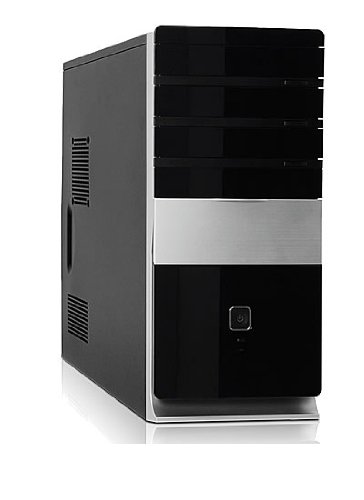
Immaġni: Quddiem view of the Foxconn TSAA725 ATX Tower Case, showcasing its design and front panel ports.
2. Informazzjoni dwar is-Sigurtà
Osserva l-prekawzjonijiet ta' sigurtà li ġejjin biex tevita ħsara lill-prodott jew korriment lilek innifsek:
- Always disconnect the power supply from the wall outlet before opening the computer case or performing any installation/maintenance.
- Handle internal components with care to avoid electrostatic discharge (ESD) damage. Use an anti-static wrist strap if available.
- Kun żgur li jkun hemm ventilazzjoni xierqa madwar il-kaxxa biex tevita li tissaħħan iżżejjed.
- Do not expose the case to moisture or extreme temperatures.
- Żomm partijiet żgħar 'il bogħod mit-tfal.
3. Kontenut tal-Pakkett
Ivverifika li l-oġġetti kollha huma preżenti fil-pakkett:
- Foxconn TSAA725 ATX Tower Case
- 350W Power Supply (pre-installed)
- Accessory kit (screws, standoffs, cable ties)
- Dan il-manwal ta' struzzjonijiet
4. Karatteristiċi ewlenin
The Foxconn TSAA725 ATX Tower Case offers the following features:
- Materjal: 0.5mm SGCC Alloy Steel construction for durability.
- Appoġġ għall-Motherboard: Compatible with ATX and Micro ATX motherboards.
- Drive Bays:
- 3x 5.25" External Bays
- 2x 3.5" External Bays
- 4x 3.5" Internal Bays
- Sistema tat-tkessiħ:
- 1x 80/92/120mm rear fan support (fan not included)
- Optional 1x 80/92/120mm front fan support (fan not included)
- 80mm Air Duct for CPU cooling.
- Panel I/O ta' quddiem:
- 2x portijiet USB 2.0
- 1x Jack tal-headphones
- 1x Microphone jack
- Provvista tal-Enerġija: Integrated 350W Power Supply.
5. Konfigurazzjoni u Installazzjoni tal-Komponenti
Follow these steps to install your computer components into the Foxconn TSAA725 case:
- Ipprepara l-Każ:
Place the case on a flat, stable surface. Remove the side panel(s) by unscrewing the thumbscrews at the rear of the case and sliding the panel backward.
- Installa Motherboard:
Install the necessary standoffs onto the motherboard tray according to your motherboard's form factor (ATX or Micro ATX). Carefully place the motherboard onto the standoffs, aligning the screw holes. Secure the motherboard with screws provided in the accessory kit.
- Install Drives (HDD/SSD):
For 3.5" internal drives, slide the drive into an available 3.5" internal bay and secure it with screws from the side. For 5.25" external drives (e.g., optical drives), remove the front panel bay cover, slide the drive in from the front, and secure it with screws.
- Installa l-Kards tal-Espansjoni:
Remove the appropriate expansion slot covers at the rear of the case. Insert your graphics card or other expansion cards into the PCIe/PCI slots on the motherboard and secure them with screws.
- Qabbad Kejbils:
Connect the power supply cables to the motherboard (24-pin ATX, 4/8-pin CPU), graphics card (if applicable), and drives (SATA power). Connect the front panel cables (USB, audio, power switch, reset switch, LED indicators) to the corresponding headers on the motherboard. Refer to your motherboard manual for header locations.
- Ġestjoni tal-Kejbil:
Route cables neatly to improve airflow and aesthetics. Use cable ties from the accessory kit if needed.
- Agħlaq il-Każ:
Once all components are installed and cables are connected, reattach the side panel(s) and secure them with the thumbscrews.
6. Istruzzjonijiet Operattivi
After successful assembly, connect your peripherals (monitor, keyboard, mouse) and power cable to the case. Press the power button on the front panel to start your computer.
Portijiet I/O tal-Panel ta' Quddiem:
- Portijiet USB 2.0: Għall-konnessjoni ta' apparati USB bħal tastieri, ġurdien, u ħażna esterna.
- Jack tal-headphone: Għall-konnessjoni ta' headphones jew speakers.
- Mikrofonu Jack: Għall-konnessjoni ta 'mikrofonu.
- Buttuna tal-Qawwa: To turn the computer on or off.
- Buttuna Irrisettja: To restart the computer.
7. Manutenzjoni
Regular maintenance helps ensure optimal performance and longevity of your computer case:
- Tindif tat-Trab: Periodically clean dust from inside the case, especially from fans and heatsinks, using compressed air. Ensure the computer is powered off and unplugged before cleaning.
- Tindif Esterni: Imsaħ il-barra tal-kaxxa b'ċarruta ratba u damp drapp. Evita prodotti tat-tindif jew solventi li joborxu.
- Ġestjoni tal-Kejbil: Iċċekkja r-rotta tal-kejbil perjodikament biex tiżgura li l-ebda kejbil ma jkun qed jostakola l-fluss tal-arja jew it-tħaddim tal-fann.
8 Issolvi l-problemi
Jekk tiltaqa' ma' problemi, irreferi għas-soluzzjonijiet komuni li ġejjin:
- Computer does not power on:
- Ensure the power cable is securely connected to both the case's power supply and the wall outlet.
- Check if the power supply switch (if present) is in the 'ON' position.
- Verify that the front panel power button cable is correctly connected to the motherboard.
- L-ebda wiri fuq il-monitor:
- Ensure the monitor is powered on and connected to the correct video output on your graphics card or motherboard.
- Erġa' poġġi l-karta grafika u l-moduli tar-RAM.
- Il-portijiet USB mhux qed jaħdmu:
- Ivverifika li l-kejbils tal-USB tal-pannell ta' quddiem huma konnessi sew mal-headers tal-USB tal-motherboard.
- Ipprova qabbad l-apparat ma' port USB differenti.
9. Speċifikazzjonijiet
| Karatteristika | Dettall |
|---|---|
| Brand | FOXCONN |
| Mudell | TSAA725-ISO450 |
| Materjal | 0.5mm SGCC Alloy Steel |
| Kompatibbiltà tal-motherboard | ATX, Mikro ATX |
| Drive Bays (External) | 3x 5.25", 2x 3.5" |
| Drive Bays (Internal) | 4x 3.5" |
| Appoġġ tas-Sistema tat-Tkessiħ | 1x 80/92/120mm rear fan, 1x 80/92/120mm front fan (optional), 80mm Air Duct |
| Portijiet I / O ta 'quddiem | 2x USB 2.0, 1x Headphone, 1x Microphone |
| Provvista tal-Enerġija | 350W (Integrated) |
| Dimensjonijiet tal-Prodott (LxWxH) | 50.17 x 24.13 x 54.61 ċm |
| Piż tal-oġġett | 6.96 kg |
10. Garanzija u Appoġġ
For warranty information and technical support, please refer to the official Foxconn webis-sit jew ikkuntattja lill-bejjiegħ lokali tiegħek. Żomm il-prova tax-xiri tiegħek għal talbiet ta' garanzija.
Riżorsi onlajn: For additional support and updated drivers, visit the official Foxconn support page.
Nota: It-termini tal-garanzija jistgħu jvarjaw skont ir-reġjun.