
Introduzzjoni
This manual provides detailed instructions for the proper setup, operation, and maintenance of your Panasonic KX-TS 520 corded telephone. Please read these instructions carefully before using your new telephone to ensure optimal performance and longevity.
The Panasonic KX-TS 520 is a reliable corded telephone designed for home and office use, featuring essential functions for clear communication. It operates without the need for batteries or external power adapters, drawing power directly from the telephone line.
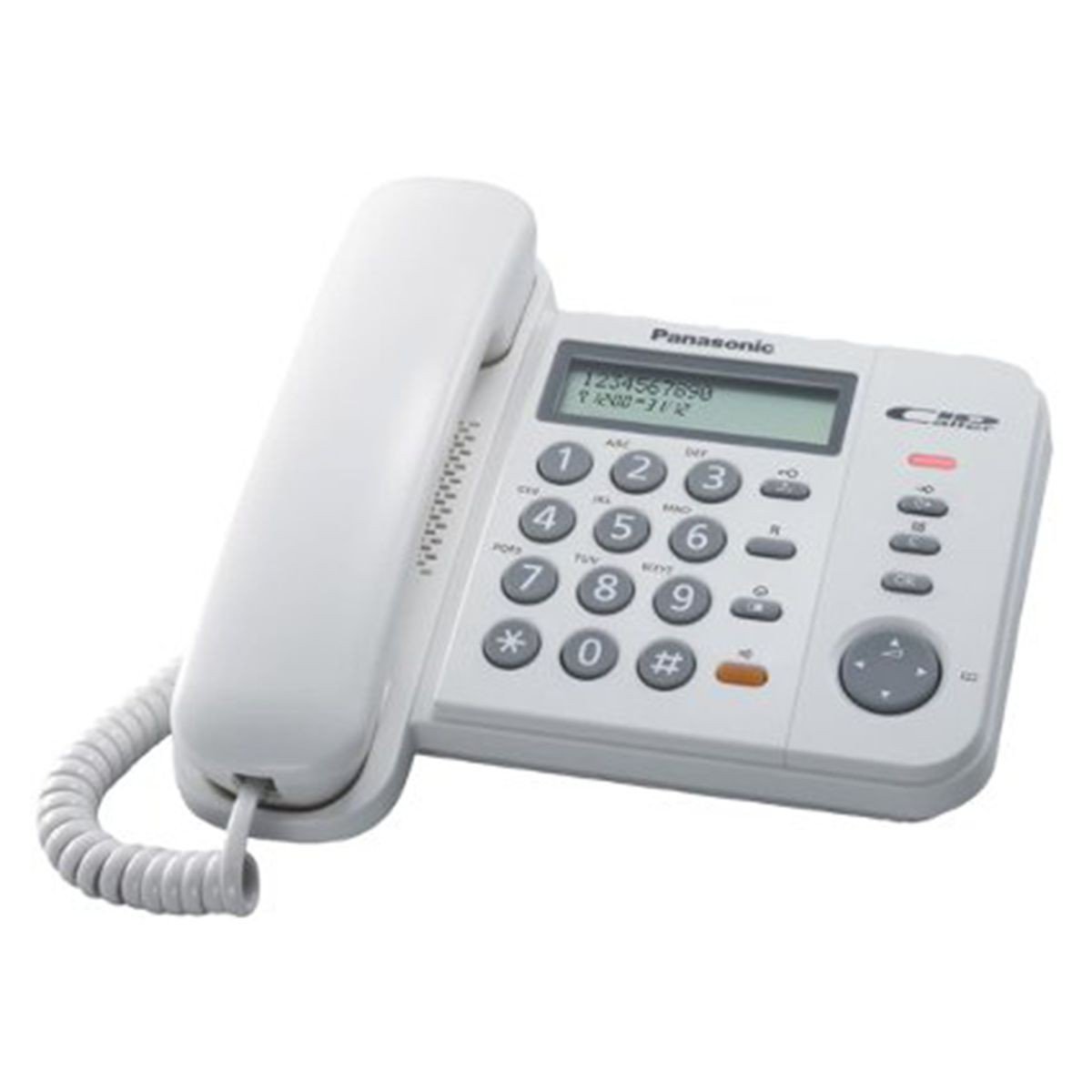
Figura 1: Panasonic KX-TS 520 Corded Telephone. This image shows the complete telephone unit, including the base, handset, and keypad.
Setup
Follow these steps to set up your Panasonic KX-TS 520 telephone.
- Spakkjar: Carefully remove all components from the packaging. Ensure you have the telephone base, handset, coiled handset cord, and telephone line cord.
- Connecting the Handset: Ipplaggja tarf wieħed tal-korda mkebba tal-handset fil-handset u t-tarf l-ieħor fil-jack immarkat "APPARAT" fuq il-ġenb tal-bażi tat-telefon.
- Konnessjoni tal-Linja tat-Telefon: Ipplaggja tarf wieħed tal-korda tat-telefon fil-ġakk immarkat "LINJA" on the back of the telephone base. Plug the other end into your wall telephone jack.
- Qawwa: The telephone is powered directly by the telephone line. No external power adapter or batteries are required for basic operation.
Istruzzjonijiet Operattivi
This section details the primary functions of your telephone.
Nagħmlu Sejħa
- Neħħi l-idejn.
- Isma għal ton ta' dial.
- Ċempel in-numru tat-telefon mixtieq billi tuża t-tastiera.
- Wait for the other party to answer.
- When finished, replace the handset on the base.
Tweġiba Sejħa
- Meta jdoqq it-telefon, erfa’ l-handset biex twieġeb is-sejħa.
- When finished, replace the handset on the base.
Aġġusta tal-Volum
- Volum tal-Idejn: During a call, use the volume control switch (often a slider or button) on the side of the handset or base to adjust the listening volume. There are 6 levels of control.
- Volum tat-Tajjeb: A switch on the telephone base allows you to select between High, Low, or Off for the ringer volume. Adjust this according to your environment.
Speed Dial (3 Stations)
Your telephone features three one-touch memory buttons (M1, M2, M3) for frequently called numbers.
- Biex Taħżen Numru:
- Neħħi l-idejn.
- Agħfas il- "STORE" button (if available, otherwise consult specific model instructions for programming).
- Dial the telephone number you wish to store.
- Press one of the memory buttons (M1, M2, jew M3).
- Ibdel l-idejn.
- Biex Tiċċempel Numru Maħżun:
- Neħħi l-idejn.
- Press the desired memory button (M1, M2, jew M3). The number will be dialed automatically.
Funzjoni ta' sejħa mill-ġdid
Biex terġa' ċċempel l-aħħar numru li ċempel:
- Neħħi l-idejn.
- Agħfas il- "REDIAL" button. The last dialed number will be automatically redialed.
Pawża Funzjoni
The pause function is useful when dialing through a PBX system or long-distance services that require a pause before dialing the next set of digits.
- While dialing, press the "PAUSE" button at the point where a pause is needed.
- Continue dialing the remaining digits after the pause.
Data Port Usage
The integrated data port allows you to connect other devices such as modems, fax machines, or answering machines to the same telephone line.
- Locate the data port on the telephone base.
- Connect the telephone line from your external device to this data port.
Manutenzjoni
Proper care ensures the longevity of your telephone.
- Tindif: Imsaħ it-telefon b'ċarruta ratba, damp drapp. Tużax prodotti tat-tindif li joborxu, xama’, jew solventi.
- Post: Avoid placing the telephone in direct sunlight, near heat sources, or in areas with excessive dust or moisture.
- Immaniġġjar: Handle the handset and cords gently to prevent damage.
Issolvi l-problemi
If you experience issues with your telephone, try these solutions before seeking service.
| Problema | Soluzzjoni |
|---|---|
| L-ebda ton tal-arloġġ. |
|
| Cannot hear the other party. |
|
| Other party cannot hear you. |
|
| It-telefon ma jdoqqx. |
|
Jekk il-problemi jippersistu wara li tipprova dawn il-passi, jekk jogħġbok ikkuntattja l-appoġġ għall-klijenti.
Speċifikazzjonijiet
- Ditta: Panasonic
- Mudell: KX-TS520
- Tip: Telefon bil-Korda
- Materjal: Acrylonitrile Butadiene Styrene (ABS)
- Sors tal-Enerġija: Corded (Line Powered)
- Dimensjonijiet (LxWxH): 19.6 x 19 x 9.5 ċm (7.7 x 7.5 x 3.7 pulzieri)
- Dialing Type: Tastiera Unika
- Apparati Kompatibbli: Netwerk PSTN
- Line Operation: Linja Unika
- Ringer Volume Control: Għoli, Baxx, Mitfi
- Handset Volume Control: 6 Livelli
- Karatteristiċi Speċjali: 3 One-Touch Speed Dial Memory, Redial, Pause Function, Data Port
Informazzjoni dwar Garanzija
This product is covered by the official manufacturer's warranty. Please refer to the warranty card included with your purchase or visit the Panasonic official website for detailed terms and conditions regarding warranty coverage and service.
Appoġġ għall-Klijent
For further assistance, technical support, or inquiries regarding your Panasonic KX-TS 520 telephone, please visit the official Panasonic support website or contact their customer service department. Contact information can typically be found on the Panasonic webis-sit jew fl-imballaġġ tal-prodott tiegħek.
You can find more information about Panasonic products and support at: www.panasonic.com