
Introduzzjoni
The GIGABYTE GM-M7600 is a wireless precision optical mouse designed for comfortable and reliable use. This manual provides instructions for setting up, operating, maintaining, and troubleshooting your device.
Kontenut tal-Pakkett
Jekk jogħġbok iċċekkja l-kontenut tal-pakkett biex tiżgura li l-oġġetti kollha huma preżenti:
- GIGABYTE GM-M7600 Wireless Optical Mouse
- Portable Nano USB Receiver
- 2 x Batteriji AAA
Setup
1. Installazzjoni ta 'batteriji
The GM-M7600 mouse requires two AAA batteries for operation. The batteries are included in the package.
- Sib l-għatu tal-kompartiment tal-batterija fuq in-naħa ta’ taħt tal-maws.
- Żerżaq jew erfa' l-għatu bil-mod biex tiftaħ il-kompartiment.
- Insert the two AAA batteries, ensuring the positive (+) and negative (-) terminals align correctly with the markings inside the compartment.
- Agħlaq l-għatu tal-kompartiment tal-batterija sew.
2. Konnessjoni tar-Riċevitur USB
The mouse connects to your computer via a portable Nano USB receiver.
- Locate the Nano USB receiver. It may be stored inside the mouse's battery compartment or packaged separately.
- Plug the Nano USB receiver into an available USB port on your computer (Laptop or Personal Computer).
- Your operating system (e.g., Windows XP, Linux) should automatically detect and install the necessary drivers. This process may take a few moments.
- Once the drivers are installed, the mouse is ready for use.
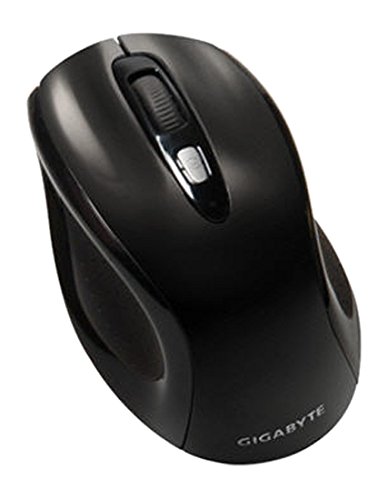
Figura 1: GIGABYTE GM-M7600 Wireless Optical Mouse. This image displays the ergonomic design of the mouse, highlighting its form factor and the location of its buttons. The Nano USB receiver is typically stored within the mouse or connected to a computer's USB port.
Istruzzjonijiet Operattivi
1. Tixgħil / Mitfi
The mouse typically has a power switch on its underside. Slide the switch to the 'ON' position to activate the mouse. Slide it to 'OFF' when not in use to conserve battery life.
2. Aġġustament tad-DPI (Sensittività)
The GM-M7600 features an adjustable DPI switch, allowing you to change the mouse sensitivity between 800 DPI and 1600 DPI. This switch is usually located near the scroll wheel. Press the DPI button to toggle between the two sensitivity settings.
3. Funzjonijiet Bażiċi tal-Maws
- Ikklikkja Xellug: Buttuna primarja għall-għażla ta' oġġetti, ftuħ files, u l-interazzjoni mas-softwer.
- Ikklikkja bil-lemin: Buttuna sekondarja għall-aċċess tal-menus tal-kuntest u għażliet addizzjonali.
- Scroll Wheel: Użat biex tiskrollja fid-dokumenti u web paġni. Jista' jiffunzjona wkoll bħala buttuna tan-nofs tal-ikklikkjar.
Manutenzjoni
1. Tindif
Biex iżżomm prestazzjoni u dehra ottimali:
- Disconnect the mouse from your computer and turn off the power switch.
- Uża drapp ratba u mingħajr ħelu ftit dampLaħlaħ bl-ilma jew b'soluzzjoni ħafifa tat-tindif biex timsaħ il-wiċċ tal-maws.
- Evita li tuża kimiċi ħarxa, prodotti tat-tindif li joborxu, jew li tisprejja likwidi direttament fuq il-maws.
- Clean the optical sensor area on the underside of the mouse with a dry cotton swab to remove any dust or debris.
2. Sostituzzjoni tal-batterija
When the mouse performance degrades or it stops responding, it may be time to replace the batteries.
- Turn off the mouse using the power switch.
- Open the battery compartment as described in the 'Installing Batteries' section.
- Neħħi l-batteriji AAA qodma.
- Insert two new AAA batteries, observing the correct polarity (+/-).
- Agħlaq il-kompartiment tal-batterija u erġa’ ixgħel il-maws.
Issolvi l-problemi
If you encounter issues with your GIGABYTE GM-M7600 mouse, try the following solutions:
- Il-maws ma jirrispondix:
- Kun żgur li l-maws ikun mixgħul.
- Iċċekkja jekk il-batteriji humiex installati sew u għandhomx biżżejjed ċarġ. Ibdelhom jekk meħtieġ.
- Ensure the Nano USB receiver is securely plugged into a working USB port on your computer. Try a different USB port.
- Ibda mill-ġdid il-kompjuter tiegħek.
- Moviment erratiku tal-cursor:
- Naddaf is-senser ottiku fuq in-naħa ta' taħt tal-maws.
- Kun żgur li qed tuża l-maws fuq wiċċ adattat. Evita uċuħ li jirriflettu ħafna jew trasparenti.
- Check for any wireless interference. Move the mouse closer to the receiver or away from other wireless devices.
- DPI switch not working:
- Kun żgur li l-maws huwa mixgħul u konness.
- Agħfas il-buttuna DPI sew.
Speċifikazzjonijiet
| Isem tal-Mudell | GM-M7600 |
| Brand | GIGABYTE |
| Teknoloġija tal-Konnettività | 2.4GHz Radio Frequency Wireless |
| Sejbien tal-Moviment | Ottiċi |
| DPI aġġustabbli | 800 / 1600 DPI |
| Numru ta' Buttuni | 3 (Left, Right, Scroll Wheel/Middle Click) |
| Sors tal-Enerġija | 2 x Batteriji AAA (inklużi) |
| Tip ta 'Riċevitur | Portable Nano USB Receiver |
| Apparati Kompatibbli | Laptop, Kompjuter Personali |
| Appoġġ tas-Sistema Operattiva | Linux, Windows XP |
| Materjal tal-għeluq | Plastic with Rubberized Finish |
| Kulur | Iswed |
Garanzija u Appoġġ
For warranty information and technical support, please refer to the warranty card included with your product or visit the official GIGABYTE websit. Żomm l-irċevuta tax-xiri tiegħek għal pretensjonijiet ta' garanzija.