
Introduzzjoni
This manual provides instructions for the installation, operation, and maintenance of the Intermec 1-206106-95 Head Lift Linkage Assembly for PM4 series industrial printers. This component is designed to facilitate the proper functioning of the printhead lift mechanism, ensuring reliable performance during media loading and maintenance.
Informazzjoni dwar is-Sigurtà
Always observe the following safety precautions when handling or installing this component:
- Ensure the printer is powered off and disconnected from all power sources before beginning installation or maintenance.
- Ilbes tagħmir protettiv personali xieraq, bħal ingwanti, biex tevita l-korrimenti.
- Handle components carefully to avoid damage to the part or the main device.
- Refer to the main printer's service manual for specific disassembly and reassembly procedures.
Kontenut tal-Pakkett
Ivverifika li l-komponenti kollha huma preżenti qabel ma tipproċedi bl-installazzjoni:
- Intermec 1-206106-95 Head Lift Linkage Assembly (1 unit)
Setup u Installazzjoni
This section outlines the general steps for replacing the head lift linkage assembly. Specific steps may vary based on the PM4 model. Always consult the printer's service manual for detailed instructions.
- Preparazzjoni: Power off the PM4 printer and disconnect the power cord. Open the printer cover to access the printhead assembly area.
- Sib l-Assemblea Eżistenti: Identify the current head lift linkage assembly. Note its orientation and how it connects to the printhead and the printer frame.
- Neħħi l-Assemblea l-Qadima: Carefully detach any springs, pins, or screws securing the old linkage assembly. Keep track of all fasteners for reinstallation.
- Installa Assemblea Ġdida: Position the new Intermec 1-206106-95 Head Lift Linkage Assembly in the correct orientation. Secure it using the previously removed fasteners. Ensure all connections are firm but do not overtighten.
- Ivverifika l-Moviment: Gently test the printhead lift mechanism to ensure smooth and unobstructed movement. The linkage should operate freely without binding.
- Agħlaq u Ittestja: Close the printer cover, reconnect the power cord, and power on the printer. Perform a test print to confirm proper operation of the printhead lift function.

Figura 1: Ġenb view of the Intermec 1-206106-95 Head Lift Linkage Assembly, illustrating its primary components and structure.

Figura 2: Close-up view of the base and attachment points of the linkage assembly, showing screws and pivot points.
Prinċipji Operattivi
The Head Lift Linkage Assembly is a mechanical component responsible for raising and lowering the printhead within the PM4 series printer. This action is crucial for:
- Tagħbija tal-Midja: Allowing easy insertion and removal of labels or ribbons.
- Manutenzjoni: Providing access for cleaning the printhead or platen roller.
- Irkupru ta' Żbalji: Facilitating the clearing of media jams.
When the printer's cover is opened, or a specific mechanism is engaged, the linkage assembly articulates to lift the printhead, creating a gap for media handling. When the cover is closed, the linkage lowers the printhead into its operational position, ensuring proper contact with the media for printing.
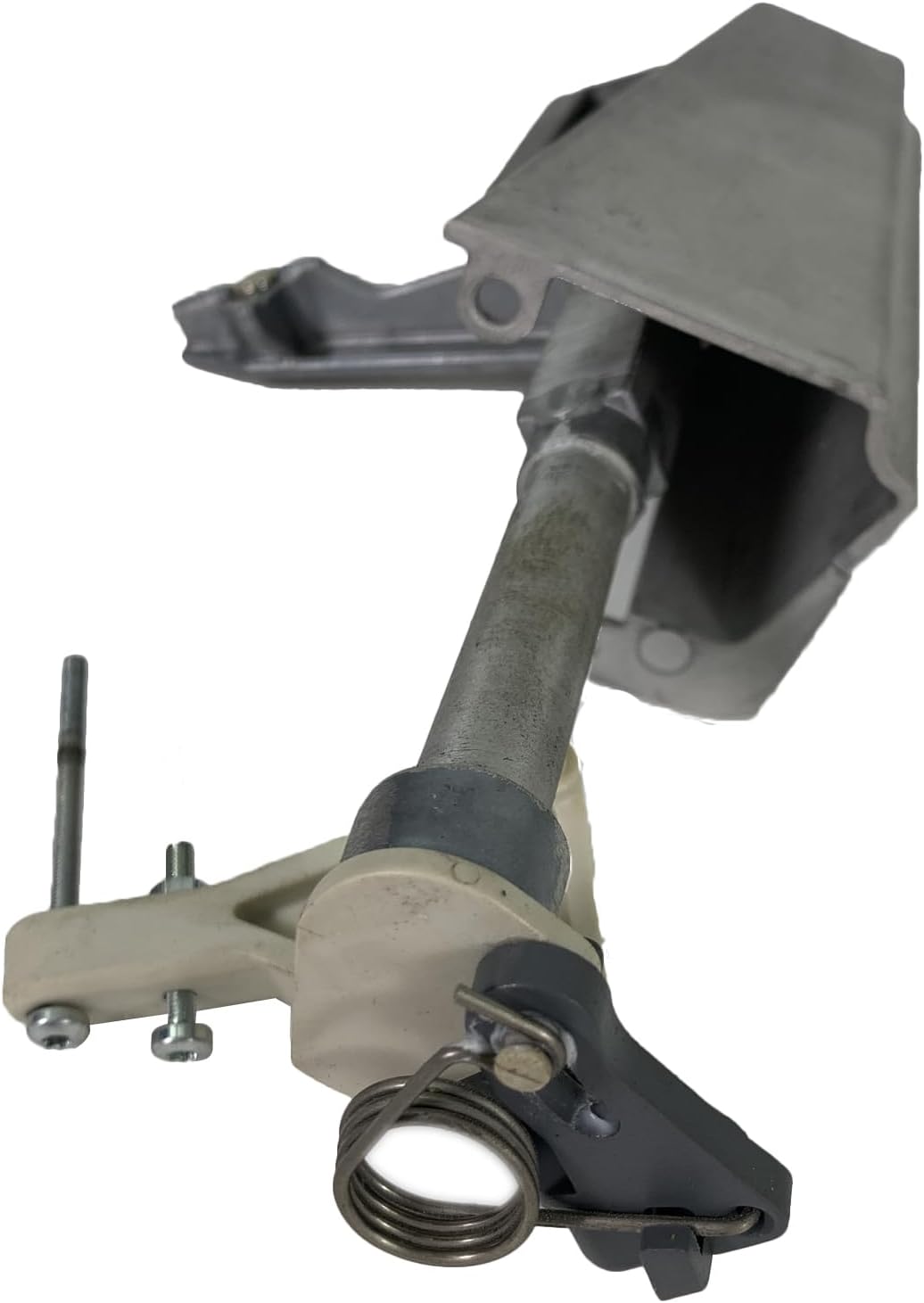
Figura 3: In-naħa ta’ taħt view of the linkage assembly, highlighting the spring and lever mechanism responsible for printhead movement.
Manutenzjoni
Regular maintenance ensures the longevity and proper function of the Head Lift Linkage Assembly:
- Tindif: Periodically inspect the linkage for dust, debris, or label adhesive residue. Clean with a soft, lint-free cloth. Avoid using harsh chemicals.
- Lubrikazzjoni: Moving parts may benefit from a small amount of printer-safe lubricant if recommended by the main device's service manual. Do not over-lubricate.
- Spezzjoni: Check for any signs of wear, bending, or damage to the linkage components, springs, or pivot points. Replace the assembly if significant wear or damage is observed.

Figura 4: Angolat view of the complete linkage assembly, demonstrating its various parts and how they connect.
Issolvi l-problemi
If you experience issues related to the printhead lift mechanism, consider the following:
- Printhead Not Lifting/Lowering:
- Check for obstructions (e.g., jammed media, foreign objects) preventing movement.
- Inspect the linkage for bent or broken parts.
- Ensure all springs are correctly attached and providing tension.
- Loose or Wobbly Printhead:
- Verify that all screws and fasteners securing the linkage are tight.
- Check for excessive wear in pivot points that might cause play.
If issues persist after basic troubleshooting, consult a qualified service technician or the main device's service manual.
Speċifikazzjonijiet
| Attribut | Valur |
|---|---|
| Numru tal-Mudell | 1-206106-95 |
| Tip ta' Parti | Head Lift Linkage Assembly |
| Kompatibilità | PM4 Series Industrial Printers |
| Għoli | 0.10 pulzieri |
| Wisa' | 6.25 pulzieri |
| Tul | 9.00 pulzieri |
| Piż tat-Tbaħħir | 0.25 liri |
| Manifattur | INTERMEC ACCESSORIES |
Garanzija u Appoġġ
For warranty information and technical support, please refer to the documentation provided with your original Intermec PM4 series printer or visit the official Intermec support websit. Żomm l-irċevuta tax-xiri tiegħek bħala prova tax-xiri għal talbiet ta' garanzija.