
1. Introduzzjoni u Fuqview
L-Avision AV 320D2+ huwa skaner ta' dokumenti A3 ta' prestazzjoni għolja ddisinjat għad-diġitalizzazzjoni effiċjenti u affidabbli ta' dokumenti. B'riżoluzzjoni ottika ta' 600 dpi u konnettività USB, huwa kapaċi jimmaniġġja firxa wiesgħa ta' daqsijiet ta' dokumenti sa A3, u b'hekk ikun adattat għal diversi ambjenti professjonali. Dan il-manwal jipprovdi informazzjoni essenzjali għat-twaqqif, it-tħaddim, il-manutenzjoni u s-soluzzjoni tal-problemi tal-iskaner tiegħek.
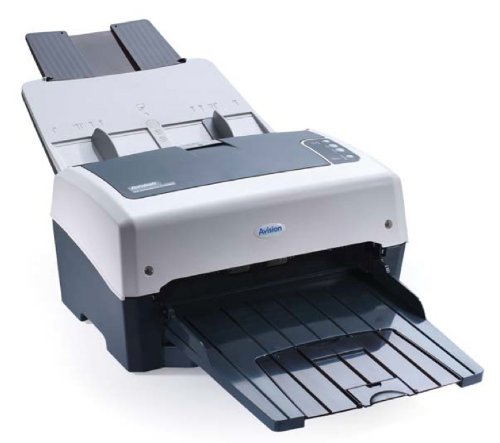
Figura 1: Skaner tad-Dokumenti Avision AV 320D2+ A3. Din l-immaġni turi l-Iskaner tad-Dokumenti Avision AV 320D2+ A3 minn perspettiva ta' quddiem fuq il-lemin. L-iskaner huwa griż ċar u griż skur, b'alimentatur awtomatiku tad-dokumenti (ADF) fil-parti ta' fuq b'gwidi tal-karta viżibbli, u trej tal-ħruġ estiż fuq quddiem. Il-logo tal-Avision huwa viżibbli fuq il-pannell ta' quddiem.
2. Setup
2.1 Disimballaġġ
- Oħroġ l-iskaner u l-aċċessorji kollha mill-imballaġġ bir-reqqa.
- Ivverifika li l-komponenti kollha elenkati fil-lista tal-ippakkjar huma preżenti.
- Neħħi t-tejps protettivi u l-materjali tal-ippakkjar kollha mill-iskaner, inkluż kwalunkwe ġewwa l-alimentatur tad-dokumenti u t-trej tal-ħruġ.
2.2 Konnessjoni tal-Iskaner
- Poġġi l-iskaner fuq wiċċ stabbli u ċatt ħdejn il-kompjuter tiegħek.
- Qabbad l-adapter tal-enerġija mad-dħul tal-enerġija tal-iskaner u mbagħad daħħalha f'sokit elettriku.
- Qabbad tarf wieħed tal-kejbil USB fornut mal-port USB fuq l-iskaner u t-tarf l-ieħor ma' port USB disponibbli fuq il-kompjuter tiegħek.
- Ixgħel l-iskaner billi tuża l-buttuna tal-qawwa, li tipikament tinsab fuq il-ġenb jew fuq il-pannell ta' wara.
2.3 Installazzjoni tas-Softwer
Qabel ma tuża l-iskaner, trid tinstalla d-drajvers u s-softwer tal-iskannjar meħtieġa. Irreferi għas-CD tas-softwer inkluż jew żur il-websajt uffiċjali ta' Avision websit għall-aħħar sewwieqa u utilitajiet.
- Daħħal is-CD tal-installazzjoni tas-softwer fid-drajv tas-CD/DVD tal-kompjuter tiegħek, jew niżżel il-pakkett tas-softwer mill-appoġġ ta' Avision. websit.
- Segwi l-istruzzjonijiet fuq l-iskrin biex tinstalla d-drajvers tal-iskaner u l-applikazzjonijiet tal-iskannjar inklużi. Huwa rakkomandat li tinstalla s-softwer kollu pprovdut għall-funzjonalità sħiħa.
- Erġa' ibda l-kompjuter tiegħek jekk tintalab wara li titlesta l-installazzjoni.
3. Tħaddim tal-Iskaner
3.1 Tagħbija ta' Dokumenti
- Alimentatur Awtomatiku tad-Dokumenti (ADF): Iftaħ it-trej tad-dħul tal-ADF. Aġġusta l-gwidi tal-karta biex jaqblu mal-wisa' tad-dokumenti tiegħek. Poġġi d-dokumenti wiċċhom 'l isfel bit-tarf ta' fuq l-ewwel fl-ADF. Il-kapaċità standard tal-folji hija ta' 50 folja.
- Kun żgur li d-dokumenti huma ħielsa minn staples, klipps tal-karti, jew kwalunkwe oġġett barrani li jista' jagħmel ħsara lill-iskaner.
- Għal dokumenti ta' daqsijiet imħallta, kun żgur li huma allinjati sew biex tevita li jiġu mgħawġa.
3.2 Proċeduri Bażiċi ta' Skennjar
- Tella’ d-dokumenti tiegħek fl-ADF kif deskritt hawn fuq.
- Iftaħ l-applikazzjoni tal-iskannjar preferuta tiegħek (eż., Avision Button Manager, softwer kompatibbli mat-TWAIN/ISIS).
- Agħżel l-Avision AV 320D2+ bħala l-iskaner tiegħek.
- Agħżel is-settings tal-iskannjar mixtieqa tiegħek (eż., modalità tal-kulur, riżoluzzjoni, folder tad-destinazzjoni).
- Ibda l-iskennjar mill-interfaċċja tas-softwer. L-iskaner awtomatikament se jdaħħal u jiskennja d-dokumenti.
- Review l-immaġnijiet skenjati u ssalvahom fil-post mixtieq tiegħek.
3.3 Iskannjar Settings
L-iskaner jappoġġja diversi settings biex jottimizza l-kwalità tal-iskannjar u file daqs:
- Riżoluzzjoni: Aġġustabbli sa 600 dpi. Riżoluzzjoni ogħla tipprovdi kwalità tal-immaġni aħjar iżda tirriżulta f'immaġni akbar file daqsijiet.
- Modalità tal-Kulur: L-għażliet tipikament jinkludu Kulur, Skala ta' Griż, u Iswed u Abjad (Binarju).
- Skanjar Duplex: L-AV 320D2+ jappoġġja skannjar duplex (żewġ naħat), li jippermettilek taqbad iż-żewġ naħat ta' dokument f'daqqa.
- Format tal-output: Formati komuni tal-output jinkludu PDF, JPEG, TIFF, u PDF li tista' tiġi mfittxija.
4. Manutenzjoni
4.1 Tindif tal-Iskaner
Tindif regolari jiżgura prestazzjoni ottimali u jestendi l-ħajja tal-iskaner tiegħek.
- Barra: Imsaħ l-uċuħ ta 'barra b'artab, damp, drapp mingħajr suf. Tużax prodotti tat-tindif jew solventi li joborxu.
- Uċuħ tal-ħġieġ: Uża drapp ratba dampNaddaf il-ħġieġ b'deterġent li ma jobrox biex tnaddaf l-uċuħ tal-ħġieġ tal-iskaner (jekk applikabbli).
- Rombli: Naddaf ir-rombli tal-għalf perjodikament b'ċarruta mingħajr suf ħafif.ampImnaddaf bl-alkoħol isopropiliku biex tneħħi t-trab u r-residwu tal-karta.
- Dejjem itfi u aqla’ l-iskaner qabel ma tnaddaf.
5 Issolvi l-problemi
Din it-taqsima tindirizza kwistjonijiet komuni li tista' tiltaqa' magħhom bl-iskaner Avision AV 320D2+ tiegħek.
| Problema | Kawża Possibbli | Soluzzjoni |
|---|---|---|
| Skaner mhux skopert mill-kompjuter | Kejbil USB maħlul, mitfi, problema bis-sewwieq | Iċċekkja l-konnessjoni tal-USB, kun żgur li l-iskaner ikun mixgħul, u erġa' installa d-drajvers. |
| Ġammijiet tal-karti | Dokumenti mhux allinjati, rombli milbusa, oġġetti barranin | Neħħi l-karta mblukkata bir-reqqa, allinja d-dokumenti kif suppost, naddaf ir-rombli. |
| Kwalità fqira tal-iskennjar (strixxi, immaġni mċajpra) | Ħġieġ maħmuġ, settings mhux korretti, rombli milbusa | Naddaf il-ħġieġ u r-rombli tal-iskaner, aġġusta s-settings tar-riżoluzzjoni/kulur. |
| Dokumenti mhux qed jitimgħu | Rombli tal-għalf mgħobbija ħażin u milbusa | Kun żgur li d-dokumenti jitgħabbew b'mod korrett, naddaf jew ibdel ir-rombli tal-għalf jekk ikunu milbusa. |
6. Speċifikazzjonijiet
Speċifikazzjonijiet tekniċi ewlenin għall-iskaner Avision AV 320D2+:
- Tip ta' Prodott: Skaner tad-Dokument
- Format tal-Karta: A3
- Riżoluzzjoni: 600 dpi (Ottiku)
- Konnettività: USB
- Kulur: Iswed/Abjad
- Piż: Madwar 26.46 libbra (12 kg)
- Konsum tal-Enerġija: 38.4 Watts
- Kapaċità Standard tal-Folji (ADF): 50 folja
- Teknoloġija tas-Sensor ottiku: CMOS
- Isem tal-Mudell: AV320D2+
- Numru tal-Mudell tal-Oġġett: FT-0807H
7. Garanzija u Appoġġ
7.1 Garanzija tal-Manifattur
L-iskaner Avision AV 320D2+ tipikament jiġi b' Garanzija ta' 2 snin mill-manifatturDin il-garanzija tkopri difetti fil-materjali u l-abbilità taħt użu normali. Jekk jogħġbok żomm il-prova tax-xiri tiegħek għal talbiet ta' garanzija. Għal termini u kundizzjonijiet speċifiċi, irreferi għall-karta tal-garanzija inkluża mal-prodott tiegħek jew żur is-sit uffiċjali ta' Avision. websit.
7.2 Appoġġ Tekniku
Għal assistenza teknika, aġġornamenti tad-drajvers, jew aktar soluzzjonijiet mhux koperti f'dan il-manwal, jekk jogħġbok ikkuntattja l-appoġġ għall-klijenti ta' Avision. L-informazzjoni ta' kuntatt tal-appoġġ ġeneralment tista' tinstab fuq is-sit uffiċjali ta' Avision. webis-sit jew fid-dokumentazzjoni pprovduta mal-iskaner tiegħek.
Nota: Id-disponibbiltà ta' spare parts u aġġornamenti tas-softwer tista' tvarja. Jekk jogħġbok iċċekkja l-kanali uffiċjali tal-manifattur għall-aktar informazzjoni aġġornata.