
Introduzzjoni
The Mackie HD1221 is a 12-inch 2-way compact high-definition powered loudspeaker designed for professional audio applications. It features 1200W of Class-D Fast Recovery amplification, high-definition audio processing, and custom-designed transducers by EAW. This manual provides essential information for the safe and effective use of your HD1221 loudspeaker, including setup, operation, maintenance, and troubleshooting.
Informazzjoni dwar is-Sigurtà
Before operating the Mackie HD1221 loudspeaker, please read and understand all safety instructions. Failure to do so may result in electric shock, fire, or other injuries. Keep these instructions for future reference.
- Sors tal-Enerġija: Qabbad l-unità biss ma' provvista tal-enerġija tat-tip deskritt fl-istruzzjonijiet tat-tħaddim jew kif immarkat fuq l-apparat.
- L-ertjar: Ensure the loudspeaker is properly grounded to prevent electric shock.
- Ventilazzjoni: Timblokkax il-fetħiet tal-ventilazzjoni. Installa skont l-istruzzjonijiet tal-manifattur.
- Ilma u Umdità: Tużax dan l-apparat ħdejn l-ilma jew tesponih għal taqtir jew titjir tal-ilma.
- Tindif: Naddaf biss b'ċarruta niexfa.
- Servizzi: Irreferi l-manutenzjoni kollha lil persunal tas-servizz kwalifikat. Is-servizz huwa meħtieġ meta l-apparat ikun ġie bil-ħsara b'xi mod, bħal korda tal-provvista tal-enerġija jew plagg ikun bil-ħsara, likwidu jkun inxtered jew oġġetti jkunu waqgħu fl-apparat, l-apparat ikun ġie espost għax-xita jew umdità, ma jaħdimx b'mod normali , jew twaqqgħet.
- Immuntar: Uża biss mal-karrettun, stand, tripod, bracket, jew mejda speċifikati mill-manifattur, jew mibjugħa mal-apparat. Meta jintuża karrettun, uża l-kawtela meta ċċaqlaq il-kombinazzjoni tal-karrettun/apparat biex tevita korriment minn qlib.
Kontenut tal-Pakkett
Verify that the following items are included in your Mackie HD1221 package:
- Mackie HD1221 Powered Loudspeaker
- Kejbil tal-Enerġija
- Gwida ta' Bidu Mgħaġġel (jekk applikabbli)
- Informazzjoni dwar Garanzija
Jekk xi oġġetti huma nieqsa jew bil-ħsara, jekk jogħġbok ikkuntattja lin-negozjant tiegħek immedjatament.
Prodott Overview
The Mackie HD1221 is a versatile loudspeaker designed for various applications, including main PA, stage monitor, and flown installations. It features a robust construction and advanced audio processing.
Quddiem u Ġenb Views
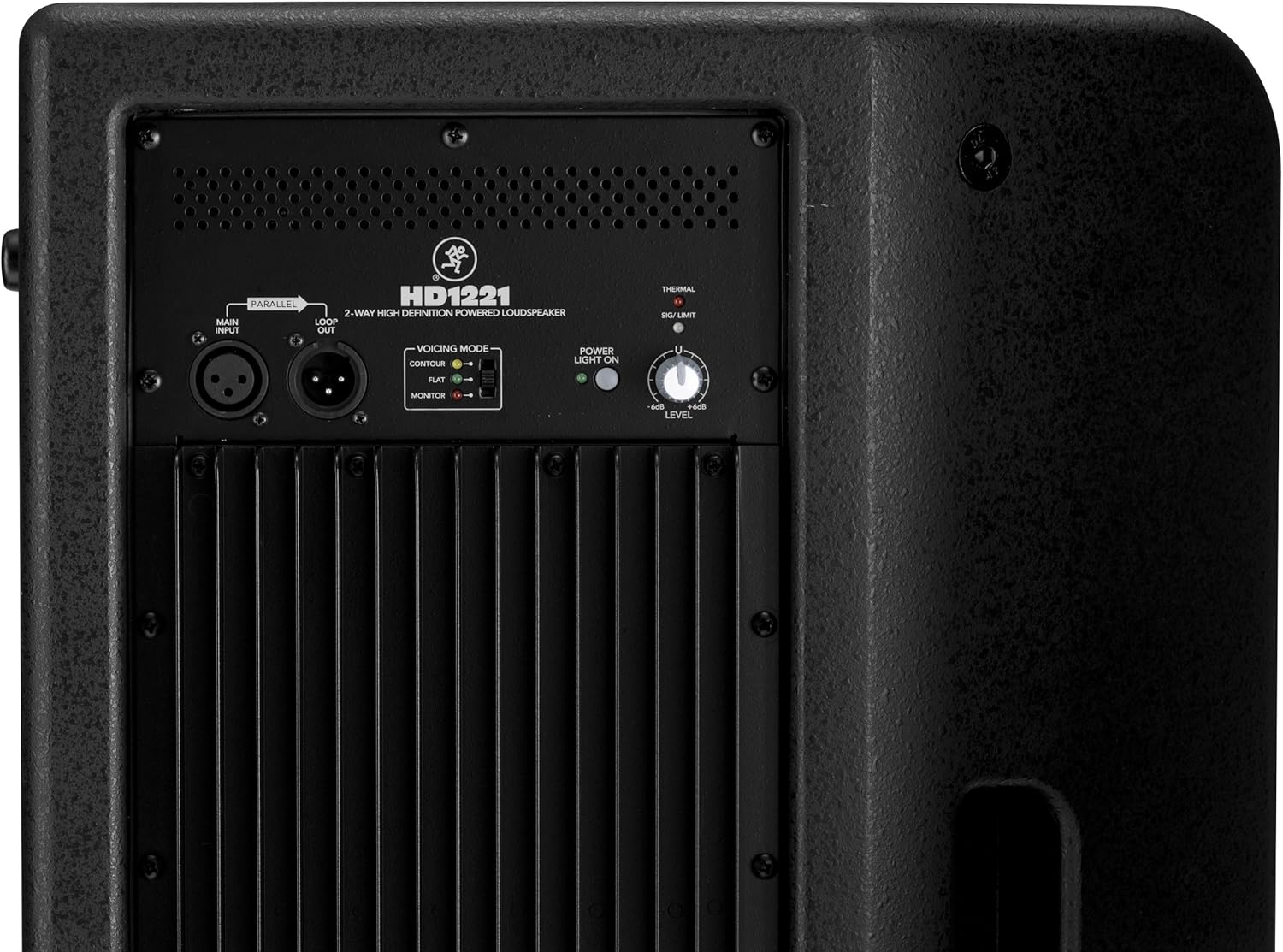
Figura 1: Quddiem u ġenb view of the HD1221 loudspeaker, highlighting the durable grille and integrated handles for portability.

Figura 2: In-naħa tax-xellug view of the HD1221 loudspeaker.
Kontrolli u Konnessjonijiet tal-Panel ta' Wara

Figure 3: Rear panel of the HD1221, detailing the input/output section, voicing mode switch, power indicator, and level control knob.
- Main Input (XLR): Connect your audio source here.
- Loop Out (XLR): Provides a parallel output of the main input signal for connecting to additional loudspeakers or other audio equipment.
- Voicing Mode Switch: Selects between Contour, Flat, and Monitor modes to optimize the loudspeaker's frequency response for different applications.
- Dawl tal-Enerġija Mixgħul: Jindika l-istatus tal-enerġija tal-unità.
- Thermal/Sig/Limit Indicators: Provide visual feedback on the loudspeaker's operational status, including thermal protection, signal presence, and limiting.
- Kontroll tal-Livell: Adjusts the overall output volume of the loudspeaker.
- Input tal-Enerġija AC: Jgħaqqad il-kejbil tal-enerġija mal-provvista tal-elettriku.
Komponenti Interni
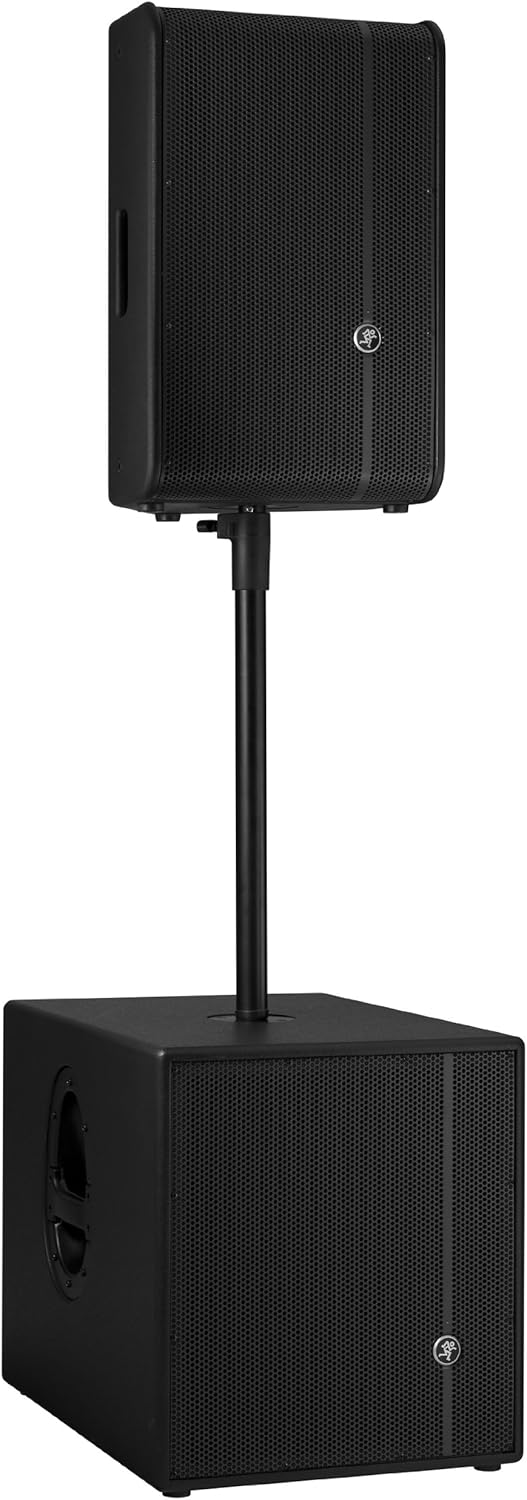
Figura 4: Intern view of the HD1221, showcasing the 12-inch neodymium woofer and 1.75-inch titanium compression driver, designed by EAW.
Setup
Proper setup ensures optimal performance and safety. Follow these steps for initial setup:
Konnessjoni tal-Enerġija
- Ensure the Level control on the rear panel is set to its minimum position.
- Connect the supplied AC power cable to the AC Power Input on the rear panel of the HD1221.
- Ipplaggja t-tarf l-ieħor tal-kejbil tal-enerġija f'sokit elettriku ertjat.
Konnessjonijiet Awdjo
- Connect your audio source (e.g., mixer, instrument) to the Main Input (XLR) on the rear panel.
- If connecting multiple loudspeakers, use the Loop Out (XLR) to send the signal to the next loudspeaker.
Għażliet ta 'Immuntar
The HD1221 offers several mounting options for flexibility:
Immuntar tal-Pol

Figure 5: The HD1221 mounted on a pole, typically above a subwoofer like the HD1501 for a full-range PA system.
The HD1221 can be mounted on a standard speaker pole stand. Ensure the stand is stable and rated for the weight of the loudspeaker (approximately 58 lbs).
Stage Monitor Placement
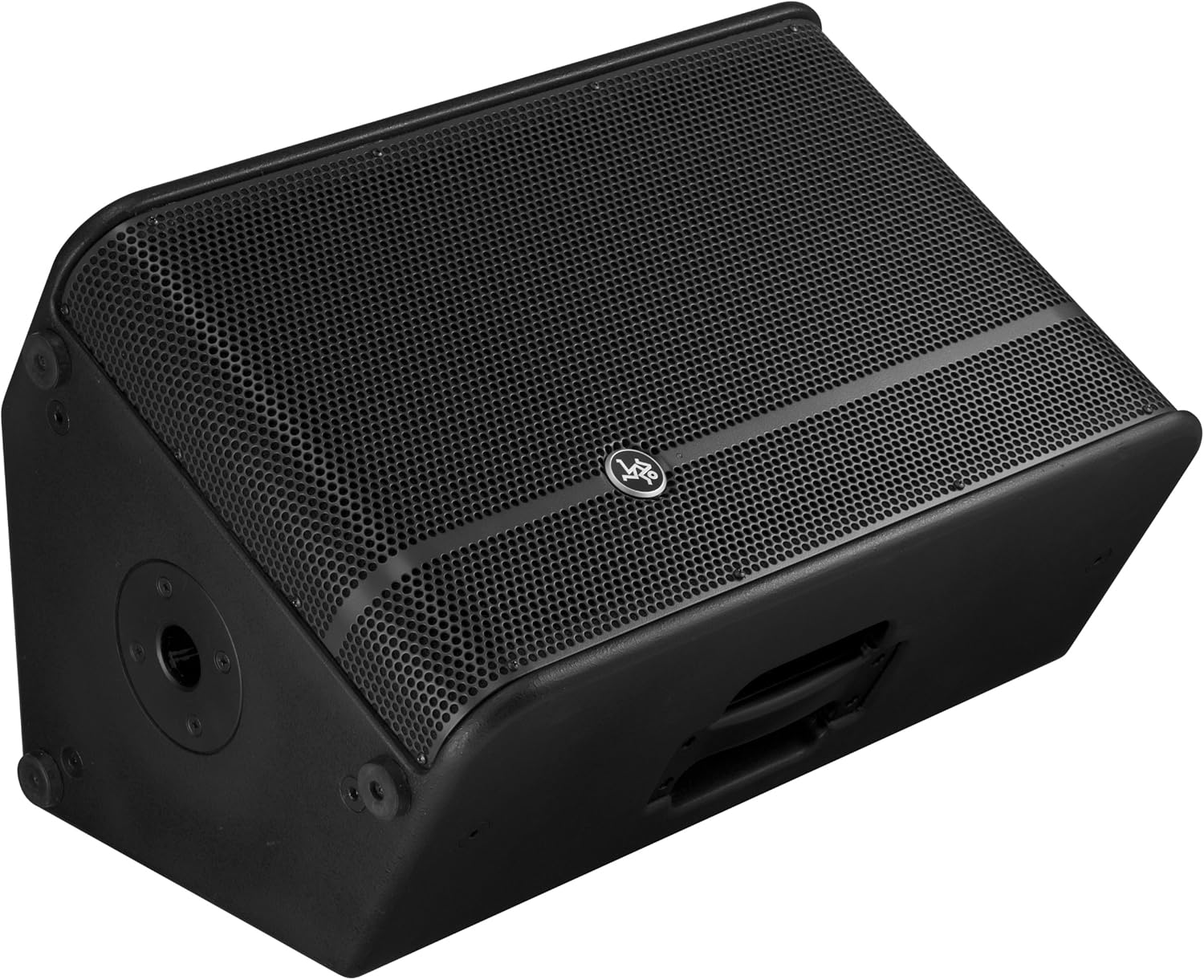
Figure 6: The HD1221 configured as a stage monitor, utilizing its 60-degree angle for optimal sound projection towards the performer.
Id-disinn tal-kabinett jippermetti l-użu bħalatage monitor with a 60-degree angle. Place the loudspeaker directly on the stage floor, angled towards the performer.
Flying/Suspension

Figure 7: The HD1221 suspended vertically using appropriate rigging hardware.

Figure 8: The HD1221 suspended horizontally using appropriate rigging hardware.
The HD1221 can be flown both vertically and horizontally. Always use certified rigging hardware and consult with a qualified professional for safe installation. The user-rotatable horn allows for precise sound placement in either orientation.
Istruzzjonijiet Operattivi
Ladarba l-ispiker ikun issettjat, segwi dawn il-passi għall-operazzjoni:
- Qawwa Mixgħul: Turn on your audio source (mixer, etc.) first, then turn on the HD1221 loudspeaker. The 'Power Light On' indicator should illuminate.
- Set Voicing Mode: Use the Voicing Mode switch on the rear panel to select the appropriate setting for your application:
- Kontorn: Provides a sculpted frequency response, often suitable for music playback.
- Ċatt: Offers a neutral frequency response, ideal for critical listening or when external EQ is used.
- Monitor: Optimizes the frequency response for use as a stage monitor, reducing low-end rumble and enhancing clarity.
- Aġġusta l-Livell: Slowly increase the Level control on the rear panel to achieve the desired volume. Monitor the 'Sig/Limit' indicator; if it flashes frequently or stays lit, reduce the input level from your source or the HD1221's level to prevent distortion and potential damage.
- Itfi: When finished, turn off the HD1221 loudspeaker first, then turn off your audio source.
Vidjo Uffiċjali tal-Prodott
Vidjo 1: Overview of the Mackie HD1221 12-inch 2-Way High-Definition Powered Loudspeaker, demonstrating its features and applications.
Manutenzjoni
Regular maintenance helps prolong the life and performance of your HD1221 loudspeaker.
- Tindif: Use a dry, lint-free cloth to clean the exterior of the loudspeaker. Do not use liquid cleaners or solvents.
- Gralja: Periodically check the steel grille for any damage or debris. Clean gently if necessary.
- Konnessjonijiet: Kun żgur li l-kejbils kollha huma konnessi sew u ħielsa minn ħsara.
- Ħażna: When not in use, store the loudspeaker in a dry, temperate environment, protected from dust and extreme temperatures.
Issolvi l-problemi
Jekk tiltaqa' ma' problemi bl-HD1221 tiegħek, irreferi għall-problemi u s-soluzzjonijiet komuni li ġejjin:
| Problema | Kawża Possibbli | Soluzzjoni |
|---|---|---|
| Ebda output tal-ħoss | No power; incorrect connections; low level setting; faulty cable. | Check power cable and outlet. Verify audio cable connections. Increase Level control. Test with a different cable. |
| Ħoss distort | Input level too high; faulty cable; damaged speaker component. | Reduce input level from source or HD1221. Check 'Sig/Limit' indicator. Test with a different cable. If distortion persists, contact support. |
| Ebda dawl ta 'enerġija | No power; power switch off; internal fuse blown. | Ensure power cable is connected and outlet is active. Check power switch. If still no light, contact support. |
| Overheating (Thermal indicator lit) | Insufficient ventilation; prolonged high-volume operation. | Ensure adequate airflow around the unit. Reduce volume. Allow unit to cool down. |
Speċifikazzjonijiet
Detailed technical specifications for the Mackie HD1221 powered loudspeaker:
- Output tal-Enerġija: 1200W Peak
- Tip ta' Kelliem: 2-Way High-Definition Powered Loudspeaker
- Woofer: 12-inch Neodymium Woofer
- Sewwieq tal-kompressjoni: 1.75-inch Titanium Compression Driver
- Qarn: Qrun li jdur mill-utent 90° x 50°
- Materjal tal-Kabinett: 15mm Birch Plywood
- Gralja: Azzar irrumblat fil-kesħa
- Angolu tal-Monitoraġġ: 60 grad
- Voicing Modes: Contour, Flat, Monitor
- Amplifikazzjoni: Class-D Fast Recovery
- Impedenza: 8 Ohms
- Piż tal-oġġett: 58 Liri
- Protokoll tal-Konnettività: Wi-Fi (Note: This specification might refer to internal processing or future features, as direct Wi-Fi audio input is not typical for this type of speaker.)
- Numru tal-Mudell: HD1221
- UPC: 663961030495
Garanzija
The Mackie HD1221 loudspeaker comes with a comprehensive warranty:
- Elettronika: garanzija ta 'sena
- Sewwieqa: garanzija ta 'sena
Please retain your proof of purchase for warranty claims. For full terms and conditions, refer to the warranty card included with your product or visit the official Mackie websit.
Appoġġ
For additional assistance, technical support, or service inquiries, please contact Mackie Customer Support. You can find contact information and frequently asked questions on the official Mackie websit.
Riżorsi onlajn: Żur il- Mackie Store on Amazon għal informazzjoni u aġġornamenti dwar il-prodott.