
Introduzzjoni
Grazzi tax-xiriasing the SENTRY CL933 Big Screen Weather Alarm Clock. This device combines a digital alarm clock with a large LCD display, providing essential information such as time, date, indoor temperature, humidity, and a weather forecast. This manual will guide you through the setup, operation, and maintenance of your new alarm clock.
Informazzjoni dwar is-Sigurtà
- Tesponix l-unità għal temperaturi estremi, dawl tax-xemx dirett, jew umdità għolja.
- Evita li twaqqa' l-unità jew li tissottomettiha għal impatti qawwija.
- Tħallatx batteriji qodma u ġodda, jew tipi differenti ta 'batteriji.
- Neħħi l-batteriji jekk l-unità mhux se tintuża għal perjodu estiż.
- Naddaf l-unità b'ċarruta ratba u niexfa. Tużax prodotti tat-tindif jew solventi li joborxu.
- Dan il-prodott huwa għal użu fuq ġewwa biss.
Kontenut tal-Pakkett
Jekk jogħġbok iċċekkja li l-oġġetti kollha huma preżenti:
- SENTRY CL933 Big Screen Weather Alarm Clock
- Manwal għall-Utent (dan id-dokument)
Prodott Overview
The SENTRY CL933 features a large, easy-to-read LCD display and intuitive controls. Familiarize yourself with the main components:
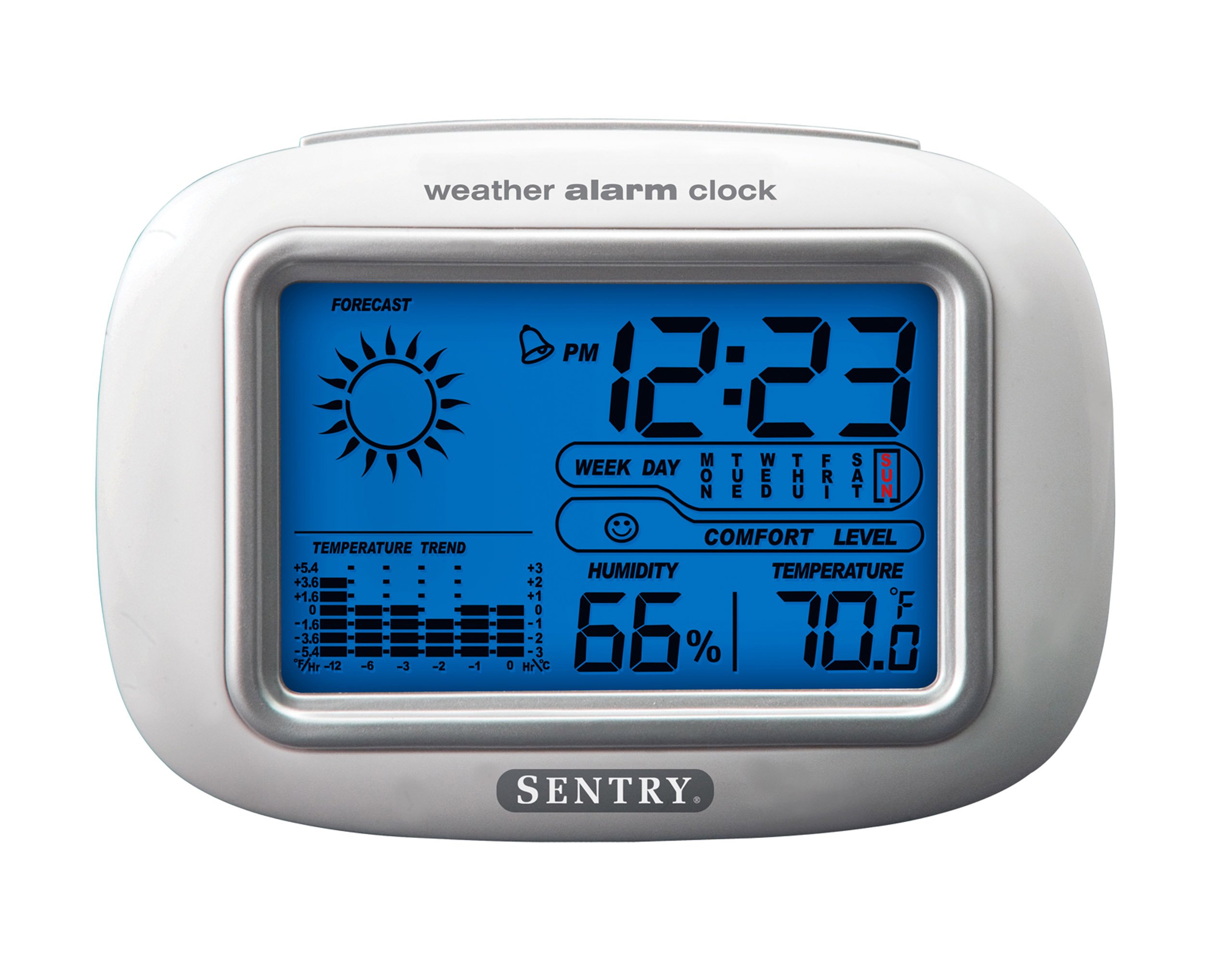
The SENTRY CL933 Big Screen Weather Alarm Clock displayed in its retail packaging, showing the clock face with time, weather forecast, humidity, and temperature readings.
Elementi tal-wiri:
- Wiri tal-Ħin: Shows current time (12/24 hour format).
- Date & Day of Week: Displays the current date and day.
- Weather Forecast Icon: Indicates predicted weather conditions (e.g., sunny, cloudy, rainy).
- Moon Phase Icon: Juri l-fażi attwali tal-qamar.
- Wiri tat-Temperatura: Juri t-temperatura ta' ġewwa f'Celsius jew Fahrenheit.
- Wiri tal-Umdità: Shows indoor humidity percentage.
- Ikona tal-Livell ta' Kumdità: Indicates the comfort level based on temperature and humidity.
- Indikatur tat-Tendenza tat-Temperatura: Shows if the temperature is rising, falling, or stable over the last 12 hours.
- Ikona tal-allarm: Indicates when the alarm is set.
Control Buttons (typically on the back or sides):
- Buttuna MODE/SET: Used to switch between display modes and enter setting mode.
- Buttuni UP/DOWN: Used to adjust values during setting and sometimes to toggle display options.
- Buttuna ALLARM: Użat biex jissettja jew jattiva/jiddiżattiva l-allarm.
- Buttuna SNOOZE/DAWL: Activates the backlight and functions as the snooze button when the alarm sounds.
- Buttuna °C/°F: Jaqleb bejn il-wiri tat-temperatura f'Celsius u Fahrenheit.
Setup
1. Installazzjoni tal-batterija
- Sib l-għatu tal-kompartiment tal-batterija fuq wara tal-unità.
- Remove the cover by sliding or lifting it.
- Insert two (2) new AAA batteries (not included) according to the polarity indicators (+ and -) inside the compartment.
- Ibdel l-għatu tal-kompartiment tal-batterija b'mod sikur.
- The clock will power on and the display will activate.
2. Tqegħid Inizjali
Place the alarm clock on a stable, flat surface away from direct heat sources, strong vibrations, or areas with extreme temperature fluctuations for accurate readings.
Istruzzjonijiet Operattivi
1. L-issettjar tal-Ħin u d-Data
- Agħfas u żomm il- MODE/SET button for approximately 3 seconds to enter time setting mode. The hour digit will start flashing.
- Uża l- UP or 'L isfel buttuni biex taġġusta s-siegħa.
- Agħfas MODE/SET għal darb'oħra biex tikkonferma s-siegħa u tmur għall-issettjar tal-minuti.
- Repeat steps 2 and 3 for minutes, year, month, and day.
- Wara li tissettja l-jum, agħfas MODE/SET darba oħra għall-aħħar darba biex toħroġ mill-modalità tas-settings.
- Biex taqleb bejn il-format tal-ħin ta' 12-il siegħa u 24 siegħa, agħfas il-buttuna UP Agħfas il-buttuna waqt li s-siegħa tkun qed teptip waqt l-issettjar tal-ħin.
2. Issettjar tal-Allarm
- Agħfas il- ALLARM Agħfas il-buttuna darba biex turi l-ħin attwali tal-allarm.
- Agħfas u żomm il- ALLARM button for approximately 3 seconds. The alarm hour digit will start flashing.
- Uża l- UP or 'L isfel buttuni biex taġġusta s-siegħa tal-allarm.
- Agħfas ALLARM again to confirm the hour and move to the alarm minute setting.
- Uża l- UP or 'L isfel buttuni biex taġġusta l-minuta tal-allarm.
- Agħfas ALLARM darba oħra biex tikkonferma u toħroġ mill-modalità tas-settings tal-allarm.
- Biex tattiva jew tiddiżattiva l-allarm, agħfas il-buttuna ALLARM button briefly when the current time is displayed. An alarm icon will appear on the display when the alarm is active.
3. Funzjoni Snooze u Dawl ta' Wara
- Meta l-allarm jinstema ', agħfas il-buttuna SNOOZE / DAWL button to activate the snooze function. The alarm will temporarily stop and sound again after a few minutes (typically 5-10 minutes).
- Biex titfi l-allarm kompletament, agħfas kwalunkwe buttuna oħra (eż., ALLARM, MODE/SET) when the alarm is sounding.
- Agħfas il- SNOOZE / DAWL button at any time to activate the backlight for a few seconds, illuminating the display for easy viewing in low light conditions. The backlight is not designed to stay on continuously to conserve battery life.
4. Għażla tal-Unità tat-Temperatura (°C/°F)
Agħfas il- ° C / ° F button (usually located on the back or side) to toggle the temperature display between Celsius and Fahrenheit.
5. Understanding Weather and Environmental Displays
- Tbassir tat-Temp: The icon (e.g., sun, clouds, rain) represents a prediction of the weather for the next 12-24 hours based on atmospheric pressure changes detected by the internal sensor. This is an estimate and may not always match official weather reports.
- Umdità: Displays the current indoor relative humidity percentage.
- Livell ta' Kumdità: An icon (e.g., smiley face, neutral face, frowny face) indicates the indoor comfort level based on the combination of temperature and humidity.
- Xejra tat-Temperatura: The arrow indicator shows if the indoor temperature has been rising, falling, or remaining stable over the past 12 hours.
- Fażi tal-Qamar: The moon icon changes to reflect the current phase of the moon.
Manutenzjoni
- Tindif: Imsaħ l-unità b'artab, ftit damp drapp. Tużax kimiċi ħarxa jew materjali li joborxu.
- Sostituzzjoni tal-batterija: When the display becomes dim or functions become erratic, replace the two AAA batteries. Ensure correct polarity.
- Ħażna: Jekk taħżen l-arloġġ għal perjodu estiż, neħħi l-batteriji biex tevita t-tnixxija.
Issolvi l-problemi
| Problema | Kawża / Soluzzjoni Possibbli |
|---|---|
| Id-displej huwa vojt jew mudlam. | Batteries are low or incorrectly installed. Replace with new AAA batteries, ensuring correct polarity. |
| Time/Date cannot be set. | Kun żgur li qed tagħfas u żżomm il-buttuna MODE/SET buttuna għal 3 sekondi biex tidħol fil-mod ta 'l-issettjar. |
| L-allarm ma jdoqqx. | The alarm may not be activated. Press the ALLARM button briefly to ensure the alarm icon is displayed. Check alarm time setting. |
| Temperatura/umdità mhux preċiża. | The unit may be placed near a heat source, vent, or in direct sunlight. Move the clock to a more stable environment. Readings are for indoor conditions only. |
| It-tbassir tat-temp jidher li mhux korrett. | The weather forecast is an estimate based on internal barometric pressure changes and may not always align with local weather reports. It is a general trend indicator. |
Speċifikazzjonijiet
- Mudell: CL933
- Ditta: SENTRY
- Tip ta' wiri: LCD diġitali b'dawl ta' wara
- Sors tal-Enerġija: Mħaddma bil-batterija
- Batteriji Meħtieġa: 2 x AAA (mhux inklużi)
- Dimensjonijiet: 6.5 x 2.25 x 4.25 pulzieri (16.5 x 5.7 x 10.8 ċm)
- Piż: 6.2 uqija (176 gramma)
- Karatteristiċi: Time, Date, Day of Week, Alarm, Snooze, Indoor Temperature (°C/°F), Indoor Humidity, Weather Forecast Icons, Moon Phase, Comfort Level Indicator, 12-hour Temperature Trend.
- Tip ta 'Immuntar: Mejda
Garanzija u Appoġġ
SENTRY products are designed for reliability and performance. For any questions, technical support, or warranty inquiries, please refer to the contact information provided with your purchase or visit the official SENTRY websit. Jekk jogħġbok żomm il-prova tax-xiri tiegħek għal talbiet ta' garanzija.