
Introduzzjoni
The Nokia Bluetooth Stereo Headset BH-905 is designed to provide a superior audio experience with active noise cancellation and wide compatibility. This manual provides instructions for setting up, operating, and maintaining your headset to ensure optimal performance.
The headset features 10 microphones: 8 dedicated to capturing ambient noise for cancellation and 2 for capturing speech in noisy environments. It offers versatile connectivity, supporting both wireless Bluetooth and wired connections with various devices.
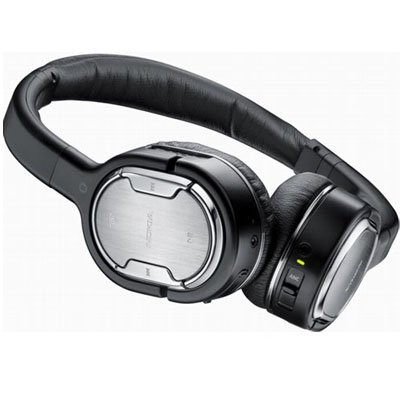
Image: The Nokia Bluetooth Stereo Headset BH-905, showcasing id-disinn eleganti tiegħu u t-tazzi li jgħattu l-widnejn.
Karatteristiċi Ewlenin
- Kanċellazzjoni Attiva tal-Ħoss (ANC): Significantly reduces ambient noise for an immersive listening experience.
- 10 Microphones: Utilizes 8 microphones for noise capture and 2 for clear speech transmission in loud surroundings.
- Kompatibilità Wiesgħa: Connects wirelessly via Bluetooth or wired to a variety of mobile phones, music players, and other audio devices.
- Seamless Control: Intuitive controls allow for easy switching between music and calls without needing to look at the device.
Setup
Tqabbil tal-Bluetooth
- Ensure your headset is charged and powered off.
- Attiva l-Bluetooth fuq it-tagħmir mobbli tiegħek.
- Press and hold the power button on the headset until the indicator light flashes blue rapidly, indicating pairing mode.
- On your device, search for Bluetooth devices and select "Nokia BH-905" from the list.
- If prompted, enter the passcode (usually "0000").
- Once paired, the indicator light will turn solid blue or flash slowly.
Konnessjoni bil-fili
For devices without Bluetooth or when battery is low, use the provided audio cables. The headset includes plugs for standard audio jacks and airplane adapters for versatile use.
- Connect one end of the audio cable to the headset's audio input port.
- Connect the other end to your audio source (e.g., mobile phone, MP3 player, airplane entertainment system).
Istruzzjonijiet Operattivi
Qawwa mixgħul/mitfi
- Biex tixgħel, agħfas u żomm il-buttuna tal-qawwa sakemm id-dawl indikatur jixgħel.
- Biex titfi, agħfas u żomm il-buttuna tal-qawwa sakemm id-dawl indikatur jintefa.
Kanċellazzjoni Attiva tal-Istorbju (ANC)
The BH-905 features advanced Active Noise Cancellation technology. With 8 dedicated microphones, it captures ambient low-frequency noise and generates an inverse sound wave, effectively canceling out unwanted sounds. This allows for a clearer audio experience, especially in noisy environments like airplanes or busy streets.
- To activate ANC, locate the ANC switch on the headset and slide it to the 'On' position. A green indicator light will confirm activation.
- To deactivate ANC, slide the switch to the 'Off' position.
Ġestjoni tas-Sejħiet
The headset is equipped with 2 microphones specifically designed for speech. These microphones not only capture your voice clearly but also work to cancel out ambient noise, ensuring that the person you are speaking with hears you, not your surroundings.
- Tweġiba/Tmiem Sejħiet: Use the dedicated call button on the headset.
- Switching between Music and Calls: The headset allows for seamless transitions between listening to music and taking calls. When a call comes in, your music will pause, and you can answer the call directly from the headset.
Daqq tal-Mużika
Control your music directly from the headset using the intuitive buttons. The design supports "blind usage," meaning you can operate the controls by feel without needing to look at them.
- Play/Pawsa: Use the play/pause button.
- Aqbeż il-binarji: Use the forward/backward track buttons.
- Kontroll tal-Volum: Aġġusta l-volum billi tuża l-buttuni tal-volum apposta.
Video: An official Nokia video demonstrating the features and technology behind the BH-905 headset, including its active noise cancellation and multi-microphone system for clear audio and calls.
Manutenzjoni
- Naddaf il-headset regolarment b'ċarruta ratba u niexfa.
- Avoid exposing the headset to extreme temperatures, moisture, or direct sunlight.
- Store the headset in its protective case when not in use to prevent damage.
- Tippruvax tiżżarma jew timmodifika l-headset, għax dan jannulla l-garanzija.
Issolvi l-problemi
- Ebda Qawwa: Kun żgur li l-headset huwa kompletament iċċarġjat.
- Ma tistax tqabbad: Make sure the headset is in pairing mode and within range of your device. Try restarting both devices.
- Ebda Ħoss/Kwalità tal-Ħoss Fqira: Check volume levels on both the headset and your connected device. For wired connections, ensure cables are securely plugged in. For Bluetooth, ensure a stable connection.
- L-ANC Mhux Taħdem b'Mod Effettiv: Ensure the ANC switch is in the 'On' position.
- Min iċempel ma jistax jismagħni b'mod ċar: Ensure the headset's microphones are not obstructed.
If issues persist, refer to the Nokia support webis-sit jew ikkuntattja s-servizz tal-konsumatur għal aktar assistenza.
Speċifikazzjonijiet
| Karatteristika | Speċifikazzjoni |
|---|---|
| Brand | Nokia |
| Numru tal-Mudell | 02716J5 |
| Fattur tal-Formola | Over-ear (two_ear) |
| Kontroll tal-Ħoss | Kanċellazzjoni Attiva tal-Ħoss |
| Teknoloġija tal-Konnettività | Bluetooth, bil-fili |
| Teknoloġija tal-Komunikazzjoni mingħajr Fili | Bluetooth |
| Karatteristiċi Addizzjonali | Microphone; Stereo |
| Tip ta' Kontroll | Kontroll tal-Midja |
| Piż tal-oġġett | 0.32 Liri |
| UPC | 758478021477 |
| GTIN | 758478021477 |
Garanzija u Appoġġ
The Nokia Bluetooth Stereo Headset BH-905 comes with a 12-il xahar garanzija mid-data tax-xiri. Din il-garanzija tkopri difetti fil-manifattura taħt użu normali. Jekk jogħġbok żomm il-prova tax-xiri tiegħek għal talbiet ta' garanzija.
For technical support, warranty service, or additional information, please visit the official Nokia support website or contact your local Nokia customer service center.