
Introduzzjoni
Grazzi tax-xiriasing the Snakebyte Wireless Bluetooth Premium PS3 Controller. This manual provides detailed instructions for setting up, operating, maintaining, and troubleshooting your new controller. Please read this manual thoroughly before use to ensure optimal performance and longevity of your device.
Kontenut tal-Pakkett
Jekk jogħġbok iċċekkja li l-oġġetti kollha huma preżenti fil-pakkett:
- Snakebyte Wireless Bluetooth Premium PS3 Controller
- USB Charging Cable (approximately 3 meters)
- Manwal ta 'Istruzzjoni (dan id-dokument)

Image: The Snakebyte Wireless Bluetooth Premium PS3 Controller shown in its retail blister packaging, indicating the product and included cable.
Setup
1. Iċċarġjar tal-Kontrollur
Before initial use, fully charge the controller. Connect the supplied USB charging cable to the controller's charging port and the other end to a USB port on your PlayStation 3 console or a compatible USB power adapter. The indicator lights on the controller will show charging status and turn off or change color when fully charged.
2. Konnessjoni mal-PlayStation 3
To connect the controller wirelessly to your PlayStation 3 console:
- Kun żgur li l-console tal-PlayStation 3 tiegħek hija mixgħula.
- Connect the controller to the PS3 console using the supplied USB charging cable. This will register the controller with the console.
- Agħfas il- Buttuna PS (located in the center of the controller) once. The controller will power on and attempt to establish a connection.
- Once the controller is registered and connected, the indicator lights will illuminate, typically assigning a player number.
- You can now disconnect the USB cable for wireless gameplay. If the connection is lost, reconnect the USB cable and press the PS button again.

Immaġni: Quddiem view of the Snakebyte Wireless Bluetooth Premium PS3 Controller, showing the button layout including the central PS button.
Istruzzjonijiet Operattivi
Tqassim u Funzjonijiet tal-Kontrollur
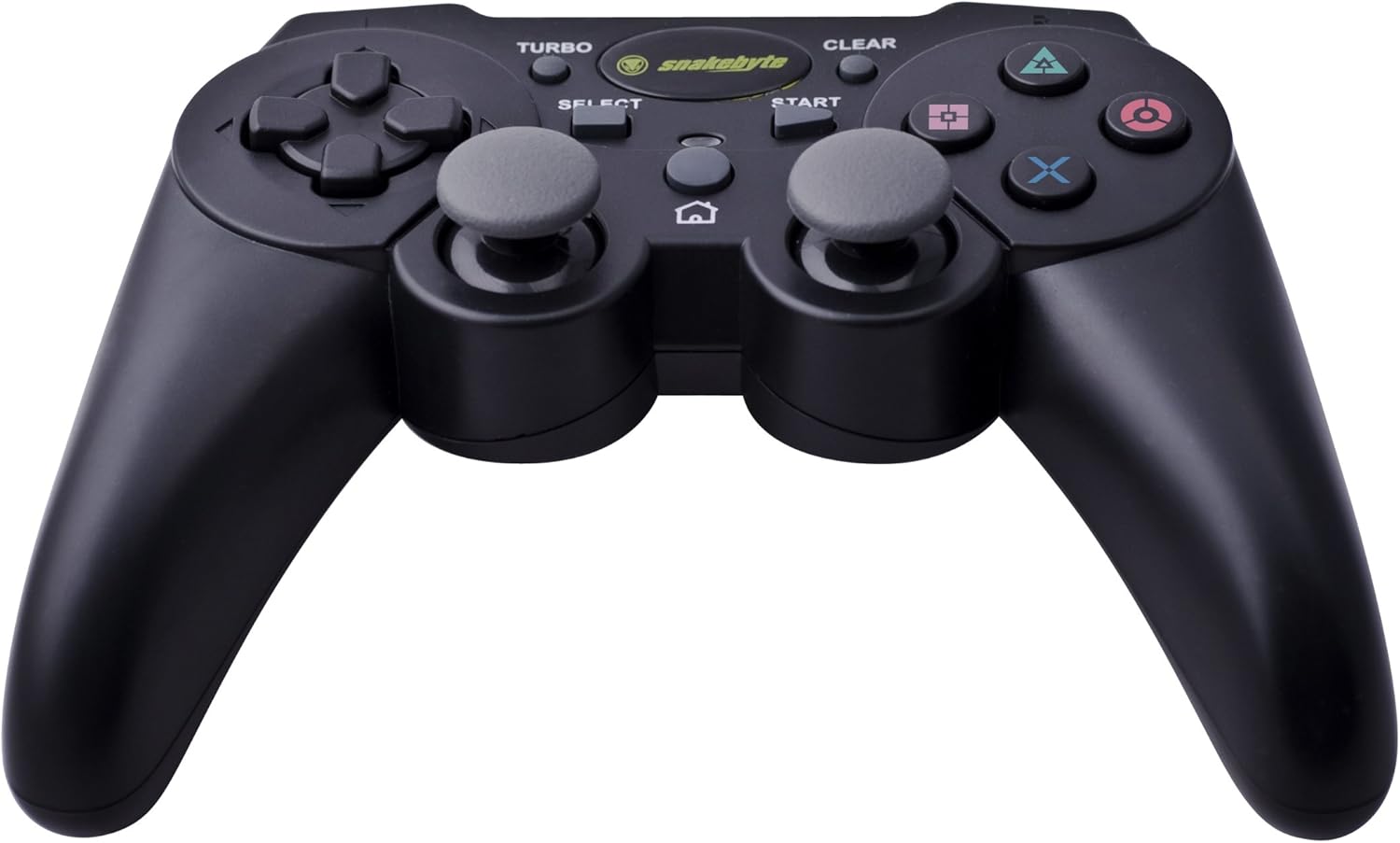
Image: The Snakebyte Wireless Bluetooth Premium PS3 Controller, highlighting the dual analog sticks and various buttons.
- Kuxxinett Direzzjonali (D-Pad): For precise directional input in games.
- Stick Analogu tax-Xellug: Kontroll primarju tal-moviment.
- Stick Analogu tal-Lemin: Kontroll tal-kamera jew moviment sekondarju.
- Buttuni ta' Azzjoni (Triangolu, Ċirku, Salib, Kwadru): Azzjonijiet speċifiċi għal-logħba.
- Buttuni L1/R1: Shoulder buttons for various in-game functions.
- Triggers L2/R2: Analog triggers for pressure-sensitive input, often used for acceleration/braking or aiming/firing.
- Buttuna START: Pauses games or opens menus.
- Buttuna Agħżel: Opens in-game maps, inventories, or other menus.
- Buttuna PS: Powers on the controller, accesses the PS3 XMB (Cross Media Bar) menu, or turns off the controller/console.
- Buttuna TURBO: Activates the turbo function for other buttons.
- Buttuna ĊARA: Deactivates the turbo function.
Funzjoni Turbo
The controller features a TURBO function, allowing a selected button to register multiple presses rapidly with a single hold. This can be useful for certain game mechanics.
- To activate TURBO: Press and hold the Buttuna TURBO, then press the desired action button (e.g., Cross, Square, Circle, Triangle, L1, R1, L2, R2). Release both buttons. The selected button will now have the TURBO function enabled.
- To deactivate TURBO for a specific button: Press and hold the buttuna ĊARA, then press the button for which TURBO is currently active. Release both buttons.
- To deactivate all TURBO functions: Press the buttuna ĊARA once without holding it down.
Motion Sensing and Vibration Feedback
This controller supports motion sensing capabilities, allowing for intuitive control in compatible games. It also provides vibration feedback to enhance immersion during gameplay, reacting to in-game events such as impacts or explosions.
Tixgħel u Mitfi
- Biex tixgħel: Agħfas il-buttuna Buttuna PS.
- To power off: The controller will automatically enter sleep mode after a period of inactivity to conserve battery. Alternatively, you can hold the Buttuna PS for several seconds to bring up the PS3 menu, where you can choose to turn off the controller.
Manutenzjoni
- Tindif: Uża drapp artab u niexef biex tnaddaf il-kontrollur. Tużax prodotti tat-tindif jew solventi li joborxu.
- Ħażna: Aħżen il-kontrollur f'post frisk u niexef 'il bogħod mix-xemx diretta u minn temperaturi estremi.
- Kura tal-batterija: Biex ittawwal il-ħajja tal-batterija, evita li tiċċarġja l-kontrollur kompletament ta' spiss. Iċċarġjah regolarment, anke jekk ma tkunx qed tużah kontinwament.
- Evita l-Ħsara: Do not drop the controller or expose it to excessive force or moisture.
Issolvi l-problemi
| Problema | Soluzzjoni Possibbli |
|---|---|
| Il-kontrollur ma jikkonnettjax mingħajr fili. |
|
| Il-buttuni jew l-istikks analogi ma jirrispondux. |
|
| Controller does not charge. |
|
Irrisettjar il-Kontrollur
If the controller behaves erratically or becomes unresponsive, you can perform a reset. Locate the small reset button on the back of the controller (often in a small hole). Use a thin, pointed object (like a straightened paperclip) to press and hold the reset button for a few seconds. This will restart the controller's internal electronics.
Speċifikazzjonijiet
- Ditta: Snakebyte
- Numru tal-Mudell: SB904714
- Pjattaforma Kompatibbli: Sony PlayStation 3
- Konnettività: Wireless (Bluetooth)
- Numru ta' Buttuni: 16
- Dimensjonijiet (L x W x H): Madwar 23.01 x 16.31 x 8.51 ċm (9.06 x 6.42 x 3.35 pulzieri)
- Piż: Madwar 419.99 g (0.93 lbs)
- Kulur: Iswed
Garanzija u Appoġġ
For warranty information and technical support, please refer to the documentation provided with your purchase or contact your retailer. You may also visit the official Snakebyte webis-sit għal aktar assistenza u informazzjoni dwar il-prodott.