
Mount-It! MI-310L
Mount-It! Full Motion TV Wall Mount
Model: MI-310L
Manwal ta' Istruzzjoni għall-Utent
1. Prodott Aktarview
The Mount-It! MI-310L is a heavy-duty full motion articulating TV wall mount designed for televisions ranging from 40 to 70 inches, and potentially up to 80 inches depending on VESA pattern and weight. This robust mount provides exceptional versatility, allowing your television to extend, swivel, and tilt for optimal viewangoli ta' ing minn diversi pożizzjonijiet ġewwa kamra.
Constructed from heavy gauge steel, the MI-310L ensures secure support for TVs weighing up to 220 lbs. Its dual-arm design enhances stability and minimizes sagging, even when fully extended. Key features include a wide range of VESA compatibility, easy tilting angle adjustment, and an integrated bubble level for simplified installation.

Figura 1.1: Quddiem view of the Mount-It! MI-310L Full Motion TV Wall Mount, showcasing its robust dual-arm design and VESA mounting plate.
2. Informazzjoni dwar is-Sigurtà
Please read and understand all instructions before installation and use. Incorrect installation can cause property damage or personal injury. If you have any doubts, consult a qualified professional.
- Kapaċità tal-piż: Do not exceed the maximum weight capacity of 220 lbs (100 kg). This mount is designed for TVs within the specified weight range.
- Daqs tal-iskrin: Compatible with TVs from 40 to 70 inches. While some larger TVs (up to 80 inches) may fit based on VESA and weight, always verify compatibility.
- Tip ta' Ħajt: This mount is designed for installation into solid concrete walls or wood stud walls. Do not install into drywall alone. Ensure wall studs are located accurately and are structurally sound.
- Ħardwer: Use only the provided mounting hardware. If your installation requires different hardware (e.g., for concrete walls), ensure it is of appropriate strength and quality.
- Għodod: Use appropriate tools and wear safety gear (e.g., eye protection) during installation.
- Installazzjoni ta' żewġ persuni: Due to the weight and size of the mount and television, a two-person installation is highly recommended for safety.
3. Kontenut tal-Pakkett
Ivverifika li l-komponenti kollha huma preżenti u mhux imħassra qabel tibda l-installazzjoni. Jekk xi partijiet huma neqsin jew imħassra, ikkuntattja l-appoġġ għall-klijenti.
- Wall Plate Assembly (with articulating arms)
- Dirgħajn tal-Bracket tat-TV (2 biċċiet)
- Hardware Kit (various screws, washers, spacers, lag bolts, concrete anchors)
- Livell tal-Bużżieqa Integrat
- Manwal ta' Istruzzjoni
4. Setup u Installazzjoni
4.1 Kontrolli ta' qabel l-installazzjoni
- Kompatibbiltà tat-TV: Confirm your TV's weight is within 220 lbs and its VESA mounting pattern (distance between mounting holes on the back of the TV) is compatible with the mount (e.g., 200x200mm to 800x450mm).
- Tip ta' Ħajt: Determine if your wall is wood stud or solid concrete. This will dictate the type of anchors and drilling required.
- Post: Choose a mounting location that allows for optimal viewing angles and is free from electrical wires or plumbing behind the wall.
4.2 Għodda Meħtieġa (Mhux Inkluża)
- Sib l-Istrutturi tal-Injam (għal ħitan b'strutturi tal-injam)
- Drill with appropriate drill bits (wood or masonry)
- Ċavetta tas-Sokit jew Ċavetta Aġġustabbli
- Tornavit tar-ras Phillips
- Lapes
- Tejp tal-Kejl
- Martell (għal ankri tal-konkrit)
4.3 Immuntar tal-Pjanċa tal-Ħajt
- Locate Studs (Wood Stud Walls): Use a stud finder to locate the centers of at least two adjacent wood studs. Mark the centers with a pencil. The wall plate is designed to span studs that are 16 or 24 inches apart.
- Pożizzjoni tal-Pjanċa tal-Ħajt: Hold the wall plate against the wall at the desired height, ensuring the integrated bubble level indicates it is perfectly horizontal. Mark the drilling locations through the holes on the wall plate that align with your stud marks.
- Drill Pilota Toqob:
- For wood studs: Drill pilot holes using a 7/32" (5.5mm) drill bit to a depth of 2.2" (55mm).
- For concrete walls: Drill pilot holes using a 3/8" (10mm) masonry drill bit to a depth of 2.4" (60mm). Insert concrete anchors into the holes, tapping gently with a hammer until flush with the wall surface.
- Pjanċa tal-Ħajt Sikura: Attach the wall plate to the wall using the provided lag bolts (for wood studs) or concrete bolts (for concrete walls). Tighten all bolts firmly with a socket wrench.

Figure 4.1: Wall plate and arm dimensions for planning installation. Wall plate is 19.75 inches wide.
4.4 Twaħħil tal-Brakketti tat-TV mat-TV
- Agħżel il-Viti: Choose the appropriate diameter and length of screws from the hardware kit that fit your TV's mounting holes. Use washers and spacers if necessary to ensure a snug fit and to prevent damage to the TV's back panel.
- Waħħal il-parentesi: Carefully lay your TV face down on a soft, clean surface. Align the TV bracket arms with the mounting holes on the back of your TV. Ensure the hooks on the bracket arms are facing downwards. Secure the brackets to the TV using the selected screws.

Figure 4.2: VESA compliant arm brackets showing horizontal and vertical adjustment capabilities, fitting patterns up to 800mm x 450mm.
4.5 Mounting the TV to the Wall Mount
- Hook TV onto Wall Plate: With assistance, carefully lift the TV with the attached brackets. Align the hooks on the TV brackets with the top edge of the wall plate. Gently lower the TV, ensuring the hooks engage securely with the wall plate.
- Secure Safety Screws: Locate the safety screws at the bottom of the TV bracket arms. Tighten these screws to lock the TV securely to the wall plate, preventing accidental dislodgement.

Figure 4.3: Detail of the safety screw bracket locking system, which secures the TV to the wall mount.
5. Istruzzjonijiet Operattivi
The Mount-It! MI-310L offers full motion capabilities for flexible viewing.
- Extension/Compression: The mount allows the TV to extend from a minimum of 4 inches to a maximum of 20.3 inches from the wall. Gently pull or push the TV to achieve the desired distance.
- Dawwar: The TV can swivel up to 45 degrees left or right. Carefully rotate the TV to adjust the horizontal viewangolu tal-ing.
- Mejjel: The TV can tilt up and down by up to 15 degrees. To adjust the tilt, loosen the two tilt adjustment knobs located on the TV bracket arms, set the desired angle, and then re-tighten the knobs firmly to secure the position.

Figure 5.1: Illustration of the mount's extension capabilities, showing compressed (4.5 inches) and extended (20.25 inches) positions.
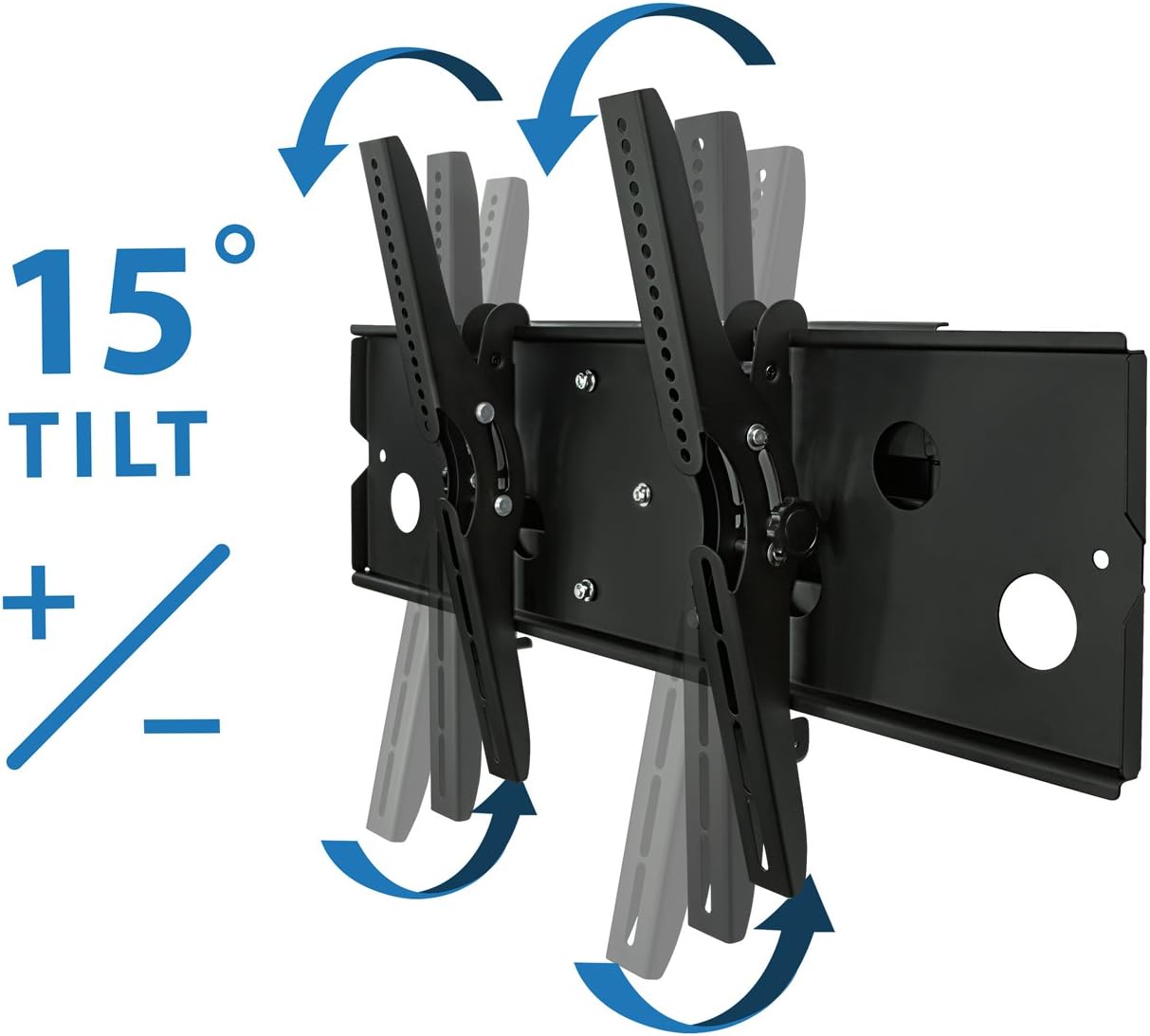
Figure 5.2: Visual representation of the mount's 15-degree tilt range, allowing for glare reduction and optimized viewing.
6. Manutenzjoni
Manutenzjoni regolari tiżgura l-lonġevità u t-tħaddim sikur tal-muntatura tal-ħajt tat-TV tiegħek.
- Kontrolli perjodiċi: Every 6-12 months, inspect all mounting bolts and screws to ensure they remain tight. Re-tighten if necessary.
- Tindif: Imsaħ il-muntatura b'ċarruta ratba u niexfa biex tneħħi t-trab. Evita li tuża prodotti tat-tindif jew solventi li joborxu li jistgħu jagħmlu ħsara lill-finitura.
- Artikolazzjoni: If the articulating arms become stiff, a small amount of silicone-based lubricant can be applied to the pivot points, avoiding contact with electrical components.
7 Issolvi l-problemi
| Problema | Kawża Possibbli | Soluzzjoni |
|---|---|---|
| It-TV mhux livellat wara l-installazzjoni. | Wall plate not perfectly level; minor rotational play in TV brackets. | Ensure the wall plate is level during installation. For minor adjustments, the TV can often be slightly rotated by hand on the mounting arms to achieve levelness. |
| Mount feels stiff when extending/swiveling. | New mount; tight factory tolerances. | This is normal for a new, heavy-duty mount. Movement will become smoother with use. Do not force movement excessively. |
| TV appears to be sagging or unstable. | Mounting bolts not fully tightened; TV weight exceeds capacity; incorrect wall installation. | Immediately remove TV. Re-check all wall plate and TV bracket bolts for tightness. Verify TV weight is within 220 lbs. Ensure proper stud location and pilot hole drilling. If unsure, consult a professional. |
| Lag bolts breaking during installation. | Pilot holes not drilled to correct size or depth; over-tightening. | Ensure pilot holes are drilled to the specified size (7/32" for wood studs) and depth (2.2"). Do not over-tighten lag bolts; tighten until snug and secure. |
8. Speċifikazzjonijiet
| Karatteristika | Dettall |
|---|---|
| Firxa Daqs tat-TV | 40 - 70 inches (some up to 80 inches depending on VESA and weight) |
| Piż Massimu tat-TV | 220 lbs (100 kg) |
| Kompatibilità VESA | 200x200, 300x200, 300x300, 400x200, 400x300, 400x400, 600x400, 700x400, 700x450, 750x450, 800x400, 800x450 mm |
| Mounting Hole Spacing (Max) | 34.5 inches horizontal, 17.5 inches vertical |
| Estensjoni mill-Ħajt | 4 inches (min) to 20.3 inches (max) |
| Angolu Mejjel | Up to 15 degrees (up/down) |
| Angolu li jdur | Sa 45 grad (xellug/lemin) |
| Materjal | Heavy Gauge Alloy Steel |
| Piż tal-Prodott | 25.6 liri |
| Dimensjonijiet tal-Pjanċa tal-Ħajt | 19.75 pulzieri (W) x 9.5 pulzieri (H) |
9. Garanzija u Appoġġ
Mount-It! stands behind the quality of its products. For specific warranty details, please refer to the warranty card included with your product or visit the official Mount-It! websit.
For technical assistance, missing parts, or any questions regarding the installation or operation of your Mount-It! MI-310L TV Wall Mount, please contact Mount-It! customer support. Contact information can typically be found on the product packaging or the official Mount-It! websit.
Tista 'wkoll iżżur il- Mount-It! Store on Amazon għal aktar informazzjoni u riżorsi tal-prodott.
Ask a question about this manual
Ask about setup, troubleshooting, compatibility, parts, safety, or missing instructions. Manuals+ will review the question and use this page’s manual context to help answer it.