
1. Introduzzjoni u Fuqview
The Nikon SB-24 Speedlight Flash is an external flash unit designed to provide enhanced lighting for your photography. It offers advanced features such as Through-The-Lens (TTL) metering, allowing for automatic and precise flash exposure. Compatible with various Nikon cameras, the SB-24 is a versatile tool for both amateur and professional photographers seeking improved illumination and creative control.
Key features include multiple flash modes, a swiveling and tilting flash head for bounce flash, and a clear LCD display for easy setting adjustments.
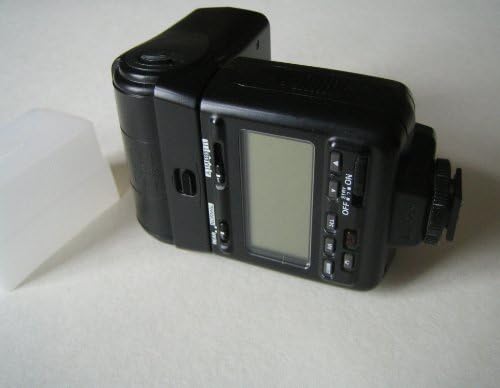
Image 1.1: The Nikon SB-24 Speedlight flash unit, showing its LCD screen and controls. A white diffuser cap is also visible.
2. Setup
2.1 Installazzjoni tal-batterija
The SB-24 Speedlight requires four (4) AA-size batteries for operation. Use alkaline, NiMH, or lithium batteries for optimal performance.
- Locate the battery compartment cover on the side or bottom of the flash unit.
- Slide or unlatch the cover to open the compartment.
- Insert four AA batteries, ensuring correct polarity (+ and -) as indicated inside the compartment.
- Agħlaq l-għatu tal-kompartiment tal-batterija sew.
2.2 L-Immuntar tal-Flash mal-Kamera Tiegħek
To attach the SB-24 to your camera's hot shoe:
- Ensure both the camera and the flash unit are turned off.
- Slide the flash's mounting foot into the camera's hot shoe until it clicks into place.
- Issikka ċ-ċirku jew il-lieva tal-illokkjar fuq l-unità tal-flash biex twaħħalha sew mal-hot shoe.
- To remove, loosen the locking mechanism and slide the flash off the hot shoe.

Image 2.1: The Nikon SB-24 Speedlight flash unit shown with its carrying case and diffuser cap.
3. Istruzzjonijiet Operattivi
3.1 Power On/Off
To turn the flash on, slide the power switch to the 'ON' position. The LCD panel will illuminate. To turn off, slide the switch to 'OFF'. The flash may enter a standby mode after a period of inactivity to conserve battery power.
3.2 Modi Flash
The SB-24 offers several flash modes to suit different shooting conditions:
- Modalità TTL (Minn Ġewwa l-Lenti): This is the standard automatic exposure mode. The flash output is automatically controlled based on light measurements taken through the camera's lens, ensuring balanced exposure.
- Modalità Manwali: Allows you to manually set the flash output power (e.g., Full, 1/2, 1/4, etc.). This mode provides precise control for specific lighting setups.
- Auto Aperture (A) Mode: The flash automatically adjusts output based on the aperture set on the flash unit and the subject distance.
- Sinkronizzazzjoni tal-Purtiera ta' Wara: Synchronizes the flash to fire just before the second curtain closes, creating natural-looking light trails behind moving subjects.
- Tnaqqis tal-Għajnejn Ħomor: Fires a series of pre-flashes to constrict the subject's pupils, reducing the red-eye effect.
3.3 Aġġustament tar-Ras tal-Flash
The flash head can be tilted upwards and downwards, and swiveled horizontally. This allows for bounce flash photography, where the light is directed off a ceiling or wall for softer, more natural illumination. Adjust the head by gently rotating or tilting it to the desired angle.
4. Manutenzjoni
4.1 Tindif
Biex tnaddaf l-unità tal-flash, uża drapp artab u niexef. Għal ħmieġ iebes, nixxef ftit.ampen the cloth with water or a mild cleaning solution. Avoid using strong solvents or abrasive materials. Keep the flash tube and sensor window clean for optimal performance.
4.2 Ħażna
When not in use for extended periods, remove the batteries to prevent leakage and corrosion. Store the flash unit in a cool, dry place, away from direct sunlight and extreme temperatures. Use the provided carrying case for protection during storage and transport.
5 Issolvi l-problemi
If you encounter issues with your SB-24 Speedlight, consider the following:
- Il-Flash Mhux Jaħdem:
- Check if the flash is turned on and fully charged (ready light illuminated).
- Kun żgur li l-batteriji huma mdaħħla sew u għandhom biżżejjed ċarġ. Ibdelhom jekk meħtieġ.
- Iċċekkja li l-flash huwa mmuntat sew mal-hot shoe tal-kamera.
- Check camera settings to ensure external flash is enabled and compatible with the selected mode.
- Espożizzjoni Mhux Korretta:
- In TTL mode, ensure your camera's metering mode is appropriate for the scene.
- Fil-modalità Manwali, aġġusta l-qawwa tal-ħruġ tal-flash.
- Check for obstructions in front of the flash or sensor.
- Consider adjusting flash exposure compensation on either the flash or the camera.
- Flash Head Not Moving:
- Ensure no locking mechanisms are engaged that prevent movement.
- Do not force the flash head; if it feels stuck, inspect for debris or damage.
Għal problemi persistenti, ikkonsulta tekniku tas-servizz kwalifikat.
6. Speċifikazzjonijiet
| Karatteristika | Speċifikazzjoni |
|---|---|
| Brand | Nikon |
| Isem tal-Mudell | SB-24 |
| Muntaturi Kompatibbli | Nikon |
| Tip ta 'batterija | 4 x batteriji AA |
| Ħajja tal-Batterija (Medja) | 6 Sigħat |
| Tip ta' Flash tal-Kamera | Flash Esterni |
| Veloċità ta' Sinkronizzazzjoni tal-Flash | 1/250 sekonda |
| Teknoloġija tal-Konnettività | Wireless (Optical Pulse) |
| Tip Muntaġġ | Hot Shoe Mount |
| Tip ta' Kontroll ta' Espożizzjoni | TTL |
| Kulur | Iswed |
| Piż tal-oġġett | 1.15 Liri |
| UPC | 018208047055 |
7. Garanzija u Appoġġ
For information regarding warranty coverage, service, and technical support for your Nikon SB-24 Speedlight Flash, please refer to the official Nikon website or contact Nikon customer service directly. Warranty terms may vary based on region and purchase date.
Nikon Uffiċjali Websit: www.nikonusa.com