
1. Introduzzjoni
Grazzi tax-xiriasing the GPX CDP6806DT Personal CD Player. This manual provides important safety instructions, operational guidelines, and maintenance procedures to ensure optimal performance and longevity of your device. Please read this manual thoroughly before using the product and retain it for future reference.
2. Informazzjoni dwar is-Sigurtà
Istruzzjonijiet Importanti dwar is-Sigurtà
- Tesponix l-unità għall-ilma jew l-umdità.
- Evita li tpoġġi l-unità ħdejn sorsi tas-sħana bħal radjaturi, reġistri tas-sħana, stufi, jew apparat ieħor (inkluż amplifiers) li jipproduċu sħana.
- Do not attempt to disassemble or modify the unit. Refer all servicing to qualified service personnel.
- Use only the specified batteries (2 x AA batteries). Ensure correct polarity when inserting batteries.
- Neħħi l-batteriji jekk l-unità mhux se tintuża għal perjodu estiż.
- Evita li tisma' f'volum għoli għal perjodi twal biex tevita ħsara fis-smigħ.
- Naddaf l-unità b'ċarruta niexfa biss.
3. Kontenut tal-Pakkett
Carefully unpack your GPX CDP6806DT Personal CD Player and ensure all items are present:
- GPX CDP6806DT Personal CD Player
- Manwal għall-Utent (dan id-dokument)
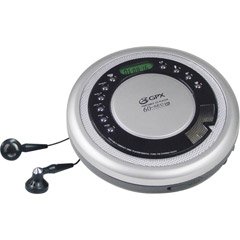
Figure 1: GPX CDP6806DT Personal CD Player. This image illustrates the compact design and general appearance of the device.
4. Kontrolli u Karatteristiċi
Familiarize yourself with the controls and features of your GPX CDP6806DT for optimal use.
- Display LCD: 6-digit display for track number, time, and FM frequency.
- PLAY/PAUSE (►/−): Press to start or pause CD playback.
- WAQQAF (■): Press to stop CD playback.
- SKIP/SEARCH (◀◀/▶▶): Press to skip tracks. Hold to search within a track.
- VOLUM (+/-): Jaġġusta l-livell tal-ħruġ tal-awdjo.
- MODE/PROG: Selects playback mode (Repeat, Random) or programs CD tracks.
- FM TUNER (ON/OFF/BAND): Switches to FM radio mode, turns FM on/off, or changes FM band.
- PRESET (+/-): Navigates saved FM radio presets.
- Kompartiment tas-CD: Area for inserting audio CDs.
- Kompartiment tal-batterija: Located on the bottom, holds 2 AA batteries.
- Jack tal-headphone (3.5mm): Jqabbad il-headphones għal smigħ privat.
Figure 2: GPX CDP6806DT Controls Layout. This image provides a visual reference for the location of various buttons and ports on the device.
5. Setup
5.1 Installazzjoni tal-batterija
The GPX CDP6806DT requires two (2) AA batteries (not included) for portable operation.
- Sib il-kompartiment tal-batterija fil-qiegħ tal-unità.
- Żerżaq l-għatu tal-kompartiment tal-batterija miftuħ.
- Insert two AA batteries, ensuring the correct polarity (+ and -) as indicated inside the compartment.
- Agħlaq l-għatu tal-kompartiment tal-batterija sew.
5.2 Konnessjoni tal-headphones
For private listening, connect your 3.5mm stereo headphones (not included) to the headphone jack located on the side of the unit.
6. Istruzzjonijiet Operattivi
6.1 Daqq ta' CD
The unit supports CD and CD-R/RW disc formats.
- Open the CD compartment lid by gently pressing the OPEN button (if present, or lifting the lid).
- Place a CD with the label side facing up onto the center spindle.
- Agħlaq l-għatu tal-kompartiment tas-CD sew sakemm tikklikkja.
- Agħfas il- DAQQ/PAWŻA (►/−) buttuna biex tibda d-daqq. In-numru tat-trakka u l-ħin li għadda se jidhru fuq id-displej tal-LCD.
- Biex twaqqaf il-plejbek, agħfas DAQQ/PAWŻA (►/−). Agħfas mill-ġdid biex terġa 'tibda.
- Biex twaqqaf il-plejbek, agħfas il-buttuna WAQQAF (■) buttuna.
- Biex taqbeż għall-binarju li jmiss, agħfas SKIP/SEARCH (▶▶).
- To go back to the beginning of the current track, press AQBEŻ/FITTEX (◀◀) once. Press twice to go to the previous track.
- To search rapidly forward or backward within a track, hold down SKIP/SEARCH (▶▶) or (◀◀) rispettivament.
- Aġġusta l-volum billi tuża VOLUM (+/-) kontrolli.
6.2 Tħaddim tar-Radju FM
The unit features a digital FM tuner with station presets.
- Żerżaq il- FM TUNER switch to the ON position or press the BANDA buttuna biex tidħol fil-modalità FM.
- Agħfas il- SKIP/SEARCH (▶▶) or (◀◀) buttuni biex tirranġa manwalment il-frekwenza mixtieqa.
- To auto-scan and save stations, hold down the DAQQ/PAWŻA (►/−) button (or refer to specific instructions for auto-scan if available on the device).
- To recall saved presets, use the PRESET (+/-) buttuni.
6.3 CD Programming (24-Track)
Tista' tipprogramma sa 24 trakka biex idoqqu f'ordni speċifika.
- Bis-CD wieqaf, agħfas il-buttuna MODE/PROG buttuna. "PROG" se jteptep fuq id-displej.
- Uża l- SKIP/SEARCH (▶▶) or (◀◀) buttuni biex tagħżel l-ewwel track li tixtieq tipprogramma.
- Agħfas MODE/PROG again to confirm the selection. The display will show the program number and the next available program slot.
- Repeat steps 2 and 3 to add up to 24 tracks to your program.
- After programming all desired tracks, press DAQQ/PAWŻA (►/−) biex tibda d-daqq ipprogrammat.
- Biex tħassar il-programm, agħfas il-buttuna WAQQAF (■) buttuna darbtejn.
6.4 Anti-Skip Protection (ASP)
The GPX CDP6806DT features a 60-second Anti-Skip Protection system. This system buffers audio data to minimize interruptions caused by minor shocks or vibrations during CD playback. The ASP activates automatically when a CD is playing.
7. Manutenzjoni
7.1 Tindif tal-Unità
- Imsaħ il-parti ta’ barra tal-unità b’ċarruta ratba u niexfa.
- Tużax prodotti tat-tindif li joborxu, xama', jew solventi.
- If the CD lens needs cleaning, use a specialized CD lens cleaner disc or a soft, lint-free cloth designed for optical lenses.
7.2 Kura tal-Batterija
- Remove batteries if the unit is not used for an extended period to prevent leakage.
- Tħallatx batteriji qodma u ġodda, jew tipi differenti ta 'batteriji.
- Armi l-batteriji użati b'mod responsabbli skont ir-regolamenti lokali.
8 Issolvi l-problemi
If you experience issues with your GPX CDP6806DT, please consult the following table for common problems and solutions.
| Problema | Kawża / Soluzzjoni Possibbli |
|---|---|
| L-unità ma tixgħelx. | Check if batteries are inserted correctly with proper polarity. Ensure batteries are fresh and not depleted. |
| L-ebda ħoss mill-headphones. | Ensure headphones are fully plugged into the headphone jack. Increase the volume level. Test with another pair of headphones. |
| Is-CD jaqbeż jew il-plejbek jiġi interrott. | Ensure the CD is clean and free of scratches or smudges. Clean the CD with a soft, lint-free cloth. Ensure the unit is on a stable surface or held steadily during use. |
| Is-CD ma jdoqqx. | Ensure the CD is inserted correctly with the label side up. Close the CD compartment lid completely. Check if the CD is a supported format (CD, CD-R/RW). |
| Ir-riċeviment tar-radju FM huwa fqir. | Extend the headphone cable as it acts as the antenna. Try moving to a different location. |
9. Speċifikazzjonijiet
- Ditta: GPX
- Mudell: CDP6806DT
- Formati ta' Diska Appoġġjati: CD, CD-R / RW
- Protezzjoni kontra l-Skip: 60 sekonda
- Wiri: LCD b'6 ċifri
- Radju: Digital FM Tuner with Presets
- CD Programming: 24-binarju
- Sors tal-Enerġija: 2 x Batteriji AA (mhux inklużi)
- Konnettività: Jack tal-Headphones ta' 3.5mm (Awżiljarju)
10. Garanzija u Appoġġ
For detailed warranty information, please refer to the warranty card included with your original product packaging. For technical support, service inquiries, or to purchase replacement parts, please visit the official GPX webis-sit jew ikkuntattja lid-dipartiment tas-servizz tal-konsumatur tagħhom billi tuża l-informazzjoni ta' kuntatt ipprovduta fid-dokumentazzjoni tal-prodott tiegħek.
Jekk jogħġbok żomm il-prova tax-xiri tiegħek għal pretensjonijiet ta' garanzija.