
Coby CT-P9040 SVR
Manwal tal-Utent tat-Telefon Analogu Mingħajr Fili Coby CT-P9040 5.8 GHz
Model: CT-P9040 SVR
Introduzzjoni
This manual provides comprehensive instructions for the setup, operation, and maintenance of your Coby CT-P9040 5.8 GHz Analog Cordless Phone. Please read this manual thoroughly before using your phone to ensure proper functionality and to prevent damage.
Kontenut u Komponenti tal-Pakkett
Qabel ma tibda, kun żgur li l-komponenti kollha huma preżenti fil-pakkett:
- Handset mingħajr fili
- Unità Bażi
- Adapter tal-Qawwa AC
- Kurdun tal-Linja tat-Telefon
- Pakkett ta' Batteriji Rikarikabbli
- Manwal għall-Utent (dan id-dokument)
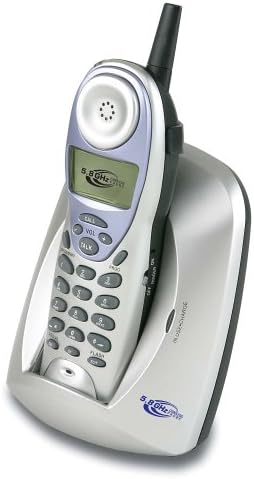
Image: The Coby CT-P9040 cordless phone, showing the handset docked in its silver base unit. The handset features a display screen, numeric keypad, and function buttons. The base unit has a charging cradle for the handset.
Gwida ta' Setup
1. Installazzjoni tal-batterija
- Sib il-kompartiment tal-batterija fuq wara tal-idejn.
- Iftaħ l-għatu tal-kompartiment tal-batterija.
- Connect the rechargeable battery pack connector to the jack inside the compartment.
- Place the battery pack into the compartment and close the cover securely.
2. Konnessjoni tal-Unità Bażi
- Connect one end of the telephone line cord to the "LINE" jack on the back of the base unit.
- Connect the other end of the telephone line cord to a standard telephone wall jack.
- Connect the AC power adapter to the "DC IN" jack on the back of the base unit.
- Ipplaggja l-adapter tal-enerġija AC f'sokit elettriku standard.
3. Iċċarġjar Inizjali
Place the handset in the base unit's charging cradle. Ensure the "IN CHARGE" indicator light on the base unit illuminates, indicating proper charging. For optimal battery performance, charge the handset for at least 12-14 hours before initial use.
Istruzzjonijiet Operattivi
Nagħmlu Sejħa
- Pick up the handset from the base unit or press the TALK buttuna.
- Isma għal ton ta' dial.
- Ċempel in-numru tat-telefon mixtieq.
- Biex ittemm is-sejħa, agħfas il- TALK button again or place the handset back in the base unit.
Tweġiba Sejħa
Meta jdoqq it-telefon, erfa’ l-handset jew agħfas il-buttuna TALK buttuna biex twieġeb is-sejħa.
Funzjoni ta' sejħa mill-ġdid
Biex terġa 'tiddaħħal l-aħħar numru msejjaħ, agħfas il-buttuna ĊANTA buttuna fuq l-idejn.
Aġġustament tal-Volum
Waqt sejħa, uża l- VOL+ u VOLUM - buttuni fuq il-handset biex taġġusta l-volum tal-earpiece.
Funzjoni Flash
Agħfas il- FLASH button to use call waiting or transfer calls if supported by your telephone service provider.
Storing Phone Numbers (Speed Dial)
Your phone can store up to 10 numbers for frequently called contacts. Refer to the detailed instructions in the full manual for programming speed dial entries.
Manutenzjoni u Kura
- Żomm it-telefon 'il bogħod minn sorsi ta' sħana, dawl tax-xemx dirett, u umdità.
- Clean the phone's surfaces with a soft, damp drapp. Tużax tindif jew solventi li joborxu.
- Ensure the charging contacts on the handset and base unit are clean to maintain proper charging.
- Jekk it-telefon ma se jintużax għal perjodu twil ta' żmien, neħħi l-batterija mill-handset.
Issolvi l-problemi
| Problema | Kawża Possibbli | Soluzzjoni |
|---|---|---|
| L-ebda ton tal-arloġġ | Telephone line cord is disconnected. | Kun żgur li l-korda tat-telefon hija konnessa sew kemm mal-unità bażi kif ukoll mal-ġakk tal-ħajt. |
| Il-mowbajl mhux qed jiċċarġja | Handset not properly seated in cradle or dirty charging contacts. | Reseat the handset in the base unit. Clean the charging contacts on both the handset and base unit with a dry cloth. |
| Kwalità tal-ħoss fqira / Statika | Interference from other electronic devices or out of range. | Move the base unit away from other electronic devices (e.g., microwaves, Wi-Fi routers). Move closer to the base unit. |
| Ma nistax nagħmel/nirċievi telefonati | Power adapter disconnected or battery low. | Check if the AC power adapter is securely plugged in. Ensure the handset battery is fully charged. |
Speċifikazzjonijiet
- Mudell: CT-P9040 SVR
- Frekwenza: 5.8 GHz Analog
- Kanali: 40 Channel Auto Scan
- Memorja: 10-number speed dial storage
- Funzjonijiet: Flash, Redial, Pause, Tone/Pulse Switch
- Jack tal-widna: Built-in 2.5mm
- Immuntar: Desk and Wall Mountable
- Dimensjonijiet (L x W x H): 5 x 8 x 4 pulzieri
- Piż: 1.8 liri
- Kulur: Fidda
- ID ta' min iċempel: Mhux Appoġġjat
- Operazzjoni Multiline: Operazzjoni b'Linja Singola
Garanzija u Appoġġ
Għal informazzjoni dwar il-garanzija u appoġġ tekniku, jekk jogħġbok irreferi għall-karta tal-garanzija inkluża mal-prodott tiegħek jew żur is-sit uffiċjali ta' Coby. websit. Żomm l-irċevuta tax-xiri tiegħek bħala prova tax-xiri għal talbiet ta' garanzija.
For further assistance, you may contact Coby customer service. Contact details are typically available on the manufacturer's websit jew fl-ippakkjar tal-prodott.